If you’ve done more than a few signings, you already know the truth: it’s the same handful of messages every single time. The confirmation. The “bring your ID.” The “running five minutes behind.” The thank-you. And somehow you’re still rewriting each one from scratch at a red light, half-distracted, hoping it sounds professional.
It doesn’t have to be that way. Below are the seven messages a mobile notary sends around almost every appointment, each as a copy-paste ChatGPT prompt. Build the set once, save them in your notes app, and you’ll spend the rest of your career swapping in details instead of writing from zero.
Before the templates: the two rules that never bend
Every prompt here has two guardrails written into it, and you should never remove them. (The full why is in our signing-day routine guide — here’s the short version.)
- Never explain or interpret a document. You can describe where something is; you can never say what it means. That’s the unauthorized practice of law. ChatGPT will try to be “helpful” and add an explaining sentence — your job is to instruct it not to, and to delete it if it slips through.
- Never put real personal information into ChatGPT. No names, addresses, Social Security numbers, account numbers, or closing documents. Use placeholders like
[Name]and[Time], then fill in the real details in your own phone after the text is generated.
Generate → read → fix → send. Never auto-send. With that locked in, here are the seven.

1. The booking confirmation
When: the moment a signing is scheduled. Job: lock in the details so nobody no-shows.
Write a short, professional confirmation text for a notary signing
appointment. Include the date, time, a 15-minute arrival window, and
where we'll meet. Warm but brief, under 5 sentences. Do not explain any
document or give legal/financial advice. Use placeholders [Name], [Date],
[Time], [Address] — I'll fill in real details myself.
2. The “what to bring” / ID reminder
When: day before, or bundled with the confirmation. Job: make sure every signer has a valid, unexpired government photo ID whose name matches the documents.
Write a friendly reminder text for a signer ahead of a notary
appointment. Remind them that every person signing needs an unexpired,
government-issued photo ID, and that the name on the ID should match the
documents. Keep it under 4 sentences, reassuring, not bossy. No legal or
financial advice. Use placeholders for any personal details.
Fix before sending: if it adds anything about what the documents do, cut it.
3. The arrival-window / running-late text
When: on your way — and especially when you’re delayed. Job: keep the signer informed so they’re not left wondering.
Write two short texts for a mobile notary: (1) an "I'm on my way, see
you at [Time]" message, and (2) a polite "running about [X] minutes
behind, thank you for your patience" message. Warm and professional,
one or two sentences each. No legal/financial advice. Use placeholders.
4. The reschedule message
When: a time falls through (yours or theirs). Job: offer new options cleanly and keep the relationship intact.
Write a polite text to reschedule a notary appointment. Apologize
briefly, offer two or three alternative time options, and keep it easy
for them to reply. Under 5 sentences. No legal or financial advice. Use
placeholders [Name] and [Time options].
Note: if it’s a loan signing, contact your hiring company first, then the borrower.
5. The post-signing thank-you (+ review ask)
When: the day after. Job: close warmly and — only if your contract allows — invite a review of your service.
Write a short, warm thank-you text to send the day after a notary
signing. Thank them for their time and, if appropriate, gently invite a
Google review of my service. Keep it about the service experience only —
nothing about the loan or any document. Under 4 sentences. Use
placeholders.
Bright line: the review is about you (on time, professional, easy). Never about the loan or its terms.
6. The fee / “what’s included” explainer
When: a client asks about your travel fee or scope before booking. Job: set expectations in plain terms — a general description of your service, never advice.
Write a clear, friendly text explaining a mobile notary's travel-fee
structure and what a signing appointment includes (showing up at the
agreed location, witnessing and notarizing signatures). Keep it a plain
description of my service. Do NOT give legal or financial advice or
explain any document. Under 5 sentences. Use placeholders for fee amounts.
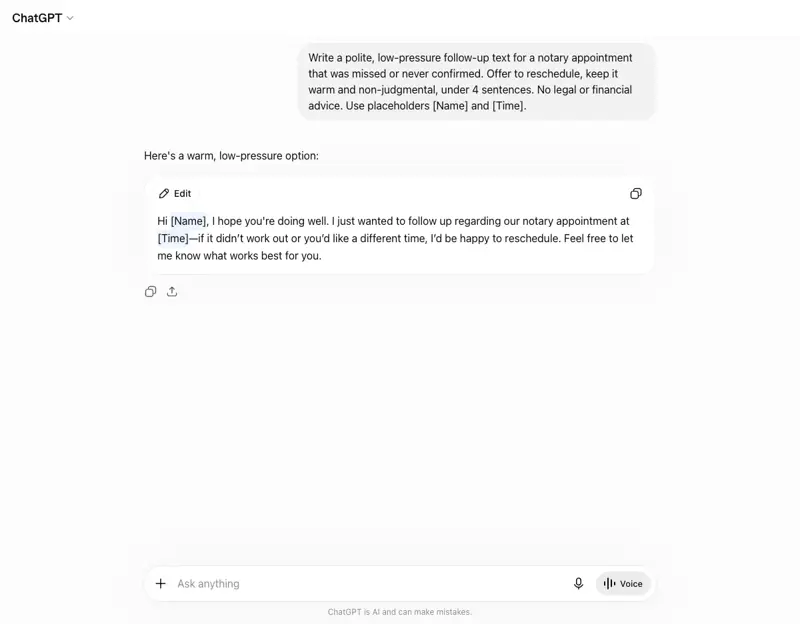
7. The no-show / follow-up text
When: a signer misses or never confirmed. Job: re-engage politely and rebook.
Write a polite, low-pressure follow-up text for a notary appointment
that was missed or never confirmed. Offer to reschedule, keep it warm
and non-judgmental, under 4 sentences. No legal/financial advice. Use
placeholders [Name] and [Time].
What this means for you
If you’re brand new: Build all seven this week. You’ll look like a seasoned pro from your first signing, and you’ll never freeze on “how do I word this?” again.
If you’re busy and full-time: The running-late and no-show templates are the ones that quietly protect your ratings with title companies. Have them ready and a bad-traffic day stops costing you reviews.
If you’re growing a team: A shared, guardrail-checked template set is how you keep every notary you work with on the right side of the UPL and privacy lines — not an honor system, an actual standard.
What ChatGPT can’t do here
- It can’t write the one message that matters most — the explanation of a document — because no notary can. Keep it on logistics.
- It can’t safely hold a borrower’s real details. Placeholders in, real details swapped in your phone, always.
- It can’t read the room. When a signer is anxious or confused, the human reassurance is the job. The templates get you to the table; they don’t sit at it.
- It can’t be the final check. Your name’s on every text. Read it before it sends.
The bottom line
Seven messages cover almost everything you send around a signing. Build them once, keep the two guardrails — describe don’t explain, placeholders not PII — and the admin side of being a mobile notary stops eating your evenings. You handle the signings; ChatGPT handles the wording.
Start with the 5-minute signing-day routine to see the whole arc in action, and if you want to get genuinely fluent with AI for the business side, ChatGPT for Business walks through client communication end to end.
Sources
- NNA — Notary Signing Agent Code of Conduct, Guiding Principle 4 (no advice, no explaining documents)
- NNA — NSA Code of Conduct, Guiding Principle 6 (confidentiality)
- NNA — Common Mistakes New Notary Signing Agents Make (2026)
- NNA — Avoiding Privacy Breaches When You Notarize
- NNA — Conference discusses AI use and cautions (2025)
