On November 11, Google began rolling out the Gemini app on Apple CarPlay. If you have an iPhone and a car with CarPlay, you can talk to Gemini Live from the dashboard screen while you drive, once the icon reaches you. It joins ChatGPT, Claude, Copilot, Grok and Perplexity, which already have CarPlay apps.
This guide covers what Google announced, what you need before you drive, how to set it up while parked, how it compares with the others, and the question the launch post skips: how much attention a spoken conversation takes from a driver. We have not tested Gemini in a car, and a day after the launch we found no first-hand driving report, so everything below comes from Google’s own pages, Apple’s developer rules, vendor help pages and published driving research. Where those sources disagree or say nothing, the guide says so.
What Google launched on November 11
Google’s post is titled “Talk it through with Gemini, now on Apple CarPlay.” It says Google is bringing “the Gemini app directly to Apple CarPlay,” following an earlier rollout on Android Auto and cars with Google built-in. You tap the Gemini icon on the CarPlay screen or side rail, then either pick up a recent chat or start a new one.
Google lists four kinds of use:
- Getting ready for the day. Ask what is on your calendar, when you need to leave for your next appointment, or talk through what you want to say before you arrive.
- Talking through your inbox. Because Gemini connects with Google Workspace apps like Gmail and Google Calendar, you can ask for your daily brief, catch up on unread emails, get summaries of long threads and talk through a quick reply by voice.
- Local spots and landmarks. Ask for recommendations in the area you are heading to, from a quick place to grab lunch to the backstory of a landmark.
- Thinking out loud. Practice an upcoming presentation, prepare for a tough conversation, or have a complex topic explained.
You can interrupt, change the subject or pause, and Google’s example of when you might pause is “when you need to focus on an exit.” Conversations sync to the Gemini app on your iPhone, so every summary, note and brainstorm is waiting in your chat history when you park, in Google’s words.
The rollout is “global” in Google’s words: “rolling out globally starting today to all Gemini users on iOS across every supported Gemini Live language.” The post does not list countries, and it does not mention subscription tiers.
Two different Gemini icons
Three weeks earlier, on October 21, Google added Gemini inside Google Maps on CarPlay. Google Maps’ own announcement describes tapping a Gemini icon in Maps on your car’s display during navigation, and the examples are about the route: finding parking at your destination, reporting a road disruption, adding stops along the way, or starting navigation that avoids toll roads.
So there are now two different Gemini entry points on a CarPlay screen, and a few people mentioned it on day one. One post on November 11 said Gemini is now on the CarPlay screen “twice.” Another stressed that the new one is “the full app, not the Maps version.”
If you want your calendar, your inbox or a general conversation, you want the second one. If you only want to change the route, the Maps one was already there.
What you need before you drive
Google’s post lists three requirements and a footnote. Here they are next to what the other sources add.
| What | What Google says | Our note |
|---|---|---|
| Gemini app | Update to “the latest version of the Gemini app on your iPhone.” | No version number is given. |
| Microphone | “Enabled microphone permissions.” | Do this while parked. |
| Gemini Live | You must have “used Gemini Live on your phone at least once.” | A hard prerequisite, not a tip. |
| iOS version | Google’s post names none. | Apple’s CarPlay category for voice assistants starts at iOS 26.4. ChatGPT’s and Copilot’s pages both say 26.4 or later. |
| Account | Gemini Live works with a personal Google account, or a work or school account that has access to Gemini Apps, and you must be over 13 (or the applicable age in your country). | From Google’s Live help page. |
| Plans | The post does not mention tiers. | It says “all Gemini users on iOS.” |
| Daily Brief | “Daily Brief feature must be enabled first.” | Separate eligibility, see below. |
The footnote is the part to read twice: “Certain personalization features, including Daily Brief, are not available to users under 18 or in the European Economic Area (EEA) and Nigeria.” That sentence limits Daily Brief and “certain personalization features.” It does not say the Gemini app on CarPlay is blocked in those places. One early post on X complained that the Daily Brief inbox recap “sounds like the best part… and of course it’s not available in the EU.”
Daily Brief has its own rules, and Google’s pages do not line up
Google’s Daily Brief help page for iPhone says you must be 18 or over and in the US, that it is “only available in English,” and that you need a personal Google account (work, school and supervised accounts are excluded). You also have to be eligible for Personal Intelligence, connect Google Workspace to Gemini Apps and turn on Memory. The page, which we read on November 12, says Google is “releasing Daily Brief to more people gradually.”
Two things do not match. The CarPlay post speaks of exclusions in the EEA and Nigeria, which suggests availability elsewhere, while the help page says “in the US.” And the plan question is open: the help page lists no plan at all, a Droid Life report on September 8 said Daily Brief “is no longer a paid feature” in the US, and our own June guide to Daily Brief said it needed a paid Google AI plan at launch. We found no Google page from September that confirms the free version, so check your own Settings rather than trusting any single page, ours included.
Set it up while parked
Everything below happens before you start the car. These steps come from Google’s post and Google’s Gemini Live and Daily Brief help pages. We have not run them on a CarPlay head unit.
- Update the Gemini app on your iPhone from the App Store. Expected result: you are on the latest version, which is what Google asks for.
- Allow the microphone for Gemini when iOS asks, or in iOS Settings. Expected result: Gemini can hear you.
- Use Gemini Live once on the phone. Open Gemini, tap Live at the bottom or swipe left, follow any first-time instructions, then start talking. Expected result: Live has been used at least once, which Google lists as a requirement.
- Connect Gmail and Calendar if you want them. Google’s Live help says that on a personal account, Gmail, Google Calendar, Google Keep and Google Tasks are available in Live chats, and that you connect them in Connected Apps settings. Expected result: your inbox and calendar questions have something to read.
- Check Daily Brief, if you are eligible. The help page says it is designed to work automatically when you qualify, and that to turn it off you go to Menu, your profile picture, Personal Intelligence, then switch off Daily brief. Expected result: the Personal Intelligence screen shows a Daily brief switch. If you cannot find it, you probably do not qualify yet.
- Connect the phone to the car and tap the Gemini icon on the CarPlay display. Google’s wording: “then start a new conversation or pick up a recent one.”
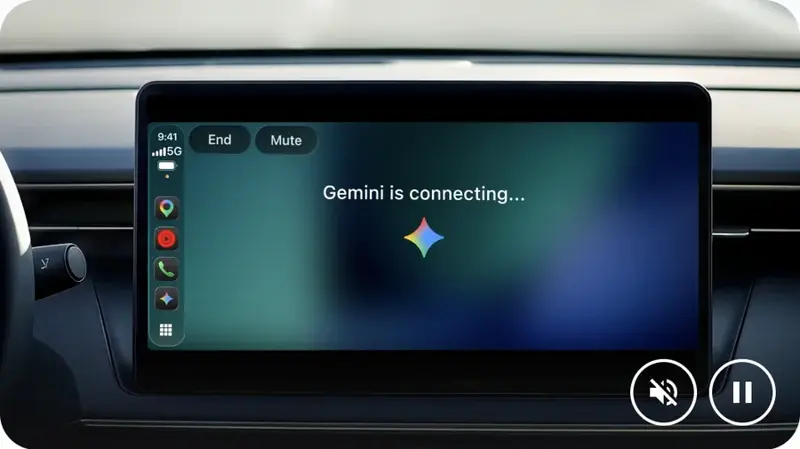
Step 6 is where Google’s instructions end, and also where we cannot report what you will see. The picture in Google’s post shows a CarPlay screen reading “Gemini is connecting…” with End and Mute buttons, which matches what Apple requires of these apps (more on that below).
A first drive, written by us and untested
Do not make the first conversation a test of your attention. A suggestion for the first week, ours and not something we have run:
- Drive one: start with a question that needs no follow-up, like Google’s own example, “What does my day look like?”
- Drive two: a daily brief, if you have one. Google’s example is “Give me my daily brief for today.”
- Always: save presentation rehearsals and email replies for when you are parked. The next sections explain why.
How it compares with ChatGPT, Claude, Copilot and Siri
Gemini arrived on November 11 in a category Apple opened in iOS 26.4. MacRumors’ report on the Gemini launch lists ChatGPT, Claude, Grok, Copilot, Perplexity “and others” as already supported. For four of them, the vendor or the trade press documents how they work:
| Assistant | How you start it | What its documentation says it can’t do | Account, plan or region |
|---|---|---|---|
| Gemini | Tap the Gemini icon, then a new or recent chat | The launch post gives no list of what it can’t do | “All Gemini users on iOS”; Daily Brief has its own gates |
| ChatGPT | Connect, select ChatGPT, New voice chat, wait for “Listening” | OpenAI: it “cannot access maps, vehicle information, or live location” and “cannot control your car” | OpenAI: global, all ChatGPT plans, iOS 26.4 or later |
| Claude | Open it from CarPlay to a “Start a hands-free conversation” screen | MacRumors: it “won’t be able to control vehicle or iPhone functions” | The reports we read give no tier or region |
| Copilot | New voice chat, or say “Hey, Siri, ask Copilot” | Microsoft: “Some features available in the Copilot mobile app may not be supported in CarPlay” | Needs iOS 26.4+ and access to voice in Copilot |
A few patterns show up across the table.
Nobody gets a wake word of their own. MacRumors reported in February that third-party apps in this category have no wake word, so you open the app first. Copilot’s “Hey, Siri, ask Copilot” starts with Siri’s wake phrase, not one of its own.
The “can’t do” lists are short, and they are vendor-specific. OpenAI’s list is the most specific and also the most revealing, because it names what ChatGPT in CarPlay does not do: it cannot touch Maps, Mail or Slack. Google’s post does the opposite and advertises Gmail and Calendar, so you cannot copy one vendor’s limits onto another.
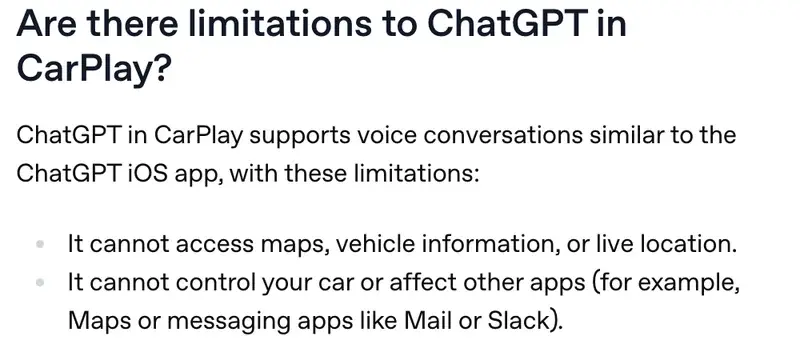
OpenAI documents one convenience we did not see in Google’s post. OpenAI’s help page says you can switch on “Start automatically in CarPlay” under Voice in the iPhone app, so that ChatGPT opens straight into voice mode. Google’s post describes no such setting for Gemini. We covered ChatGPT’s launch in April in our ChatGPT on CarPlay review, and Claude’s voice mode in a guide to rehearsing hard conversations.
Siri is a separate story. Before iOS 26.4, MacRumors noted, Siri was the only voice control in the car. Apple’s requirements page for Siri AI (beta), published November 5, lists iOS 27, iPhone 15 Pro models or iPhone 16 and later, six languages, and says it “is not available in the EU on iOS.” That page does not cover CarPlay, so we say nothing about how Siri AI behaves there. Our explainers on the new Siri in iOS 27 and choosing which assistant sits behind it cover the phone side.
Grok and Perplexity are on CarPlay according to the same MacRumors line, but we did not find a vendor page we could open for either, so we leave them out of the table rather than guess.
What Apple’s rules decide for every one of these apps
Much of what feels like a Gemini design choice is Apple’s rule. Apple’s CarPlay Developer Guide, dated October 13, 2026, has a category called voice-based conversational apps, and an entitlement for it that starts at iOS 26.4. Three guidelines apply only to this category:
- The app “must have a primary modality of voice upon launch” and, after launch, “appropriately respond to questions or requests and perform actions.”
- It should “only hold an audio session open when voice features are actively being used.”
- It should “optimize for voice interaction in the driving environment (for example, don’t show text or imagery in response to queries).”
The rules for all CarPlay apps add more. An app must never instruct people to pick up their iPhone to perform a task. All CarPlay flows must be possible without interacting with the iPhone. And apps must “never show the content of messages, texts, or emails on the CarPlay screen.” On the screen itself, a voice-based conversational app gets at most three template levels, root included, and has to show Apple’s voice control screen while voice features are active.
That last rule fits the “Gemini is connecting…” screen with End and Mute buttons in Google’s picture. It also fits the way Google describes the inbox features: summaries and a spoken reply, nothing about showing a thread on the display, which would break Apple’s rule on message content.
What the guide does not say is that these apps cannot control the car or the phone. MacRumors wrote in February: “Apps can’t control vehicle or iPhone functions.” We could not find that sentence in the guide itself, so treat it as the press’s description of the category. It matches what OpenAI documents for ChatGPT and what MacRumors repeated for Claude. Google’s post makes no claim either way. A question posted under Google’s announcement, whether Gemini “can take actions hands-free yet, or is it read-and-chat only for now,” is not answered in Google’s post.
One question we could not answer: the locked phone
Apple’s guide says “CarPlay is frequently used while iPhone is in a locked state,” and tells developers to test for it. Apple also says every CarPlay flow must work without touching the phone.
Google’s help page for Gemini Live on iPhone describes the phone, not the car. It says “You can’t start Gemini Live on a locked screen,” that you need to unlock to start it, and that you can continue a Live chat after locking. If the chat ends or is put on hold while locked, you have to unlock the phone to continue.
Those statements are about different screens, and we found no Google line that says what happens when you start a fresh Gemini conversation from a CarPlay icon with the phone locked. Our research, including a Perplexity deep-research pass, found no such line, and none of the early posts we found on X described the case. If you hit an “unlock your phone” wall on your first drive, you have found the answer. Do not fix it while moving: pull over, or sort it out before you leave.
The safety question
Google’s post says you can get more done “while keeping your hands on the wheel and your eyes on the road.” That is true as far as it goes. What years of driving research add is that holding the wheel is not the only thing a driver needs.
Here is what the published studies say, and what they do not.
Hands-free does not mean mentally free. The AAA Foundation’s 2014 study from the University of Utah put it plainly: “hands-free” does not mean “risk-free.” It found that listening to text or email messages is category 2 on its scale, and that composing a response raises the level “from a category 2 to a category 3.” The authors recommend limiting driver access to high-demand functions such as composing message responses.
Distraction outlasts the task. In the 2015 studies, in-vehicle voice systems averaged 3.34 on the 1-to-5 scale against 1.2 for the radio or an audiobook, a week of practice did not make the distraction go away, and it could last up to 27 seconds after a call ended. A separate 2015 study tested Siri, Google Now and Cortana and found moderate to high workload, with distraction lingering up to 20 seconds. It also found the phones differed, and the distraction tracked system errors and time on task: “robust, error-free systems produced lower workload.”
Those studies are old, and none of them tested a chatbot. They tested car systems and phone assistants from 2014 and 2015. We looked for any study of Gemini Live, or of a generative chatbot, used while driving, with Perplexity’s help and our own searches, and found none. A system that makes fewer errors may well score better today, and one that talks back at length may score worse. We found no measurement.
The evidence is not one-sided. The European Road Safety Observatory’s report on driver distraction (November 2025 version) says experimental studies make hands-free phoning “probably risky,” with delayed reactions and less attention to signs, other vehicles and the speedometer. It also says naturalistic driving research finds that the conversing part of a phone call does not significantly increase crash risk, and that all mainly cognitive tasks together carry an odds ratio of 1.25. In the same report, dialling a number carries 12 times the risk. So the fair reading is that a conversation carries far less measured risk than dialling by hand, and is not free of risk or of distraction.
Two other vendors say the same thing. OpenAI’s help page for CarPlay says to use your device “only when allowed by law and when conditions permit safe use,” to set the app up before driving and to avoid interacting with the device while the vehicle is in motion. Microsoft’s page for Copilot says to set up before driving and avoid interacting with the device while moving. Google’s post says it designed the feature to work “like a conversational driving companion that minimizes distraction” and mentions pausing “when you need to focus on an exit.”
What the law says about talking and dictating
We can say what we found, and where it stops.
In the United States, rules vary by state. The Insurance Institute for Highway Safety’s table (November 2026 version, “not guaranteed to be current”) lists hand-held phone bans for all drivers in most states and says hands-free rules “vary by state,” in wording like “device allowed if voice-operated or without use of either hand except to activate or deactivate feature or function.” Some states limit hands-free activation to a single swipe or tap, and some say “hands-free” without defining it. For novice drivers, most states answer yes to a total device ban, hands-free included.
In Europe, the European Road Safety Observatory says hands-free phone use is generally permitted, with national extras. France allows it only through a car kit, not headphones or earbuds, and in Belgium and Germany the handheld ban applies at a red light or in a traffic jam too. Germany’s traffic code (StVO § 23, paragraph 1a) lets a driver use a communication, information or organisation device only if it is neither picked up nor held, and only by voice control and read-aloud functions or a brief glance suited to the conditions. Its stationary exception for a motor vehicle needs the engine fully switched off, and an automatic start-stop engine does not count.
In the sources above, we found no statute that specifically allows or forbids dictating an email to Gemini on CarPlay. “Hands-free calls are legal here” does not answer that question, and an app’s approval by Apple is a platform rule, not a traffic law. If you are a new driver or a parent of one, check your state’s novice rules first.
Privacy: what syncs and what you control
Google says CarPlay conversations “sync automatically” with the Gemini app on your iPhone. The settings behind that are Google’s usual Gemini ones, and a few of them matter in a car.
- Keep Activity. When it is on, your chats and what you share with Gemini are saved in your Activity, which Google also uses to improve its services, including training generative AI models. Activity auto-deletes after 18 months by default, and you can choose 3 or 36 months, or turn auto-delete off.
- When it is off, future chats do not appear in Activity and are not used for model training unless you send feedback, but they are “retained with your account for 72 hours.”
- Human review. Google says reviewed chats “are retained for up to three years,” disconnected from your account before service providers receive them.
- Audio. “Your audio and Gemini Live videos and screenshares aren’t used to improve Google services by default,” and you can change that in Gemini Apps Activity.
- The trade-off. Google’s Activity page says “Some Connected Apps are unavailable when this setting is off.” Google does not say which ones. If you switch Keep Activity off for privacy, test your Gmail and Calendar questions afterwards.
Google’s Live help also asks you to “ask permission before recording or including” other people in a Live chat. A car is full of other people. If a colleague is riding along, tell them before you start an inbox recap.
What the sources do not say: where in the world the conversation is stored, whether your car’s head unit keeps any audio, or whether CarPlay has its own retention schedule. Google’s statement that chats sync to your phone does not answer those. For the wider picture, our Gemini Memory summary guide walks through what Gemini keeps.
What this means for you
If you already use Gemini and commute alone. This is the obvious fit. First action: do the “use Live once” step tonight and drive one day with a single question.
If you use ChatGPT or Claude in the car already. Nothing forces a switch. The real difference is Google’s Gmail and Calendar connection, so try Gemini for the one job it advertises, a calendar check, and keep the one you prefer for open conversation.
If your Google account is through work or school. Google’s Live help says only Calendar, Keep and Tasks work in Live for work and school accounts, and Gmail is not listed. An administrator has to enable the apps. First action: ask your admin before you build a habit around the inbox recap.
If you live in the EEA or Nigeria. Google’s post says the rollout covers “all Gemini users on iOS” and lists no countries, while its footnote excludes Daily Brief and “certain personalization features” in the EEA and Nigeria. First action: check whether your Personal Intelligence screen shows a Daily brief switch, and expect it not to.
If you are a parent of a teen driver. The footnote excludes under-18s from Daily Brief, and in IIHS’s table most states have a total device ban for novice drivers. First action: read your state’s novice rule before you say yes to any dashboard assistant.
If you drive for work or a lot. Rehearsing a presentation is one of the uses Google suggests, and the research warns about composing and long conversations. First action: keep composition tasks, replies and role-play for parked time, and use the car for listening and light questions.
If you run an IT team. One early post told IT teams to update their mobile policy on what may be read aloud in the car with passengers present, since company mail and calendars live on employee iPhones. First action: put a line about it into your mobile policy.
Edge cases and things that go wrong
We have no road reports to draw on, so this list comes from Google’s pages, the other vendors’ help pages and what people asked on X in the first day.
- No icon on the CarPlay screen. Google’s November 11 post calls this a rollout, and one early post warned the icon might not be on your car yet because the rollout goes by language. Check the app version, the microphone permission and the “used Live once” step before assuming a fault.
- A different Gemini opens. If the icon you tapped sits inside Google Maps, you are in the navigation helper from October. Go back to the CarPlay home screen.
- Daily Brief does not appear. The most likely reason is eligibility: US only, English only and 18 or over, per Google’s help page, plus a personal account, Memory on and Workspace connected.
- Your inbox questions fail. Check that Keep Activity is on, since some connected apps are unavailable when it is off, and that Gmail is connected under Connected Apps.
- It asks you to unlock your phone. See the locked-phone section above. Do it parked.
- The voice quality is bad. OpenAI’s help page for ChatGPT says audio depends on the car’s microphones, speakers and echo cancellation, and suggests trying again in a different car to confirm whether the problem is car-specific. Google’s post says nothing about car audio, but the same car hardware sits in the path, so it is reasonable to suspect it. That is our inference, not a Google statement.
- The app opens by itself. OpenAI’s page notes that CarPlay reopens the last app you used when the phone reconnects. If the last one was a voice assistant, expect it on the next start.
- It reads you something you did not want read aloud. One reader’s joke about an alert read out at a red light is a real design question: inbox summaries are spoken, not shown. Disconnect Gmail in Connected Apps if you do not want that.
What it can’t do
- It isn’t meant to show you text. Apple’s rules for these apps say not to show text or imagery in response to queries and never to show the content of messages or emails on the screen.
- It has no wake word of its own. MacRumors reported that third-party apps in this category have no wake word, so someone has to tap the icon first.
- It can’t reliably control the car or the phone. The press described Apple’s category that way. Google’s launch post gives no list of what Gemini on CarPlay can and cannot do.
- It can’t be called a safe habit on the evidence. No study of Gemini Live while driving exists that we could find, and the older studies warn about composing messages and about lingering distraction.
- It can’t give you Daily Brief everywhere. Daily Brief and “certain personalization features” have gates that the basic app does not, and the pages describing them disagree.
Questions people are asking
Is Gemini on CarPlay free? Google’s post says it is rolling out to “all Gemini users on iOS” and does not mention subscription tiers. Daily Brief has separate gates, and we could not confirm from a Google page whether it needs a paid plan.
Does it replace Siri in the car? Nothing we read says so. Apple’s guide treats these apps as a category with their own entitlement, and MacRumors reported they have no wake word. Siri stays Apple’s own assistant. A couple of posts on X raised the question, and one of them noted that Apple has made no such announcement.
Which iOS version do I need? Google does not say. Apple’s entitlement for voice-based conversational apps starts at iOS 26.4, and ChatGPT’s and Copilot’s help pages name 26.4 or later.
Can it send an email by voice? Google says you can “talk through a quick reply using just your voice.” It does not say Gemini sends the message from CarPlay. For work and school accounts, Google’s Live help does not list Gmail at all.
Is it legal to use while driving? Hands-free phone use is generally permitted in Europe, with national extras, and US rules vary by state. In the sources above, we found no law that settles dictating to or chatting with a chatbot. Check the rules where you drive.
Is it safe? Safer than holding a phone, not free of distraction. The best-known studies are about older systems. The 2014 study’s own advice is to limit message composition and shorten tasks, and the 2015 work found distraction lingering after a task ended.
Does it work in the EU? The Gemini app on CarPlay is part of a global rollout in Google’s words. Daily Brief and certain personalization features are not available in the EEA.
Where do my CarPlay chats go? To your Gemini chat history on the phone, according to Google, under the Keep Activity settings described above. Where the data is physically stored is not stated.
I use Android Auto. Is this for me? No: Google says Gemini reached Android Auto and cars with Google built-in first, so this launch is the iPhone catch-up.
The bottom line
Gemini on CarPlay is a sensible launch and a thin one. It brings Gemini Live to the dashboard with your calendar and, if you qualify, your inbox, and it follows Apple’s rules for voice apps. What it does not bring is evidence that long conversations are safe to have at speed, or a clear answer on the locked-phone case, or one consistent account of who can use Daily Brief.
The practical plan is short. Do the setup parked. Use it for listening and short questions. Save the presentation rehearsal and the email reply for the driveway. If you want to get more out of Gemini before you drive, our course Google Gemini Mastery (first 2 lessons free) starts with the basics, and AI Privacy 101 (first 2 lessons free) covers what to keep out of any assistant. Start lesson 1 free →
Sources
- Google, “Talk it through with Gemini, now on Apple CarPlay,” Nov 11, 2026
- Google Maps’ announcement of Gemini in Maps on CarPlay, Oct 21, 2026
- Apple, CarPlay Developer Guide (dated Oct 13, 2026)
- Apple, entitlement: CarPlay Voice-Based Conversation App
- Apple Support, Requirements for Siri AI (Beta), Nov 5, 2026
- MacRumors, iOS 26.4 CarPlay support for voice apps, Feb 18, 2026
- MacRumors, Gemini app on Apple CarPlay, Nov 11, 2026
- MacRumors, Anthropic’s Claude is coming to CarPlay, Sep 4, 2026
- iPhone in Canada, Claude voice mode works with CarPlay (Anthropic’s statement)
- OpenAI Help Center, Using ChatGPT in CarPlay
- Microsoft Support, Copilot voice in Apple CarPlay
- Gemini Apps Help, Talk naturally with Gemini Live (iPhone & iPad)
- Gemini Apps Help, Daily Brief (iPhone & iPad)
- Gemini Apps Help, Keep Activity
- Droid Life, Google makes Gemini’s Daily Brief a free feature, Sep 8, 2026
- AAA Foundation, Measuring Cognitive Distraction in the Automobile II (2014)
- AAA Foundation, smartphone assistants’ cognitive workload (Siri, Google Now, Cortana, 2015)
- Association for Psychological Science, Even Hands-Free Devices are Dangerously Distracting, Oct 28, 2015
- European Road Safety Observatory, Driver Distraction thematic report (Nov 2025 version)
- IIHS, Distracted driving: electronic device laws (Nov 2026)
- Germany, StVO § 23 (gesetze-im-internet.de)