

On November 12, Google and Samsung opened preorders for a pair of glasses with Gemini built in. Google calls them Intelligent Eyewear, the frames come from Warby Parker and Gentle Monster, and they go on sale on December 10. The cheapest pair is $395. There is no screen in the lens: you talk to Gemini and it answers in your ear.
That is the whole idea, and it comes with a long list of small conditions: which phone you own, which country your Google account is from, whether you need prescription lenses, and what you are comfortable with a camera on your face doing around other people. This guide goes through those conditions in the order you will meet them when you try to buy a pair, so you can decide before you put money down.
We have not touched a pair. Everything below comes from Google’s, Samsung’s and Gentle Monster’s own pages and from news reports, mainly Android Authority’s hands-on review. We could not read Warby Parker’s own site. Where those sources disagree, we say so. Where they say nothing, we say that too.
What was announced on November 12
Google’s launch post says the glasses were designed with Warby Parker and Gentle Monster and engineered with Samsung. Samsung describes it as developed in collaboration with Google, with Gemini built in, and Samsung’s engineering behind the hardware. Thurrott says the glasses run Google’s Android XR platform. Preorders opened online and in stores on November 12, and Google’s post says they “will be available to purchase in stores and online on December 10.”
| Warby Parker | Gentle Monster | |
|---|---|---|
| Starting price (US) | $395 | $449, up to $489 depending on the model |
| Styles | Three: Alden, Reid and Wren | Six designs |
| Variations | 14 | 16 |
| Where | The United States | The United States and South Korea |
| Prescription lenses | Optical and sun versions; we did not read its lens options | Prescription for 5 styles, per Gentle Monster’s US page |
Samsung’s release says the two collections together make up “30 distinctive designs”, which are variations: 14 based on three Warby Parker frames and 16 based on six Gentle Monster frames, so nine basic shapes in all.
Two details are easy to miss:
- The prices are starting prices. Android Authority’s hands-on gives them as “$395 for Warby Parker and $449 for Gentle Monster, before lens upgrades.” We did not find a published price for prescription lenses in a page we read, so we do not give one.
- December 10 is the purchase date. We did not read a delivery date for each preorder, so do not assume a pair ordered today arrives that day.
One more limit sits in a footnote of Google’s post: the eyewear is “only available for use with Google accounts from the United States and South Korea,” and “requires a compatible 18+ Google Account.” That is an account rule, not only a shipping rule, so a pair bought elsewhere does not get around it.
What the glasses are, and are not
The first Intelligent Eyewear models have no display. Android Authority’s hands-on says they are “strictly audio-only,” unlike the Meta Ray-Ban Display. You will not see maps floating in the lens or captions under a person’s face. What you get is:
- two open-ear speakers and four microphones,
- a 12-megapixel ultra-wide camera,
- touch and swipe controls on the frame,
- a Snapdragon AR1 Gen 1 chip, 2 GB of memory and 64 GB of storage, per Samsung’s spec table,
- IPX4 water resistance for the glasses (not the case), which Google describes as protection against splashes, light rain and sweat.
Google’s product page says Gemini “stays in standby until it detects activation”, such as “Hey Gemini,” and adds: “A similar-sounding noise can also trigger it.”
The glasses also need your phone. Google’s page says “a phone connection is required for Gemini surroundings features and media streaming,” while volume, battery checks and taking photos work without it. Android Authority adds that photos look better than the small lens suggests because the glasses send raw data to the paired phone for processing. In other words, these are an accessory for a phone, not a replacement for one.
Which phones work, and where the sources disagree
This is the part of the page most likely to decide the purchase. Here is Samsung’s own compatibility row:
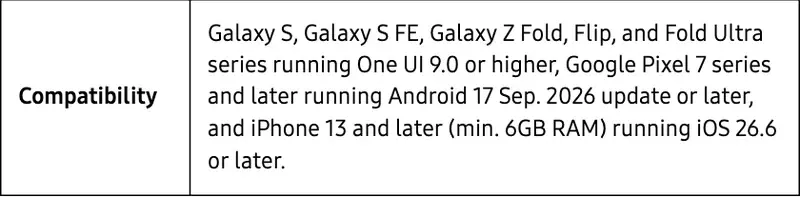
| Your phone | What the pages say | What to check |
|---|---|---|
| Samsung Galaxy | Galaxy S, S FE, Z Fold, Flip and Fold Ultra series, running One UI 9.0 or higher | Your exact model and software version. Samsung’s list names the series above and no others. |
| Google Pixel | Pixel 7 series and later, running the Android 17 September 2026 update or later | Your Pixel’s current Android version. |
| iPhone | Samsung and Google’s product page: “iPhone 13 and later (min. 6GB RAM) running iOS 26.6 or later”. Google’s launch-post footnote: “iPhone 13 Pro and above”. | Which of the two lists is right for your iPhone 13. |
| Other Android phones | Not supported at launch: Android Authority names Motorola, OPPO, HONOR and Xiaomi | Nothing to check at launch. |
The iPhone row is the one to read twice. Google’s launch post says “iPhone 13 Pro and above”, while Google’s product page and Samsung’s release say iPhone 13 and later with at least 6 GB of RAM. We cannot tell you which is right, so the safe habit is to treat “iPhone 13 Pro and later” as the conservative reading, and to ask the store or the brand about your exact model before you order.
There are also feature gaps by phone type. Google’s footnotes say that at launch, Guided Vision and the Aira service are only available with a compatible Android phone, and that Audible works only when the glasses are paired with an Android phone. Android Authority adds that communication with select apps works on Android at launch.
Samsung’s spec table lists two assistants, Gemini and Bixby, with a note that Bixby works “Only with Galaxy phones”.
What Gemini does on the glasses
Google’s pages list what Gemini does. We have grouped it by the situation you would be in, and put the requirement or catch next to each:
| What you do | What the glasses do | Catch |
|---|---|---|
| Look and ask | Identify an object, a plant or a building, and answer questions about it, such as local business details or shopping comparisons | Android Authority’s tester asked “what is this thing?” and Gemini said it didn’t know. Google told them you must say something like “look at this thing”, because Gemini never uses the camera otherwise. |
| Take a photo or video | Capture by voice or a tap. Up to 3K video, with automatic stabilization | Android Authority found the long press records 2K HDR video, and the orientation is locked to portrait. Samsung says video HDR is supported up to 2K. |
| Navigate | Turn-by-turn audio directions through Google Maps | Needs the Google Maps app. |
| Translate | Speech translated into your ear, in “more than 70 languages”, with automatic language detection; text translation through the camera | Needs the Google Translate app. Android Authority notes it does not translate your own voice back to the other person. Samsung says translation and navigation “may vary by language, region, app, service provider and network environment.” |
| Messages and calls | Hear texts read aloud, reply by voice, summaries of group chats, take calls with one tap on the frame | Which apps work varies by phone type. |
| Calendar and lists | Check a poster against your calendar, add items to a grocery list, set reminders | Google’s footnote says “Gemini requires setup” and a compatible 18+ Google Account. |
| Share what you see | Show your point of view in a Google Meet video call | Needs the Google Meet app. Samsung says live visual sharing “may vary by app, service, market and applicable laws or consent requirements.” |
| Music and audiobooks | Voice control for YouTube Music, Spotify, Apple Music and Audible | Other apps work only through ordinary Bluetooth playback, per Android Authority. Audible works only with an Android phone at launch. |
| Accessibility | Guided Vision gives audio descriptions for people who are blind or have low vision | Google says it “is AI and can make mistakes”, is not a medical device or mobility aid, and is not intended for navigation, safe-travel guidance or obstacle detection. |
Samsung gives one more example: capture a whiteboard during a meeting, ask Gemini to summarize the key takeaways and save them into Samsung Notes. We did not find a page that says this works on an iPhone.
The price, and what is missing from it
The $395 and $449 figures are starting prices, before lens upgrades. If you wear prescription glasses, three things change.
- The price goes up, and we cannot tell you by how much. We did not read a price for prescription lenses on any page. Warby Parker’s lens prices were reported by other outlets, but we did not read them ourselves, so we do not quote them.
- Gentle Monster prescriptions cannot be undone. Its US prescription page says “Glasses fitted with prescription lenses are made to order and cannot be returned or refunded, including the device.” The device is included in that sentence, not just the lenses.
- Not every frame takes prescription lenses. The same page says prescription lenses are available for 5 styles of Gentle Monster Intelligent Eyewear, and Google’s post says prescription options are available for most Gentle Monster frames.
There is also a line on both Google’s and Gentle Monster’s pages that matters if you hate subscriptions: “Some features require setup or subscription.” Neither page says which features. The only one we found named is in Google’s footnotes: Guided Vision and Aira “May require subscription or membership.” Nothing we read says you must buy a paid Gemini plan to use the basics, but nothing says you will never need one.
Privacy: what Google says, and what is still open
A camera on someone’s face is why this category has a reputation. Google’s page lists these protections:
- Camera visuals from Gemini are not saved in Gemini History and are not used to train AI models or target ads.
- Bystander faces are automatically redacted before Gemini processes the visuals, according to Google’s launch post. Thurrott’s write-up says the same.
- An indicator light shows when you are taking a photo or video, and the glasses stop recording if the outer light is covered or blocked.
- Data stored on the glasses is encrypted, and data sent off the glasses is encrypted in transit.
- You choose which apps can use the camera and microphone, and there is a physical off switch plus a toggle that turns off the camera, microphones and Gemini.
- Your Gemini history can be reviewed, managed and deleted in settings.
Not everyone will find that enough. Android Authority’s reviewer notes “social pushback over face cameras” as one reason adoption will be hard. Two things we did not find on the pages we read: how long audio is kept, and how the glasses behave in places where recording is restricted. We did not research recording laws for this guide. A simple habit is to treat the glasses like a phone with its camera out: ask before recording in someone’s home, a medical office or a workplace, and take them off where cameras are not allowed.
If you want the background on what AI services do with what you say to them, our course AI Privacy 101 (first 2 lessons free) walks through it.
What the one hands-on review found
Android Authority’s C. Scott Brown tried final retail units for about 30 minutes in a controlled demo and plans to test review units. Treat what follows as a first impression, not a verdict.
What went well:
- Comfort: the frames “never felt warm at all,” and they wore like regular glasses.
- Photos came out better than expected for such a small lens.
- The open-ear audio was clear for Gemini and voice prompts over Manhattan street traffic.
- Guided Vision and the Aira integration stood out as early strengths.
What fell short:
- “You can’t adjust Intelligent Eyewear stems at all,” so a bad fit means swapping the pair.
- The Gemini camera needs to be asked explicitly (see the table above).
- Translation does not speak your words back to the other person.
- The sound is fine for podcasts and calls, but the reviewer would not use it for serious music.
- Battery: no noticeable drain in 30 minutes, but the reviewer doubts heavy users will reach nine hours. Google’s battery footnote says the figure was measured in a mixed-use scenario.
The reviewer’s overall verdict is doubtful: they “still can’t name one task” the glasses handle that a phone, a smartwatch and earbuds can’t already do. They also say a 30-minute controlled demo isn’t everyday use. That is one person’s early view, but it is a fair question to ask yourself before you order.
We could not open the hands-on pieces from Tom’s Guide and Gizmodo, so we do not summarize them.
A 15-minute check before you preorder
This is the walkthrough, step by step, with what you should see at each point. It is a checklist we wrote from the pages above, not something we tested with a pair.
Step 1: Find your phone’s exact model and software version. On iPhone, open Settings, then General, then About. On Android, Settings, then About phone. You are looking for a model name and a version number such as iOS 26.6 or One UI 9.0. Expected result: a model and version you can compare with the table above.
Step 2: Compare it with both iPhone lists, if you have an iPhone. If you have a plain iPhone 13, you are in the place where Google’s launch post and Samsung’s list differ. Expected result: either “Pro or newer, fine” or “plain 13, ask first.”
Step 3: Check your Google account’s country. Google says the glasses work only with Google accounts from the United States and South Korea, and the account must belong to someone 18 or older. Expected result: you know whether your account qualifies before you add the glasses to a cart.
Step 4: Decide whether you need prescription lenses. If you do, find out which frames support them and the total price at checkout, and remember Gentle Monster’s no-return line. Expected result: a total, not a starting price.
Step 5: Try a pair if you can. Google’s launch post lists hands-on demos at select Gentle Monster, Warby Parker and Google Store locations, and guided demos at more than 360 Warby Parker locations. Samsung says its own demos start on December 10. A demo lets you check fit, which matters because the stems do not adjust.
Step 6: Write the one job you want them for. Android Authority’s reviewer could not name one. If you can, a translation trip, a hands-free commute, audio descriptions or photos while carrying things, the purchase has a reason.
Step 7: Decide. Preorder if all six steps pass and you would use the job weekly. Try a demo first if any step is uncertain. Wait if your phone or country is not on the list.
A worked example, with an invented person
Here is a sample, written by us, to show the checklist in use. “Maya” is made up.
Maya has an iPhone 13, wears prescription glasses and lives in Ohio. She wants the glasses for translating menus on a trip to Seoul in the spring.
- Step 1: her phone shows iPhone 13 and iOS 26.6 after an update.
- Step 2: Samsung’s list says iPhone 13 and later with at least 6 GB of RAM, but Google’s launch footnote says 13 Pro and above. Her phone is a plain 13, so she cannot tell. She writes to the retailer.
- Step 3: her Google account is a US account, so it qualifies.
- Step 4: she needs prescription lenses. Gentle Monster’s no-return line tells her not to order a prescription pair without trying one first, and the price for her lenses is not a number we can give her.
- Step 5: she looks for a store near her that lists demos.
- Step 6: translation is her one job. Google’s pages list speech translation in more than 70 languages and Samsung adds that it varies by language and region, so she checks the Korean-English pair in the store.
- Step 7: she waits for the demo and the retailer’s answer.
In this example the checklist did what it is for: it moved the decision from “preorder because it launched” to “go to a store and ask one question.”
Should you preorder? A decision table
| Your situation | Our read | First action |
|---|---|---|
| iPhone 13 Pro or newer, US account, no prescription | Reasonable to preorder if you can name a weekly use | Pick the frame at a demo |
| Plain iPhone 13 | Ask first, because the sources disagree | Email the retailer with your exact model |
| Prescription wearer | Try a pair and get the full price first | Find a demo store, check the lens price at checkout |
| Pixel 7 or newer, US or Korean account | Straightforward on compatibility | Update to the Android 17 September 2026 release |
| Galaxy S or Z phone | Straightforward on compatibility | Confirm One UI 9.0 on your phone |
| Other Android phone | Wait | Not supported at launch |
| Outside the US and South Korea | Wait | Check Google’s page for later countries |
| You mainly want hands-free photos | Compare with other camera glasses first | Look at the 12 MP and video limits above |
What this means for you
- If you commute and want hands-free audio: you can already do part of this with earbuds and a phone. The glasses add a camera and a voice assistant. Your first action: list what you would ask Gemini on the way to work.
- If you travel and translate: the feature list is strong on paper, and Samsung says it varies by language, region and app. Your first action: check the two languages you need in a demo.
- If you are blind or have low vision: Guided Vision is the feature to ask about, and Google says it is not a mobility aid. Your first action: ask whether your phone supports it, since at launch it needs an Android phone.
- If you work in a hospital, a lab, a school or any place with privacy rules: ask your employer before you bring camera glasses to work. Your first action: read your workplace’s policy on cameras.
- If you are buying a gift: the phone list and the account country decide whether it works at all. Your first action: ask the recipient for their phone model.
- If you are curious but not sure: wait for more reviews. The sales date is December 10.
Edge cases and things that may go wrong
- Your iPhone is on the border. See the iPhone discussion above. Get the answer in writing before you order.
- The glasses are in your cart but the account says unavailable. Google’s footnote limits use to Google accounts from the United States and South Korea.
- Gemini says it does not know what you are looking at. Say “look at this” or similar. Google told Android Authority that Gemini never uses the camera otherwise.
- Gemini wakes up when you did not say its name. Google says a similar-sounding noise can trigger it. The physical switch and the toggle are the answer.
- A frame does not fit and the stems do not adjust. Android Authority says you cannot adjust the stems. Try a pair at a store, and read the return policy for your frame before you pay.
- You ordered a prescription pair from Gentle Monster and it is wrong. Its US page says prescription pairs are made to order and cannot be returned or refunded, including the device.
- Audible or an app is missing. Google says Audible works only with an Android phone at launch, and Android Authority says only YouTube Music, Spotify, Apple Music and Audible have voice control.
- Someone near you objects to the camera. The indicator light is there to show recording. Taking the glasses off is the simplest answer.
What this can’t do
- It cannot show you anything. There is no display in these first models.
- It cannot replace your phone. A phone connection is required for Gemini surroundings features and media streaming.
- It cannot work with most Android phones at launch. Only the phones in the table do.
- It cannot be used with a Google account from most countries. Only the United States and South Korea are listed.
- It is not a safety device. Google says Guided Vision is not intended for navigation, safe-travel guidance or obstacle detection.
Questions people are asking
How much do Google’s Gemini glasses cost? Warby Parker frames start at $395, and Gentle Monster frames run from $449 to $489 in the US, before lens upgrades. Prescription lens prices were not on a page we read.
When can you buy them? Preorders opened on November 12, 2026. Google says they will be available to purchase in stores and online on December 10.
Do they have a screen? No. Android Authority calls them strictly audio-only.
Which phones work with them? Galaxy S and Z phones on One UI 9.0 or higher, Pixel 7 and later on the Android 17 September 2026 update or later, and iPhones whose exact cutoff differs between Google’s launch post (13 Pro and above) and Samsung’s list (13 and later with at least 6 GB of RAM, on iOS 26.6 or later).
Do you need a Gemini subscription? The pages we read do not name a required paid Gemini plan. They say “Some features require setup or subscription,” and Guided Vision and Aira “May require subscription or membership.”
Where are they sold? Warby Parker in the United States, and Gentle Monster in the United States and South Korea. Google’s account rule also limits use to accounts from those two countries.
Can you get prescription lenses? Gentle Monster says prescription lenses are available for 5 styles, and Google says most Gentle Monster frames have prescription options. Warby Parker’s frames come in optical versions; we did not read its lens options. Gentle Monster’s prescription pairs cannot be returned or refunded.
How long does the battery last? Google and Samsung say up to nine hours, measured in a mixed-use scenario. Google says the case recharges the glasses up to seven times, and Samsung says up to 72 hours with a charged case. Android Authority’s reviewer doubts heavy users will reach nine hours.
Do they record everything around you? Google says an indicator light shows when you take a photo or video, and the glasses stop recording if the light is covered. It also says Gemini camera visuals are not saved to Gemini History or used to train models, and bystander faces are redacted before processing.
Are they waterproof? Samsung lists IPX4 for the glasses only, which Google describes as protection against splashes, light rain and sweat.
Do they work in Japan or Europe? Not at launch: Google’s account rule limits use to Google accounts from the United States and South Korea. We found no page that names other countries for later.
Is this the same product as the Samsung Galaxy Glasses from July? Samsung showed its glasses with Gemini at its July 22 event, which our earlier post on Samsung Galaxy Glasses covers. That post says the glasses must pair with a Galaxy phone. The preorder pages above list Pixel and iPhone models too.
The bottom line
These glasses are a phone accessory with a camera, a speaker and Gemini, priced from $395 and sold from December 10 in two countries. Whether they are worth buying depends on a short list of facts about you: your phone’s model and software, your Google account’s country, whether you need prescription lenses, and one job you would use them for every week. One hands-on reviewer still could not name a task they handle that a phone, a smartwatch and earbuds can’t already do. If you can name one, a demo is the next step.
If Gemini is new to you, our course Google Gemini Mastery (first 2 lessons free) covers what the assistant can and cannot do before you wear it on your face.
Your first step today: write down your phone’s exact model and software version, then check it against the table.
Sources
- Google: Intelligent Eyewear, collections and pre-order (launch post)
- Google: Intelligent Eyewear product page
- Samsung Newsroom: Samsung announces December release for Intelligent Eyewear
- Gentle Monster US: Intelligent Eyewear prescription service
- Gentle Monster US: Intelligent Eyewear overview
- Android Authority: Google Intelligent Eyewear hands-on
- Android Authority: you can finally pre-order Samsung’s smart glasses with Android XR
- Thurrott: first Android XR smart glasses from Warby Parker and Gentle Monster launch in December