You found a free AI tool that would be perfect for your class. It grades exit tickets, or gives kids instant feedback, or turns your lesson into a quiz in ten seconds. The sign-up button is right there. Thirty students, one click.
Wait — before that click. The tool being free and helpful tells you nothing about whether it’s safe to feed it your students’ names, work, and grades. And the person on the hook if it isn’t safe is you. This is a 15-minute check you can run on any tool before you sign a single kid up. No law degree required.
Why this matters right now
In late July 2026, the Financial Times reported that AI companies are racing to get free and discounted tools into schools — a report headlined around AI labs muscling into the education market, with names like OpenAI and Anthropic among those handing educators and students free tailored versions. Great for your budget. Also a flood of tools that were never built with student privacy in mind, all landing on your desk at once.
And schools are scrambling to keep up. Ohio just became the first state to require every public district to adopt a formal AI policy, with a deadline of July 1, 2026. Other states are moving. But policy from the district office doesn’t help you at 9pm when you’re deciding whether to sign your third-period class up for a shiny new app tonight.
Here’s the part almost nobody says out loud: the riskiest move isn’t using AI — it’s you personally signing up a consumer account and pointing your students at it. When you do that, you’re handing a company identifiable student information under regular consumer terms, without your district’s permission or a data agreement behind it. Lawyers call that an unauthorized disclosure of education records. You didn’t mean to. It still counts.
The two laws, in plain English
You don’t need to memorize these. You just need to know what they protect.
- FERPA is the federal law that gives parents the right to see and control their child’s education records — grades, work, notes, anything a school keeps that’s tied to a specific student. If you share that identifiable info with an outside company, your school needs a proper legal basis for it (usually a signed data agreement or parent consent). A teacher can’t create that basis solo.
- COPPA is the rule for kids under 13. Any online service collecting personal info from an under-13 child needs verifiable parental consent first, has to let parents review and delete the data, and must collect only what it actually needs. Most free consumer AI tools set their minimum age at 13 (or higher) specifically to sidestep this — which means they’re often not cleared for your younger students at all.
The one-line version: don’t put identifiable student information into a tool that hasn’t been cleared by your school. Everything below is how to check whether a tool clears that bar.
The 15-minute check: 5 questions
Open the tool’s privacy policy in one tab and its settings in another. Then walk these five questions. Each answer lives in a predictable spot, so this goes faster than it looks.
1. What data does it collect? Look for the section titled “Information we collect” or “Data we collect.” You want to see what it grabs — names, emails, uploads, everything you type, location, device info. If the list is huge and vague, that’s a flag.
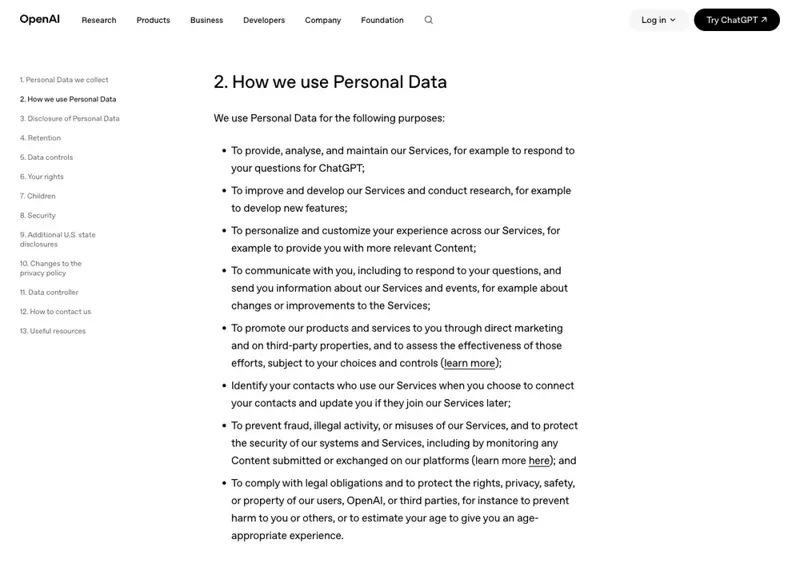
2. Does student work train the model? This is the big one. Jump to “How we use your information,” and scan for the words training, improve our models, or model development. Free consumer tiers often use what you type to train future versions by default — OpenAI’s own privacy policy, for example, says consumer chats may be used to improve its models unless you turn that off. A tool built for schools will usually say plainly that it does not train on your data. Anthropic’s new Claude for Teachers, for instance, states that what you share isn’t used for model training and is backed by a K-12 data agreement written for FERPA. Same company can offer both a “trains on you” version and a “doesn’t” version — so this is about the specific product, not the brand.
3. Is it FERPA- and consent-safe? Search the page for “Education,” “school customers,” “FERPA,” or “data processing addendum.” A tool that’s serious about classrooms will have an education section and a data agreement your district can sign. If there’s nothing — if it’s a pure consumer product with no mention of schools — that’s your sign to route it through your tech coordinator before students touch it.
4. Are there age limits? Find “Eligibility,” “age requirements,” or “Children’s privacy.” If the minimum age is 13 and you teach younger kids, the tool isn’t cleared for them, period. If you teach teens, check whether it needs parental consent under 18.
5. Can data be deleted and exported? Look for “Retention,” “Deletion,” or “Your rights.” You want to be able to delete accounts and content, and — because it may be part of the education record — export a student’s data if a parent asks. No deletion path is a real problem.
The 3 settings to change first
Even with a decent tool, the defaults usually favor the company, not your class. Change these before day one:
- Turn off model training on your data. It’s often a toggle buried in settings, labeled something like “Improve the model for everyone” or “Use my data for training.” Off.
- Turn off chat history / data retention where the tool lets you. Less stored, less exposed.
- Don’t turn on “memory” or “personalization” that saves student info between sessions. Convenient, but it’s the last thing you want holding kids’ data.
Red flags vs. green flags
When you’re skimming fast, these are the tells:
| 🟢 Green flags (good sign) | 🔴 Red flags (stop and check) |
|---|---|
| Has an “Education” or “for Schools” section | No mention of schools anywhere |
| Says plainly it does not train on your data | “We use your content to improve our services” with no opt-out |
| Offers a data agreement (DPA) your district can sign | Consumer terms only, no DPA |
| Clear age policy that fits your students | Vague or missing age requirements |
| Easy account + data deletion | No way to delete student data |
What this means for you
If you’re a classroom teacher signing up a class: run the five questions before you sign up, not after. If a tool trips question 2 or 3 — trains on your data, no school agreement — don’t feed it identifiable student work. You can often still use it yourself (planning, drafting) as long as no real student names or records go in. The rule of thumb: your prep is fine; student PII needs a cleared tool.
If you’re a grade lead or department head: you’re the one colleagues copy. Vet the two or three tools your team actually wants, do it once properly, and share a short “cleared / not cleared” list. One careful pass saves ten rushed ones.
If you’re a school tech coordinator: this check is the fast triage before the real procurement review. Teachers will adopt tools whether or not you’ve blessed them — giving them this 5-question filter means the obviously-bad ones get caught at the classroom door, and only the maybes reach your desk.
If you’re a parent-facing teacher: knowing this makes the “is it safe?” email easy to answer honestly. You can tell a worried parent exactly what a tool collects, whether it trains on kids’ work, and what you turned off. That specificity builds more trust than any reassurance.
What this check can’t do
- It’s not a legal review. Fifteen minutes tells you if a tool is obviously fine or obviously not. The gray-zone ones still need your district’s official process — this check just tells you which ones those are.
- It doesn’t override your district’s policy. If your district has already cleared (or banned) a tool, that decision wins over anything you find. Check the approved list first.
- Privacy policies change. A tool that’s clean today can update its terms next quarter. Re-check anything you rely on heavily once in a while, especially after a big “new AI features” announcement.
- A clean policy isn’t a promise of security. “We don’t train on your data” is about use, not breaches. It’s necessary, not sufficient — but a tool that won’t even promise the basics isn’t worth the risk.
This check is specifically about a tool’s data handling. It pairs with a few things we’ve covered before: locking down your own ChatGPT account settings, writing the classroom AI rule and the parent email that sets expectations, and — for the tools themselves — our roundup of the best AI tools for teachers. Different jobs, same goal: using this stuff without getting burned.
The bottom line
Free AI tools are pouring into schools faster than any policy can keep up, and the honest truth is that free often means your data is the payment. You don’t need to be paranoid, and you definitely don’t need to swear off AI. You need 15 minutes and five questions: what it collects, whether it trains on student work, whether it’s built for schools, its age rules, and whether you can delete the data. Run that pass, and you’ll catch the tools that would’ve gotten you in trouble — before you sign a single student up.
If you want the confident version of this — knowing not just how to vet a tool but how to bring AI into your classroom in a way that’s safe, useful, and defensible to parents and admin — that’s exactly what our AI for Teachers course is built to give you. Plain English, made for the classroom, no CS degree required. Because the goal was never to fear these tools. It’s to use them like a pro.
Been eyeing a free AI tool for your class? Run the five questions tonight — future-you, at the next privacy audit, will be very glad you did.
Sources
- Financial Times — AI labs begin to muscle in on $6tn education market
- U.S. Department of Education — What is FERPA? (Student Privacy)
- Federal Trade Commission — Complying with COPPA: Frequently Asked Questions
- Future of Privacy Forum — Checklist to Help Schools Vet AI Tools for Legal Compliance
- OpenAI — Privacy Policy
- Anthropic — Introducing Claude for Teachers
- Ohio Department of Education — AI Model Policy for Ohio Districts and Schools
