It’s mid-October. Fall progress reports are due, conference sign-up sheets are filling, and you have a class of 25 or 150 students who each deserve a comment that sounds like you wrote it after thinking about them.
AI can take the blank page away. It can also, if you use it carelessly, put a child’s name, grades and learning needs into a tool your district never approved, and hand every family a comment that reads like it came off the same assembly line. Those are the two worries teachers keep raising, and they’re both fair.
This guide is a workflow that handles both. You write the evidence, AI turns it into sentences, and the student’s name never goes into the prompt. It covers the privacy rules (including why swapping a name for “Student A” often isn’t enough), a copy-paste master prompt, a worked example from notes to final comment, a way to check your comments for bias, and a second prompt that turns the same notes into a conference sheet.
A note on sourcing. I read the primary sources: the federal regulation that defines student personal information, the research on feedback, two studies on bias in AI-written feedback, and Gallup’s teacher surveys. I haven’t tested every tool mentioned, and where a vendor’s claim is its own, I say so. This is US-focused, because FERPA is a US law. If you teach elsewhere, the workflow still helps, but check your local data rules.
The short version
- Check your district’s rule first. Most teachers have no formal guidance, so ask.
- Write an “evidence card” per student with a code, not a name. Evidence, a strength, a next step. Nothing identifying.
- Use one master prompt that only works from the card. It drafts, it doesn’t decide.
- Edit every draft against your notes. The risks are invented details and generic phrasing.
- Add names back in your own system, not in the AI tool.
- Run a quick fairness check across students before you submit.
Why the comment matters more than the speed
Before the privacy part, it’s worth knowing what a good comment looks like, because that’s what you’re asking the AI to imitate. A fast, bad comment isn’t a time saver.
What the feedback research says
Hattie and Timperley’s three questions. John Hattie and Helen Timperley’s 2007 review, “The Power of Feedback,” organizes useful feedback around three questions: Where am I going? How am I going? Where to next? Applied to a report comment, that’s a learning goal, evidence of where the student is now, and a next step. They also separate feedback about the task, the process, and the person. General praise aimed at the person (“you’re a great student”) tells a child very little about learning.
Feedback can backfire. Kluger and DeNisi’s 1996 meta-analysis covered 607 effect sizes and 23,663 observations. Feedback helped on average (d = 0.41), but more than a third of the interventions made performance worse, especially when attention shifted away from the task and toward the self. A longer comment isn’t better if it’s full of personality judgments.
Comments need information. Thomas Guskey’s 2019 review, “Grades versus comments,” concludes that students need information about where they are and what to do to improve. His summary of effective comments: say what the student did well, name the specific thing to improve, explain how, and show confidence that the student can get there with help.
How you praise matters. Mueller and Dweck’s 1998 studies with fifth graders found that children praised for intelligence, rather than effort, later showed less persistence after failure. Praise that points to a strategy (“your diagram helped you keep track of the quantities”) works better than praise that points to a trait.
One honest limit: much of this research is about comments on assignments, not the narrative comments on a term report card. It supports a design for the comment. It doesn’t prove that any particular report-card template raises achievement, and nobody has shown that AI-drafted comments do.
What that means for AI
AI is good at turning rough notes into tidy sentences. It’s bad at knowing what a child actually did this term. So the quality of the comment depends almost entirely on the evidence you give it. A prompt that says “write a comment for a fifth grader who’s doing well” produces warm, interchangeable praise. A prompt built from three specific observations produces something a parent recognizes.
The privacy rule, explained once
What FERPA counts as personal information
FERPA is the federal law that gives parents control over their children’s education records. The regulation’s definition of “personally identifiable information” (34 CFR 99.3) is wider than most people assume. It includes the student’s name, the names of parents or family members, addresses, personal identifiers like a student number, indirect identifiers such as date of birth, and this catch-all:
“Other information that, alone or in combination, is linked or linkable to a specific student that would allow a reasonable person in the school community, who does not have personal knowledge of the relevant circumstances, to identify the student with reasonable certainty.”

The words that matter are “alone or in combination.” A comment that never uses the name but says “the only fifth grader who moved here from Ghana in September and has a reading support plan” identifies a child to anyone at your school.
Why “Student A” isn’t automatic safety
Swapping a name for “Student A” removes one identifier. It doesn’t remove the others. The Department of Education’s Privacy Technical Assistance Center warns that indirect identifiers and combinations of details can still identify a student. Under the regulation, even releasing “de-identified” data requires a reasonable determination that the student can’t be identified, considering other information that’s reasonably available. That’s a judgment, not a checklist.
So the working rule isn’t “remove the name.” It’s put the least identifying evidence into the tool that still lets it write a useful comment. Skills, observations and next steps are fine. Names, family details, diagnoses, dates of specific incidents, other students’ names and your school’s name aren’t needed, so leave them out.
Which account you use matters
Three different things get confused:
- A free account (you can use it).
- A no-training promise (the company says it won’t train on your chats).
- Permission to process identifiable student records (your district has signed an agreement that makes it a “school official” under FERPA).
A vendor having the first or second doesn’t give you the third. The Department of Education’s guidance on online educational services says a provider has to perform a service the school would otherwise do itself, be under the school’s direct control for how records are used, and follow the use and redisclosure limits. “Doesn’t train on your data” is useful. It isn’t the same as having a data agreement.
Here’s where the common options stand, using what each company has published. These are vendor statements, not independent legal certifications:
| Option | Who gets it free | What the company says about data | What you still need to check |
|---|---|---|---|
| ChatGPT for Teachers | Verified US K-12 educators | Workspace content isn’t used to train models by default; education protections and a student-data privacy agreement | It’s different from a personal ChatGPT account. Being verified isn’t your district approving any upload. OpenAI’s own pages disagree on how long it’s free (June 2027 on general pricing pages, June 2028 on teacher pages), so check the plan page |
| Gemini for Education | Qualifying schools through Google Workspace for Education; an administrator must switch it on | Google says education data isn’t human-reviewed, used to train AI models, or used for ad targeting | Use the managed school account, not a personal one |
| Claude Free | Anyone | Consumer plan; you choose whether chats help improve models | It’s not a school contract. Turning training off doesn’t make it a FERPA-covered arrangement |
| MagicSchool Free | Teachers, with usage limits | Says it doesn’t sell student data or let third parties train on it; offers data agreements | Terms differ between free and district accounts, so read yours |
| Brisk Educator Free | Teachers, after a trial | Says inputs aren’t used to train models; stores inputs and outputs | “Doesn’t store the essay” isn’t “stores nothing.” A prompt or a generated comment can itself contain student information |
For this reason the workflow below works in any of them: it doesn’t depend on a district agreement, because it never puts identifiable information in.
Most teachers have no guidance, so ask
Gallup and the Walton Family Foundation surveyed 2,069 US public K-12 teachers between February 9 and March 2, 2026. Only 18% reported formal AI guidance from their school administrators. Another 48% had informal guidance only, and 34% had none, across the ten tasks measured. For grading and student feedback specifically, 58% had no guidance at all.
So there’s a good chance nobody has told you what’s allowed. Send one email to your principal or technology coordinator: “Which AI tools are approved for me to use with student information, and may I use [tool] for drafting comments if I include no student names or identifying details?” A written yes is worth having.
Does AI actually save time on this?
Gallup and Walton’s 2025 survey of 2,232 teachers found that teachers who used AI at least weekly estimated they saved 5.9 hours a week, which they annualized to about six weeks a year. About 60% of teachers had used AI for work that year and 32% used it weekly. Gallup’s October 14, 2026 release, based on 1,952 K-12 educators surveyed July 28 to August 14, found 59% had used AI in 2025-26 and that, among those users, 13% said it gave them a lot more time and 51% somewhat more.
Treat those numbers with care. They’re self-reported, they cover all kinds of AI use, and none of them measure report-card writing. EdWeek’s collection of examples from 990 educators included teachers using AI to edit report-card comments, but as stories, not a percentage. What the evidence supports is modest: teachers say it frees time. Nobody has measured how much it saves on comments, or whether the comments are better.
The workflow, step by step
Step 0: Check your rule and pick your account (5 minutes)
Send the email above. In the meantime, use whichever account your district points you to. If you’re on a free personal account, the workflow below still applies, because it keeps names and identifying details out.
Expected result: either a written okay, or at least a clear sense of which account to use.
Step 1: Build an “evidence card” for each student
An evidence card is a few lines you write about one child, labeled with a code that only you can decode (S01, S02, and so on). Keep a separate spreadsheet that matches codes to names on your own device or district system. Don’t use initials. Initials plus a grade and subject can point to a real child.
Here’s the template:
CODE: S07
GRADE/SUBJECT: 5th, writing and math
THIS TERM'S GOAL: Paragraph with a claim and two pieces of evidence.
Multiply multi-digit numbers accurately.
EVIDENCE: Recent writing sample has a clear claim and two relevant
examples; reasons not yet connected back to the claim.
Math check: most multi-digit problems correct; errors happen when carrying.
STRENGTH: Revised a paragraph twice without being asked. Asks
classmates useful questions in peer review.
NEXT STEP: Add a "this shows..." sentence after each example.
Estimate the answer before finishing a math problem.
SUPPORT NOTES (instructional only): Benefits from a worked example first.
What to leave out: names (the student’s, parents’, classmates’, teachers’), dates and places, family circumstances, medical or disability information, specific behavior incidents, and anything that would let a colleague guess who it is. Where a support is essential, describe the instruction, not the label. “Benefits from a worked example first” tells the model what it needs. A diagnosis doesn’t.
That last point has research behind it, covered in the bias section below. For now: describe what the student did, not who they are.
Expected result: a card of 6 to 8 short lines per student. This is the part that takes your time, and it’s the part that makes the comment good.
Step 2: Use the master prompt
Paste this into your approved tool, then paste one evidence card below it.
You are helping a 5th-grade teacher draft report-card comments that
will go home to families.

Use ONLY the evidence card below. Do not add facts, events, feelings
or personality traits that are not in it. Do not guess at ability,
motivation, family circumstances, culture, or any diagnosis. If you
need information that is missing, list it under "Missing" instead of
inventing it.

Write one comment of 55 to 80 words with this shape:
1. One specific strength, with the evidence that shows it.
2. One thing the student is working toward, phrased as "is learning
   to..." and not as a label.
3. One concrete next step the student can practise at school or home.

Rules: plain, warm, family-friendly language. No jargon or standards
codes. No comparisons to other students. No "always" or "never".
Refer to the student as "the student" and use "they". I will add
the name and correct pronouns myself.

Evidence card:
[paste one card here]
Why each line is there. “Use ONLY the evidence card” and “list Missing” cut down on invented details. The three-part shape is Hattie and Timperley’s model in practice. “No labels” follows the Kluger and DeNisi warning about feedback that drifts toward the person. “The student” and “they” keep gender cues out of the draft, which I explain below.
Change the grade level, the word count and the subject for your class. If your school system has a character limit, put it in the prompt.
Expected result: a draft of about 60 to 80 words that follows the three-part shape.
Step 3: Try one, then do a batch
Run one student first. Read it against the card. If it’s off, change the prompt, not the output. Then paste five cards at once, each with its own code, and ask for one comment per code. Batches of five to eight keep you able to check every comment against its card.
Expected result: five drafts, each starting with its code.
Step 4: Edit every comment (the part you can’t skip)
Check each draft against this list, in this order:
- Every fact is in the card. If the draft says the student “takes pride in their work” and your notes say nothing about pride, that’s the model filling a gap. Cut it or replace it with something you observed.
- Every adjective is traceable. “Enthusiastic,” “curious,” “thoughtful” are easy for AI to add. Keep one only if you can point to when you saw it.
- The next step is something a child can do. “Continue to work hard” isn’t a next step. “Add a sentence after each example” is.
- No labels. Cut “struggles with,” “weak in,” “lazy,” “gifted.”
- It sounds like you. Read it aloud. Change a phrase or two to your own words. If you have an old comment bank, paste two of your own comments into the prompt as style samples (with names removed) and ask the model to match your tone.
Sensitive comments, such as behavior concerns, attendance, and anything touching special education, are best written by hand. AI shouldn’t draft those from a thin note.
Expected result: a comment you’d be comfortable defending to the parent.
Step 5: Add the name and pronouns yourself
Paste the final text into your report system. Replace “the student” with the name and fix pronouns. This takes 20 seconds a comment. It’s slower than letting the model use “she” or “he,” but it keeps the draft free of gender cues. If you decide to include pronouns in the card, that’s your call. Just run the fairness check in Step 6.
Step 6: Run a fairness check
Skim your finished set and ask three questions. Do some students get long strengths and short next steps, while others get the reverse? Does the language of high expectations show up for everyone, or only for some? Would a parent reading this comment know exactly what to do at home?
The reason to check comes from research on AI feedback, covered next.
A worked example, from notes to comment
Here’s one student carried through the whole process. S07 is a composite I made up to show the steps. It isn’t a real child.
The card is the one in Step 1.
The model’s draft from the master prompt (this is a sample I wrote to show the target shape; your tool’s wording will differ):
The student opens writing with a clear claim and supports it with two relevant examples. They revised a paragraph twice without being asked. Next, we’re practising a “this shows…” sentence after each example to explain how it backs up the claim. In math, the student multiplies multi-digit numbers accurately, and slips happen mostly when carrying. Estimating the answer first is a quick way to catch those.
That draft is 66 words, uses only things in the card, and ends on a next step. Now the edit pass:
- Check 1 (facts). The claim, the two examples and the double revision are all in the card. Carrying errors are in the card. Pass.
- Check 2 (adjectives). None invented. Pass.
- Check 3 (next step). Two concrete next steps, one per subject. Pass.
- Check 4 (labels). None. Pass.
- Check 5 (sounds like you). It doesn’t mention the student’s good questions in peer review. That’s the most personal thing in the card. Add it.
The final comment, with the name and pronouns restored (using “Maya” and “she” for illustration):
Maya opens her writing with a clear claim and backs it up with two relevant examples. She revised one paragraph twice without being asked, and her questions during peer review help classmates improve their work too. Next, we’re practising a “this shows…” sentence after each example to explain how it supports her claim. In math, Maya multiplies multi-digit numbers accurately and mostly slips when carrying; estimating the answer first is a quick way to catch those.
The edit added one observation only the teacher could add. That sentence is what makes the comment sound like someone who knows the child.
The same notes, written badly
For contrast, here’s what you get from a lazy prompt such as “write a report card comment for a fifth grader who is doing well in writing and math”:
Maya is a delightful student who consistently demonstrates enthusiasm for learning. She is a pleasure to have in class and shows strong skills in both writing and math. Keep up the great work!
Nothing in it is false and nothing in it is useful. The table below shows why one works and the other doesn’t.
| Lazy prompt | Evidence-card prompt | |
|---|---|---|
| Goal named? | No | Yes (claim plus evidence; accurate multiplication) |
| Evidence of current performance? | “Strong skills” | Two examples, a double revision, carrying errors |
| Next step? | “Keep up the great work” | A “this shows…” sentence; estimate first |
| Could it describe any child? | Yes | No |
| Praise type | Person (“delightful”) | Process (revised twice, asks useful questions) |
| What a parent can do | Nothing | Practise the sentence frame; ask about estimating |
Why leaving out demographics isn’t just a privacy move
There’s a second reason to keep a student’s background out of the prompt, and it has nothing to do with FERPA.
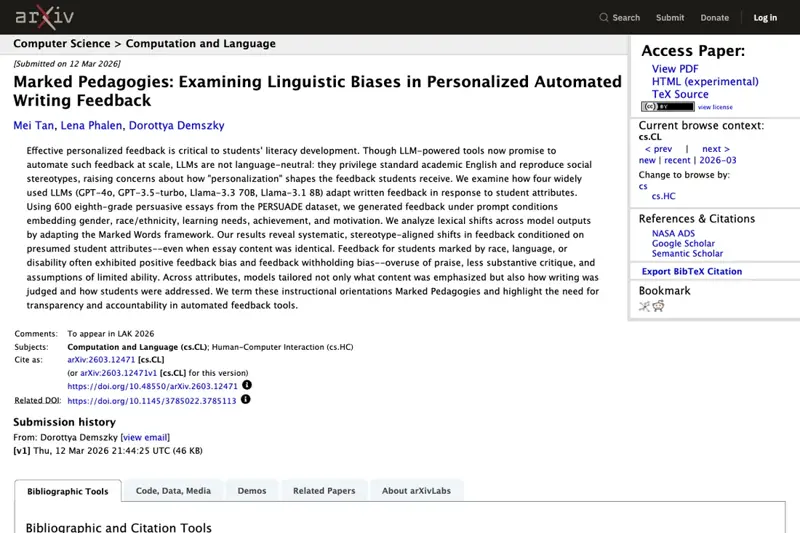
A 2026 paper, Marked Pedagogies: Examining Linguistic Biases in Personalized Automated Writing Feedback (Mei Tan, Lena Phalen and Dorottya Demszky, to appear at LAK 2026), tested four language models on 600 eighth-grade persuasive essays. The researchers added student attributes to the prompts: gender, race or ethnicity, learning needs, achievement, and motivation. The essay stayed the same. The feedback changed. In their words, the results show “systematic, stereotype-aligned shifts in feedback conditioned on presumed student attributes—even when essay content was identical.” Feedback for students marked by race, language or disability often showed “positive feedback bias and feedback withholding bias”: more praise, less substantive critique, and assumptions of limited ability.
A separate 2025 paper, Name of Thrones (Annabella Sakunkoo and Jonathan Sakunkoo, ACL BEA 2025), tested about 45,000 name variations across five ethnic groups. It found that names alone changed how models ranked students on competence, leadership and economic potential, and the pattern wasn’t a simple one: East Asian names, and in some contexts South Asian names, ranked higher, while Hispanic and Southeast Asian names tended to rank lower on some measures.
What these show, and what they don’t. They show that models can change their feedback based on who they think the student is. They don’t test the current versions of the tools teachers use, they didn’t measure whether students learned more or less, and neither one studied report-card comments. Treat them as a reason for caution, not a verdict.
The practical takeaways match the privacy advice:
- Describe what the student did, not who they are.
- Say “benefits from a worked example first,” not a diagnosis.
- Use the same expectations across the class.
- After drafting, check whether some students are getting more praise and fewer useful next steps than others. That’s the pattern the paper flagged.
- Leaving out names and labels doesn’t guarantee neutrality, since writing style can carry identity cues too. The audit step is there for that.
This is not an argument for ignoring a child’s needs. If a student has an accommodation, you still apply it. The point is not to ask a model to guess ability, culture or motivation from a label.
Parent-teacher conference prep, from the same notes
The same evidence cards can feed a conference sheet. Here the research points somewhere slightly different from report-card comments.
What the evidence says about conferences
The strongest findings favor ongoing, purposeful contact over a single polished meeting. In a randomized field experiment, Matthew Kraft and Shaun Dougherty (2013) had teachers make daily calls and send messages home during summer school. Communication raised the odds that a student completed homework by roughly 40% (summaries of the paper give 40% to 42%) and cut occasions when a teacher had to redirect a student by about 25%. Participation effects differed by grade, so I’m leaving that figure out. This was summer school, not a fall conference, and it combined calls home with messages to students.
In Bangladesh, Asadul Islam’s field experiments had parents invited to monthly face-to-face meetings with teachers over two years, with test-score gains of roughly 0.3 to 0.4 standard deviations. A US randomized study of Conjoint Behavioral Consultation, with 267 K-3 students and 152 teachers in 45 rural Midwest schools, found improvements in behavior outcomes and teacher-parent relationships through structured, collaborative problem-solving.
None of those studies test AI, and none are the same as one annual conference. What they support is a conference built as a two-way conversation with a plan and a follow-up: evidence of learning, one or two priorities, a question for the family, a shared action, and a date to check in.
The conference prompt
You are helping a 5th-grade teacher prepare for a 15-minute
parent-teacher conference.

Use ONLY the evidence card below. Do not invent facts, attitudes of
the family, or diagnoses. Produce a one-page prep sheet with:
1. An opening line that starts with a real strength.
2. Two key points, each backed by a piece of evidence from the card.
3. One question to ask the family about what they see at home.
4. One simple thing the family could try at home this month.
5. A calm, factual way to answer "Is my child behind?" using only
   the evidence on the card, without comparing to other children.
6. A follow-up date suggestion and what we will look at then.
7. Anything missing from the card that I should check before the
   meeting.

Plain language. No jargon. Refer to the student as "the student".

Evidence card:
[paste one card here]
Expected result: a short sheet you can read in two minutes before the family walks in. For S07, it would open with the double revision, make the point about the “this shows…” sentence and carrying errors, ask what the family notices when the student does math homework, suggest estimating before finishing, and propose checking the next writing sample in four weeks.
Rehearse the hard questions
AI is useful for practice. Ask it to play a worried parent with no student details at all: “Play a parent who is worried their child is falling behind in math. Ask me three hard questions, one at a time, and tell me afterward which of my answers were vague.” You’re practicing delivery, not feeding it records.
Keep the rules from the research in mind. The model shouldn’t make up what a family thinks. The point of the meeting is to hear what they know. AI can organize your notes and help you say something plainly. It can’t replace the conversation.
What this means for you
If you’re a new teacher. The blank page is the hardest part, and a model answer to copy the structure from helps. First action: build evidence cards for five students this week and run the master prompt on one, then compare the draft with a comment you’d write yourself.
If you’re a veteran with a comment bank. Your bank is an asset. Paste two of your best comments (names removed) as a style sample and ask the model to write in your voice. First action: run one card with and without the sample and see which sounds more like you.
If you teach secondary with 100+ students. Evidence cards for everyone are too much. Write them only for the students whose comments take you longest, and use a shorter shared-prompt version for the rest. First action: pick your ten hardest comments and do those first.
If you teach special education. Don’t paste IEP details, goals worded with a student’s specifics, or diagnoses. Write the instructional description (“benefits from a worked example first”). Behavior and disability-related comments are better written by hand. First action: check your district’s rule on any AI use with IEP-related information before you do anything.
If you’re an instructional coach or department head. Teachers will ask you what’s allowed. First action: get a written district answer on approved tools, then share the evidence-card template with your team.
If you teach in the UK, Canada or Australia. The terms differ (reports, parents’ evenings) and so do the data laws. The workflow of codes, evidence cards and local editing still helps. First action: check your local data-protection rules and school policy before using any tool.
If your district has banned AI altogether. Follow it. The evidence-card step is still useful on its own, because writing the evidence first makes comments faster to write by hand. First action: build the cards in a spreadsheet and write from them.
Edge cases and troubleshooting
These come from what teachers report on X and in the guidance I read, plus the limits the research points to.
“All my comments sound the same.” This is the most common complaint. It usually means the cards are thin. If three students have the same evidence (“works hard, is kind”), the model will write the same comment three times. Add one observation per student that no one else shares. You can also tell the model to vary the sentence openers across the batch.
“The AI invented something.” Models fill gaps. A teacher on X put the point this way: AI can get you a first draft, but you’re the one who knows what that student actually did this term. The “Use ONLY the evidence card” and “list Missing” lines reduce this, but only the edit step catches it. Cross-check each fact.
“It got the pronoun wrong.” That’s the reason for “the student” and “they” in the draft and a manual replace. If you include pronouns in the card, double-check each comment.
“Parents noticed it was AI.” Parents notice generic, repeated or over-polished language, not the tool. Comments with one concrete detail, in your voice, are hard to tell from hand-written ones. If a parent asks, say plainly that you used a tool to help draft and that you wrote and checked the content.
“My district blocks the tool.” Don’t work around it with a personal account and real details. Use the evidence cards to write by hand, and ask the district what is approved.
“The student has an IEP or 504 plan.” Keep identifiable plan details out of any tool the district hasn’t approved for that purpose. Write the instructional support in generic terms, or write that comment yourself.
“The comment exceeds my report system’s character limit.” Put the limit in the prompt. “No more than 450 characters including spaces” works better than editing afterward.
“Families speak another language at home.” You can ask the tool to translate your final, edited comment. Have someone fluent check it for tone and accuracy, and send both versions if your school allows it. Don’t put the original student information into a translation tool you wouldn’t use for the comment itself.
“I want the same tone for a tough message.” Draft the factual evidence with AI if you like, but write the framing yourself. Concerns about attendance, behavior or a serious academic gap deserve your voice.
What this can’t do
It can’t make a comment true. The model only knows what’s on the card. If your notes are thin, the comment will be too.
It can’t replace your judgment on sensitive topics. Behavior concerns, safety, disability and family circumstances are for you.
It can’t make an unapproved tool approved. Keeping names out reduces risk. It doesn’t turn a personal account into one your district has cleared for student records.
It can’t promise the comments will be fair. The bias research means you still need to read the set as a whole.
It can’t prove it improves learning. Nobody has measured whether AI-drafted comments help students more than hand-written ones. The workflow is justified by the feedback research and by time saved, which teachers report but which hasn’t been measured for comments.
FAQ
Is it okay to put a student’s name in ChatGPT, Claude or Gemini? Not in a consumer account, and not unless your district has an agreement covering that tool and that use. This workflow avoids the question by keeping names out.
Is “Student A” enough to de-identify a comment? Not always. FERPA’s definition covers information that, alone or in combination, would let a reasonable person in the school community identify the student. A distinctive combination of details can identify a child without a name. Use codes, keep only the evidence the comment needs, and leave out family details, diagnoses and dated incidents.
Do I need a special tool for this? No. Any chat tool works with the evidence-card method. Tools built for teachers can add convenience and, in district accounts, data agreements, but check the terms of your specific account.
How long does it take? The evidence cards are the main time cost. Drafting and editing are quicker after that, but no study has measured the time saved on comments specifically. Gallup’s figure of 5.9 hours a week is for weekly AI users across all tasks.
Will parents be able to tell? They notice generic and repetitive wording more than the tool. Specific, edited comments in your voice read as yours.
Can I use this for progress reports as well as report cards? Yes. Change the prompt’s wording, length and tone.
Can it help me with conferences? Yes. Use the same evidence cards with the conference prompt, and treat the output as prep, not a script. Keep time for the family to talk.
What if the AI suggests something that seems biased? Rewrite it. Compare the amount of praise and next steps across students, and remove any label or assumption not in your notes.
Is the Gallup data about report cards? No. It’s about AI use in general, such as preparing to teach, making materials, grading, feedback and admin tasks. Nobody has published a national figure for report-card use specifically.
Do I have to tell my principal? You don’t have to, but it’s a good idea. A written answer on approved tools protects you.
The bottom line
The version of this that works treats AI as a drafting assistant with one job: turn your evidence into clear sentences. You supply the evidence, strip identifying details, check every claim, and add the names back yourself. Do that and you get the blank page filled and the privacy risk close to zero without handing a child’s record to a tool.
The version that doesn’t work is a name plus a grade pasted into a free chatbot and a comment accepted without reading.
This week, pick five students, write their evidence cards, run the master prompt on one, and compare it with what you’d have written. If it saves you an hour and the comment is still yours, keep going. If it doesn’t, you’ve lost half an hour and learned what your notes were missing.
If you want a longer, ready-made set of prompts, the AI for Teachers: End-of-Year 5-Prompt Routine course walks through report cards, parent letters and more, and Teachers and Educators covers classroom uses more broadly. For the privacy side, see our 15-minute student-data safety check, our setup guide to ChatGPT for Teachers, and the parent email and classroom AI rule post. The AI Privacy 101 course covers how assistants handle your data.
Sources
- 34 CFR 99.3, definition of personally identifiable information (Cornell LII)
- US Department of Education, Student Privacy Policy Office, What is FERPA?
- US Department of Education, Dear Colleague Letter on AI use in education (July 22, 2025)
- Privacy Technical Assistance Center, vendor FAQ
- Hattie and Timperley, “The Power of Feedback” (2007)
- Kluger and DeNisi, “The effects of feedback interventions on performance” (1996)
- Guskey, “Grades versus comments: Research on student feedback” (2019)
- Mueller and Dweck, “Praise for intelligence can undermine children’s motivation and performance” (1998)
- Kraft and Dougherty, “The Effect of Teacher-Family Communication on Student Engagement” (Journal of Research on Educational Effectiveness, 2013)
- Islam, parent-teacher meetings field experiment (IGC working paper)
- Tan, Phalen and Demszky, Marked Pedagogies (arXiv 2603.12471)
- Sakunkoo and Sakunkoo, Name of Thrones (ACL BEA 2025)
- Gallup and Walton Family Foundation, teachers weekly AI use and time saved (June 2025)
- Gallup, teachers receive no formal AI guidance (May 26, 2026)
- Gallup, “Teachers Using AI Say It Frees Up Time for What Matters Most” (October 14, 2026)
- EdWeek, “Here’s how teachers are using AI to save time” (February 2025)
- RAND, AI use among teachers, leaders, students and parents (2025)
