On October 15, Google switched on Universal Cart for shoppers in the United States. It’s one shopping cart that follows you between Google Search (the AI Mode tab) and the Gemini app, holds items from different stores, watches them for price drops, and lets you either pay inside Google or finish at the store.
If you’ve been saving products in a dozen browser tabs, that’s a real fix. It also raises the questions you’d ask about any new thing that sits between you and your card: who sells me the item, who handles the return, what does Google remember, and can it spend my money without asking?
This guide answers those from Google’s own documentation and the reporting from the first day. I haven’t tested it on a live account. Where Google hasn’t published a detail, I say so instead of guessing.
What Universal Cart actually is
Google calls it “an intelligent shopping cart and your new hub for shopping on Google.” Strip away the marketing and it does four things:
- It keeps one cart across Google’s shopping surfaces. Save a handbag while you’re chatting in AI Mode, add a sweater later from the Gemini app, and both show up in the same place when you come back. Google’s launch post uses exactly that example.
- It watches what you saved. The cart checks price and stock in the background using Google’s Shopping Graph, which Google says holds more than 60 billion product listings. If something drops in price or comes back in stock, it sends a notification.
- It surfaces savings. It shows promo codes and, because it’s built on Google Wallet, it knows the perks on the cards you’ve saved and can suggest which one to use.
- It gives you two ways to buy. At some stores you pay inside the cart with Google Pay. At others, Google fills the store’s own cart for you and you finish on the store’s site.
It was first shown at Google I/O in May. Google had pointed to a summer launch, so the October 15 date came late, just ahead of the holiday shopping season.

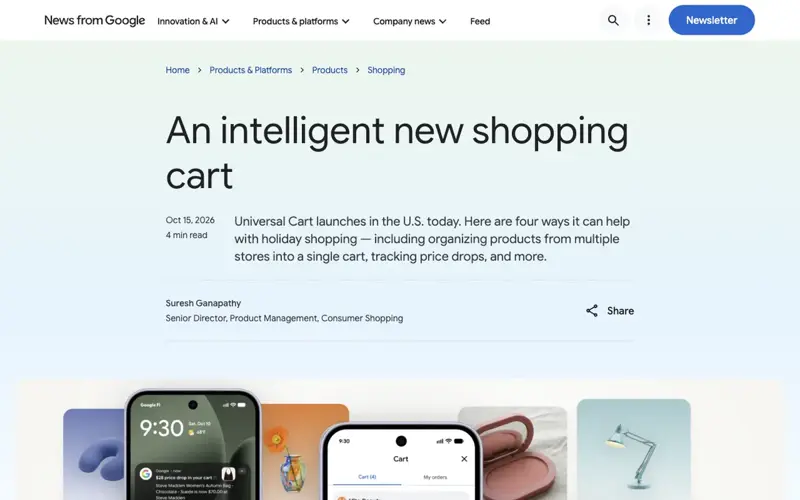
The three phones in Google’s image map to the three jobs. On the left, a price-drop notification on a lock screen. In the middle, the cart grouped by store with its two tabs, “Cart” and “My orders.” On the right, the “Pay with Google Pay” review screen.
The part people get wrong: it isn’t a buyer
The name makes it sound like an agent that shops for you. As launched, it isn’t. PPC Land compared the launch post with what Google showed before and noted that Universal Cart “saves, watches, suggests, and hands off,” and the shopper decides when to buy.
That’s a real difference from Google’s November 2025 demo, where an agentic checkout feature could complete a purchase for you once a price fell within a budget you’d confirmed. At I/O, Google also talked about pairing the cart with its Agent Payments Protocol for spending-limit-based automatic buying. The launch post mentions neither. So if you were hoping to say “buy this when it hits $60” and walk away, that isn’t what shipped on October 15.
If the agentic side is what you’re curious about, we covered the whole spectrum, from assistants that only recommend to ones that spend, in Should You Let AI Check Out for You? and the agentic commerce glossary page. This post stays on the cart.
Who can use it, and where
Country: the United States only. Google’s Wallet help page says so in its first line: “This feature is currently available only in the United States.”
Where it lives: Google’s help page lists three places you can add products from: Google Search and Shopping, AI Mode, and the Gemini app. The cart itself is part of Google Wallet, and it groups your items by store.
Which stores: Google names Nike, Sephora, Target, Ulta Beauty, Walmart, Wayfair and “many Shopify merchants.” PPC Land points out that Amazon isn’t on that list, and neither is Chewy, which was a partner in Google’s November 2025 checkout announcement. Google describes the named stores as examples, so the real list is probably longer, but nobody has published the full thing.
What isn’t there yet: at I/O, Google said YouTube and Gmail would also be places the cart shows up. The launch post doesn’t mention either. Google hasn’t said whether they’re delayed or dropped.
Other countries: here the sources disagree, so I’ll be careful. Google said in May that its checkout technology would come to Canada and Australia “in the coming months” and later to the UK. A PPC Land report in October says Canada and Australia are now expected next year, in 2027. That date rests on one source, and it was about the merchant-side tools, not the shopper cart. If you’re outside the US, the safe summary is: not yet, and no confirmed date.
How to use it, step by step
Google hasn’t published one click-by-click path that’s identical on every phone and browser, and the rollout is gradual, so you may not see it yet. What follows is built from Google’s help page and launch post. Where I’m inferring something, I say so.
Step 1: Start somewhere that can save to the cart
Open Google Search in AI Mode, a Shopping results page, or the Gemini app. Ask for the kind of thing you’re after, the way you’d ask a friend: “a waterproof jacket under $150 for walking the dog in rain.”
Expected result: product results with a way to save an item. Google’s help page says products saved from any of those three surfaces end up in the same cart.
Step 2: Save, don’t buy
Save the products you like instead of clicking through to a store. You can save from more than one retailer, and from more than one Google surface in the same shopping session or across different days. “Shopping rarely happens in one sitting” is how Google’s VP of Ads and Commerce, Vidhya Srinivasan, put it in her launch post on X.
Expected result: the items accumulate in one cart, grouped under each store’s name.
Step 3: Open the cart and read it like a receipt
In Google’s image, the cart has two tabs at the top: “Cart” with a count, and “My orders.” Each store gets its own box, and each product shows its price, its return window (“30-day returns” in Google’s example) and a stock note (“In stock online”).
That return line is worth reading every time. It’s the first place you’ll see whether a store gives you thirty days or none.
Expected result: you see your saved items by store, with price, stock and return information. You can open an item for details or remove it.
Step 4: Check the savings panel before you pay
Google’s simulated screen shows a panel with three lines: “Your card gets you 2% cash back on this purchase,” “Take 20% Off Online Purchase, Copy code SAVE20,” and “Free delivery on orders $35+.” That’s the promo code and card-perk feature at work.

Two cautions. First, Google’s post doesn’t say where the promo codes come from or how it picks among them. Second, nothing published says the cart tests every code or finds the best possible combination. Treat the panel as a helpful starting point and still glance at the store’s own banner before you check out.
Expected result: you see any codes and card perks that apply, and you copy the code if you want it.
Step 5: Choose how to pay
You’ll get one of two paths, depending on the store:
- Google Pay inside the cart. For participating stores, you review the order on Google and pay with the cards and address saved in your Google Wallet. Google’s sample screen shows the item, a virtual card, a delivery address, a shipping method, then subtotal, shipping, estimated tax and total, with a black “Pay with Google Pay” button.
- Checkout on the store’s site. For other stores, the button says something like “Checkout on Ulta Beauty,” and a line under it explains “Google will add these items to Ulta Beauty’s cart for you.” You finish on the store’s own checkout.
Which one you get depends on the store, not on you. In both, the store remains the seller.
Expected result: an order confirmation from the store, not from Google. Google says the store remains the “seller of record” and sends the order confirmation and customer support.
Step 6: Track it, and know where it won’t show
After you buy, the “My orders” tab can show your recent purchases made through the cart. Stores that share their data with Google can show fulfillment updates such as shipped and delivered. Some stores don’t share, and then the order won’t appear there. Google’s own help page says that for a problem with a purchase, you contact the store you bought from.
One thing that surprises people: chatting with the cart
You’d think you could tell Gemini “what’s in my cart?” Google’s help page warns that Gemini and AI Mode have limited access and may not be able to list your cart items or order status in the chat, add items directly to the cart, or give order updates. You save through the shopping interface. The cart is something you open and read, not something the chatbot reads back to you.
A worked example, with numbers
Google’s simulated screens give us enough to do a real walk-through. I’ll use their numbers, and these are Google’s illustrations, not a live order.
The price drop. A notification says there’s a “$28 price drop in your cart” on a women’s autumn bag, now $70.00. The Pay screen shows $70.00 with the old price of $98 crossed out and “29% off.” Quick check: $98 minus $28 is $70, and $28 is about 28.6% of $98, so “29% off” is right.
The checkout total. On the Google Pay screen: subtotal $70.00, shipping $8.95, estimated taxes $5.43. Adding them gives $84.38, which matches the total on the button. Notice that shipping and tax add $14.38 to a $70 item, about 20%. The price-drop notification said $70. Your actual cost was $84.38. That’s the kind of gap you’d want to see before pressing pay, and it’s why the review screen is worth reading line by line.
The savings panel. Suppose the two Ulta items in the cart ($15.00 and $20.00) are the only things you’re buying from that store. That’s $35. The “20% off” code would take $7 off, leaving $28. The “free delivery on orders $35+” line is where it gets interesting: after the code, your order is $28, which may no longer meet the $35 threshold. Whether the store counts the threshold before or after the discount is the store’s rule, not Google’s. And the 2% card cash back is worth roughly 56 cents on $28, or 70 cents on $35. So the code matters about ten times more than the card perk in this example.
The lesson isn’t about this specific bag. It’s that a cart can show you three different savings messages at once, and they can interact. Read the final screen, not the headline.
What’s still unknown
Google’s launch post leaves several things unsaid, and PPC Land’s review of it lists the gaps. Here are the ones that matter to a shopper:
- How promo codes are chosen. The post doesn’t say where codes come from, or which store’s offer shows when several stores sell the same item.
- Whether there are ads in the cart. Google hasn’t confirmed any. In May, Google’s Nick Fox called cart-stage merchandising interesting but undecided.
- Fees. Whether merchants pay Google when a sale completes through the cart isn’t addressed.
- Alert timing. There’s no published guarantee for how fast a price-drop alert arrives, how big a drop triggers one, or whether stock is held for you.
- Notification controls. The help page doesn’t document a per-item notification switch.
- Features promised in May. The compatibility checks (Google’s example was a custom PC built from parts at different stores) and price history aren’t mentioned in the launch post.
None of this means the cart is bad. It means it’s a day old.
Is it safe? The honest breakdown
“Safe” is three separate questions: Can someone steal from me, what happens if the order goes wrong, and what does Google learn about me. They have different answers.
Who is the seller, and who handles the return?
The store. Google’s post says the merchant “remains the seller of record” and provides order confirmations and customer support. Both checkout routes work this way. The cart isn’t a replacement for the store’s return policy, and it isn’t a promise that Google will refund you.
So for an ordinary return, an exchange or a cancellation, you start with the store. Keep the confirmation email and the return terms, the same as you would for any online order.
What if I pay with Google Pay and something goes wrong?
Here’s the point that trips people up: Google Pay isn’t the thing that decides your legal protection. The card or account behind it does.
- If you paid with a credit card, the federal billing-error rules apply. Under Regulation Z (the Fair Credit Billing Act), you have 60 days from the first statement showing the error to notify the card issuer in writing. The issuer generally has to acknowledge within 30 days and resolve the dispute within two billing cycles, no more than 90 days. You don’t have to pay the disputed amount while it’s investigated.
- If you paid with a debit card, a different law applies, Regulation E, which covers unauthorized or incorrect electronic transfers. You generally need to report an error within 60 days of the statement. The bank normally has 10 business days to investigate, and if it needs up to 45 days, it generally has to give you provisional credit in the meantime.
- Using Google Pay as the checkout screen doesn’t turn a debit payment into a credit-card payment.
Two more details from the Consumer Financial Protection Bureau’s rules, because people mix them up. A billing error (wrong amount, goods not delivered as agreed) is one process. Being unhappy with something you received is separate and falls under a different rule, which generally applies only if the purchase was over $50 and happened in your home state or within 100 miles of your billing address, with exceptions. Don’t expect either to work for “I changed my mind.”
For unauthorized credit-card use, your liability is generally capped at $50. For debit cards, reporting a lost or stolen card within two business days generally limits you to $50, and waiting longer can raise your exposure to as much as $500.
This isn’t legal advice, and card issuers often go further than the minimum. The practical takeaway is a habit: a credit card is the cleaner way to pay for anything you order through a cart, because the dispute path is clearer and the money hasn’t left your bank account yet. And these are US rules for US consumer accounts. They don’t automatically extend to a card issued somewhere else.
What does Google keep?
Google says your cart and orders are saved in Google Wallet. That means the cart itself is stored data, even if you never buy anything. “I haven’t bought it yet” doesn’t mean “there’s no record.”
The controls are separate, not one master switch. Based on Google’s Wallet help pages:
| What you want to do | Where it lives | What it does and doesn’t do |
|---|---|---|
| Remove one item from the cart | In the cart | Removes it from the cart view. The help page doesn’t promise it erases every related search, payment or transaction record |
| Stop Wallet from personalizing things | Wallet settings | Controls how Google uses your Wallet and payment information to personalize Wallet |
| Limit wider Google personalization | Wallet setting “Use Wallet to personalise experiences across Google” | Controls broader use of Wallet and payment data across Google. Google says changing it doesn’t change how purchases on other Google services are saved |
| Stop saving Wallet activity | Wallet history setting | Controls whether Wallet and payment-service activity is saved under that setting |
| Manage ad personalization from Wallet | Wallet settings and My Ad Center | Separate from the cart |
| Edit or remove cards | Google Wallet; Chrome has its own setting for saving payment info | Handled separately from the cart |
Google’s help pages describe the path to these as wallet.google.com, then Settings, then Data and privacy, or in the Wallet app, your profile menu, then “Your data in Wallet.” Labels can vary while the rollout is in progress. There’s also a Wallet-specific activity page at myactivity.google.com/product/wallet.
Two honest limits. Deleting a Search or Gemini chat doesn’t necessarily delete your Wallet cart, because the cart lives in Wallet. And the launch materials don’t give a full list of what data each store receives, or a retention schedule.
What the stores get depends on the route. With Google Pay checkout, Google passes the order and the shipping and payment details needed to complete it. With the handoff route, the cart you’ve built is sent into the store’s own checkout. Some stores can send order status back to Google. Nothing published says every store sees your whole cart across other stores, your searches, or your Gemini chat.
What do actual shoppers think?
It’s very early, and on X it’s mostly industry talk. A sweep of X posts from the first day found few everyday-shopper reactions and no wave of bug reports or privacy complaints. A few typical ones:
- One user wrote that it’s “kinda useful,” because stuff stops getting lost in tabs and store carts.
- Another called it “a boring but useful AI feature,” and added they’d like it in India too.
- One reply made a fair point about habits: a cart that lives in Google only helps people who still start their shopping in Google.
The more pointed commentary came from the retail side. One post summarized the merchant concern as being “easier to replace,” and another noted that when a shopper uses the transfer route, a store gets “a transfer, not a visit,” with Shopify saying some analytics tools don’t fire there. That matters to sellers more than to you, but it’s a reminder that the cart changes who owns the relationship with the buyer.
What the research says about price alerts and trust
There’s no study of Universal Cart yet. It launched yesterday. What exists is related evidence, and I’ll keep it in its lane.
Cart reminders can work, but the reason matters. A randomized field experiment by Moriguchi, Xiong and Luo, presented at the ICIS 2022 conference, tested retargeting ads for abandoned carts. Retargeting that included return-policy information beat ordinary product reminders: reported net revenue was 49.7% higher, and retargeting aimed at people close to buying was 2.25 times as effective as retargeting at the top of the funnel. The useful point isn’t the percentage, which applies to those specific ad treatments. It’s the mechanism: reminders that reduce a shopper’s worry about risk worked better than reminders that just say an item exists. A price-drop or restock alert gives you new information, which is a stronger kind of nudge than “you left something behind.”
People are using AI to shop and still want limits. Capgemini’s survey of 12,000 consumers in 12 countries, taken in October 2025, found 25% had used generative AI shopping tools and another 31% planned to. At the same time, 76% wanted strict boundaries before an assistant takes an action for them, and 71% were worried about how their data is collected and used. That fits what Universal Cart does: it saves, watches and suggests, and leaves the final tap to you.
Wrong AI information costs trust. Adobe surveyed 1,011 US consumers who had used large language models for shopping. In that group, 49% said they’d abandoned a purchase after finding a mismatch between what an AI said and what the brand’s site said, and 59% said they’d lost trust in a brand after incorrect AI information. This is a self-selected group of AI shoppers and the numbers are recalled behavior, so treat them as a signal, not a rate for all shoppers. It’s still a good reason to confirm price and stock on the store’s page before paying.
How it compares to the other ways AI helps you shop
Most of these tools help you find things. The differences that matter are where your shopping list lives, how payment happens, and who acts without a fresh decision from you.
| Google Universal Cart | Amazon’s Alexa for Shopping (launched as Rufus) | ChatGPT shopping | Perplexity Instant Buy | |
|---|---|---|---|---|
| Where your list lives | A persistent cart in Google Wallet, across Search and Gemini | Inside Amazon | Product research in chat; no persistent cross-store cart | Inside Perplexity |
| Which stores | Many US retailers, across stores | Amazon (and, separately, Buy for Me for other brands) | Any, via links; some merchants have apps in ChatGPT | Participating merchants |
| Price tracking | Price-drop and restock alerts, per Google | Price history (30, 90 and 365 days) and price alerts, per Amazon | Not a core feature | Not documented as an equivalent |
| Buys on its own? | No, as launched. You decide when to buy | Yes, if you set a target price and allow it | No | You complete a purchase on request |
| Checkout | Google Pay in the cart, or hand-off to the store | In Amazon, with your default payment method | Store’s own site or app | In Perplexity, with saved details |
| Who is the seller? | The store | Amazon, or the brand for Buy for Me | The store | The merchant |
A few notes on that table. Amazon’s page describes asking its assistant to “Purchase this t-shirt when it’s $15 or less,” and says it checks prices regularly and either alerts you or buys with your default payment method. That’s more agentic than what Google shipped. ChatGPT’s standalone Instant Checkout was scaled back in March 2026, and OpenAI now points merchants toward their own checkout, so shopping there means being sent to the store. Perplexity’s current help page describes buying from participating merchants within Perplexity.
The honest summary: Google’s strength is the cross-store cart that follows you between its own surfaces. Amazon’s strength is that it can act on a rule you set. Neither makes the other obsolete.
What this means for you
If you do a lot of holiday shopping from many stores. This is the use case it was built for. Start saving gift ideas into the cart now instead of keeping a notes file. First action: save five items you’re fairly sure you’ll buy, then check the cart once a week for price-drop notifications.
If you’re a deal hunter. Use the promo-code panel as a starting point, not a verdict. First action: the next time a code appears in the cart, open the store’s own site in another tab and compare it against the store’s banner or email offer before checking out.
If you’re a parent buying for a household. The “My orders” tab and the return windows in the cart help, but don’t rely on them as your only record. First action: keep each store’s confirmation email, and use a credit card for cart purchases so the dispute path is simple.
If you’re privacy-minded. The cart is stored in your Google Wallet and linked to your Google account. First action: before using it, open Wallet’s Data and privacy settings and decide what you’re comfortable with. Consider using the handoff route, where you pay on the store’s site, if you’d rather not run payment through Google.
If you shop mainly on Amazon. Universal Cart won’t change much for you today. Amazon isn’t on Google’s launch list. First action: keep using Amazon’s own price history and alerts, and use Google’s cart only for other stores.
If you’re outside the US. You can’t use it yet, and there’s no confirmed date for your country. First action: nothing to switch on. Watch Google’s shopping announcements, and don’t trust third-party sites that claim a workaround.
If you run a small online store. This is the other side of the same launch, and it deserves its own guide. For now, know that Google has been building a Merchant Center option that lets stores choose between pay-on-Google and cart-transfer. First action: ask whoever manages your store platform whether your listings are eligible, and don’t assume you were opted in.
Edge cases and troubleshooting
Because the feature is a day old, nobody has a long list of real-world bug reports yet. These are the problems Google’s own help page and early commentary make likely, with what to do about each.
“I can’t find the cart.” Google hasn’t published one menu path that’s the same everywhere, and rollout is gradual. Check you’re in the US, signed in to the Google account you use for Wallet, and on the latest versions of the Google app and Gemini. Start from a Shopping result or AI Mode and look for the save option on a product. If it’s not there yet, it likely hasn’t reached your account.
“Gemini can’t tell me what’s in my cart.” That matches Google’s documented limit. Open the cart itself rather than asking the chat. The same goes for asking it to add an item or give an order update.
“My order isn’t in ‘My orders.’” Some stores don’t share order data with Google. Check the store’s confirmation email and the store’s own account page. Google’s help page tells you to contact the merchant for any purchase problem.
“The price in the cart doesn’t match the store.” Price-drop alerts rely on Google’s Shopping Graph, which draws heavily on stores’ own product feeds. If a store’s feed lags, the cart may show a stale price or miss a drop. Always confirm the price on the final screen. If it differs, trust the checkout screen, and take a screenshot if you want to ask the store about it.
“The promo code didn’t work at the store.” Codes can have conditions, such as minimum spend, excluded items, one use per customer, or a requirement for a store account. Google’s post doesn’t say how codes are sourced, so a failure may not be a bug at all. Check the code’s fine print on the store’s site, or try the store’s own offers page.
“The cart says in stock, but the store says sold out.” Stock is another feed-driven signal, and Google doesn’t say it reserves anything for you. If it matters, buy sooner rather than later, and don’t treat “in stock” as a guarantee.
“It suggested a card I don’t want to use.” The suggestion comes from card perks Wallet knows about. It doesn’t know your budget, your bill-pay habits or whether you’re trying to avoid a card with a balance. Choose the card yourself.
“I want to start over and clear everything.” You can remove items from the cart. The help page doesn’t document a one-click “delete all cart data,” so use the Wallet data controls above, and expect that the removal path may change as the rollout continues.
What it can’t do
It can’t buy for you on its own. As launched, you decide when to buy. The autonomous version Google showed earlier isn’t what shipped.
It can’t promise the lowest price. The alerts watch the listings Google knows about. They don’t guarantee the best price anywhere, and a stale feed can mislead. Amazon’s price history shows up to 365 days of changes, while Google’s launch description doesn’t mention price history at all.
It can’t make Google responsible for your order. The store is the seller. Returns, exchanges and customer service are the store’s job.
It can’t work outside the US, and it doesn’t cover every store. Amazon isn’t on the launch list, and the full merchant list isn’t public.
It can’t read the cart back to you in chat. The cart is a thing you open, not a thing you talk to.
FAQ
What is Google’s Universal Cart? It’s a shopping cart that lives in Google Wallet and works across Google Search’s AI Mode, Shopping results and the Gemini app. You save products from different stores, it tracks price drops and restocks, shows promo codes and card perks, and lets you pay with Google Pay or finish at the store.
When did it launch, and who can use it? Google began rolling it out in the US on October 15, 2026. It’s US-only for now, and the rollout is gradual, so it may not show up for everyone right away.
Is Universal Cart free? Google’s launch post doesn’t mention any fee for shoppers. Whether stores pay Google when a sale goes through the cart isn’t addressed.
Does it buy things automatically? No. As launched, it saves, watches, suggests and hands off. You choose when to buy. Google’s earlier demos showed a more autonomous version, but that isn’t in the launch.
Who is responsible if my order is wrong or late? The store. Google says the merchant remains the seller of record and handles order confirmations and customer support. For a payment error or an unauthorized charge, the card issuer or bank is also an option, and the rules differ for credit and debit cards.
Is it safer to pay with Google Pay inside the cart or on the store’s site? Neither is clearly safer, and Google hasn’t claimed one is. Paying on Google keeps the payment inside Google Pay and gives you the cart’s order tracking. Paying on the store’s site means the store’s own account, rules and checkout apply. What matters more is the card you use: a credit card gives you the clearer dispute path.
What does Google store about my cart? The cart and orders are saved in Google Wallet, including your product selections and, where stores share it, order status. There are separate controls for Wallet personalization, history, ads and payment methods. Google doesn’t publish a full retention schedule for cart data.
How is it different from Amazon’s shopping assistant? Amazon’s can keep price history, set price alerts and, if you let it, buy at a target price, all inside Amazon. Google’s cart works across many stores and between Search and Gemini, but as launched it leaves the buying decision to you.
Does it work on Gmail or YouTube? Not in the launch. Google said at I/O that those were planned. The October 15 announcement mentions only Search and the Gemini app.
Should I use it for holiday shopping? It’s a good fit if you shop at several US stores and like the idea of a single list with price alerts. Use a credit card, read the final checkout screen line by line, and keep the store’s confirmation email.
The bottom line
Universal Cart solves a problem most online shoppers already have: too many tabs, too many half-built carts, and no good way to notice when something drops in price. For that, it looks genuinely useful, and the fact that a major retailer list is in at launch is a good sign.
It’s also a day old, US-only, and honest about its limits only if you read the fine print. It doesn’t buy for you. It doesn’t make Google the seller. It stores your cart in your Wallet. And the savings it shows you are hints, not guarantees.
If you try it, make three habits: pay with a credit card, read the final screen for shipping and tax, and keep the store’s confirmation email. Do that and you get the convenience without giving up the protections you already have.
If you want to understand what these assistants do with your data and how to keep control, our AI Privacy 101 course covers memory, profiles and settings across the major tools, and AI Fundamentals explains how they work. For the wider picture of AI that can act for you, see our guide to agentic commerce and our comparison of assistants that check out for you.
Sources
- Google, “An intelligent new shopping cart” (Oct 15, 2026)
- Google Wallet Help, “Manage your universal cart”
- Google for Developers, Universal Commerce Protocol overview
- PPC Land, “Google’s Universal Cart reaches US Search and Gemini, but not YouTube”
- PPC Land, “Canada and Australia face 2027 wait for Google’s Merchant Center UCP hub”
- Search Engine Land, “Google launches Universal Cart across Search and Gemini”
- 9to5Google, “Google rolling out Universal Cart” (Oct 15, 2026)
- PYMNTS, “Google Launches Intelligent Shopping Cart for Search and Gemini App”
- CFPB, Regulation Z, 12 CFR 1026.13 (billing error resolution)
- CFPB, Regulation Z, 12 CFR 1026.12 (special credit card provisions)
- CFPB, Regulation E, 12 CFR 1005.11 (error resolution)
- FTC, sample letter for disputing credit and debit card charges
- Moriguchi, Xiong and Luo, “Retargeting Ads for Shopping Cart Recovery: Online Field Experiments” (ICIS 2022)
- Capgemini Research Institute, “What matters to today’s consumer 2026”
- Adobe for Business, AI search and shopper abandonment research
- Amazon, “How to use Alexa for Shopping”
- Perplexity Help Center, “What is Instant Buy?”
