On Friday, October 2, OpenAI opened Finances in ChatGPT to everyone in the U.S. on the Free and Go plans. Until then, connecting a bank account to ChatGPT was a paid feature: Pro only when it launched on May 15, then Plus on June 25. Now it costs nothing.
If you run a small business, a side business, or a freelance practice, that’s a real change. The feature does the boring job most owners put off, which is looking at where the money went. It lists your subscriptions, flags charges that went up, and lets you ask questions in plain English instead of building a spreadsheet. But there’s a catch, and it’s the reason this guide exists: the feature was designed for personal finances, and OpenAI doesn’t promise it works with business accounts. Owners also tend to mix personal and business money, which is exactly where an AI reading your bank feed gets confused.
This guide covers how Finances works, how to run a 15-minute spending audit on a small business, which accounts to connect (and which to leave out), the privacy settings to check first, and the tax-planning use that people are excited about, with its limits. A note on how this was built: I haven’t connected my own accounts. Everything here comes from OpenAI’s help center, Plaid’s documentation, IRS pages, regulator guidance, and community reports. Where something isn’t documented, I say so.
What it actually is
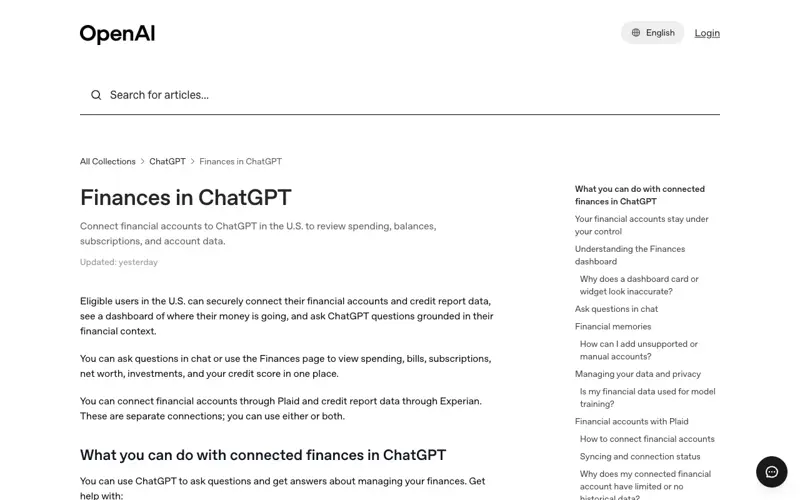
Finances in ChatGPT lets you link your financial accounts and credit report to ChatGPT, then ask questions grounded in your own numbers. Two separate connections make it work:
- Plaid connects bank, credit card, and investment accounts. Plaid is the same connection service that most budgeting apps use, and it reaches more than 12,000 financial institutions.
- Experian connects your credit report and score, separately. You can use either connection or both, and you don’t need a bank link to use the credit score.
Once connected, you get a Finances page with a dashboard, and you can ask finance questions in any chat by typing /finances or @finances. OpenAI’s help center lists the widgets you may see: spend by category, spend this month versus recent trends, upcoming payments, subscriptions, bills, net worth, portfolio mix, daily market moves on holdings, and credit score. Widgets only appear when ChatGPT has enough data to build them.
The timeline in one table
| Date | What happened |
|---|---|
| May 15, 2026 | Finances launches as a preview for ChatGPT Pro users in the U.S. |
| June 25, 2026 | Plus users added |
| Oct 2, 2026 | Free and Go users in the U.S. added, on web, iOS, and Android |
The help center page, which was updated the day before I checked it, says Finances is available in the U.S. to Free, Go, Plus, and Pro users. It also lists the credit-score feature in the same description, so credit score isn’t limited to paid plans. (Some early summaries said it was Plus/Pro only. Go with OpenAI’s help page over those.)
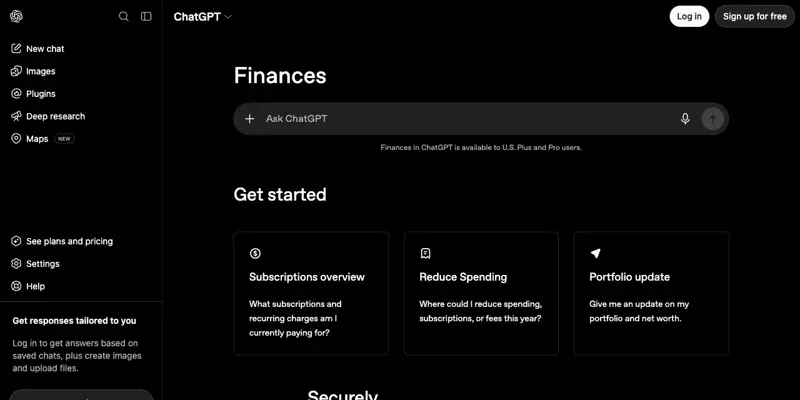
One small oddity worth knowing: the logged-out version of the chatgpt.com/finances page still carries a stale line saying Finances “is available to U.S. Plus and Pro users.” That’s cached text. The help center is the current source of truth.
What it can’t do, by design
OpenAI is explicit that this is a read-and-explain tool. ChatGPT cannot move money, pay bills, change account settings, make trades, change retirement contributions, open or close accounts, or file taxes. It also says ChatGPT is not a fiduciary, investment adviser, broker-dealer, tax preparer, or law firm. That’s good news for safety: connecting an account doesn’t give the chatbot the keys to your cash. It’s also a boundary for what you should expect it to do for your books.
The catch for business owners
Here’s the part the launch coverage mostly skips.
OpenAI doesn’t publish a promise that every business account works. The help center talks about “financial accounts” and personal finance. Whether your business checking account or business credit card connects comes down to two practical tests: does your institution show up in the connection screen, and does it supply the data Finances asks for?
What the documentation does and doesn’t say:
| Account type | Practical answer | The catch |
|---|---|---|
| Business checking | Possibly. Plaid recognizes depository accounts and can label them business or personal | Plaid’s own business label is a beta field filled in for only about 70% of accounts. OpenAI doesn’t guarantee every business account works in Finances |
| Business credit card | Possibly, if the issuer appears and supports transaction data | A personal card from a bank working doesn’t prove that bank’s commercial card portal works |
| PayPal | Possible in Plaid generally | Plaid supports PayPal account types, but that isn’t a Finances availability commitment |
| Stripe merchant balance | No documented direct connection found | Plaid’s Stripe relationship is about verifying bank accounts for payments, not importing your payouts, fees, and disputes |
| Small bank or credit union | Only if it’s listed and supports the needed data | Plaid says it hasn’t reached every institution, and some drop out if connections are unreliable |
| Joint or mixed personal/business account | Technically connectable | Connectable doesn’t mean advisable. ChatGPT can’t tell which mixed transactions are personal, deductible, or owner draws |
OpenAI’s help page also notes that an account can connect successfully but still not share every data type: for example, balances but not full transaction history. If something looks incomplete, check the account’s connection status and last-sync time, and ask ChatGPT what data it actually used.
One cautious view worth hearing comes from a small-business IT firm that wrote about the May preview. Its advice: treat this as a read-only analysis tool and don’t connect a primary operating account, or any account that handles payroll, customer receipts, vendor payments, or tax reserves. Its reasoning was that “a preview product is still a preview product.” The feature is no longer a Pro-only preview, but the underlying logic still holds for a first try: start with the account where a mistake costs the least.
Before you connect: three settings to check
Do this first. It takes about two minutes, and it’s the difference between a decision and a default.
1. Model training: Settings → Data controls
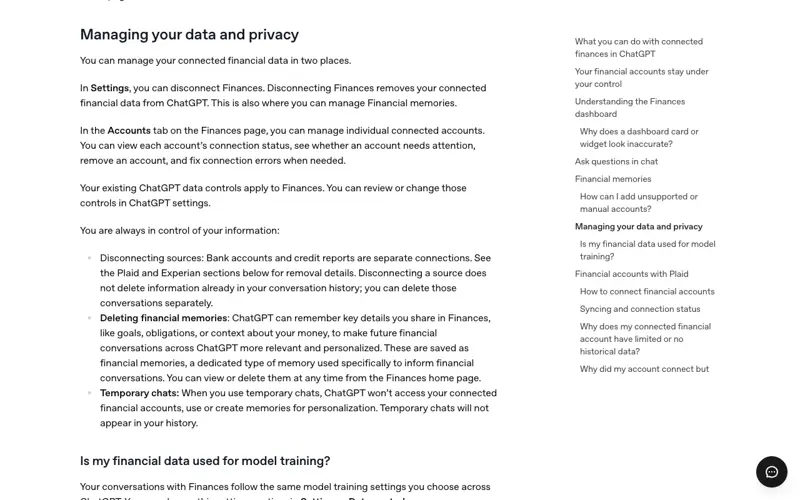
OpenAI states that your conversations with Finances follow the same model-training settings you choose across ChatGPT, and you can change that in Settings → Data controls. In plain terms: the training choice you’ve already made applies. If you’ve never looked at it, look now. (One third-party summary claims connected account data is excluded from training by default. OpenAI’s own help page doesn’t say that. It says your existing controls apply. Trust the help page and set the control yourself.)
2. Memory and financial memories
ChatGPT can save details you share in finance chats, like “I’m saving for equipment” or “keep at least $5,000 in checking,” as financial memories. You can view or delete them any time from the Finances home page. Separately, temporary chats won’t access your connected accounts and won’t create or use memories, and temporary chats don’t appear in your history. That’s useful when you want to talk about money without leaving a trail, but it also means a temporary chat can’t read your accounts. Pick whichever matches the job.
3. Ads: Settings → Ad controls
This one’s new for Free and Go users. OpenAI shows ads on those plans (Plus, Pro, Business, Enterprise, and Edu have none). Its help center says ads don’t influence ChatGPT’s answers, that advertisers don’t get your chats, memories, or personal details, and that ads don’t appear in temporary chats. You can turn off ad personalization in Settings → Ad Controls. If you do, you’ll still see ads based on the topic of your current chat, but OpenAI says it won’t use other chats, ad history, or topics to choose them. With personalization on and memory on, ChatGPT may use memories and recent chats to pick ads.
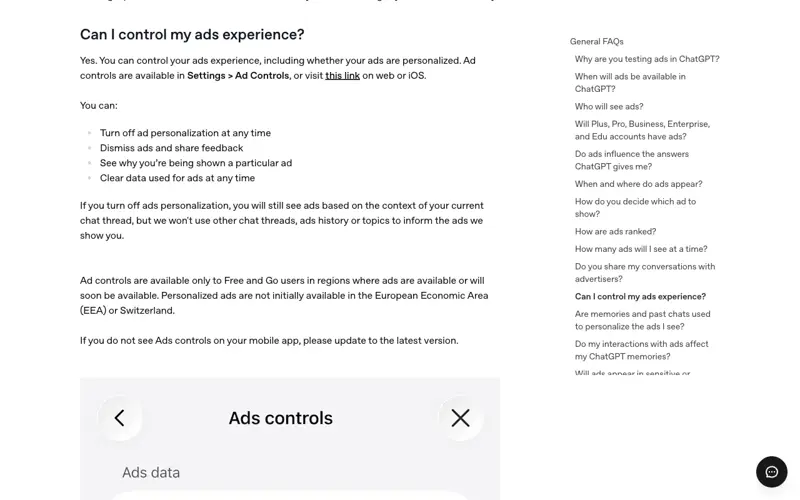
Here’s what I couldn’t find: a clear statement, in the pages I read, about whether your connected account data is walled off from ad personalization. OpenAI does say ads aren’t eligible to appear near sensitive or regulated topics such as personal health, mental health, or politics, while financial-services advertisers may be allowed to run ads under its policies. So I’d turn off ad personalization and be deliberate about memory when you’re doing finance work. It costs you nothing.
The 15-minute audit, step by step
Here’s the workflow. I’ve broken it into steps with an expected result at each one.
Step 1: Decide which account to connect first
Pick one. The safest first choice for most owners is a business credit card or a dedicated business checking account that isn’t tangled up with personal spending. Avoid your payroll account, your tax-reserve account, and any account holding customer funds for now. If your business and personal money share one account, you can still connect it, but plan on correcting a lot of categories (more on that below).
Expected result: a single account in mind, with the settings above already checked.
Step 2: Connect through Plaid
In ChatGPT, open Finances and select Get started, or type @Finances, connect my accounts in any chat. Select Connect with Plaid, sign in, and choose the institutions and accounts you want. Return to ChatGPT. OpenAI says syncing and categorizing usually takes a few minutes, and in rare cases several hours.
A security note straight from OpenAI’s help page: if you’re prompted to enter personal information or verification codes (this applies to the credit connection with Experian), enter them in the provider’s own form, not into the chat. OpenAI’s troubleshooting advice, if a connection fails, is to sign in directly to your bank first.
Expected result: the Finances page shows your account with a last-sync time and starter prompts.
Step 3: Verify what actually came in
Open the Accounts tab on the Finances page. Check three things: the account is listed, the connection status is healthy, and the last sync is recent. Then ask ChatGPT a sanity-check question: “Which accounts and date range are you using, and what data is missing?” OpenAI notes that institutions may share limited history, and that some accounts connect without every data field. Know the gaps before you trust any number.
Expected result: you know which months and accounts the answers are based on.
Step 4: Run the audit prompts
Paste these one at a time. They’re designed to avoid the most common mistakes (counting transfers as spending, counting credit-card payments twice).
Prompt 1: the recurring-charge sweep
Using my connected [business card / business checking] account, list every recurring charge from the last 6 months. Group them by merchant. For each one show: the monthly amount, how many months it has been charging, whether the price changed, and the date of the most recent charge. Exclude transfers between my own accounts and credit card payments. Then flag anything that looks like a duplicate or something I might have stopped using.
Prompt 2: the weekly cash-flow view
Show my money in and money out by week for the last 12 weeks on this account. Mark the lowest-balance weeks. Treat transfers between my own accounts and credit card payments as neutral, not as spending or income. List the five largest outflows and the five largest deposits.
Prompt 3: the “what might be wrong” check
Before I rely on these numbers, tell me which transactions might be (a) transfers between my own accounts, (b) credit card payments, (c) pending charges that may be duplicated by posted ones, or (d) personal rather than business. Don't treat any of these as spending until I confirm.
Prompt 4: the price-creep check
Which vendors or subscriptions have raised their price in the last 12 months? Show the old amount, the new amount, and the first date I was charged the new amount.
Prompt 5: the accountant handoff
Create a one-page list of questions and items to bring to my accountant: uncategorized or unclear transactions, large one-time purchases, anything that looks like an owner draw or personal expense, and any account I should double-check. Say clearly what you can't know from bank data alone.
Expected result: a list of subscriptions with amounts, a rough weekly cash picture, and a list of items that need your judgment.
Step 5: Correct the categories, then re-ask
OpenAI says that if a spending breakdown looks off, you can ask ChatGPT to explain which transactions were included, reclassify anything that looks wrong, and remember the correction for future finance conversations. A breakdown can look inaccurate when transfers, credit card payments, reimbursements, or duplicate pending transactions are counted as spending. Spend five minutes here. Every correction makes the later answers more useful.
Expected result: a spending breakdown that matches how you think about your business.
Step 6: Act on it, then decide whether to stay connected
ChatGPT can’t cancel a subscription for you. Use the list to cancel at the vendor’s own site or by contacting them. Then decide: keep the connection (it syncs automatically) or disconnect. You can disconnect in Settings (Apps → Finances) or from the Finances home page, and you can remove individual accounts from the Accounts tab. OpenAI says synced account data is deleted from its systems within 30 days of disconnecting, and data tied to the ChatGPT connection is deleted from Plaid within 30 days under Plaid’s policies. Disconnecting doesn’t delete your past conversations. Delete those separately if you want them gone.
A worked example (with made-up numbers)
These numbers are invented to show the arithmetic. They’re not from a real business.
Say you’re a solo consultant. You connect your business credit card and run Prompt 1. ChatGPT lists these recurring charges over six months:
| Vendor | Monthly | Months | Notes |
|---|---|---|---|
| Design software | $55 | 6 | Price rose from $50 in month 4 |
| Project-management app | $24 | 6 | Nobody on your team has opened it since spring |
| Cloud storage | $12 | 6 | Duplicated: you also pay for a second storage plan |
| Second cloud storage | $10 | 6 | The duplicate |
| Webinar tool | $79 | 3 | Last used once |
| Accounting software | $35 | 6 | Keep |
What you’d do with it: cancel the project-management app ($24), the duplicate storage ($10), and the webinar tool ($79). That’s $113 a month, or $1,356 a year, from a 15-minute review. The price-creep check also spots the $5 increase on the design software, a reminder to check whether the annual plan is cheaper. The tool did the sorting. You did the deciding, because only you know that nobody uses the project app.
Now the tax use, with equally made-up numbers. Your business profit so far this year is $62,000. Here’s the self-employment tax arithmetic the IRS describes: the rate is 15.3% (12.4% Social Security plus 2.9% Medicare), applied to 92.35% of your net self-employment earnings.
- $62,000 × 0.9235 = $57,257
- $57,257 × 0.153 = about $8,760 in self-employment tax
That’s before federal income tax and any state tax, which depend on your whole household return. A common cash-management rule of thumb is to set aside 25% to 30% of income for taxes, which on $62,000 would be $15,500 to $18,600. That’s a heuristic, not an IRS rule, and some practitioners recommend 30% to 40% once state taxes are included. Treat the arithmetic as a reason to talk to your accountant with real numbers, not as a replacement.
The tax-planning use, and its limits
The most-shared use of Finances among self-employed people is tax planning. One widely shared workflow connects accounts, points ChatGPT to a folder of tax documents, and sets up a monthly “tax advisor” prompt to reconcile year-to-date income, estimated payments, and business revenue and expenses, excluding internal transfers. It’s a smart structure. Here are the guardrails.
What ChatGPT can reasonably do: summarize cash activity, spot uncategorized transactions, list estimated payments you’ve made, and organize questions for your accountant. OpenAI says for taxes it can help organize information, explain concepts, and identify possible areas to review, such as deductions or estimated payments. It doesn’t replace a tax professional and doesn’t file your taxes.
What it can’t do: know your full tax picture. Bank data doesn’t tell it which expenses are deductible, whether a purchase should be capitalized, what your household income is, or what you owe in your state.
Dates and rules worth knowing for Q4 2026 (from IRS guidance, as summarized in my research; confirm against the IRS before relying on them):
| Item | What the IRS says |
|---|---|
| Who pays estimated tax | Sole proprietors, partners, and S-corp shareholders who expect to owe $1,000 or more when filing |
| 2026 payment dates | Apr 15, Jun 15, Sep 15, and Jan 15, 2027 for the last period |
| Safe harbor to avoid a penalty | Pay at least the smaller of 90% of this year’s tax or 100% of last year’s tax |
| Higher-income variation | The prior-year figure becomes 110% if last year’s adjusted gross income was above $150,000 ($75,000 if married filing separately) |
| Self-employment tax | 15.3% on 92.35% of net self-employment earnings, with a deduction for half |
A warning from the research: meeting a safe harbor usually prevents an underpayment penalty. It doesn’t mean your tax is fully paid. A fast-growing business can hit the 100% or 110% prior-year test and still owe a big balance in April. Also, one trap with bank data: moving $5,000 from checking to a tax-savings account is not a $5,000 expense, and paying your credit card from checking can double-count the same purchases if the tool counts both. This is why Prompt 3 exists.
What it can’t do well: the accuracy problems
OpenAI’s own help page admits “AI can make mistakes,” and the research highlights a predictable set of issues for business owners:
- Wrong categories. Plaid’s categories are for personal finance, not IRS deductions or a business chart of accounts.
- Stale balances. Balances may update roughly daily, and transaction checks commonly happen one to four times a day.
- Duplicate pending charges. A pending transaction can appear alongside the final posted one until it settles.
- Transfers counted as spending. Moving money between your own accounts isn’t an expense.
- Processor deposits are net. A $970 deposit from a payment processor might be $1,000 in sales minus $30 in fees. A bank feed alone can’t rebuild your gross sales, refunds, and sales tax.
- Mixed accounts. Merchant names don’t prove business purpose.
The right mental model, which the research kept returning to: it’s a review queue, not a ledger. Use it to find things to look at. Don’t use it as the record of your books.
Where it fits: ChatGPT Finances versus the alternatives
| ChatGPT Finances | A budgeting app | Bookkeeping software | Your accountant | |
|---|---|---|---|---|
| Built for | Personal money questions in plain English | Personal budgets and net worth | Business books and tax-ready categories | Advice and filing |
| Price (U.S.) | Free on Free and Go plans | Typically paid | Typically paid | Fee-based |
| Business accounts | Not guaranteed | Varies | Designed for them | Yes |
| Acts on your behalf | No. Read and explain only | Mostly no | Can import, reconcile, invoice | Can file and represent you |
| Best use | Audits, subscription hunting, quick questions | Ongoing personal tracking | Your actual books | Taxes, decisions with consequences |
If you want a head-to-head on the personal-finance side, our comparison of ChatGPT Finance, Monarch, and Copilot Money goes deeper. It was written in May when the feature was Pro-only, so read the pricing section with that in mind. Our prompt list for a connected account and the safe-connection checklist predate the free rollout too, but the habits in them still apply. And if your next estimated-tax date is on your mind, the Q3 taxes AI workflow is a good companion.
What this means for you
Here are seven situations, each with a recommendation and a first action.
If you’re a solo freelancer with a separate business card. You’re the best fit. Connect the card (not your personal checking), run the subscription sweep and the price-creep check, and keep it read-only. First action: run Prompt 1 on the card this week and cancel one thing.
If you own a small shop with one business checking account. Check whether your bank appears in the connection screen before you commit time to this. If it does, start with the weekly cash-flow prompt, since cash timing is what hurts small retailers. First action: run Prompt 2 and look at the three lowest weeks.
If your personal and business money are mixed. You can connect, but expect to spend most of your time correcting categories, and don’t treat any total as your business profit. The cleaner fix is a separate business account. First action: ask ChatGPT (Prompt 3) to flag likely personal transactions, then open a separate account if the number is large.
If you have employees or run payroll. Keep payroll and tax-reserve accounts out of this for now, per the cautious guidance above. Use it on a secondary operating card or a single vendor-spend account. First action: connect one non-payroll account and see how the data looks.
If you’re a bookkeeper or accountant. Clients will start connecting their banks to a free ChatGPT and bringing you the output. Your value is the judgment above the tool: what’s deductible, what’s capitalized, what belongs in the ledger. First action: write a one-page “what I’ll review in your ChatGPT summary” checklist for clients.
If you’re a financial or budget coach. The cleanest pattern is for the client to connect their own account on their own device and share their screen or an exported summary, so you never hold their login. Keep the plan in writing and keep clear lines about what’s advice and what isn’t. First action: write your credential-handling rule into your client agreement. (This isn’t legal or compliance advice. Check the rules that apply to your practice.)
If you’re just curious and cautious. Try it with a low-stakes account first, or don’t. It’s optional, and you can turn it off. First action: read the “Managing your data and privacy” section of the help page before you decide.
Edge cases and troubleshooting
Your bank isn’t listed. It may not be supported, may not support the data Finances needs, or may be temporarily unavailable. Check whether it appears under a different name. If it still doesn’t, you can tell ChatGPT about unsupported accounts in a finance chat, and it can save the details as financial memories, but it won’t have live data.
The connection says “action required.” Your bank wants something from you: a multi-factor code, updated terms, a password reset, or permission for third-party data sharing. Sign in directly to your bank, finish the step, then reconnect.
Invalid credentials error. Confirm your login works at your bank. Retry without autofill or a password manager, and watch for typos and extra spaces. If you changed your username after connecting, remove the connection and add it again.
Not much history shows up. Institutions decide how much history to share. Limited history is common, and it limits any trend you ask about.
Spending looks inflated. Almost always transfers, card payments, reimbursements, or pending duplicates. Run Prompt 3 and ask ChatGPT to explain which transactions it included.
Deposits don’t match your sales. Payment processors pay out net of fees, refunds, and timing. Reconcile against the processor’s own report, not the bank feed alone.
Credit score looks different from another site. ChatGPT shows a VantageScore 3.0 based on your Experian report. Scores vary by model, bureau, and report date, and it’s updated monthly. Checking it through the connection is a soft inquiry that doesn’t affect your score.
You want to talk about money without ChatGPT seeing your accounts. Use a temporary chat. It won’t access your connected accounts or create memories.
It’s confidently wrong about a number. Ask it to cite which transactions it used. OpenAI says it may cite the source data so you can review where an answer came from. If you can’t verify it, don’t use it.
What this can’t fix
- It’s not your books. A bank feed can’t replace invoices, receipts, sales-tax records, or a proper ledger.
- It can’t file or sign anything. No taxes, no returns, no representation.
- Business-account support isn’t guaranteed. Stripe merchant balances have no documented direct connection, and PayPal and commercial cards depend on your institution.
- It’s U.S.-only for now. The help center describes availability for eligible users in the U.S.
- Consumer-protection rules may not fully cover business accounts. The federal open-banking rule (the CFPB’s Section 1033) is tied up in reconsideration, with enforcement blocked by a court order in October 2025. And consumer protections like Regulation E generally focus on consumer-purpose accounts. If an account is used only for business, don’t assume you get the same protections.
FAQ
Is ChatGPT Finances really free now? Yes, in the U.S. Since October 2, 2026, it’s available on the Free, Go, Plus, and Pro plans on web, iOS, and Android, according to OpenAI’s help center. It launched for Pro users on May 15 and added Plus on June 25. Free and Go users may see ads in ChatGPT.
Can I connect a business bank account? Maybe. OpenAI doesn’t guarantee that business accounts work. It depends on whether your institution appears in the Plaid connection and supplies the data Finances needs. Try one low-stakes account first and check the Accounts tab afterward.
Is it safe to connect my bank to ChatGPT? It’s read-only: ChatGPT can’t move money, pay bills, or change settings. The connection runs through Plaid, which uses industry security standards. The real questions are privacy choices: your model-training setting, memory, and ads. Check those first, connect only what you need, and know how to disconnect.
How do I disconnect and delete my data? In Settings (Apps → Finances) or on the Finances home page. You can also remove single accounts from the Accounts tab. OpenAI says synced data is deleted from its systems within 30 days, and Plaid deletes data associated with the ChatGPT connection within 30 days. Past conversations aren’t deleted automatically, so delete them separately.
Does ChatGPT use my bank data to train its models? OpenAI says conversations with Finances follow the same model-training settings you choose across ChatGPT. You control that in Settings → Data controls. Set it deliberately.
Will I see ads based on my finances? OpenAI says ads on Free and Go don’t influence answers, advertisers don’t get your chats or personal details, and ads don’t appear in temporary chats. I couldn’t find a statement about connected account data and ad personalization, so turn off ad personalization in Ad Controls if you want to be safe.
Can ChatGPT do my taxes? No. OpenAI says it can help organize information, explain concepts, and flag areas to review, but it doesn’t replace a tax professional and doesn’t file taxes. Use it to prepare better questions for your accountant.
How much should I set aside for taxes as a freelancer? There’s no single IRS number. Self-employment tax is 15.3% on 92.35% of net earnings, and income tax depends on your whole return and state. A common rule of thumb is 25% to 30%, with some advisors suggesting more. Your accountant can turn that into a real figure.
Is it better than a budgeting app? Different job. A budgeting app is a dedicated, ongoing tracker with a tuned interface. Finances is a free, conversational layer inside ChatGPT that’s good for audits and quick questions. For business books, you still want bookkeeping software.
What if my numbers look wrong? Ask ChatGPT which transactions it included, then have it reclassify and remember corrections. Most errors come from transfers, credit card payments, and pending duplicates.
The bottom line
Free changes who can try this, not what it is. ChatGPT Finances is a good review queue: it can find the subscription you forgot, point at the vendor that raised its price, and show where a month got tight. It isn’t a ledger, it isn’t a tax preparer, and OpenAI doesn’t promise it works with your business accounts.
So go small. Check your privacy and ad settings, connect one low-stakes account, run the five prompts, fix what’s wrong, cancel something, and decide afterward whether to stay connected. If you want to go deeper on connecting accounts safely and building a money routine around it, our ChatGPT Bank Account Money Manager course walks through it, and the Small Business course and Solopreneurs course cover the other pieces of running lean.
Sources
- OpenAI Help Center: Finances in ChatGPT
- OpenAI Help Center: Ads in ChatGPT
- OpenAI: A new personal finance experience in ChatGPT
- ChatGPT: Finances
- IRS: Estimated taxes
- IRS: Self-employment tax (Social Security and Medicare taxes)
- IRS Publication 505: Tax Withholding and Estimated Tax
- Plaid: Institution coverage and how Link works
- Elegant Software Solutions: ChatGPT Personal Finance Tools, What Small Businesses Should Know
- The Next Web: OpenAI wants ChatGPT to see your bank account
- CFPB: Personal Financial Data Rights (Section 1033)
