

On November 13, 2026, OpenAI launched ChatGPT Wallet: a way for your “dot,” one of its AI agents, to pay for things with a card you saved, after you approve each purchase with Face ID or a fingerprint. For a shopper that is a convenience. For a shop owner, a bookkeeper or an agency owner, it raises a different question: should the agent ever spend on the business card?
The safeguards you might reach for when software spends company money are a short list: a dedicated low-limit or virtual card, an approved-merchant list, a cap per purchase, an approval step. We read OpenAI’s launch post, its help article and its Wallet terms to see which of those exist today. Approval on every purchase exists. A virtual card is not supported, and we found no setting for a spending cap or a merchant list. This guide goes through what Wallet does, what the card on the other end of it still controls, and what to keep so the books are clean on the day an agent buys something.
We have not made a Wallet purchase ourselves: it needs a ChatGPT Pro account in the United States that the gradual rollout has reached. Everything below comes from pages we read on November 14, 2026, linked at the end. Where we give a sample, it says so.
What ChatGPT Wallet is
OpenAI describes it as a way for agents to pay “without access to users’ actual card details” and one that “requires a security check for every purchase.” It was built with American Express, Mastercard and Visa, and it begins rolling out in dots, for ChatGPT Pro subscribers aged 18 and older in the US with eligible US-issued cards.
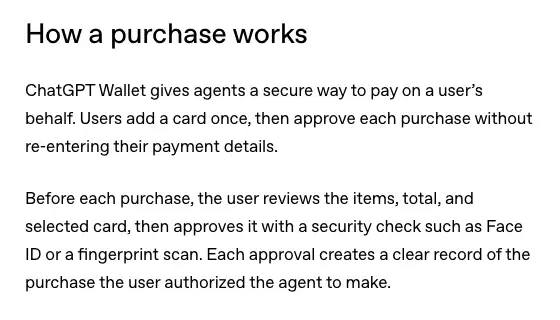
The flow, in OpenAI’s words, has four moves:
- You add a card once.
- You ask your dot to buy something. At checkout it shows you the merchant, items, total and selected card.
- You approve with a security check such as Face ID or a fingerprint scan. OpenAI says each approval “creates a clear record of the purchase the user authorized the agent to make.”
- The payment network issues a payment token, a substitute for your real card details, and the charge goes to your selected card.
Three details matter for a business.
It lives in one person’s account. Wallet works in conversations with your dot. OpenAI’s help article says it is not available in Chat, Work or standalone Codex threads, and that approving requires biometric verification on a supported device. If you cannot approve on the device in front of you, the article says to continue on a supported device signed in to the same ChatGPT account.
It is for ChatGPT Pro. The help article says Wallet is rolling out to eligible ChatGPT Pro users in the United States, and adds that “even if you’re an eligible Pro user in the United States, you might not have access yet.” It does not mention ChatGPT Business or Enterprise workspaces, so do not assume a seat in one gets it.
The charge goes to your real card account. After you approve, the dot “uses a virtual card number linked to your selected card to complete checkout.” That number can differ from the one printed on your card, which matters later at month-end.
If you want the background on dots themselves, our explainer on OpenAI dots covers who gets one.
Which safeguards exist
Here is the usual list of safeguards, checked against what OpenAI’s pages say today. The date matters: Wallet launched on November 13, and the rows may change.
| Safeguard people suggest | In Wallet on November 14, 2026 | What OpenAI says |
|---|---|---|
| A dedicated virtual card | No | “Virtual cards are not supported at launch” |
| A debit card as a spending cap | No | “ChatGPT Wallet doesn’t support debit cards” |
| Approval on every purchase | Yes | Each purchase needs a biometric check |
| A spending limit | Not as a setting you control | Limits are something OpenAI “expect[s]” to add “over time” |
| An approved-merchant list | Not documented | The help article describes no merchant list |
| An employee’s own limited card | Not documented | For Chase cards, only the primary cardholder can enroll |
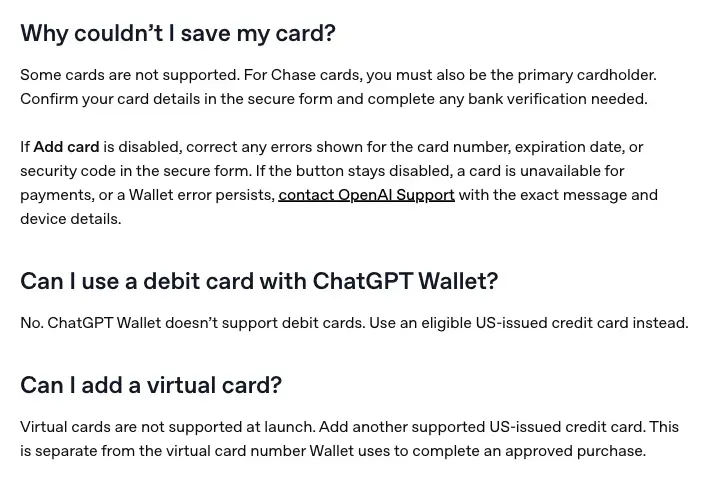
The two clear “no” answers are in OpenAI’s help article, in its FAQ.
On limits, OpenAI’s launch post is plain that this is the next stage: “Over time, we expect users to be able to delegate purchases entirely to their agent by setting clear parameters—such as spending limits, purchase categories, or time periods.” TechCrunch’s report of the launch says the same: future updates may add spending limits and rules by category or time period. Today the only control inside Wallet is you, approving each purchase. The Wallet terms also let OpenAI itself “set transaction, merchant, category, card, account, device, or geographic limits,” but those are OpenAI’s limits, not ones you configure.
One more row deserves its own sentence. OpenAI’s help article says to add a Chase card you must be “the primary cardholder, not an authorized user.” That rules out the obvious move of enrolling a Chase employee card with a low limit. We did not find a matching statement for American Express, Mastercard or Visa cards issued by other banks, and we did not find a page saying whether they accept an employee card. Ask your issuer before you plan around it.
Is a business card even allowed?
Yes, with a condition. The ChatGPT Wallet terms, effective November 12, 2026, say you must “use a card that belongs to you or that you are legally authorized to use and that was issued by a financial institution in the United States. If it is a business card, your organization must permit you to store your business card with us for purchases.”
So the first step is not a setting. It is a decision by whoever owns the card agreement, and for a small business that is usually you. Write the decision down: who may store the card, in which account, and on which devices.
The same terms close the door on shared use: “Do not let another person use your ChatGPT Wallet or approve a purchase unless they are authorized to act for you.” Wallet belongs to one ChatGPT account, and approving means a biometric check on a supported device. An office manager who wants the agent to buy supplies should not borrow the owner’s account to approve it. The simple shape is a request: the manager asks, the owner approves.
A decision in five steps
This is our own sequence, built on the pages above. Do it in order and stop at the first “no.”
Step 1: Check that you can use it
You need a ChatGPT Pro account, in the US, aged 18 or older, with a dot set up. Wallet is not in Chat, Work or standalone Codex threads. Ask your dot to help you add a card, or look for the Wallet section of the Settings page. OpenAI says rollout is gradual, so you may not have it yet.
What you should see: either a Wallet section in your settings, or nothing yet. If nothing, you are done for now.
Step 2: Choose the card on purpose
Wallet takes eligible US-issued American Express, Chase, Mastercard and Visa credit cards. It does not take debit or virtual cards. A card that is not on your primary account is the closest thing to a limit you can set: a separate business credit card account carries its own credit line. That is our reasoning, not an OpenAI feature, and the terms say your issuer decides whether to authorize a transaction.
If you pick a Chase card, you must be the primary cardholder. Bank verification may be asked of you during setup, and OpenAI says to enter card details in its secure form, never in chat.
What you should see: “Card added” in the secure flow, before you start a purchase. If you are not sure it worked, OpenAI says to ask to see your saved cards before adding it again.
Step 3: Set the limits where they exist
They exist at the card issuer. As one example, American Express’s help page says employee cards let people “buy what they need within limits you set,” with “real-time Merchant Category Alerts if employees spend outside of your approved merchant types, such as U.S. gas stations, U.S. shipping, and U.S. office supply stores.” You can “freeze and unfreeze Employee Cards at any time,” and a trusted team member can be made an Account Manager who can set spending limits.
Those are Amex’s features for its own cards, read on its help page. Other issuers have their own, and we did not compare them. Two cautions apply to any issuer. First, what Amex’s page describes is an alert when employees spend outside approved merchant types, so ask your issuer whether anything is actually blocked. Second, Amex’s wording is “approved merchant types,” so the control is about the kind of merchant, not the item.
What you should see: in your issuer’s app or online account, a limit, an alert or a freeze option on the card you chose. If you cannot find one, treat the card’s credit line as your only cap.
Step 4: Run one small purchase
Pick a low-value item from a merchant you already use. OpenAI’s help article lists what to check on the approval screen: “the merchant, items, total, selected card, and any shipping or recurring-payment terms shown.” Read all of it. Approve, then wait for the merchant’s confirmation email. OpenAI is explicit that “Ready to check out means your approval is complete. It does not confirm that the merchant has placed your order.”
What you should see: a merchant order confirmation, and later a card transaction for the same amount. If you see a pending charge but no confirmation, go to the troubleshooting section below.
Step 5: Keep the records before you buy the second thing
The IRS tells business owners that supporting documents “should identify the payee, the amount paid, proof of payment, the date incurred.” Its list of expense documents includes “Credit card receipts and statements,” “Account statements” and “Invoices,” and notes that “a combination of supporting documents may be needed to substantiate all elements of the expense.” Wallet’s approval record shows what you authorized. The merchant’s receipt shows what was sold. The card statement shows what was paid. You need all three in one place.
What you should see: a folder or a bookkeeping entry holding the order confirmation, the receipt, and a note of who approved it and why.
A sample month-end, for the bookkeeper
Here is how one agent purchase might look in your books. This is a sample written by us, with made-up numbers and a made-up shop, to show the shape of the records. It is not a real purchase and not a model’s answer.
Harbor & Pine, a small print shop, runs a Wallet pilot on a separate business credit card. On the 17th, the owner asks the dot for a box of shipping mailers. The owner approves $38.40 with Face ID and gets this on the approval screen: merchant, item, total, card, delivery address. Three days later the merchant’s receipt arrives by email.
| Record | What it says | Where it lives |
|---|---|---|
| Approval | Mailers, $38.40, pilot card, approved 17th | Screenshot or note kept by the approver |
| Merchant receipt | Order number, item, $38.40, shipping | Email saved to the expense folder |
| Card line | Posted amount, merchant name, date | Card statement or bank feed |
| Books | Supplies, $38.40, memo “agent purchase” | Accounting software |
The check at month-end is a three-way match: the approval, the merchant’s receipt and the card line all say $38.40 to the same merchant. If any one is missing, the entry is incomplete, and nothing about Wallet fixes that for you.
Two cautions from OpenAI’s help article apply to the match. The number the dot enters at checkout may differ from the number on the physical card, so do not require identical last four digits on every document. Match on merchant, amount, date and order reference. And a pending charge with no confirmation needs a call to the merchant before anyone orders again.
Hold on to the “memo” idea. It is ours, not OpenAI’s. A short tag such as “agent purchase” in the memo lets you filter for these entries later, which is how you review a pilot.
A short policy you can copy
A policy for a pilot can be short. Put it in your team notes. Replace the brackets with your own details.
Agent purchases are a pilot. Only [name] may approve a purchase, on their own device.
The pilot uses one card, [card nickname], and no other card is stored in Wallet.
Each purchase is for [categories] from merchants we already use.
Before approving, check the merchant, items, total, card and any recurring terms.
Save the merchant receipt and a note of why we bought it the same day.
Tag the entry "agent purchase" in the books.
Review every agent purchase at month-end, and stop the pilot if any cannot be matched.
Where each control lives
The hard part of this topic is that three different parties hold three different controls, and it is easy to assume Wallet holds all of them. Here is where each one actually sits, as far as the pages we read say.
| Control | Wallet | Your card issuer | You and your books |
|---|---|---|---|
| Says yes to each purchase | Yes, with a biometric check | Decides whether to authorize | Reviews afterward |
| Caps the spend | Not a setting you control | Limits on some cards, such as Amex employee cards | The policy you write |
| Flags odd merchants | Not documented | Category alerts on some cards, such as Amex employee cards | Month-end review |
| Holds the proof | An approval record | Statements | Receipts, invoices and notes |
| Handles a refund or return | No: OpenAI “does not decide or fund merchant refunds” | Handles a card dispute | Asks the merchant, then logs it |
That last row is worth a second look. OpenAI’s terms say contact “the merchant” for an order problem and “your issuer promptly” for “a card charge, billing error, or unauthorized transaction.” OpenAI “may provide ChatGPT Wallet records or other reasonable assistance” but does not decide or fund refunds or chargebacks “unless required by law or OpenAI separately promises otherwise.” The launch post does say you keep your card’s “existing rewards and protections for eligible disputes with businesses, for example when an item is defective.” The word that matters there is “eligible.” The terms say your cardholder agreement and your issuer’s and network’s rules “continue to apply,” including dispute rights, so read yours.
What this means for you
If you run a one-person shop. You are the owner and the approver, so the authorization question is simple. Your risk is a purchase you approved too fast. Start with one low-value pilot on a separate business credit card, and save the receipt the same day. First action: decide the one category you would let your dot buy, and write it at the top of the policy above.
If you are a bookkeeper. We found no page that says what the card line shows for a Wallet purchase, so check it on the first pilot purchase. What OpenAI does document is a gap between approval and order, so ask your client to forward the merchant receipt with a one-line reason. First action: add a memo convention such as “agent purchase” and a rule that no entry posts without a receipt.
If you own an agency and buy on clients’ cards. Do not store a client’s card in your own ChatGPT account. The Wallet terms require a card you own or are “legally authorized to use,” and a business card needs your organization’s permission. A client’s card needs the client’s written yes at least, and your client’s issuer may have its own rules. First action: ask each client whether they would permit it in writing, and expect many to say no.
If you manage an office of ten people. Wallet is one account’s card and one person’s biometric check, and the terms say not to let another person approve unless they are authorized to act for you. The workable shape is a request form: the employee asks, the approver checks and approves. First action: pick one approver and one card, and tell the team the rest still go through your normal purchasing route.
If you are on a Free, Plus or Business plan. The help article lists Pro users, so as of November 14, 2026 Wallet is not yours. You can still use the checklist above for any tool that asks to spend. First action: read your own card agreement for how it treats purchases you authorized, because that governs disputes whatever the tool.
If you are outside the US. Wallet needs a US billing address and a US-issued card, so it is not available to you. First action: nothing to switch on. Watch OpenAI’s help page for a change in the list of countries.
If you sell things and wonder about the other side. Agent buyers arrive at your site in the same rollout. OpenAI’s launch post tells merchants that “Some sites may unintentionally block purchases through ChatGPT Wallet or other agentic payment products,” and that risk systems may flag legitimate agent purchases, leading to declines or cancellations. Our guide to claiming your business in ChatGPT covers the product-information side.
Edge cases and troubleshooting
These come from OpenAI’s help article, which describes each case, and from the TechCrunch report on blocked retailers.
You approved, but there is no confirmation. “Ready to check out” is not an order. Check your email for a merchant confirmation, and if there is none, contact the merchant before trying again. OpenAI says to contact the merchant rather than immediately repeating the purchase.
Checkout failed but a charge is pending. OpenAI says to check for an order confirmation, contact the merchant, and ask your card issuer about the pending charge and when the hold may clear. A conversation error does not tell you whether the order went through.
The card number looks wrong on the receipt. That is expected. Wallet generates a payment token for each use, and the receipt can show a different number from your physical card.
The store will not work with it. OpenAI says Wallet “may not be able to complete checkout at every store.” TechCrunch reports that some retailers block AI agents and names Amazon as the largest to ban them. If a purchase fails, check for a confirmation before trying another payment method directly with the store.
A subscription started. If you agree to a recurring or continuous payment plan, OpenAI says the merchant may store the payment credential and charge it again under the terms you agreed to. Removing the card from Wallet does not cancel it: “Contact the merchant to manage or cancel those charges.” Read the recurring terms on the approval screen, and log the subscription in your books the day you approve it.
The purchase differs from what you approved. OpenAI’s help article routes “a purchase different from what you approved” to OpenAI Support, and an unrecognized charge to your card issuer. Save the approval screen first. The terms say OpenAI may keep “the purchase details, the confirmation screen, and your approval.”
You cannot add the card. The article’s FAQ gives the causes: some cards are not supported, a Chase card needs the primary cardholder, and the button stays disabled if a field has an error. If your bank locks the card during verification, stop and call the bank through its official app or the number on the card, as OpenAI instructs.
You removed a card, and thought that closed things. Removing a card means you cannot use it for new Wallet payments. It does not cancel purchases, close the card with your bank or delete your Wallet data.
What it can’t do
- It cannot spend within a budget you set. Preset limits are described as a future direction. As of November 14, 2026, every purchase needs you.
- It cannot use a debit or virtual card. OpenAI’s help article says so for both.
- It cannot give each team member their own approval. Wallet is one account’s card and biometric check, and the terms tell you not to let another person approve unless they are authorized to act for you.
- It cannot guarantee that a store will take it. Some sites block agents, and OpenAI says it may not complete checkout at every store.
- It cannot do your bookkeeping. An approval record is not a receipt. The IRS’s list of supporting documents still applies, and the merchant’s receipt and the card line are still yours to file.
- It cannot decide refunds or chargebacks. OpenAI’s terms say those sit with the merchant and the card issuer.
Questions owners ask
Can I use a business credit card? Yes, if it is an eligible US-issued credit card and your organization permits it. The terms say so for business cards. Debit and virtual cards are not supported.
Does the agent see my card number? OpenAI says Wallet lets agents pay “without access to users’ actual card details.” The launch post adds that the payment is charged to your selected card “without ChatGPT Wallet sharing their actual card details with the business or agent,” using a payment token from the network.
Can I set a spending limit? Not in Wallet as of November 14, 2026. OpenAI expects to add spending limits, purchase categories and time periods over time. Use your card issuer’s limits, and keep per-purchase approval as the control.
Can my employee use it on the company card? Not on their own approval. The terms say not to let another person use your Wallet or approve a purchase unless they are authorized to act for you, and approving needs a biometric check on a device signed in to your account.
Who do I call about a wrong charge? The merchant for order problems and refunds, your card issuer for unrecognized or disputed charges, and OpenAI Support for Wallet errors, suspected account access or a purchase different from what you approved. These routes come from the help article.
What do I keep for tax? The IRS says supporting documents should show the payee, the amount paid, proof of payment and the date incurred, and lists credit card receipts and statements and invoices. Keep the merchant’s receipt, the card line and a note of what the purchase was for.
Will it work on Amazon? TechCrunch reports that Amazon is the largest retailer to ban AI agents. OpenAI says Wallet may not complete checkout at every store.
Is this available outside the US? Not per OpenAI’s pages: it needs a US billing address, a US-issued card and a US Pro account.
The bottom line
ChatGPT Wallet is a careful first step. OpenAI says it is “starting with limited availability to ChatGPT Pro users,” requires a security check on every purchase, and expects to add limits “over time.” As of November 14, 2026, the control a business owner has is approval of each purchase. The rest of the safety lives at your card issuer and in your records, and you decide how much of it to build before the first purchase.
If the day-to-day of reconciling receipts and cards is the part you want to get right, the Bookkeeping with AI course (first 2 lessons free) is where we point bookkeepers. For owners, ChatGPT for Business (first 2 lessons free) covers using ChatGPT across a small company, and Agentic Commerce for Business (first 2 lessons free) looks at agent shopping from the seller’s side.
Your first step: write the three lines of the policy that decide the most, who approves, which card, and which category, before you turn Wallet on for anything.
Sources
- OpenAI: Introducing ChatGPT Wallet, November 13, 2026
- OpenAI Help Center: Making purchases with ChatGPT Wallet
- OpenAI: ChatGPT Wallet terms, effective November 12, 2026
- TechCrunch: ChatGPT’s new Wallet lets AI agents shop and check out for you, November 13, 2026
- IRS: What kind of records should I keep
- American Express: Employee cards help page