

You join a video call with a client, and the participant list has one more name than you expected: “Notetaker,” or a tool’s brand, or someone’s name with “AI” after it. Nobody said it was coming. It may have joined before you did.
The next ten seconds are when you decide what happens to everything said on that call. Say nothing, and the conversation may be recorded, transcribed and summarized by a tool you did not choose, under settings you cannot see. This guide gives you a short script for those ten seconds, then the law and the professional rules behind it, as far as we could verify them on November 14, 2026.
It is a guide, not legal advice. Recording law differs by state, and professional rules differ by profession. Where we could not confirm something from a primary source, we say so.
We did not run a tool on a real client call to write this. The script and the sample are ours; the rules, dates and quotes come from pages we read, linked at the end.
Why this is in the news now
Two things happened in August 2026, and a third a few months earlier.
On August 5, 2026, the New York City Bar’s ethics committee issued Formal Opinion 2026-2, about using AI to record, transcribe and summarize conversations with people who are not clients. Its conclusion: “an attorney should obtain consent of all other parties to a call before recording it,” and, “as the default practice (i.e., absent a good reason to record a conversation in a particular instance),” avoid recording conversations because of the ethical and tactical risks. The City Bar published a press release about it on August 17.
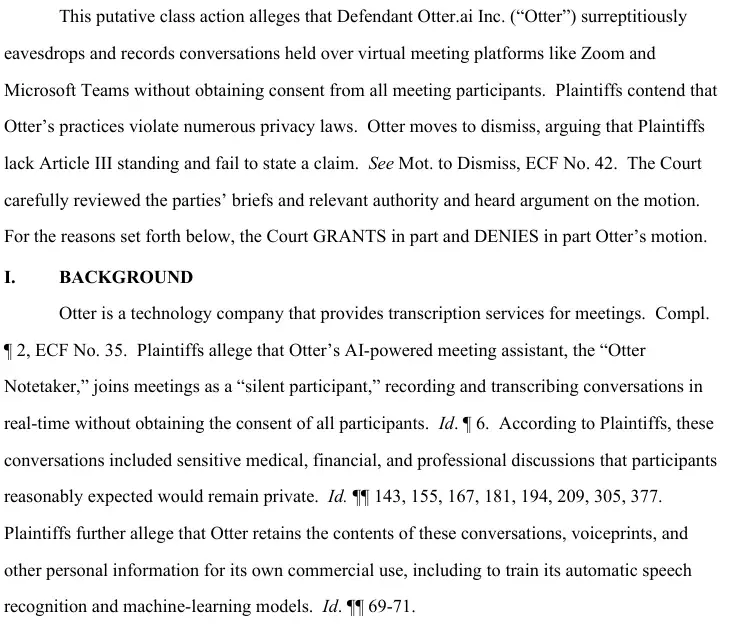
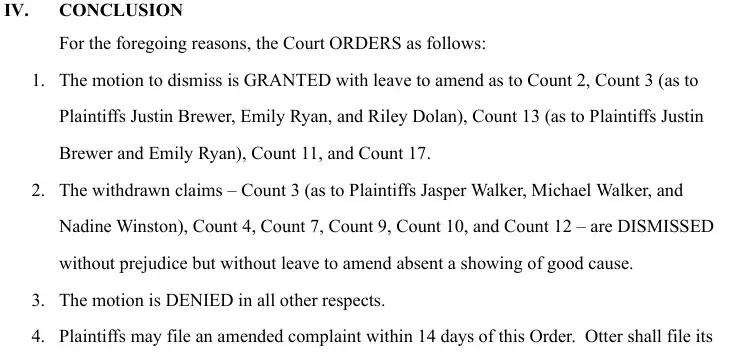
On August 13, 2026, a federal judge in California ruled on a motion to dismiss in a class action against Otter.ai, the maker of the Otter Notetaker. The case is In re Otter.AI Privacy Litigation. The order is a ruling at the pleading stage, and we explain below exactly what the order did and did not decide.
On March 13, 2026, Microsoft published a notice that Teams would detect external third-party meeting bots and label them “Unverified” in the lobby, according to UC Today’s report of May 6, 2026. The report says the organizer must explicitly admit such a bot and that general availability was expected in early to mid-June 2026.
None of this makes AI notetakers illegal. It does mean “someone else’s bot is on my call” is no longer only an etiquette question.
The ten-second move
This is our own procedure, written to fit what the opinion and the court order raise. It is not required by any statute we read.
- Pause the substance. Stop discussing anything sensitive. You are not accusing anyone.
- Name it, out loud. “I see an AI notetaker on the call.”
- Say your position. “I haven’t agreed to recording or transcription.”
- Ask for removal. If you are the host, remove it. If you are not, ask the host to.
- Offer the alternative. “I’m happy to send a written summary afterward.”
- Write down what happened, with the time, who invited the bot, and what you said.
Here is the script in words you can use as they are.
Before we continue, I see an AI notetaker on this call.
I haven't agreed to recording or transcription, so please remove it for now.
If you'd like notes, I'm glad to send you a written summary after we talk.
If we decide later that a recording makes sense, we'll agree it out loud first.
If you are the host and the tool will not leave, end the call and reschedule. A client who says “it is just for me” has told you something useful about whose consent they think counts. We come back to that below.
“One person clicked accept” is not “everyone said yes”
A common defense of an uninvited bot is that one participant approved it: Otter argued in the case below that its Notetaker “joins meetings as an invited participant and functions as the meeting host’s recording tool.” That is one person’s consent, and whether it is enough depends on where the people on the call are.
Federal law sets a floor of one-party consent. The federal Wiretap Act says it is not unlawful for a person not acting under color of law to intercept an electronic communication “where such person is a party to the communication or where one of the parties to the communication has given prior consent to such interception,” unless it is intercepted “for the purpose of committing any criminal or tortious act.” The Reporters Committee for Freedom of the Press summarizes the same point: one-party consent “is the minimum requirement for these conversations across the country.”
Many states ask for more. The Reporters Committee’s guide says about 11 states primarily require all-party consent. A few more split the rule by the kind of conversation. Its summary, as we read it on November 14, 2026:
| Rule | States the guide names | In plain words |
|---|---|---|
| All-party consent | California, Delaware, Florida, Illinois, Maryland, Massachusetts, Michigan (at least for a recording by someone not in the conversation), Montana, New Hampshire, Pennsylvania, Washington | Every person on the call has to agree |
| Phone calls only | Connecticut, Nevada | Every person must agree to a phone call; one person’s yes is enough in person |
| In-person only | Missouri, Oregon | Every person must agree in person; one person’s yes is enough on the phone |
| Private places only | Hawaii, Maine | Every person must agree where the conversation is particularly private |
The guide says “about 11,” so treat any single count as approximate.
California’s statute is a useful example of what “all-party” looks like. Penal Code section 632 punishes a person who, “intentionally and without the consent of all parties to a confidential communication,” uses a recording device to record the conversation, with a fine of up to $2,500 per violation, or up to a year in county jail, or both. It defines a confidential communication as one “carried on in circumstances as may reasonably indicate that any party to the communication desires it to be confined to the parties thereto.” A call in which a client expects privacy fits that description.
Which state’s law governs a call between two states is a question for a lawyer. We found no page we could verify that settles it, and we would rather say that than guess. Until you know, the safest working rule is the strictest one: ask for everyone’s yes before any recording.
Two more points from the Reporters Committee’s guide matter for bots. The first is implied consent: it says consent is generally presumed when parties “are warned of the recording and continue with the conversation,” while adding that it is “a best practice” to record the subject’s verbal consent. That is why the script above ends with agreeing out loud. The second is that, in addition to criminal penalties, most states with recording laws create a private right of action for civil suits. The guide itself says it “should not take the place of legal advice from a lawyer.”
What the Otter order did, and what it did not
The order is 23 pages long and available to anyone on CourtListener. We read it. The plain-language version:
| What the court did | What it did not do |
|---|---|
| Let the federal Wiretap Act claim go forward, because the plaintiffs allege Otter used their conversations to train its models for its own gain, and the one-party exception does not cover a “criminal or tortious” purpose | Decide that Otter broke any law |
| Let the California claim under section 631 go forward, because the plaintiffs plausibly allege Otter “independently collects, retains, and uses communications for its own commercial purposes” | Hold that every AI notetaker is a third-party eavesdropper |
| Recognized that software “acting only as an extension of a user or client” is not a third-party interceptor | Treat a host’s own recording tool as an eavesdropper just because it is software: the question turned on the allegation that Otter keeps and reuses the data for itself |
| Dismissed several claims, most with leave to amend, including the Washington claim of one plaintiff for not alleging enough to show his communications were “private” | Certify a class |
| Treated the plaintiffs’ allegations as true, as a court does on a motion to dismiss | Make any finding of fact |
The sentence that matters most to you is about a bot’s visibility. Otter argued that one plaintiff consented because he saw the Notetaker in the meeting and should have known another party was there. The court called that “a factual dispute” it could not resolve on the pleadings and wrote: “Even if the Otter Notetaker appeared in the meeting as another participant, the Court cannot infer that Dolan knew his communications were being recorded, transcribed, and retained by Otter.” That was a statement about what the complaint alleged at this stage, not a final rule. But it is a useful reminder that a name in the participant list does not prove everyone consented.
One more case is worth knowing about. A law firm’s summary dated August 24, 2026 says a similar proposed class action was filed in July in the same court against Granola, and that, according to the complaint, Granola “captures audio directly from a user’s computer, allowing it to transcribe conversations without appearing as a meeting participant.” That is an allegation in a complaint, and we have not read the filing. It matters for one reason: a notetaker with no name in the list is one you cannot spot by looking.
If you are a lawyer: what the City Bar says about another person’s tool
Formal Opinion 2026-2 applies the New York Rules of Professional Conduct, so it speaks to New York lawyers and does not bind anyone elsewhere. Check your own jurisdiction. Within that limit, it is clear about the situation in this article.
It says lawyers “must also be aware of the challenges that arise when clients or other participants in videoconferences have chosen to use their own AI tools to record, transcribe, and summarize the conversations.” Those challenges, it says, include “a lack of control over the security features necessary to ensure confidentiality, an inability to review transcripts and summaries for accuracy and lack of access to the transcripts and summaries when developing strategy.”
It adds that the technology “may complicate the process of obtaining informed consent, because the technology may lock people out of the discussion if they do not grant consent to the recording.” And it says the duty of competence “includes knowing how to turn off the recording function, so that conversations are not inadvertently recorded.”
It then goes through specific contexts, and in each its default is not to record: co-counsel, prospective clients, opposing counsel, witnesses and a lawyer’s own investigators. For witnesses, it notes the recordings are “potentially discoverable.” For prospective clients, it calls the question of whether to record “a paradox,” because a record can both document a decision and create a conflict risk.
If you are a therapist: transcripts are health information
For a therapist the question is partly about consent and partly about HIPAA. HHS’s guidance says the HIPAA Rules apply to covered entities, which include health care providers who transmit health information electronically in connection with a covered transaction, and to their business associates. A business associate is generally a person who performs functions “on behalf of a covered entity” that involve “creating, receiving, maintaining, or transmitting PHI.” A covered entity may share protected health information with a business associate if it has “satisfactory assurances, in the form of a contract or other written arrangement,” a business associate agreement.
What that means for a bot you did not invite depends on facts we cannot see: whether you are a covered entity, whether the tool acts on your behalf or on a client’s, and whether any agreement exists. We are not saying HIPAA bans a client’s own notetaker. We are saying you should not assume that a client’s yes settles the question, and that you should settle it before the session, not during one. Our earlier guide to Google Meet’s automatic notes covers turning off your own tool.
Recruiters, advisors and agents
We did not find a source we could verify for rules specific to these three roles, so here is what we can say honestly.
Recruiters: we found no source for recruiter-specific rules, so treat an interview as any private call and ask for agreement before anything is recorded. A candidate who did not agree to a recording has not agreed to a transcript that someone else keeps. Say your position at the start of the interview, in the same words as the script.
Financial advisors: we did not read any regulator’s guidance on AI notetakers, so ask your firm’s compliance officer whether a client-supplied tool is allowed, before a client brings one.
Real-estate agents: we found no real-estate-specific rule. Calls about money, offers and negotiating positions are worth protecting, so use the script at the start and ask for agreement first.
Who can remove a bot, and how
If you host the call, you are the person in a position to act. Meeting platforms differ, so we describe only what we could verify.
- Microsoft Teams. Per UC Today’s May 6, 2026 report of Microsoft’s March 13 notice, Teams was set to label external third-party bots “Unverified” in the lobby, with the organizer required to admit them and admins able to set a policy to block them automatically; general availability was expected in early to mid-June 2026. Check whether your tenant has the feature.
- Zoom and Google Meet. UC Today reports that Zoom’s AI Companion needs a host or co-host to start it, with a visible indicator and a prompt for participants, and that Google Meet’s “Take notes for me” must be started by a host or co-host, with an on-screen icon and banner. Those describe each company’s own AI notes. UC Today does not say whether either platform blocks an outside bot that joins as a guest, and the sources we read did not include an official Zoom or Google help page on the question.
- An admin allowlist. One example is Virginia Commonwealth University’s Zoom notice of March 5, 2026, which says that from March 12 the university would “allow access only to authorized SDK applications.” That is one institution’s policy, not a Zoom-wide rule, but it shows the approach an organization can take.
If you are a guest, ask the host to remove it, using the script.
A worked example, from start to finish
Here is how this might go for a therapist. This is a sample we wrote to show the shape, with an invented client. It is not a transcript of a real call, and not a model’s answer.
Dana is a therapist doing a telehealth intake. Her client, Sam, joins with a participant named “Sam’s Notetaker” already in the room. Dana notices it as the session starts.
Sample, written by us. Dana: “Before we go on, I see an AI notetaker on the call. I haven’t agreed to recording or transcription, so could it be removed for now?” Sam: “Oh, it just takes notes for me. It’s my tool.” Dana: “I understand, and I’d like you to have good notes. Let’s do this: I’ll send you a written summary after we finish, and if we want to try a recording later, we’ll agree on it first and I’ll check my practice’s rules.” Sam removes the tool.
Dana then writes down what happened. The note takes a minute and does a lot of work later.
| Field | What Dana writes |
|---|---|
| Date and time | The time the session started |
| What was on the call | An AI notetaker under the client’s account |
| Who invited it | The client, not the practice |
| What was said | The script, in her own words |
| Outcome | Client removed it before the session began |
| Follow-up | Add a line to the intake form about recording and notetaker tools |
If the tool had already captured part of the session, Dana’s follow-up would be different, and the next section covers it.
If it already recorded
Sometimes you only notice after the call, when a summary arrives in your inbox. A calm email helps, and so does the order of steps. These are our own suggestions.
- Do not forward the summary. It may hold information you have no right to spread.
- Ask where it went. Who received a transcript or summary, and where is it stored?
- Check with your own counsel or compliance officer before you ask anyone to delete anything. A record may matter later: the City Bar opinion notes, for example, that witness recordings are “potentially discoverable.”
- Send a short, non-accusatory note.
I noticed an AI notetaker joined our call on [date].
I hadn't agreed to recording, so I'd like to understand what was captured.
Could you tell me whether a transcript or summary was created, who received it, and where it is stored?
Please hold it for now and don't share it further while I check what applies.
- Add a sentence to your pre-call notice so the next call starts clean.
We don't record calls or allow AI notetakers unless we've agreed to it in advance.
If you'd like notes, tell us and we'll send a written summary.
What this means for you
If you are a therapist or counselor. Your risk is a client’s tool recording a session without a clear agreement, plus the HIPAA questions above. First action: put one sentence about notetaker tools in your intake paperwork and your session reminder.
If you are a solo lawyer. The City Bar’s default is not to record without a good reason, and its list of contexts includes co-counsel, prospective clients, opposing counsel and witnesses. First action: check your own state bar’s guidance on AI recording, then adopt the script.
If you recruit. Candidates may bring a notetaker without thinking about it. First action: add a pre-interview line that says whether the call is recorded and how to ask for notes instead.
If you are a financial advisor. Your firm decides what tools are allowed. First action: ask compliance for the written rule on client-supplied notetakers.
If you sell real estate. A bot on a call with a buyer or seller may capture price and strategy. First action: use the script at the start of any call where money is discussed.
If you host many calls a day. You are the one who can remove a bot, so know your platform’s controls before the day you need them. First action: open your meeting settings today and see what your host controls and your admin policy allow.
If you are the person who brought the notetaker. Tell everyone at the start, and wait for their yes. First action: put the notice in the invite, and turn auto-join off for sensitive meetings.
Edge cases and troubleshooting
The bot joined before you did. Treat the first minute as unrecorded if you can: say nothing sensitive until you have used the script. Then ask the host what was captured.
The client says it is just for them. That may be true, and your own agreement is still a separate question. Offer your written summary, and explain that you need everyone’s agreement for a recording.
You cannot see any bot, but someone says they are recording. A tool that listens on a participant’s own computer may not appear in the participant list. The Granola complaint alleges exactly that design. Ask at the start of sensitive calls: “Is anyone recording or using a notetaker on their end?”
The host will not remove it. You can leave the call and reschedule. Ending a call you cannot make safe is a legitimate choice.
The summary has already been emailed to others. Do not forward it, ask where it went, and talk to your own counsel before asking for deletion, as above.
The call crosses state lines. We found nothing we could verify that settles which state’s law applies, so use the strictest rule you can: ask for everyone’s yes before recording.
You want to use your own notetaker. Say so at the start, ask for everyone’s agreement, and repeat it out loud so it is on the record. Our guide to turning off Copilot’s AI notes in Teams covers the settings side.
Someone accuses you of recording. Tell them what you did and did not do, and offer to show your meeting settings.
What this can’t fix
- It cannot tell you your state’s rule for a particular call. The map above is a summary of a guide that itself says it is not legal advice.
- It cannot make a tool’s data practices visible. The Otter case turns partly on what the vendor does with recordings. You cannot see that from the call.
- It cannot undo a recording that already happened. The steps help you contain it, and the outcome depends on facts and law we do not know.
- It cannot replace your profession’s rules. The City Bar opinion applies New York’s professional-conduct rules; HIPAA applies to covered entities and their business associates; neither covers everyone.
- It cannot guarantee a platform will block outside bots. Only Teams’ labeling was described in the sources we could verify, and its rollout date came from a news report, not from Microsoft’s page.
Questions people ask
Is it illegal for someone to record a call I’m on? It depends on the state. Federal law needs one party’s consent, and about 11 states, per the Reporters Committee’s guide, require everyone’s.
What about someone who is not on the call at all? The Reporters Committee’s guide says “regardless of the state, it is almost always illegal to record a conversation to which you are not a party, do not have any consent to record, and could not naturally overhear.”
Does a bot in the participant list count as my consent? Not on its own, as far as the Otter order goes. At the pleading stage the court would not infer that a plaintiff knew he was being recorded just because the Notetaker appeared as a participant.
Can I tell a bot to leave a call someone else is hosting? You can ask. Ask the host to remove it.
Did the Otter ruling make AI notetakers illegal? No. It is an order on a motion to dismiss. It let several claims continue and dismissed others, accepted the plaintiffs’ allegations as true for that purpose, and found nothing for or against Otter on the facts.
Does HIPAA ban a client’s own notetaker? We did not find a rule that says so. HHS’s guidance describes when a vendor is a business associate. Whether a client’s own tool is covered depends on facts, so settle it before the session.
What did the NYC Bar opinion say? That a lawyer should get the consent of all other parties before recording a call, and by default should avoid recording non-client conversations without a good reason. It applies New York’s rules of professional conduct.
What should my invite say? One or two lines: whether the call is recorded, whether AI notetakers are allowed, and how to ask for written notes instead.
Can I use an AI notetaker myself? Yes, subject to the consent rules and your profession’s. Tell everyone first and wait for their yes.
The bottom line
A bot you did not invite is a consent question, not a technology question. The law is a patchwork, and the professional rules are stricter than the law in places. The script costs you ten seconds and a little awkwardness, and it settles the part you control: you did not agree.
If you want to go deeper, AI Meeting Notes (first 2 lessons free) covers using notetakers well, AI Therapy Notes: The HIPAA-Safe Workflow (first 2 lessons free) is for therapists, and ChatGPT Without the Liability (first 2 lessons free) is for lawyers.
Your first step: write the two-line notice for your next meeting invite, and say the script out loud once so it is ready.
Sources
- New York City Bar: Formal Opinion 2026-2, August 5, 2026
- New York City Bar: press release on Formal Opinion 2026-2, August 17, 2026
- In re Otter.AI Privacy Litigation, Order Granting Motion to Dismiss in Part, Dkt. 68, August 13, 2026 (CourtListener)
- Baird Holm: Core Privacy Claims Against AI Note Taking Platform Survive Dismissal, August 24, 2026
- 18 U.S.C. 2511 (Cornell Legal Information Institute)
- California Penal Code section 632
- Reporters Committee for Freedom of the Press: Introduction to the Reporter’s Recording Guide
- HHS: Business Associates frequently asked questions
- UC Today: AI meeting bots controls from Microsoft, Zoom and Google, May 6, 2026
- VCU Zoom blog: new security policy to block bots, March 5, 2026