If you pay for Claude Pro, Max or Team, there’s probably a button sitting in your settings right now that refills your usage limit for free. It was handed out on September 22, when Anthropic launched Claude Opus 5.5, and it expires on October 22. Press it and you can’t undo it. Don’t press it and, after the 22nd, it’s gone.
The catch is that most of the confusion online isn’t about whether to use it. It’s about when. One person on X clicked it right away and watched their weekly limit refill by itself ten minutes later, which means the reset bought them nothing. Another was blocked with a day and a half left in their week, pressed it, and got roughly 35 more hours of full-strength Claude.
Same button. Very different value. This post explains what the reset really does (straight from Anthropic’s help page, not from rumor), who has it, what the odd cases are, and a simple rule for when to press it. I also pulled the best evidence-backed ways to make your normal limits last longer, because the reset is a one-time gift and your weekly limit is a weekly problem.
What happened on September 22
Anthropic launched Claude Opus 5.5 on September 22, 2026. Three things came with it, and they’re easy to blur together:
- A price cut. Opus 5.5 costs $4 per million input tokens and $20 per million output tokens through the API, 20% less than Opus 5. Anthropic says typical Opus 5.5 work costs about 40% less than Opus 5 at default settings.
- A bigger five-hour allowance. In its announcement Anthropic says it’s “increasing five-hour usage limits on Pro, Max, Team, and seat-based Enterprise plans.” The official @ClaudeDevs account put the number on it: five-hour session limits went up 20%.
- A saved reset. Anthropic is “providing subscription users a rate limit reset, which you can now save and use whenever you choose.”
Number 2 and the price cut compound. @ClaudeDevs said Opus usage goes about 25% further within your limits, which is plain arithmetic: if a task costs 20% less per unit of work, the same allowance buys 25% more of it (100 units at the old price becomes 125 at 80% of the price). Don’t add that 25% to the 20%. They describe different things.
The reset is number 3, and it’s the one with an expiry date.
Is Opus 5.5 worth spending a reset on?
The reset was framed as “extra wiggle room to explore Opus 5.5,” which is the wording on the card in the English version of claude.ai. So it’s fair to ask what you’d be exploring.
Anthropic’s announcement leans on coding and knowledge-work benchmarks. Opus 5.5 scores 66.4% on Terminal-Bench 4.0 (Opus 5 got 52.3%), 54.4% on FrontierCode v1.1 (Opus 5 got 48.0%), and 1846 on GDPval-AA v2.1, an Elo-style score for office-type work, against 1708 for Opus 5. Those are Anthropic’s numbers from its own announcement, so read them as the vendor’s claim, not an independent test.
The part that matters more if you don’t write code: Anthropic says Opus 5.5 “communicates more naturally than prior models,” puts “the most important information up front,” and was easier to follow over long sessions, and that it generates output more than 30% faster than Opus 5. If you write, analyze or summarize all day, that’s the thing to test. If your Claude use is mostly short questions, you’d feel little difference, and you probably don’t need the reset at all.
A simple way to use the reset well is to pair it with a real task you’ve been putting off. Pick the longest, most annoying piece of work on your list (the report, the data cleanup, the codebase you’ve been avoiding), run it on Opus 5.5, and see whether the result is better than what you were getting before. That’s a better test than a benchmark chart.
What people on X actually said
The reaction split into three camps, which is useful for knowing which camp you’re in.
“I’ll never hit the limit anyway.” @TheSpacerr’s post, “It’s impossible to hit usage limits with Claude Opus 5.5,” drew more than 2,200 likes and a related post asking if anyone had maxed it out got about 570. A lot of people are sitting on an unused card because they’ve never been blocked.
“I need this right now.” @brsabel hit the weekly wall, pressed it, and described getting about 35 hours of runway. @actual_dvs found the card still sitting there at 99% of the weekly limit. For these users the reset was an obvious win.
“I wasted it.” @UnveilWithKunal pressed it right away and the weekly limit refilled on its own roughly ten minutes later. And @ever_market_seo, posting in Japanese, banked the reset, then downgraded from Max 20x to Max 5x and found the card gone. That one matches Anthropic’s downgrade rule exactly.
On Anthropic’s side, the launch post from @claudeai passed 15,000 likes, and @ClaudeDevs followed up on September 28 (Sonnet 5.5 launch day) with a reminder to people who hadn’t used theirs yet. That reminder is a hint in itself. A company doesn’t nudge people about a free perk when everyone has already claimed it.
Who gets the reset (and who doesn’t)
This is where a lot of the online summaries are sloppy, so here’s what the evidence supports.
Post by @ClaudeDevs
| Plan | Got the Sept 22 reset? | How sure are we? |
|---|---|---|
| Pro | Yes | Confirmed by @ClaudeDevs: “If you’re on Pro, Max, or Team, your reset is available today in Settings → Usage.” |
| Max (5x and 20x) | Yes | Confirmed, same post |
| Team | Yes | Confirmed, same post |
| Seat-based Enterprise | Unclear | Anthropic says it raised five-hour limits for seat-based Enterprise. @ClaudeDevs only named Pro, Max and Team for the reset |
| Free | No evidence it did | The reset is described as a subscriber perk, and Free was never named |
| API / Console | No | This is a claude.ai subscription feature, not an API credit |
Anthropic’s help page also describes limit resets generally as “given occasionally to eligible plans.” There are no published rules for how often or on what criteria. So this isn’t a promise of a monthly refill. Treat the September one as a one-off.
If you’re not sure the offer is on your account, you can check in a minute: Settings → Usage on claude.ai or in Claude Desktop. If there’s a “Resets” section with a “Reset for free” button and an expiry date, it’s yours. If there isn’t one, you don’t have it. Check the page itself rather than relying on any article, this one included.
What the button actually does
Everything below comes from the help page unless I say otherwise.
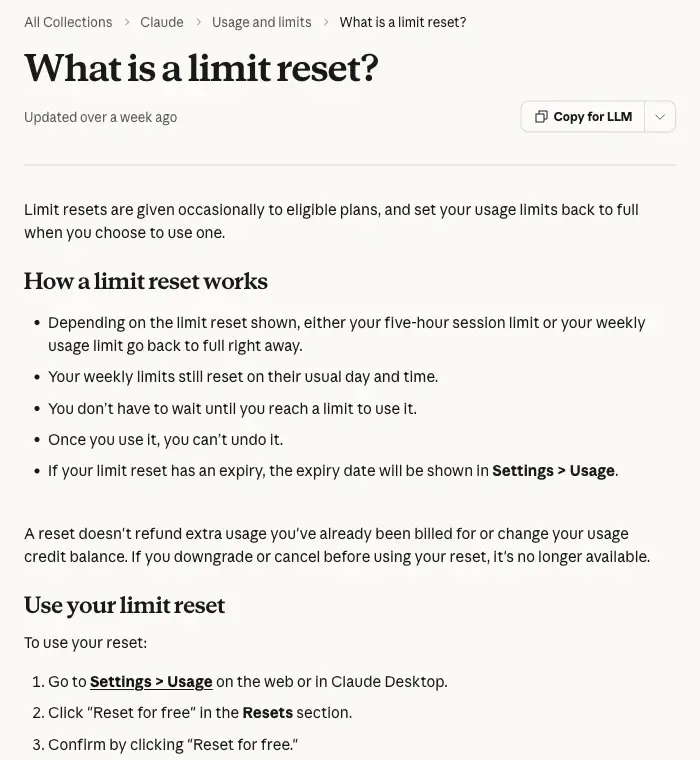
- It refills one limit, not necessarily both. The page says, “Depending on the limit reset shown, either your five-hour session limit or your weekly usage limit go back to full right away.” The card on your account shows which. Some summaries online say it resets both. Anthropic’s wording says it depends on the offer shown to you.
- Your normal weekly schedule doesn’t move. “Your weekly limits still reset on their usual day and time.” So if you use a weekly reset at, say, Thursday 8 pm, your weekly clock still ticks to Thursday 8 pm afterward. You get a full tank now and the usual full tank when the week turns over.
- You don’t have to be out of usage. “You don’t have to wait until you reach a limit to use it.” You can press it with 90% of your limit left. That would be a waste, but it works.
- It can’t be undone. “Once you use it, you can’t undo it.”
- It doesn’t touch your billing. A reset “doesn’t refund extra usage you’ve already been billed for or change your usage credit balance.”
- It disappears if you downgrade or cancel first. “If you downgrade or cancel before using your reset, it’s no longer available.”
- Where it lives. Go to Settings → Usage on the web or in Claude Desktop, find the Resets section, click “Reset for free,” then confirm. The same button also shows up on the message you get when you hit a limit.
- Where it doesn’t live. The button isn’t in Claude’s mobile apps or in Claude Code (terminal or IDE). That sounds like a dealbreaker for Code users, but it isn’t. Usage limits are account-wide, so after you reset from the web or Desktop, your meters refill everywhere, mobile and Claude Code included.
- The expiry. The date shown on your card in Settings → Usage is the authoritative one. @ClaudeDevs said “any time until Oct 22.” Nobody has published the exact time zone or cutoff hour, so don’t leave it to the last evening.
One more point, because I saw it argued over: the Sonnet 5.5 post on September 28 isn’t a second reset. When Sonnet 5.5 launched, @ClaudeDevs wrote that Pro, Max and Team users were granted “a reset last Tuesday” and that, if you haven’t used it, you can still apply it “before Oct 22.” It’s the same card and the same deadline, just a reminder.
When to press it: the one rule that matters
The reset’s value is simple to describe. It’s how much time is left until your next natural refill, multiplied by how fast you’d use Claude in that time.
Think of your limit as a bucket that gets topped up on a schedule. Pressing the reset when the bucket is almost empty and the next scheduled top-up is far away gives you a whole extra bucket. Pressing it a few minutes before the scheduled top-up gives you almost nothing, because you were about to get that bucket anyway.
That explains the two real stories I mentioned. @UnveilWithKunal clicked immediately, then watched the weekly limit refill on its own about ten minutes later. The reset was spent on nothing. @brsabel hit the weekly wall with the natural refill about a day away (the post says tomorrow at 8 pm), used the reset, and described getting around 35 hours to burn a full week’s allowance.
Here’s the rule written out:
- Blocked now, long wait ahead: press it. This is the best case, and it’s what the 35-hours story was.
- Blocked now, but your weekly limit resets in an hour or two: wait. You’d waste most of it.
- Not blocked yet: don’t press it “to be safe.” Keep it until you actually need it.
- It’s October 20 and you’ve still got it: use it on your next heavy session. A reset you never press is worth exactly zero.
And if the card shows a five-hour reset instead of a weekly one, the same logic applies at a smaller scale. A five-hour limit that would refill on its own in forty minutes isn’t worth resetting. One that just got burned in the first hour of a long working session is.
A worked example
Say it’s Tuesday afternoon. Your weekly limit refreshes on Thursday at 8 pm, and you’ve hit it while you still have a proposal, two spreadsheets, and a long document review left to do. (The days and hours here are just an example. Read yours off your Usage page.)
- Option A: wait more than 50 hours for the natural refill.
- Option B: press the reset, get the weekly limit back at full right now, and still receive the regular refill on Thursday at 8 pm.
Option B is the whole point of the offer. Compare that to pressing it Thursday at 7:30 pm. Same button, 30 minutes before the clock would have refilled anyway. You’d have spent your one-time reset to avoid a half-hour wait.
If you take only one thing from this post, take that: look at your refresh time before you click.
How Claude’s limits work (so the reset makes sense)
If you’ve ever wondered why Claude sometimes runs out in an hour and sometimes lasts all day, this is the reason. According to Anthropic’s help pages, paid individual plans run on two clocks at once:
- A five-hour session allowance that refreshes every five hours.
- A weekly allowance across all models that refreshes at a fixed, account-assigned time.
You need room under both to keep going. Anthropic doesn’t publish a fixed number of messages for Pro or Max, because usage depends on what you do. Message length, attachment size, how long the current conversation is, tool use, which model you pick, effort level, and multi-step jobs like running code or browsing all change how fast you use it up.
| Plan | Five-hour session allowance | Weekly allowance |
|---|---|---|
| Free | Refreshes every five hours; varies with demand | No weekly allowance specified on Anthropic’s help page |
| Pro | The baseline paid allowance | One weekly cross-model allowance |
| Max 5x | 5x Pro’s per-session allowance | One weekly cross-model allowance |
| Max 20x | 20x Pro’s per-session allowance | One weekly cross-model allowance |
| Team Standard | 1.25x Pro’s per-session allowance, per member | Per-member weekly limit, not pooled across the team |
| Team Premium | 6.25x Pro’s per-session allowance, per member | Per-member weekly limit, not pooled across the team |
A word on “5x” and “20x”: those multipliers describe the per-session allowance, not a promise that you get exactly five or twenty times as many messages in every situation.
How Claude’s limits compare to ChatGPT and Gemini right now
Since the Gemini free tier is shrinking on October 9 (we covered that in Is Gemini Still Free?), a lot of people are comparing limits across all three. A fair warning: none of these three companies uses comparable units, so there’s no honest “X Claude messages equals Y ChatGPT messages.”
| Service and plan | What’s published | What happens at the limit |
|---|---|---|
| Claude Pro / Max | Unpublished compute-sensitive five-hour allowance plus a weekly allowance | Wait for refresh, use a reset, or pay for extra usage credits at API rates |
| ChatGPT Plus | No fixed number on OpenAI’s current help pages: limits “may vary based on system conditions” and depend on plan and model; ChatGPT shows when an allowance resets | OpenAI says that if you hit a Thinking limit, ChatGPT may continue with another available model |
| Google AI Pro | 4x the standard Gemini Apps compute limit, refreshing every five hours until a weekly limit | Per Google’s pages, conversations can continue on Flash-Lite |
ChatGPT Free is the one with a clear promise: OpenAI says Free and Go users have “unlimited everyday text chats, subject to abuse-prevention safeguards,” with separate limits on uploads, images, voice and data analysis. For paid plans, OpenAI’s current help pages don’t publish a fixed number either (older articles quoted message caps, so treat any figure you see in a screenshot with suspicion). Claude, Gemini and ChatGPT’s paid tiers all meter by plan, model and demand. If you want the bigger picture on why every AI service is tightening, Is AI Still “Unlimited”? walks through it.
Stretching your normal limits (the part that works every week)
The reset is a one-time gift. These habits are what make your regular limits last, and every one of them comes from Anthropic’s or Google’s own documentation rather than from forum folklore. None of them comes with a guaranteed percentage saving. I’m not going to invent one.
- Pick the lighter model when the job is light. Anthropic says model choice affects how fast you use your allowance, and tells people who hit limits to switch to a lighter model. A quick rewrite doesn’t need your most powerful model.
- Keep chats focused. Claude counts the length of the current conversation, so a three-hour sprawling thread costs more per message than a fresh, focused one. When a task is done, start a new chat.
- Be careful with heavy features. Research, web search, artifacts, code execution, file creation and browsing all use more than plain chat. They’re worth it when you need them. Don’t leave them on by habit.
- Use Projects for material you reuse. Anthropic says content in a Project is cached, and cached portions count less against your limits when reused. If you keep pasting the same brief, handbook, or style guide into new chats, put it in a Project instead.
- In Claude Code, manage context. Anthropic recommends
/compactwhen context fills up and/clearwhen old history no longer matters, noting that unexpectedly high usage commonly traces back to very long sessions that were never cleared. - Mind the effort setting. Higher effort uses more. Reserve it for the problems that need it.
If you’re a heavy Claude Code user specifically, our piece on Claude Code rate limits and the 10-minute math is a good companion.
What this means for you
If you’re on Pro and you’re a casual user. You may never be blocked at all. @TheSpacerr’s post that “it’s impossible to hit usage limits with Claude Opus 5.5” got over 2,000 likes, which is why so many cards are still unclaimed. Your plan: don’t press it. Put a reminder on October 18 to check your Usage page, and press it then only if you’ve been blocked recently.
If you’re on Pro and you hit the weekly wall regularly. This reset is for you. Your plan: next time you’re blocked with more than a day to go, press it. Make a note of your refresh time first.
If you’re on Max. You have less reason to rush, but the same card. Careful here: one person reported that after switching from Max 20x to Max 5x, the card vanished. That matches Anthropic’s rule that a downgrade or cancellation before using it removes it. Your plan: don’t change plans until you’ve used the reset.
If you’re on a Team plan. The reset is per member, and so are Team limits (they aren’t pooled). Your plan: tell your team, because most members won’t know the card exists. Anyone who’s been blocked can use it.
If you’re on Enterprise (seat-based). Whether you received this reset is unconfirmed. Anthropic confirmed the higher five-hour limits for you. Your plan: check Settings → Usage and ask your admin if the Resets section is missing. Don’t assume.
If you’re on the Free plan. There’s no evidence the reset applies to you. Your plan: nothing to press, and nothing to buy because of this. Your own free limit refreshes about every five hours.
If you’re considering a plan change before October 22. Don’t switch down or cancel until you’ve pressed the reset. That’s the cleanest rule in the whole post.
Edge cases and troubleshooting
“I can’t find the button.” Check you’re on the web (claude.ai) or in Claude Desktop, not the mobile app or Claude Code. The button isn’t in those. Go to Settings → Usage and look for a section called Resets. If it isn’t there, either you don’t have the offer on this account, or it was removed because of a plan change. There’s also a short link people have shared, clau.de/reset, but go through Settings if it doesn’t work for you.
“Which limit will it refill, five-hour or weekly?” Read the card. Anthropic says it depends on the reset shown. Several people on X guessed “both,” and Anthropic’s documentation doesn’t support that. @ritesh_khokhani asked the question publicly and got guesses back, not an official answer.
“I pressed it and the limit refilled by itself.” That’s the early-press mistake. It happens when your natural refresh was close. There’s no way to reverse it, which is why the rule above is “check your refresh time first.”
“My reset disappeared after I changed plans.” Per Anthropic, downgrading or cancelling before you use it removes it. At least one user reported losing it after moving between Max tiers. No one has reported getting a card back after upgrading again, and Anthropic hasn’t said whether it can be restored.
“An old or expired account can still claim one.” One post claimed this. It contradicts Anthropic’s rule that the reset is gone if you cancel, and I couldn’t confirm it. Treat it as unreliable.
“I’m already paying for extra usage. Does the reset refund it?” No. Anthropic says a reset doesn’t refund extra usage you’ve already been billed for and doesn’t change your usage credit balance. What isn’t clear from user reports is what happens if you’re mid-way through extra-usage billing when you press it, so it’s safest to press it before you start spending credits.
“I only use Claude Code. Do I need the web?” You need the web or Desktop to press the button, but not to benefit. Limits are account-wide, so once you reset, Claude Code and mobile both show the refilled allowance.
“What time on Oct 22 does it end?” Not published. The expiry on your Usage page is the only authority. Don’t wait for the final evening.
What this can’t do
- It can’t make your weekly limit permanent. It’s a one-time refill, after which you’re back on the normal schedule.
- It won’t tell you how much you get. Anthropic doesn’t publish a fixed message count, so you can’t calculate in advance how far a reset will take you.
- It’s not a recurring feature. The help page says resets are “given occasionally” with no published frequency. Don’t plan around another one.
- It doesn’t cover API or Console spending. That’s billed separately, and the reset doesn’t touch it.
- It isn’t an upgrade. It doesn’t unlock Opus 5.5 for people who couldn’t use it. It refills the allowance of people who already can.
FAQ
What is the Claude “Reset for free” button? A one-time, saved usage reset Anthropic gave subscribers when it launched Claude Opus 5.5 on September 22, 2026. It sets a usage limit back to full when you choose to use it, and it expires on October 22.
Who gets the Claude reset? Pro, Max and Team subscribers, per @ClaudeDevs. Seat-based Enterprise is unconfirmed for the reset. There’s no evidence Free accounts or API users got one.
Does it reset the five-hour limit or the weekly limit? Whichever your card shows. Anthropic says “either your five-hour session limit or your weekly usage limit go back to full right away,” depending on the reset shown. It isn’t described as refilling both.
Can I use it before I hit my limit? Yes, you don’t have to be at a limit. It’s usually a bad idea unless the natural refill is far away, because the unused part of your current allowance is lost value.
Where is the reset button? Settings → Usage on claude.ai or Claude Desktop, in the Resets section. It also appears on the message you get when you hit a limit. It’s not in the mobile apps or Claude Code.
Does it work in Claude Code? You can’t press it there, but limits are account-wide. Pressing it on the web or Desktop refills the allowance everywhere, Claude Code included.
What happens if I downgrade or cancel? An unused reset is no longer available. Anthropic’s help page is explicit about this.
Does the reset change my weekly refresh day? No. Your weekly limits still reset on their usual day and time.
Is the Sonnet 5.5 reset a different one? No. The September 28 @ClaudeDevs post was a reminder about the same reset, with the same October 22 deadline.
Is the 20% limit increase the same thing as the reset? No. The 20% is a permanent increase to the five-hour session allowance. The reset is a one-time refill that expires on October 22.
The bottom line
The reset is a good deal for anyone who actually hits Claude’s limits, and a non-event for everyone else. Don’t press it early. Open Settings → Usage, read which limit your card refills and when your next natural refresh is, and use it the next time you’re blocked with a long wait ahead. Do it before October 22, and don’t downgrade or cancel until you’ve used it.
If you want your regular limits to go further, the habits above (lighter models for light jobs, focused chats, Projects for reused material) will do more over a year than any one-time reset. And if you’re deciding between Claude, ChatGPT and Gemini in a month when all three are changing their free and paid limits, our ChatGPT vs Claude course lays out which one fits which kind of work, and AI Fundamentals covers the basics that make switching tools painless.
Sources
- Claude Help Center, “What is a limit reset?”
- Anthropic, Introducing Claude Opus 5.5
- @ClaudeDevs on X, reset announcement (Sept 22, 2026)
- @ClaudeDevs on X, Sonnet 5.5 launch and reset reminder (Sept 28, 2026)
- @ClaudeDevs on X, Opus 5.5 pricing and speed thread
- XDA Developers, Claude now lets you manually trigger your own weekly reset
- Pasquale Pillitteri, Claude introduces experimental usage limit resets as Opus 5.5 launches
- Mad Robot, Claude Resets: how to use your free usage reset
- Cesar Ayala, Reset your Claude usage limit for free
- Claude Help Center, usage limit best practices
- Google, Gemini Apps limits & upgrades
- OpenAI Help Center, ChatGPT usage limits
