
On November 5, 2026, Anthropic announced Personal Finance in Claude. You link your bank and credit card accounts through Plaid, and Claude answers questions about your own balances and transactions: where the money went, whether a bill crept up, whether a charge was doubled. It’s a beta, it’s for Pro, Max and Ultra subscribers in the US, and Anthropic’s own Help Center page is the best description of what it does and doesn’t do.
This guide goes through that page the way you’d use it. Who can see the feature at all, the ten clicks that link a bank, what Claude can and can’t read once it’s linked, which privacy protections cover which chats, how to unlink, and what to do when it fails. Then the part most readers need: if you’re on a free plan, outside the US, or just don’t want to hand an AI your bank link, a free route that needs no live bank link, just a statement you export yourself.
One honest note first. We haven’t linked a bank to Claude. The feature is US-only and paid, and we don’t have a US Pro account or a US bank connection to test with. Every step and limit below comes from Anthropic’s Help Center, Plaid’s announcement and press coverage, which we read on November 6. The screenshots are of Anthropic’s Help text, not of the product. Where the sources disagree or stay quiet, we say so.
What Personal Finance in Claude is
Anthropic’s Help Center describes it in one sentence: Personal Finance “lets you link your bank, credit card, loan, and investment accounts to Claude, so you can see your balances and spending on one page and ask Claude questions about your own money.” There are two parts to that.
The first is a page. Personal Finance sits in Claude’s side menu and shows widgets for spending, cash flow, accounts, subscriptions, upcoming bills and short insights from Claude. You can add, edit, remove and reorder them. Budgets are settings on those widgets.
The second is chat. You can ask a question on the Personal Finance page, pick one of the suggested questions, or ask in a regular chat. TechCrunch’s launch report gave the flavor: asking “Where did my money go this month?” makes Claude total your spending across the connected accounts and sort it into categories such as rent and utilities, food and drink, and shopping, and a follow-up like “Is that more than usual?” works. Claude also looks through your transactions for problems like duplicate charges, unexpected fees and steadily rising bills.
Two limits are stated up front, in Anthropic’s words and Plaid’s. Access is read-only: Claude can’t move, manage or invest your money. And Anthropic says Personal Finance “isn’t designed to give investment advice.” It helps you understand your money. It isn’t an adviser.
Anthropic’s own line on ads, quoted by TechCrunch, is that “like the rest of Claude, Personal Finance has no ads or sponsored recommendations,” and that it doesn’t offer its own credit cards, loans or savings accounts. Android Authority’s report adds that Bank of America has warned customers against sharing banking passwords with AI assistants, which matters for how you connect anything. We come back to it below.
Can you use it today
This is the first thing to settle, because the feature is narrow. Anthropic’s Help Center is clear on each point.
| Question | The answer in Anthropic’s Help Center |
|---|---|
| Which plan? | Pro, Max and Ultra. Not Free, Team or Enterprise |
| Which country? | US only, and only US banks can be linked |
| Where does it run? | Claude on the web, Claude Desktop, Claude for iOS and Claude for Android |
| Is everyone in yet? | No: “We’re rolling it out gradually, so you might not see it yet” |
| What if I’m traveling? | Outside the US, or on a VPN from another country, it doesn’t appear until you’re back, and your banks stay linked |
| Anything else that blocks it? | It isn’t available in Claude Duet |
The travel row is easy to miss: a US Pro customer who’s abroad, or on a VPN set to another country, won’t see the menu item, though the banks stay linked.
Anthropic gave no date or share for when everyone on an eligible plan will see it. If the menu item isn’t there, the edge cases below list the usual reasons.
What Claude can read, and what it can’t
When you link a bank you choose which accounts to share, and Claude can read a defined list. The Help Center spells it out.
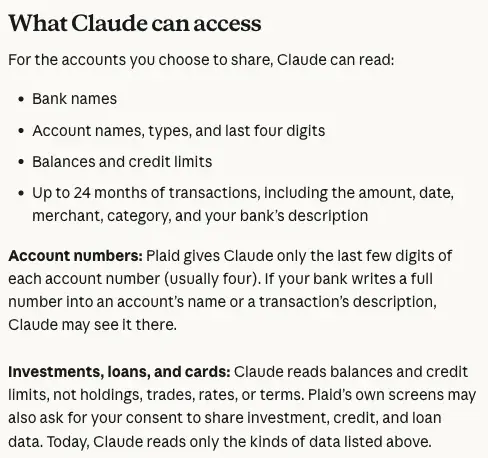
| What | Does Claude read it? | What to know |
|---|---|---|
| Bank name, account name and type | Yes | Plus the last four digits of the account number |
| Balances and credit limits | Yes | Balances can be a day or two old |
| Transactions | Yes, up to 24 months | Amount, date, merchant, category and your bank’s description |
| Full account number | Not as a field | If your bank writes a full number into an account name or a transaction description, Claude may see it there |
| Investment holdings and trades | No | For investment accounts it reads balances only |
| Loan or card rates and terms | No | It reads balances and credit limits |
| Your bank password | No | “Claude doesn’t ask for or see your bank password” |
Holdings, trades, rates and terms. The Help Center’s first line says you can link “loan and investment accounts.” The same page says, about those accounts, that “Claude reads balances and credit limits, not holdings, trades, rates, or terms.” It also notes that Plaid’s own screens “may also ask for your consent to share investment, credit, and loan data,” and that “today, Claude reads only the kinds of data listed above.” So the consent screen you see in Plaid can look wider than what Claude uses today. That’s worth knowing when you read it.
It also affects the questions you ask. TechCrunch’s report lists explaining APR among the things Claude can do. Claude can explain what an APR is. But since it doesn’t read your card’s rate, tell it the rate yourself rather than assuming it saw it.
The 24 months. “Up to 24 months” is a ceiling, so don’t assume every account gives you the full two years. A newly linked account can also take a few minutes to sync. A trend that starts before the first transaction Claude has can’t be seen.
The ten steps to link a bank
Here’s the path from the Help Center, in its own order. The page describes it for web, Desktop and mobile alike.
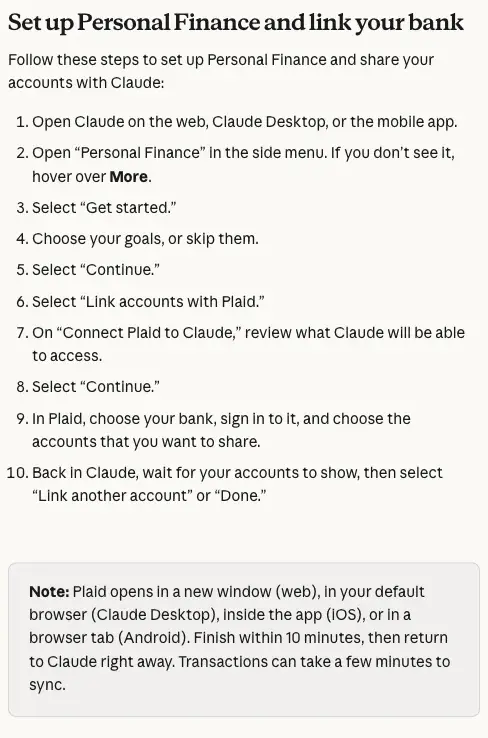
Step 1. Open Claude on the web, Claude Desktop or the mobile app. Use a personal account. Team and Enterprise accounts don’t get the feature.
Step 2. Open “Personal Finance” in the side menu. If you don’t see it, hover over “More.”
Step 3. Select “Get started.”
Step 4. Choose your goals, or skip them, then select “Continue.”
Step 5. Select “Link accounts with Plaid.” The screen that follows is the one to read. It’s titled “Connect Plaid to Claude” and tells you what Claude will be able to access.
Step 6. Select “Continue.” Plaid opens. On the web it opens in a new window, on Claude Desktop in your default browser, on iOS inside the app, and on Android in a browser tab.
Step 7. In Plaid, choose your bank and sign in to it. This is the safety step. You enter your bank login in Plaid’s flow, and Claude says it neither asks for nor sees the password.
Step 8. Choose the accounts you want to share. Don’t accept every box by default. We’ll come back to that in the privacy section.
Step 9. Return to Claude and wait for your accounts to show. Anthropic says to finish the Plaid part “within 10 minutes, then return to Claude right away,” and that transactions “can take a few minutes to sync.”
Step 10. Select “Link another account” or “Done.” Anthropic says to wait for your accounts to show before you pick.
Linking more than one bank
You can link up to 16 banks. The limit counts banks, not accounts. To add another account at a bank that’s already linked, link that bank again and share every account you want Claude to keep, since the new link is what defines the accounts Claude can read.
On iOS and Android, the way to link another bank is Personal Finance, then the gear icon, then “Link another account.”
If you link a bank that’s already linked, Claude asks what to do, and the three answers do different things:
| Option | What it does | Use it when |
|---|---|---|
| Switch to the new link | Replaces the old sign-in. Claude reads only the accounts you shared this time | You want to add an account, or fix a broken link |
| Keep it as it is | Keeps the existing link and adds nothing | You linked it by mistake |
| Keep both | Keeps two logins at the same bank | A joint account or a business account has its own login |
Five questions to ask first
Once the data has synced, the question is what to ask. The launch coverage gives example questions. Here they are as prompts you can paste, ordered from the least to the most demanding. These are our suggestions, built on the capabilities in the Help Center and press reports, not a tested sequence.
1. Where did the money go?
Where did my money go this month? Show spending by category and list the five biggest merchants.
2. Is that normal?
Is that more than usual? Compare this month's spending in each category with the last three months and tell me which category changed most.
3. Anything odd?
Flag duplicate charges, unexpected fees and any subscription whose price went up. For each one, give the date, the merchant and the amount.
4. What’s left?
How much money is left in my checking account after the bills coming up before my next payday? Tell me which bills you counted.
5. Do I spend more than I earn?
Over the last three months, did I spend more than I earned? Show income and spending by month, and say how you treated transfers between my own accounts.
Notice that the prompts keep asking for the list behind the number. Anthropic says “Claude is AI and can make mistakes” and tells you to check important figures against your bank’s app or statements, so make that easy: “which bills did you count” turns a confident answer into something you can compare with a statement.
The privacy picture
The privacy section is where this feature gets confusing, because Anthropic’s page gives different protections to different chats. Read it as a table of situations, not as one promise.
| Situation | What Anthropic’s Help Center says |
|---|---|
| A chat inside the Personal Finance hub | “Those conversations aren’t used to train our models” |
| A chat outside the hub | Your privacy settings apply |
| A chat that used your linked accounts | Designed not to save anything to memory, not to be searchable later, and to be left out of your monthly recap |
| A chat you share by link | Shows your messages and Claude’s replies, including figures |
| An artifact from such a chat | Claude asks before publishing. It may contain bank data and stays until you delete it, even if you delete the chat |
| Anything in chat history | Stays until you delete the chat, subject to retention practices |
The training protection is narrower than it sounds. It covers conversations in the Personal Finance hub. Financial talk outside the hub follows your ordinary settings. If you want the hub’s promise, ask your money questions there.
The memory, search and recap protections work differently. They apply to chats where Claude has used your linked accounts, and Anthropic words them as design: “designed not to.” They don’t delete the chat. The chat is still in your history until you delete it.
The sharing rows are the ones to remember. A shared chat link, or an artifact published from a chat that used your accounts, can show account figures “to anyone who opens them.” Not used for training does not mean safe to publish. If you share a chat about your budget with a partner, share it knowing the numbers go with it.
Settings worth knowing about
Claude reads your linked accounts without asking each time, unless you change that. Two controls matter:
- Plaid on or off for a chat. On the web and Desktop, use the “+” in the message box, then Connectors, then Plaid, to turn Plaid off or on for chats.
- Needs approval. On iOS and Android, “+” then Connectors then Plaid then “All tools” (it’s “Set all tools” on Android) lets you pick Blocked, Always allow or Needs approval. With Needs approval, Claude asks before each read, unless the chat is set to Automatically approve.
Claude also asks before it links or unlinks a bank inside a chat.
For a wider look at what Claude keeps about you in general, our memory privacy audit walks through it, and the explainer on connectors covers what a connector like Plaid is in plain language.
Choosing which accounts to share
Plaid lets you choose, and nothing in the flow makes you share everything. A reasonable first link is the checking account and the credit card you spend from, since that’s where “where did my money go” gets answered. Anthropic’s page says you can’t unlink a single account, because the whole bank login goes, so a narrow first link is easier to undo than a wide one.
Is it safe to connect a bank to an AI
That question has two parts. The first is about passwords, and a bank’s own security page is the place to start.
Bank of America’s page on AI tools says: “Never share your user ID or password with another person or an outside service, including an AI-enabled tool or agent.” It also says the bank “gives you a secure way to connect eligible third-party services to your account,” and lists what to check before you connect: what information the tool can access, how your information may be used, stored, shared or kept, what actions it’s authorized to perform, and whether access is temporary or ongoing. If you already shared a password, it says to change it immediately and review recent transactions.
Here is how Anthropic’s flow compares. You sign in at Plaid, not in Claude, and Anthropic says Claude doesn’t see the password. Plaid’s CTO says Claude’s access “is read-only, so it can’t move money.” That is not the same as typing your login into a chatbot, which is the act Bank of America’s page is about, and it says that if you do share your password, “you’re responsible for activity resulting from that access.” Whether signing in through Plaid counts as sharing with “an outside service” is a question for your own bank, so read its page on connecting AI tools before you link.
The second part is harder to answer, and honesty means saying where the answer stops.
- Deletion after unlinking. Anthropic’s page says unlinking stops Claude reading the bank, and that what Claude already said stays in your chats. In the page as we read it on November 6, we found no stated deadline for deleting data Claude had already synced. OpenAI’s Finances page, by comparison, says synced data is deleted from its systems within 30 days of disconnecting. Anthropic may state its timing elsewhere. If it matters to you, ask Anthropic’s support before you link.
- What happens if something goes wrong. The CFPB’s Regulation E FAQ says that when account access information is obtained from a third party through fraudulent means, a transfer made with it is an unauthorized electronic fund transfer. It adds that a consumer’s negligence “cannot be used as the basis for imposing greater liability than is permissible under Regulation E,” and that “an agreement cannot restrict a consumer’s rights beyond what is provided in the law.” Those FAQs cover consumer accounts and electronic fund transfers, and the page was last modified in January 2025. They aren’t a ruling on Claude, Plaid and a bank, and we found none. They also say nothing about a bad budgeting answer or about your data leaking.
- Accuracy. We found no independent test of the beta’s accuracy as of November 6. Treat numbers as leads to check.
So the honest summary is that Anthropic’s flow doesn’t have you type your bank password into Claude, and the open questions are about what your bank allows, data retention and accuracy.
What people on X were saying
On the morning of November 6 we had Grok search X. The posts were mostly relays of Anthropic’s announcement and early takes, with little hands-on testing, plus some flat refusals to give an AI company that access, including from someone promoting a competing product. We couldn’t open the posts to check them, so read this as mood, not evidence.
Unlinking, and what cancelling does not do
Unlinking is simple, but a few details surprise people.
To unlink one bank: go to Personal Finance, open your linked accounts (the three-dot menu then “Manage linked accounts” on the web and Desktop; the gear icon on iOS and Android), pick “Unlink” on the bank and confirm. You can’t unlink a single account, because the whole bank login goes. To remove every bank, choose “Unlink all banks.” You can also disconnect Claude at my.plaid.com.
Unlinking doesn’t erase what Claude already said. Your chats, artifacts and shared links keep it until you remove them.
Unlinking your last bank resets the dashboard. Widgets, their settings (budgets included) and your setup answers are deleted, and “this can’t be undone.”
The second box is the one to remember. When your paid plan ends, the Help Center says you can’t open Personal Finance and Claude can’t read your accounts in chats, but “banks stay linked until you unlink them.” If you resubscribe, your banks and dashboard are as you left them, though a bank may ask you to sign in again. If you’re leaving Pro for good, unlinking first is the cleaner exit. That’s our advice, based on those two facts.
Two other exits are automatic. Moving to a Team or Enterprise organization unlinks your banks when the move starts, and deleting your Claude account unlinks them after the deletion is processed.
Claude Personal Finance and ChatGPT Finances
The obvious comparison is ChatGPT’s Finances, which OpenAI launched in May. We read OpenAI’s Help Center page on November 6. Here are the differences that affect a choice.
| Claude Personal Finance | Finances in ChatGPT | |
|---|---|---|
| Who can use it | Pro, Max, Ultra in the US (beta) | Free, Go, Plus and Pro users in the US |
| How you connect | Plaid | Plaid for accounts, Experian for credit report data (separate connections) |
| What it reads | Balances, credit limits and up to 24 months of transactions. Not holdings, trades, rates or terms | OpenAI’s page lists spending, subscriptions, bills, net worth, portfolio and credit score widgets |
| Moving money | Can’t move, manage or invest | Can’t move money, pay bills, change settings or make trades |
| Training | Hub chats are not used to train; outside the hub, your settings apply | Follows your ChatGPT model training setting |
| Memory | Chats that used your accounts are designed not to save to memory | Dedicated financial memories, which you can view and delete |
| Leaving | Unlink in Claude or at my.plaid.com. No deletion deadline in the page we read | Synced data deleted from OpenAI’s systems within 30 days |
Nothing in that table says which one is more accurate, and we found no test that does. If you’re in the US with a free ChatGPT account, that one is available without a paid plan, and our setup guide for connecting a bank to ChatGPT and the comparison with Monarch and Copilot Money cover that side. Claude’s version suits people who already pay for Claude.
The free route: a statement you export yourself
If you’re on a free plan, outside the US, or don’t want a live bank link at all, there’s a route that needs nothing from Anthropic: export a statement and paste it into a chat. You choose the date range, you choose what’s in the file, and nothing stays connected afterward.
The steps:
- Export from your bank. Look for a download of transactions as a CSV, or a PDF statement, on the account page. Pick the last one to three months.
- Strip what the question doesn’t need. Delete account numbers, your name and your address from the file. Keep the date, description and amount columns. A bank’s description can carry a full account number, which is the same thing Anthropic’s page warns about.
- Check your chatbot’s data settings before you paste anything. The setting that decides whether chats can be used for training differs by product, and you should know which one you’re on.
- Paste and ask. Use a prompt that asks for the working, not just the total.
Here’s a prompt for step 4:
Below is a month of bank transactions as CSV: date, description, amount. Negative amounts are money out.
1. Group the spending into categories and show the total for each, plus the grand total.
2. Treat transfers between my own accounts as transfers, not spending.
3. Flag any charge that appears twice with the same amount, and any subscription.
4. List which rows you put in each category so I can check them.
Do not guess merchants you do not recognize. Put them in "Unsure" and ask me.
A worked example
We made up a small month to show what the answer should look like. The merchants and amounts are invented, and the answer below is a sample we wrote to show the shape. We did not run it through a chatbot, so it is not an output from Claude or ChatGPT.
The sample file, 16 rows (income and transfer included):
date,description,amount
2026-10-01,RENT OAKVIEW APTS,-1450.00
2026-10-02,PAYROLL ACME CO,2900.00
2026-10-03,WHOLE GROCER 112,-86.40
2026-10-04,STREAMFLIX,-15.99
2026-10-05,SHELL GAS 4410,-42.10
2026-10-07,WHOLE GROCER 112,-94.75
2026-10-09,STREAMFLIX,-15.99
2026-10-10,CITY WATER,-48.00
2026-10-12,BRIGHTMUSIC PLUS,-10.99
2026-10-14,THAI HOUSE TAKEOUT,-31.50
2026-10-16,PAYROLL ACME CO,2900.00
2026-10-18,WHOLE GROCER 112,-102.30
2026-10-21,ELECTRIC CO,-96.20
2026-10-23,THAI HOUSE TAKEOUT,-28.00
2026-10-25,PHONE CARRIER,-65.00
2026-10-28,TRANSFER TO SAVINGS,-300.00
A sample answer, written by us to show the shape:
| Category | Rows counted | Total |
|---|---|---|
| Housing | Rent | $1,450.00 |
| Groceries | Three Whole Grocer rows | $283.45 |
| Utilities and phone | Water, electric, phone | $209.20 |
| Subscriptions | Two Streamflix rows, BrightMusic Plus | $42.97 |
| Dining | Two Thai House rows | $59.50 |
| Transport | Shell gas | $42.10 |
| Total spending | $2,087.22 |
Income was $5,800.00 from two paychecks. The $300.00 to savings is a transfer, so it’s counted as neither income nor spending, which leaves $3,412.78 of the month’s money after spending and the transfer. One flag: Streamflix charged $15.99 on October 4 and again on October 9, the same amount twice in five days. That’s worth checking on the statement, because it may be a duplicate, or two plans.
Notice what you can verify. Every row is listed under a category, the total can be added up by hand, and the one odd pair is named with dates. That’s the test for any answer you get, from any tool: if it can’t show you the rows, don’t trust the total.
Two free skills that fit
FindSkill’s Spending Pattern Analyzer and Financial Goal Tracker are free skills you can paste into any chatbot for this kind of work. For the longer version, Master Your Money with AI (first 2 lessons free) goes through budgeting, debt payoff and savings plans.
What this means for you
If you’re a US Pro user with one bank and a credit card. Link those two accounts and nothing else, using the ten steps above. First action: ask question 3, the one that flags duplicates, fees and rising subscriptions, since that’s a check that’s tedious to do by hand.
If you share a joint account with a partner. Talk to them before you link it. If you each have a login at the same bank, use “Keep both” so the account is counted once, and remember Anthropic says it counts it once if the bank shows it the same way under each login. First action: link your own accounts first and check the totals against your bank app.
If you’re a freelancer with a personal and a business account. The Help Center gives “a joint or business account” as the case for a second login at one bank. Keep in mind that spending figures leave out any bank Claude can’t read, so a budget can show more money left than you have. First action: link the account you spend from, and reconcile one month against your bank statement before you trust a number.
If you’re on a free plan or outside the US. Use the statement route above. It works in any chatbot, in any country, and nothing stays connected. First action: export one month, strip the account numbers and run the prompt.
If you don’t want any AI near your bank. The feature is optional, and the statement route lets you decide each month what to share. First action: read Bank of America’s page, or your own bank’s, on connecting AI tools.
If you’re about to cancel Pro. Cancelling pauses the access but leaves the link. First action: unlink your banks before the plan ends, or check my.plaid.com afterward for what’s still connected.
Edge cases and troubleshooting
These come from the Help Center’s troubleshooting section.
There’s no Personal Finance in the menu. Check your plan (Pro, Max or Ultra), use a personal account and not a Team or Enterprise one, and update the app. It may also not be enabled for your account yet. It also won’t appear outside the US or on a VPN from another country.
Plaid says nothing new was linked, or the bank is already linked. That means no new accounts were found. Link the bank again and share every account you want Claude to read.
The link fails from Claude Desktop or Android. Finish in the browser Claude opened, and don’t reload Plaid’s page. On Desktop, that browser has to be signed in to the same Claude account.
You linked the bank but it isn’t listed. Wait a minute or two and reopen Personal Finance. If it’s still missing, link again, finish within the 10 minutes and return to Claude straight away.
Transactions are missing. A new bank can take a few minutes to sync. If the bank asks you to sign in, choose “Sign in again.” If nothing has loaded a day after linking, relink or wait.
“Sign-in expired.” A bank can end Claude’s access. Open your linked accounts, choose “Sign in again” on the bank and use the same bank login. Anthropic says the dashboard stays as it was.
“Claude can’t read this bank.” Don’t unlink first. Link again with “Link another account” and choose “Switch to the new link” or “Keep both,” then unlink the old entry if it stays. If you already have 16 banks, unlink this one first.
Claude won’t use your accounts in a chat. On mobile, update the app and check that Plaid is on. A chat that already ran code, created files or started from an artifact can’t use your accounts, so start a new chat.
The numbers look off. Balances can be a day or two old, an account linked through two logins may be counted twice, and spending leaves out banks Claude can’t read, so a budget can show more left than you have. Ask Claude which transactions it included.
What it can’t do
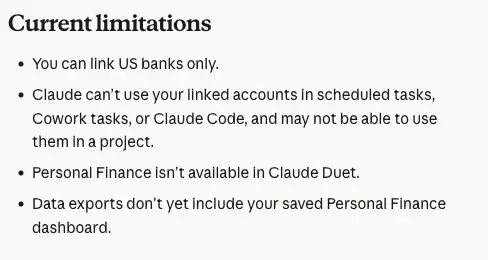
- It can’t act on your money. No transfers, no payments, no investing. Anthropic and Plaid both say read-only.
- It doesn’t read your holdings, trades, rates or terms. Linked loan and investment accounts give balances and credit limits only.
- It isn’t investment advice. Anthropic says Personal Finance isn’t designed to give it.
- It doesn’t work everywhere in Claude. Linked accounts can’t be used in scheduled tasks, Cowork tasks or Claude Code, may not work in a project, and aren’t available in Claude Duet. As of November 6, data exports don’t include the saved dashboard.
- It can’t be checked for accuracy yet. We found no independent test of the beta as of November 6, and Anthropic says to check important figures against your bank.
- It’s not for everyone. US banks only, US Pro, Max and Ultra only, and a gradual rollout as of November 6.
FAQ
Is Personal Finance in Claude free? No. It’s in beta on Pro, Max and Ultra plans in the US. It isn’t available on Free, Team or Enterprise.
Does Claude see my bank password? Anthropic says no: “Claude doesn’t ask for or see your bank password.” You sign in at Plaid.
Is my data used to train Claude? Anthropic says conversations in the Personal Finance hub aren’t used to train its models. Outside the hub, your privacy settings apply.
Can I link a bank outside the US? No. Only US banks can be linked, and the feature doesn’t appear outside the US or on a VPN from another country.
What happens to my data if I cancel Pro? You can’t open Personal Finance and Claude can’t read your accounts in chats, but your banks stay linked until you unlink them. Chats that include figures stay until you delete them.
How do I disconnect everything? Use “Unlink all banks” in Personal Finance, or disconnect Claude at my.plaid.com. Unlinking the last bank also resets the dashboard.
Should I trust the totals? Check them. Ask which transactions are in each total, and compare one month with your bank statement before you rely on it.
The bottom line
Personal Finance in Claude is a read-only way to ask Claude about your own money, and you sign in at Plaid, where Anthropic says Claude never sees your password. It’s also narrow, paid, US-only and a beta, and it’s honest in its own documentation about what it doesn’t read and where it can be wrong.
If you’re eligible and curious, link one checking account and one card, ask the five questions, and compare the first month’s totals with your bank statement before you trust anything else. If you’re not eligible, or you’d rather not connect, export a statement and use the free route. The method is the same either way: ask for the rows behind every number.
To build the habits that make any of these answers useful, try Master Your Money with AI (first 2 lessons free): Start lesson 1 free →
Sources
- Claude Help Center: Use Personal Finance in Claude
- Plaid: Plaid Powers Financial Insights In Claude (November 5, 2026)
- TechCrunch: Claude can now analyze your spending with its new Personal Finance tool (November 5, 2026)
- Android Authority: Anthropic rolls out Claude Personal Finance with spending analysis and bill tracking
- Bank of America: Connecting AI to your financial accounts? Know what you’re sharing
- CFPB: Electronic Fund Transfers FAQs
- OpenAI Help Center: Finances in ChatGPT
- Plaid Portal (my.plaid.com), where Anthropic’s page says you can also disconnect Claude