
Most AI tools for grant writing do one job: they write the first draft. On October 14, Google released something that does the opposite job. Deep Review reads a document you already wrote and tries to find what’s wrong with it, and every user gets two free reviews a week.
One quick clarification, because the names are almost identical. This is Deep Review, not Deep Research. Deep Research goes out and writes a report about a topic. Deep Review takes your finished draft and hunts for logic gaps, numbers that don’t add up, claims with no evidence behind them, and sections that contradict each other. Different product, different job.
If you write grant proposals, that second job is the one you never have enough time for. The week before a deadline, you’re too close to the draft to see it. Your colleague is busy. The funder’s reviewer, on the other hand, has nothing but time and a scoring rubric.
This guide covers what Deep Review actually is, how to use it on a proposal without handing over anything you shouldn’t, what the evidence says about how well it works, and where it can’t help you. One honest note up front: I haven’t run a grant proposal through it myself. It needs a Google sign-in and uses one of the two weekly reviews, and I didn’t want to publish “I tested it” off a made-up sample. Everything below comes from Google’s own pages, the first hands-on reports from people using it, and the research on AI proposal review. Where something isn’t known yet, I say so.
What Deep Review actually is
Deep Review started as an internal Google tool called the Paper Assistant Tool, or PAT. Google offered it to authors at computer science conferences as a pre-submission check: upload your paper before the deadline and get feedback you can act on. Google says it ran on more than 16,000 submissions across STOC, ICML, NeurIPS and ICLR, with the feedback kept entirely separate from the official peer review.
On October 14 Google opened it to everyone. Vahab Mirrokni, one of the Google researchers behind it, wrote in his launch post that the public version has been “improved and expanded” for “all types of documents: legal, finance, presentations, design docs, and others.” Google’s own examples are design documents, presentations, and legal and financial documents. Grant proposals aren’t on that list by name. Google’s announcement on X did mention “complex proposals,” but the written examples are the ones above, and that matters for how much you should trust it on your own documents. More on that below.

That screenshot answers most of the basic questions. You sign in with a Google account, upload a document or paste text, and wait. The results show up in a “Your documents” table when they’re done. There’s also an optional “custom context” box where you can tell the tool what it’s reviewing and who it’s for. For a grant proposal, that box is where you’d put the funder’s scoring criteria, and we’ll come back to it.
How the review works under the hood
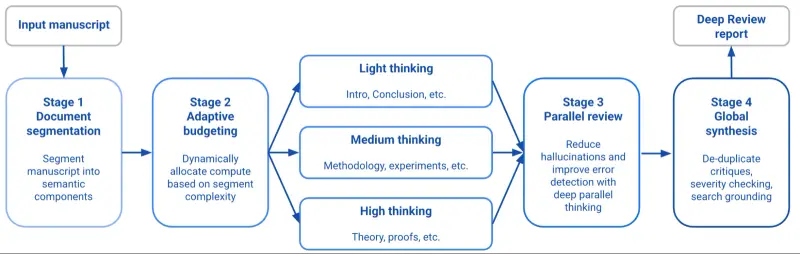
Google describes a four-stage pipeline, and it’s worth understanding because it explains both what Deep Review is good at and why it takes a while.
In plain terms:
- Segmentation. A first agent splits your document into logical sections and has to cover all of the content.
- Adaptive budgeting. Easy sections get light attention (an introduction, a conclusion). Dense sections get more computing time. In Google’s diagram, methodology gets “medium thinking” and theory or proofs get “high thinking.”
- Parallel review. Separate agents each review one section at the same time, but each one can see the whole document, so they can catch a claim on page 3 that contradicts a number on page 19.
- Global synthesis. A final agent merges the reports, removes duplicate complaints, checks how severe each issue is, and runs searches to ground what it found.
For a grant proposal, stage 3 is the interesting one. The most common errors in a proposal aren’t inside one paragraph. They live between sections: the narrative says 120 participants and the budget pays for 100, the timeline ends in month 18 but the evaluation plan needs data from month 20. A tool that reads section by section while still holding the whole document in view is built for exactly that kind of problem.
What it flags, and what Google says it can’t promise
According to Google’s launch post, Deep Review checks logical consistency and mathematical statements, grounds facts, compares claims against existing work, and suggests improvements. The post says higher-level judgments stay with humans. In the hands-on reports, the findings come with severity labels (critical, major, minor) and suggested fixes anchored to the text.
Here’s the most detailed public test I could verify. A user posted this on X on October 18 about a 35-page private benchmark specification, not a grant, but the kind of document where internal consistency matters:
- It found 36 flaws: 6 critical, 14 major, 10 minor, plus 6 suggestions.
- One flagged a sampling rule that couldn’t work: “30 runs < 40 needed across 2 exclusive rates.”
- Another caught a statistical mismatch (a 97.5th percentile used where a 95th was stated).
The author’s verdict was that they’d expected “generic AI peer-review-style fluff” and got something closer to “a hostile NeurIPS chair.” That’s one person, one document, a technical one. But notice what the best catch was: a rule that contradicted itself arithmetically. That is the same family of mistake as a budget that doesn’t match its narrative.
A Japanese academic who writes about using AI for papers and grant applications posted that a review “takes about 20 minutes” and gives “quite detailed, reasonable” points. Google’s own interface, according to one source I couldn’t verify directly, quotes 15 to 30 minutes. Plan on a coffee break, not a quick scan.
What the evidence says about accuracy
This is the section to read slowly, because the headline numbers in the coverage are easy to misread.
The 89.7% figure. Several outlets report that Deep Review “detected 89.7% of known errors.” That number is real, but it describes the earlier tool (PAT), on a small test: 26 math and computer science papers containing 29 known errors. It found 26 of the 29, and a single Gemini 3.1 Pro response found 55.2%. So “89.7%” is just 26 divided by 29. It measures how many known math or proof errors got caught. It doesn’t tell you how many of the tool’s complaints were correct, and it wasn’t tested on grant proposals, budgets or legal documents. The arXiv paper itself, which is the primary source, describes the gain more loosely as a “34% improvement over zero-shot recall on mathematical errors” and doesn’t report false positives. I couldn’t find the 26-of-29 detail in the paper’s abstract, so treat it as secondary reporting.
The pilot surveys. Google’s launch post includes a table of what authors said afterward. These are self-reported answers from authors who opted in:

| Pilot | Scale | What authors reported |
|---|---|---|
| STOC 2026 | 220 papers | 97% found feedback helpful and would use it again; 81% said clarity improved |
| ICML 2026 | 4,500+ submissions | 92.1% would use it again; 35.4% of theory authors found significant gaps needing more than an hour to fix; 31.0% of empirical authors ran entirely new experiments |
| NeurIPS 2026 and ICLR 2027 | 5,500 and 6,000+ submissions | “Very” or “Mostly Helpful” ratings rose from 73% to 86%; 94.0% said changes improved clarity; 97.2% said most feedback was factual; 58.5% of ICLR authors ran new experiments |
What these numbers support: a lot of people who tried it found it useful and acted on it. What they don’t support: that every finding is correct, or that it works the same way on a grant narrative. The people surveyed chose to use the tool, and they were writing machine learning papers. Google itself says the feedback isn’t an accuracy measurement. And the same coverage that quotes the best numbers also notes cases where the system judged a valid proof to be an error. Treat its output as a list of questions a skeptical reviewer might ask, not as a verdict.
The grant-specific evidence. There is no independent test of the public Deep Review on grant proposals yet. The nearest research is a March 2026 preprint from the Universities of Sheffield and Manchester, Evaluating LLM-Based Grant Proposal Review via Structured Perturbations. The authors took six real EPSRC proposals, inserted controlled flaws along six axes (funding, timeline, competency, alignment, clarity, impact), and measured which AI review designs caught them.
- Reviewing section by section beat a single-pass review.
- An expensive “council of personas” setup did no better than the baseline.
- Alignment problems (does this fit the call?) were usually caught. Clarity problems were mostly missed by every system.
- Human evaluators found the AI feedback largely valid but skewed toward compliance checking rather than the big-picture judgment an experienced panel brings.
- The study is small (six proposals, one institution) and the authors call it exploratory. It’s a preprint, not a finished journal paper.
Put those together and you get a realistic picture for grant writers. An AI review is likely to be good at the mechanical layer: totals that don’t reconcile, dates that conflict, a stated goal with no matching activity. It’s weak at the layer where proposals are actually won: whether the idea is compelling, whether the need is real, whether your organization is the right one to do it.
How to run a pre-submission pass on a grant proposal
Here’s a workflow that fits the tool’s real limits. The numbers (two reviews a week, one document at a time) shape the whole approach.
Step 1: Choose which proposal earns a slot
Two free reviews a week sounds generous until you’re submitting three applications before a deadline. Spend a slot on the proposal where an error costs the most: the largest request, the renewal where the program officer knows your past numbers, the application with a complicated budget. Skip the short letter of inquiry. Your colleague can read that one in ten minutes.
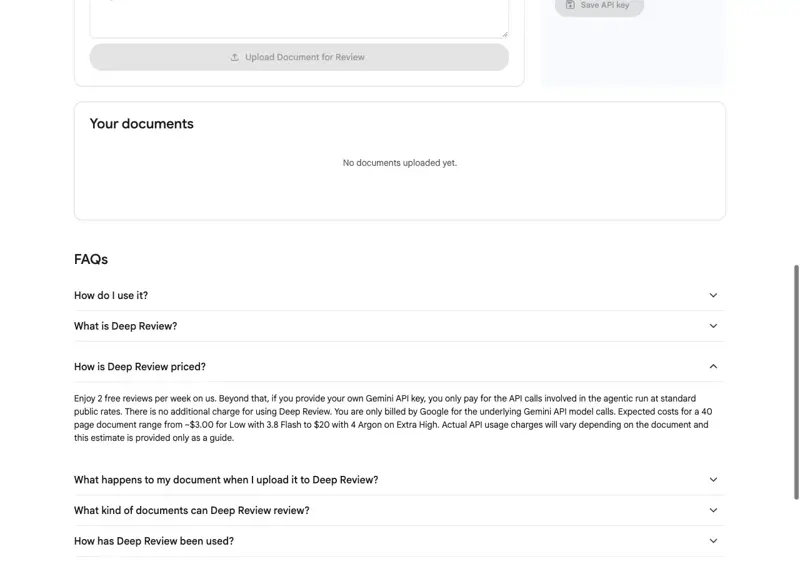
If you need more than two, Google says you can add your own Gemini API key and pay standard rates for the underlying model calls. Its pricing FAQ estimates a 40-page document at roughly $3 on a Low setting with Gemini 3.8 Flash up to about $20 on Gemini 4 Argon at Extra High, with the caveat that actual charges vary by document.
Step 2: Combine everything into one document
The launch post says multi-file uploads are “coming soon.” Today you give it one document. That has a practical consequence for grants, because the budget is usually a separate spreadsheet and the budget justification is a separate file, and the budget is exactly where the cross-checking pays off.
Assemble a single PDF with the narrative, the timeline, the budget table and the budget justification together. Use a searchable PDF, not a scan. Tables and footnotes depend on the text extracting cleanly, and a scan can turn a budget into garbage. (Google’s launch post says PDF and plain text; the live page also lists Google Docs and Google Slides, so you may be able to skip the PDF step. I’d still use a PDF so you know exactly what the tool read.)
Step 3: Strip what’s private
This step is not optional, and the next section goes through exactly why. In short: replace donor names, beneficiary names and anything tied to an individual with codes or generic labels. Leave in the facts that make the arguments checkable: amounts, dates, headcounts, percentages.
Step 4: Use the custom context box
Deep Review reviews your document as a document. It doesn’t automatically know what your funder scores. The optional context field is where you fix that. Something like this (adjust to your own funder, and only include criteria the funder has published):
“This is a 12-page project narrative plus budget for a foundation grant program. Reviewers score on need, approach, organizational capacity and measurable outcomes, 25 points each. The request is $180,000 over 18 months. Please check that the outcomes in the evaluation plan match the activities in the narrative, that the budget totals and the budget justification agree, and that every statistic is supported.”
Don’t paste your funder’s confidential review materials or a non-public RFP into that box. If it isn’t something the funder has published, leave it out.
Step 5: Upload, then go do something else
Expect about 20 minutes, based on the one hands-on report I could verify. Google’s interface says the results appear in the “Your documents” table.
Step 6: Triage the report
When it comes back, don’t read it top to bottom. Sort it. I’d suggest four buckets, which map onto the four things Google says it looks for:
- Logic gaps: an outcome with no activity that produces it, or an activity with no outcome.
- Inconsistent claims: the narrative says one thing, another section says another.
- Shaky math: totals, percentages, per-unit costs, effort calculations.
- Missing evidence: a statistic with no source, a “studies show” with no study.
Handle critical-severity items first.
Step 7: Verify every finding yourself
This is the step that makes the tool safe to use. For every item, ask “can I reproduce this?” For math, rerun it in a spreadsheet. For a missing citation, find the source or cut the claim. For a logic gap, decide whether the reviewer’s confusion is real or whether the tool misread your structure. If you can’t reproduce a finding, don’t change anything on the tool’s say-so.
Step 8: Fix, then decide on a second review
If the first pass found serious problems and you have a review left this week, run the revised version once. The point of the second run is to see whether your fixes introduced new inconsistencies. Don’t run it for reassurance.
Finally, a human signs off. That means you, and ideally a colleague, reading the final version as if you were the funder.
A way to test it safely before you trust it
You can try the tool in a controlled way, and I’d recommend it before you use a review slot on a live application. Take an old proposal that’s already been submitted and is no longer sensitive, and plant three mistakes in a copy of it:
- Change one line in the budget so a subtotal is wrong by a round amount.
- Make the timeline end a month before a deliverable that’s due.
- Add a statistic with no source.
Then see which of the three it catches, and what it says about them. You’ve now learned something real about how it behaves on your kind of document, which no benchmark can tell you. The three planted errors are a test fixture, not a claim about what the tool does. Run the test yourself and judge by what you see.
The bar heights are my illustration of exposure, not a Google or funder rating.
What you can and can’t upload: privacy and funder rules
Two sets of rules apply, and people tend to read only the first.
Google’s side
Per Google’s page and FAQ:
- Uploaded documents are stored for up to one year so you can view them in the interface, then deleted.
- They won’t be used for model training without your permission. You can opt in to let the research team use your data to improve the tool.
- The tool may run web searches to find related work while reviewing your document.
- Uploads must comply with Google’s Generative AI Prohibited Use Policy.
That’s a reasonable set of promises for a free consumer tool, but notice what’s missing. Nothing in the public materials offers a data-processing agreement, a zero-retention mode, or special terms for confidential material. “Stored for a year” is fine for a draft with the names taken out. It’s a poor fit for a document that contains someone’s health information or a client’s confidential strategy.
The funder’s side
Google’s promise doesn’t override what your funder, your institution or your own contract says. A few anchor points, and a caution about how I got them:
- NSF issued a notice in December 2023 that bars reviewers from uploading proposal content to generative AI tools that NSF hasn’t approved, because anything entered outside NSF’s firewall is treated as entering the public domain. For proposers, NSF doesn’t prohibit AI use. It encourages you to say in the project description how much generative AI you used, if any, and you stay responsible for the accuracy of everything you submit. Read it at nsf.gov/policies/ai/merit-review.
- NIH notice NOT-OD-25-132 (July 2025) says NIH won’t treat an application “substantially developed by AI” as the applicant’s original work, and it warns about plagiarism and fabricated citations. A separate notice, NOT-OD-23-149, says NIH peer reviewers may not use generative AI to analyze applications. I couldn’t load NIH’s own pages from my tools, so the NIH details here come from university research-office summaries (University of Utah, University of Maryland). Read the notices yourself before relying on my summary.
- Foundations and state agencies vary a lot, and many haven’t published anything. If a program officer is reachable, a one-line email asking “do you have a position on applicants using AI to check their drafts?” is faster than guessing.
Two rules fall out of this that I’d treat as absolute:
- If you’re a reviewer on someone else’s application, never upload it to Deep Review or any other AI tool. This is the clearest line in both the NSF and NIH policies.
- If the document contains information you promised someone you’d protect, it doesn’t go in. That includes unpublished data under a sponsor’s terms, a partner’s confidential plans, and anything covered by an NDA.
A note on how this interacts with NIH’s “substantially developed by AI” wording. Using Deep Review to find problems in text you wrote is a different thing from having AI write the application. But Deep Review also suggests fixes. If you paste its rewrites into the narrative wholesale, you’re drifting toward the thing the policy is concerned about. Use its findings to guide your own edits, in your own words.
What this means for you
If you’re a solo grant consultant. You’re the last reader on every deliverable, and you have no colleague to catch your blind spots. The free review is basically a second reader that works at midnight. Your first action: run the planted-error test on one of your own past proposals this week, so you know what kind of error it catches before a client’s deadline depends on it. Make sure your client agreements allow uploading de-identified drafts to a third-party tool.
If you’re a nonprofit executive director who writes your own grants. You’re writing the proposal, the budget and the evaluation plan, usually in that order and usually alone. The cross-section checks are where this helps most. First action: next time you finish a draft, assemble the narrative and budget into one PDF and use a review slot on your biggest application of the month. Keep a short list of the things it catches so you can see your own repeat mistakes.
If you’re on a development team of three to five. Your bottleneck is internal review. Everyone’s busy, so the draft reaches the director the night before. First action: make the Deep Review pass a step in your checklist after the draft is complete and before it goes to internal review, so the human reviewers spend their time on the story and not on the arithmetic. Agree as a team on one standard de-identification routine so nobody improvises.
If you’re a university PI or research administrator. Your institution almost certainly has an AI policy, and your sponsor’s rules sit on top of it. First action: check your research office’s guidance before you upload anything, and if you’re also a reviewer for a funder, keep that work completely separate from this tool. If your work is in math or computer science, you’re closest to the tool’s home territory, since that’s what it was built and measured on.
If you’re an independent consultant writing client proposals or bids. The use case is the same as grants: a cold read for logic holes before you hit send. For client work, the confidentiality question is mostly about your client’s name and numbers. First action: build a de-identification habit (client becomes “the Client,” figures kept in proportion), and read our guide on building client decks with AI for how to keep client information out of AI tools generally.
If you write proposals for a small business or an SBIR-style application. Sometimes the person who knows the technical idea best is also the one writing the budget. First action: use the review slot on the part of the proposal where technical claims and costs meet, such as the cost per milestone versus the milestone description.
If you’re a board member or volunteer helping with a grant. You may be the person asked to “take a look.” First action: don’t upload the organization’s draft anywhere without checking with the executive director. If you’re given permission, the planted-error test is a fine way to see what the tool does before the real thing.
Edge cases and troubleshooting
These come from Google’s FAQ, the first days of user reports, and the limits of the tool.
The report flags something that’s actually correct. This will happen. Google’s own pilot coverage notes that the system sometimes judges a valid argument to be an error. Ask the question the tool is implicitly asking and answer it in the text if a reader could reasonably have the same doubt. If you’ve checked and the number is right, leave it. A false alarm that makes you add a clarifying sentence isn’t a wasted review.
The review is long and nitpicky. One user described the thoroughness as echoing the human “Reviewer 2.” Sort by severity, fix the critical and major items, and give the minor ones a quick skim. You aren’t obliged to resolve every comment.
It doesn’t know your funder’s scoring rubric. Left alone, it reviews your document as a general document, not against a specific funder’s criteria. Put the published criteria in the custom context box. The grant-review preprint found that alignment problems were the ones AI caught most reliably, which suggests giving it something to align against is worth the thirty seconds.
Your budget lives in a spreadsheet. Multi-file input isn’t available at launch. Paste the budget table and justification into the same PDF as the narrative. If the budget is large, include the summary table and the justification, not 40 pages of line items.
The PDF won’t process or the review hangs. Earlier pilot versions reportedly had trouble with very large PDFs. Shrink the file by removing high-resolution images and appendices that aren’t relevant, make sure the PDF is searchable, and try again. If that fails, try the “Paste text” tab with the core sections.
You’ve used your two reviews and still need more. Options: wait for the weekly reset, run the highest-stakes document first, or add a Gemini API key and pay per use. Google’s estimate for a 40-page document is $3 to $20 depending on settings. Neither the free tier nor the paid one has been independently benchmarked, so don’t assume the more expensive setting finds more of the problems that matter to you.
You can’t sign in with your work account. I couldn’t verify whether Google Workspace accounts, which many organizations use, have access, or whether an administrator can block it. If sign-in fails, ask your IT contact rather than switching to a personal account for work documents. That would undercut the point of your organization’s data rules.
You ended up in the wrong product. If you searched “Google Deep” and landed on Deep Research, you’re in the wrong tool. Deep Review lives at research.google/deepreview, and it asks you for a document to review, not a question to research.
What this can’t fix
It doesn’t judge whether your idea is good. It can tell you that your outcomes and activities don’t line up. It can’t tell you whether the program is the right response to the need, or whether a program officer will find it exciting. Google itself says higher-level judgment stays with humans, and the grant-review research found AI feedback skewed toward compliance over holistic assessment.
It hasn’t been tested on grants. Google’s numbers come from machine learning and theory papers, plus a predecessor tool on a 26-paper benchmark. There’s no independent evaluation of the public product on grant narratives or budgets. Anything beyond that is my reasoning, not evidence.
It can’t check what it can’t see. It doesn’t know your organization’s indirect cost rate, what the funder will disallow, or what your finance director agreed in a phone call. Deep Review can flag that two numbers disagree. It can’t know which one is right.
It won’t replace the relationship. A conversation with the program officer, a read from someone who knows the funder, and a final proofread by a person all do things this can’t. The tool is a check, not a substitute for those.
It isn’t a plagiarism, originality or “AI detector” check. It doesn’t tell you whether your text reads as human-written or whether it duplicates another proposal. That’s a different product category entirely.
FAQ
Is Google Deep Review really free? You get two free reviews per week, running Gemini 4 Argon on Medium, according to Google’s page. Beyond that you can connect your own Gemini API key and pay standard rates for the model calls. Google’s estimate is roughly $3 to $20 for a 40-page document depending on settings.
Is it the same as Google Deep Research? No. Deep Research does web research and writes a report. Deep Review takes your own document and looks for logic gaps, math errors, inconsistent claims and missing evidence. One Japanese user already chains them: draft with Deep Research, then check the draft with Deep Review.
What file types does it take? Google’s launch post says PDF and plain text at launch, with multi-file input coming. The live page also lists Google Docs and Google Slides. A Word file can be saved as a PDF first.
Does Google train its models on my proposal? Google says uploads are not used for model training without your permission, and you can opt in to let the research team use them. Documents are stored for up to one year so you can see them in the interface. Read the terms yourself before uploading anything sensitive.
Can I use it on NIH or NSF proposals? The policies I could verify distinguish between applicants and reviewers. Reviewers shouldn’t upload applications to AI tools. For applicants, NIH is concerned with applications “substantially developed by AI,” and NSF encourages disclosing the extent of AI use. A check on your own draft is a different activity from AI writing it, but your institution may have its own rules, so check with your research office.
How accurate is it? Nobody knows yet for grants. Google reports strong author satisfaction in pilots (for example, 97.2% of NeurIPS and ICLR respondents said most feedback was factual), and the earlier PAT tool caught 26 of 29 known math errors in a small test. Those are Google’s numbers from research papers, not independent tests on proposals. It also sometimes flags correct material.
How long does a review take? The hands-on report I could verify says about 20 minutes. Google’s interface reportedly says 15 to 30. Short documents may be faster.
Will it tell me if I’ll win the grant? No, and don’t ask it to. It looks for internal problems in your document. It doesn’t know the other applicants, the funder’s budget or the panel’s preferences.
Is it okay to paste the funder’s RFP into the context box? If the RFP is public, summarizing its scoring criteria in a sentence or two is the most useful thing you can put there. If it isn’t public, leave it out.
Does it work in languages other than English? Google hasn’t published a Deep Review-specific language list. Gemini is multilingual in general, but I wouldn’t assume the same depth of technical review in every language. Test it on a document you already know well.
The bottom line
If you write grants, Deep Review is worth one free review on your next big proposal, with three conditions. Take out the names and anything confidential first. Verify every finding yourself before you change a word. And don’t treat a clean report as proof the proposal is good, because Google hasn’t shown that it works on grants.
The tool is strongest where proposals most often fail quietly: a budget that disagrees with its narrative, a timeline that doesn’t fit the activities, a claim with nothing behind it. Those are the mistakes that make a reviewer trust you less before they’ve even reached your best idea. Catching a few of them for free, in twenty minutes, while you do something else, is a good trade.
If you want to go deeper on the writing side, our AI for Nonprofit Grant Writing quick skill covers drafting and disclosure, and Grant Writing goes through the full craft. For what to keep out of any AI tool, AI Privacy 101 is the place to start. And if you’re drafting, our 4 prompts to draft a federal grant post pairs well with this one: draft there, check here. The grant proposal writer skill is a free template if you want a starting prompt.
Update note: this is a Day-5 guide. Deep Review launched on October 14, there’s no independent testing on grant proposals yet, and Google may change limits, file types or terms quickly. If something here is out of date, Google’s pages linked below are the source to trust.
Sources
- Google Research, “Analyzing technical documents with Deep Review” (October 14, 2026)
- Google Research, Deep Review product page and FAQ
- Jayaram et al., “Towards Automating Scientific Review with Google’s Paper Assistant Tool” (arXiv 2606.28277)
- Thorne et al., “Evaluating LLM-Based Grant Proposal Review via Structured Perturbations” (arXiv 2603.08281)
- Vahab Mirrokni on X, public launch announcement (October 15)
- News from Google on X, Deep Review announcement (October 14)
- @ChrisUniverse on X, 35-page spec test with 36 findings (October 18)
- @genkAIjokyo on X, hands-on note on review time and free tier (October 16)
- Digital Today, “Google unveils Deep Review tool to verify paper errors with 89.7 percent detection rate”
- Explainx, “Google Deep Review: two free reviews a week”
- NSF, “Notice to Research Community: Use of Generative AI Technology in the NSF Merit Review Process”
- NIH, NOT-OD-25-132, “Supporting Fairness and Originality in NIH Research Applications”
- University of Utah Office of Sponsored Projects, summary of NOT-OD-25-132
- University of Maryland SPA, “NOT-OD-25-132: AI, application limits and updated FAQs”
- Case Western Reserve University, “NIH limits PIs to six applications per year, issues guidance on AI use”