Medicare’s Annual Enrollment Period opened on October 15 and runs through December 7. For an agent, that’s eight weeks in which every client who got a 2027 Annual Notice of Change wants to know one thing: what happened to my plan, and do I need to do anything?
This year the answer is “something” more often than usual. More than 3 million Medicare Advantage members have to find a new plan for 2027, KFF counts 193 counties with no general-enrollment Medicare Advantage drug plan at all, and the average medical out-of-pocket maximum is rising. You’re about to explain a lot of notices.
This post gives you one workflow that a free ChatGPT, Claude or Gemini account can handle: turn a plan-level 2027 ANOC into a plain-English “what changed, what to check” brief you can use in a client conversation. It’s built around the two things that can sink an agent this season, which are putting client information into a chatbot and letting AI-written language slip past CMS marketing rules.
A note on what this is and isn’t. I’m not a lawyer, and this isn’t compliance advice. Your carrier and your FMO can, and often do, set rules stricter than CMS’s. I haven’t run the sample prompt below against a live carrier document, and the example output is written by hand to show the shape of a good answer, so you can judge any AI’s output against it. Where a detail isn’t published, I say so.
What’s different about AEP 2027
Three things are stacking up this fall, and they all change what a good AI workflow looks like.
1. The 2027 plan changes are large and uneven
- Plan exits. A widely shared analysis by Jared Strock at Medicare Market Insights is headlined “11% of Medicare Advantage enrollees are losing their plan in 2027,” and CNN’s reporting puts it as more than 3 million enrollees needing new plans, in the third straight year of upheaval. Humana alone is reported to be sending non-renewal notices to roughly 600,000 members.
- County exits. KFF’s October 9 landscape analysis finds that residents of 193 counties (about 638,000 people, 1% of beneficiaries) will have no Medicare Advantage drug plan available for general enrollment, up from 123 counties in 2026. KFF also lists insurer county exits: HCSC leaves 498 counties, Centene 359, UnitedHealth Group 228, CVS Health 186 and Humana 62, in each case before counting the counties they enter.
- Choice shrinks a little. The average beneficiary has 28 Medicare Advantage drug plans to pick from in 2027, per KFF. 20% of beneficiaries can choose from more than 40, down from 27% in 2026.
- Costs shift. A Stephens analysis reported by Fierce Healthcare says the average Medicare Advantage out-of-pocket maximum rises 9.1% in 2027. And on the Part D side, the numbers are official: Medicare.gov says no drug plan may have a deductible above $700 in 2027 (up from $615), and the annual out-of-pocket threshold rises from $2,100 to $2,400.
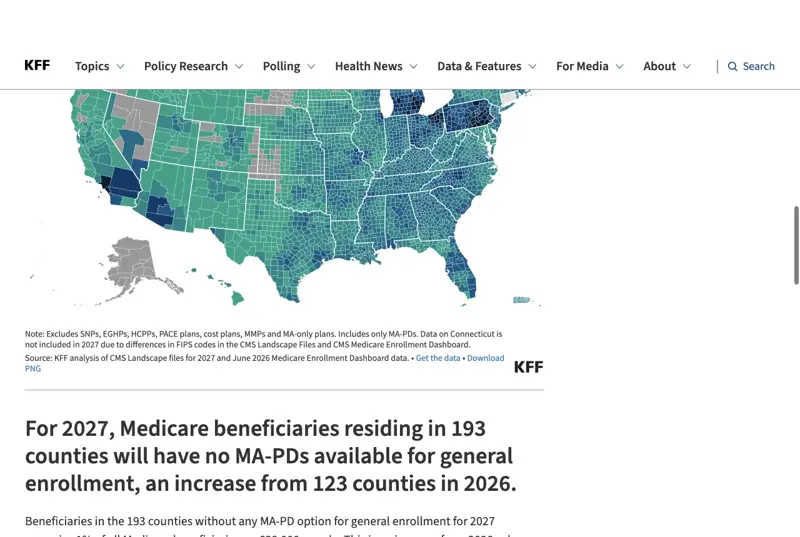
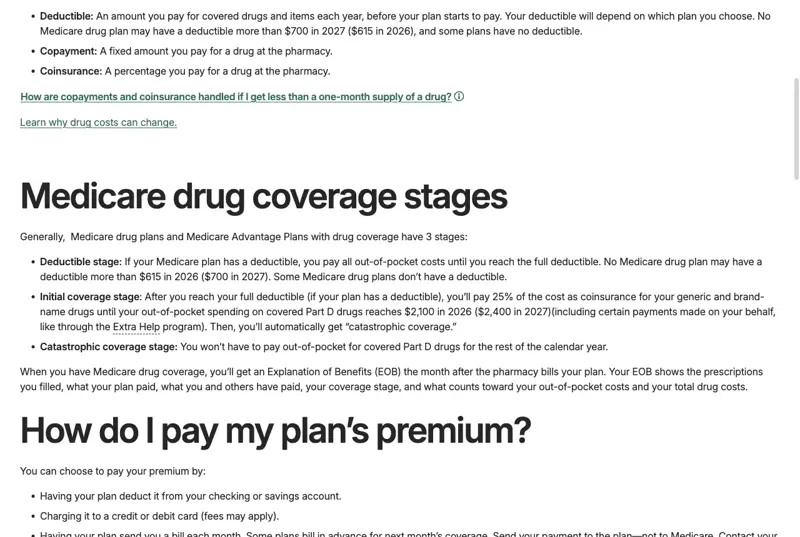
One caution about reading these numbers: they measure different things. Strock’s figure counts current members. KFF’s county count measures availability, and its 638,000 are residents of those counties, not necessarily members being dropped. Quote them with their source attached.
2. The CMS marketing rules changed on October 1
The final rule for contract year 2027 was published in the Federal Register on April 6, 2026. Its marketing and communications provisions apply to CY2027 marketing beginning October 1, 2026. For an agent using AI to draft anything, these are the changes that matter:
| What changed | What it means in practice |
|---|---|
| 48-hour Scope of Appointment wait removed | You can collect the SOA and hold the authorized appointment the same day. The SOA itself is still required and documented before the personal marketing appointment. |
| TPMO disclaimer timing | On sales calls it must come before any discussion of plan benefits, instead of within the first 60 seconds. It’s still required in electronic communications. The SHIP reference was dropped from the standard wording. |
| Call recording | Marketing and sales calls recorded and kept in full for a minimum of 6 years, with audio for the first 3 years. For years 4 to 6, audio or a complete and accurate transcript is allowed. |
| Superlatives | Words like “best” are no longer flatly barred in marketing, but trade summaries say you need support for the claim. |
Sources: Federal Register, Contract Year 2027 final rule, 42 CFR 422.2274, and trade summaries from RISE Health and Senior Market Sales. Check your carrier’s current script and approval process, which can be stricter.
The call-recording line is the one I’d double-check, because you’ll see three different numbers in articles. The regulation itself, in the provision on how plans must oversee third-party marketing organizations, reads:
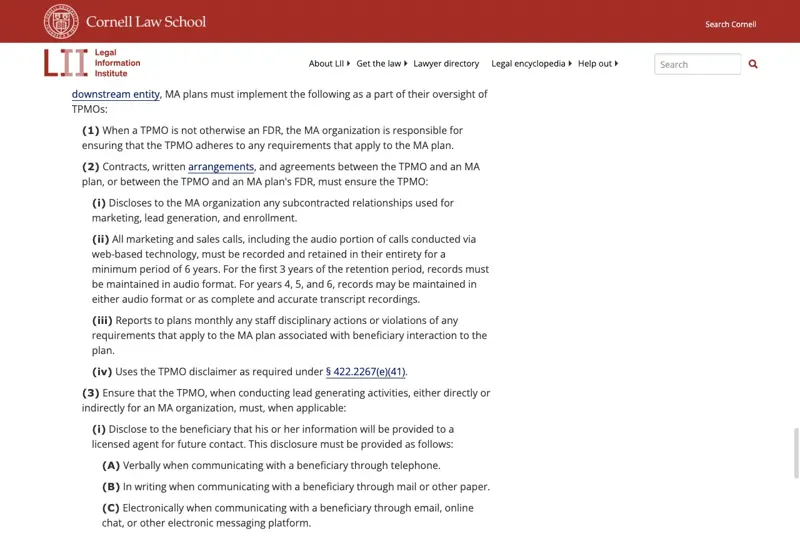
That text matters for AI in one specific way: an AI-written summary or CRM note is not a “complete and accurate transcript.” If you use an AI note-taker, it supplements the recording rules, it doesn’t replace them.
3. Nobody has written AI rules for agents, so the old rules apply to the new tool
I searched for CMS rules specific to AI-generated Medicare marketing and found none. A law-firm analysis of the CY2027 rule says CMS addressed AI only in the risk-adjustment context, through a request for information. Separately, in February 2026 CMS asked industry in a request for information about AI tools for plan selection, including “plain-language translation of plan information and Medicare documents.” That’s a request for ideas, not an approval for brokers to use public chatbots.
So the working position is: the existing rules on misleading or inaccurate communications, on carrier oversight of agent marketing, and on beneficiary privacy all apply to whatever the AI writes. There’s no exemption because a chatbot produced the sentence.
The rule that decides everything: what goes into the chatbot
Most of the ways AI goes wrong for an agent come back to a single question: what did you paste?
Safe to paste into a free chatbot:
- The text of a plan-level 2027 ANOC or Summary of Benefits, the kind carriers post for each plan on their plan-documents pages. It describes the plan, not a person.
- Public pages from Medicare.gov and CMS.
- Your own scripts and email templates, with blanks where client details go.
- Fictional clients you invent for practice.
Never paste into an unapproved tool:
- A client’s name, date of birth, address, Medicare number or phone number.
- A drug list, doctor list, diagnosis or pharmacy that is tied to a person.
- A photo or scan of a client’s mailed ANOC with the address block and member details on it. The notice is typically addressed to the member, so the name block is exactly what you’d need to cut.
- A signed SOA, a call transcript or a recording.
- Anything a client told you in confidence, even with the name taken off.
Why not just remove the name? Because removing a name isn’t the same as de-identifying data under HIPAA. HHS recognizes two methods, Safe Harbor and Expert Determination, and details that look harmless on their own can identify someone in combination, such as a rare drug, a small county and a specialist’s name.
Is HIPAA even your problem?
It depends on your role, and it’s worth knowing which side of the line you’re on. An insurance license alone doesn’t make you a HIPAA covered entity. HIPAA applies to covered entities and their business associates, and an agent’s status turns on what functions they perform and for whom. If you do work involving protected health information on a covered entity’s behalf, business-associate obligations can apply. The practical consequence for AI: if an identifiable-client workflow is ever going to be allowed, it needs an approved tool covered by an appropriate agreement for that specific product and account, plus whatever your carrier and FMO require. Having a vendor that offers such an agreement somewhere in its catalog isn’t the same thing. And turning off model training or paying for a subscription doesn’t create that coverage by itself.
For the free-tool workflow in this post, none of that applies, as long as you keep to the safe list. That’s the point of using the plan-level document.
The workflow, step by step
Step 1: Get the plan-level document
Go to the carrier’s plan-documents page for the exact plan and plan year and download the 2027 ANOC. If you only have a client’s mailed copy, use the generic version from the carrier’s site instead. That version describes the plan with no member details on it.
Check the filename and the cover page for “2027” and the correct plan name. The most common AI mistake in plan work is mixing years or mixing plans, so make sure you start from the right file.
Expected result: a PDF for the right plan and year, with no personal information in it.
Step 2: Paste only the sections you need
Most ANOCs are long. You rarely need the whole thing. Copy the summary of important costs table, the changes to benefits and costs section, and the changes to prescription drug coverage. Pasting only these keeps the AI focused and keeps you within the model’s limits.
If the PDF is a scan and the text won’t copy, don’t screenshot a client’s mailed copy into a chatbot. Use the carrier’s text-based version or type the few rows you need.
Expected result: a few pages of plain text with 2026 and 2027 values side by side.
Step 3: Run the master prompt
Copy this into a new chat, then paste the ANOC text below it:
You are helping a licensed Medicare agent prepare an educational summary of a Medicare Advantage or Part D plan’s Annual Notice of Change for plan year 2027. The text I paste is plan-level and contains no client information.
- List every change between 2026 and 2027 under these headings: premium; medical maximum out-of-pocket (MOOP); medical copays and coinsurance (primary care, specialist, hospital, emergency, ambulance); drug deductible and tiers; supplemental benefits (dental, vision, hearing, OTC, meals, transportation, fitness); pharmacy and network rules; anything else.
- For each change, quote the 2026 value and the 2027 value exactly as written and name the section or page it came from. If the text doesn’t give both values, write “not stated.”
- Explain each change in one plain sentence at an eighth-grade reading level. Do not say whether a change is good or bad for any person.
- Write a list called “Questions to ask the client”: things only the client can tell me that would decide whether each change matters, such as their medications, doctors, pharmacy and expected care.
- Write a list called “Verify before the meeting”: anything this document cannot confirm, such as whether a specific drug is on the formulary or a specific doctor is in network, and where to check it.
Rules: Do not recommend a plan. Do not invent numbers or benefits. Do not use anything that isn’t in the text I paste. If something is unclear, say so. Do not mention other plans or insurers.
Two things this prompt does on purpose. It forces exact quotes with locations, so you can spot-check each line in a minute. And it separates what the document says from what only the client can answer, which is where AI summaries most often overreach.
Expected result: a bucketed list of changes with quoted values, a plain-English line for each, and two short checklists.
Step 4: Verify, then add the client’s facts yourself
Open the ANOC and check at least the numbers in the three buckets that matter most to most clients: premium, medical MOOP and the drug deductible. Then do the part the AI can’t: bring in your client’s medications, doctors and pharmacy from your own approved systems and check them in the plan’s formulary, provider directory and Medicare Plan Finder.
The ANOC is the change map. It does not contain the full formulary or provider directory, so it can’t tell you whether a particular drug or doctor is covered next year. CMS expects the pre-enrollment conversation to cover providers, pharmacies, current prescriptions, costs and benefits.
Expected result: a verified brief plus a client-specific checklist you filled in yourself.
Step 5: Turn it into a client conversation, not a recommendation
Use the brief to open the appointment, with the SOA done and documented first, and let the client’s answers drive what you look at next. Keep any recommendation in your own words and your own judgment.
A worked example, with a fictional plan
To show the shape of the work, here is a made-up plan. Everything below is invented for illustration: the plan name, the figures and the answer. I wrote the answer by hand to show what a good result looks like, and it is not the output of any chatbot.
Fictional input. This is the kind of text you’d paste from a plan-level ANOC’s “Summary of important costs”:
| Cost | 2026 | 2027 |
|---|---|---|
| Monthly plan premium | $0 | $18 |
| Medical maximum out-of-pocket (in-network) | $5,900 | $6,500 |
| Primary care visit | $0 | $0 |
| Specialist visit | $35 | $45 |
| Drug deductible (Tiers 3-5) | $250 | $350 |
| Dental allowance (comprehensive) | $1,500 | $1,000 |
| Over-the-counter allowance | $75 per quarter | Not offered |
What a good answer looks like. Quoted values, a plain sentence, no verdict:
- Premium: 2026 “$0,” 2027 “$18” (Summary of important costs). The plan charges a monthly premium in 2027 where it charged none in 2026.
- Medical MOOP: “$5,900” to “$6,500.” The most this member could pay in a year for covered medical services rises by $600.
- Specialist visit: “$35” to “$45.” Each specialist visit costs $10 more.
- Drug deductible (Tiers 3-5): “$250” to “$350.” The member pays the first $350 of drugs on those tiers before the plan starts paying, up from $250.
- Dental allowance: “$1,500” to “$1,000.” The yearly dental allowance is $500 lower.
- OTC allowance: “$75 per quarter” to “Not offered.” The plan no longer provides this benefit.
Questions to ask the client: Which medications do you take and on which tiers? Which specialists do you see, and how often? Did you use the dental allowance or the OTC card last year, and how much? Which pharmacy do you use?
Verify before the meeting: Whether each of the client’s medications is on the 2027 formulary and at what tier. Whether the client’s doctors are in the 2027 network. Whether the plan is available in the client’s county. All three come from the plan’s formulary, provider directory and Plan Finder, not from the ANOC.
The reason this is better than a vague “your plan got more expensive” is that every line can be checked against the notice in seconds, and nothing in it tells the client what to do. That’s the line between a useful summary and a recommendation you’d have to defend.
Four more prompts that follow the same rules
All four use only generic or fictional information. Anything that includes a real client’s details has to wait for an approved tool.
1. Outreach template with blanks. Use this for the “your plan is changing” email.
Write a short, plain-English email template from a licensed Medicare agent to an existing client whose plan is changing for 2027. Use bracketed placeholders for the client’s first name, the plan name and the appointment link. Say that changes are described in their Annual Notice of Change and that I can walk through them. Do not mention any specific benefit, price or comparison. Do not use the words “best” or “guaranteed.” Leave a line that says [INSERT CARRIER-APPROVED DISCLAIMER] at the bottom.
Then your carrier or FMO approves the template and the exact disclaimer wording goes in from their approved text. Don’t let the AI write the disclaimer.
2. FAQ answer bank. Ask for plain-language definitions of terms clients mix up, such as deductible, out-of-pocket maximum, formulary, tier, network and Part D threshold. Give it the 2027 Part D figures from Medicare.gov and tell it to use only those. It’s a way to produce reading material, not advice.
3. A check on your own draft. Paste a draft email or script that contains no client details and ask:
Review this draft for claims that aren’t supported by the text I give you, for superlatives such as “best,” and for anything that sounds like a plan recommendation. List each problem with the exact words. Don’t rewrite it.
4. Practice conversations with fictional clients. Ask it to play a fictional 72-year-old whose plan is ending and who is worried about a pharmacy change, and run the first three minutes of an appointment with you. Use it to practice, never with a real client’s details.
If you have saved prompts, templates or custom GPTs from 2024 or 2025, treat them as drafts that need updating. They can carry wording that predates the October 1 changes, such as the old disclaimer timing and the 48-hour SOA assumption.
What the evidence says about AI picking plans
If a client says “I asked ChatGPT which plan is best,” you’ll want facts. Here’s what I could verify, and where the evidence stops.
- Recommendations concentrate on big insurers. A 5W AI Communications study, reported by MarketWatch, ran more than 60 prompts across ChatGPT, Claude, Perplexity, Gemini and Google AI Overviews and found recommendations concentrated among particular insurers. The coverage I found says UnitedHealthcare led AI citations at roughly 15% and Humana followed at about 12%. 5W is a PR and digital-marketing firm, and this measures how often plans are named, not whether a recommendation fits a person.
- A relevant category can still lead to the wrong plans. TheStreet reported on researcher testing in which Google’s AI Overview correctly identified dual-eligible special needs plans as relevant, then pointed the user to a page listing standard Medicare Advantage plans. The same report described plan-year mixing, county mistakes and invented allowances. It also cited a hallucination rate from a 50-query sample without published prompts or scoring, so I’m not repeating that number.
- There’s no good benchmark. I did not find a peer-reviewed study measuring how often general chatbots choose a suitable 2027 plan from a person’s full situation and live plan data. That’s an evidence gap, not proof of safety.
The takeaway isn’t “AI is bad at Medicare.” It’s that the plan-specific facts that decide a choice, like formulary status, network participation and county availability, aren’t reliably in what a chatbot retrieves. That’s why the workflow keeps AI on the document and keeps those checks with you.
What this means for you
If you’re an independent agent working alone. The ANOC workflow is the cleanest first use of AI this season because the input is public. First action: pick your three highest-volume plans, run the master prompt on each plan’s generic ANOC, spot-check the quoted values, and save the verified briefs as your own reference.
If you work through an FMO or IMO. Your FMO and the carriers you contract with may have AI policies stricter than CMS’s. First action: ask for the written rule on AI-drafted outreach and on which tools may touch client data before you build any workflow around it.
If you own an agency with CSRs or admins. The risk is the person who pastes a client’s file in at 7 p.m. during the busiest week. First action: write a one-page rule with the safe list and the never list above, and add “fictional clients only” for practice.
If this is your first AEP. You’re learning the ANOC format and the rules at the same time, which makes AI summaries tempting and error-prone. First action: run the prompt, then read the notice yourself and mark every line the AI got wrong or left out. That’s faster training than any webinar.
If you’re carrier-employed or captive. Your employer may already have an approved internal AI tool, and personal accounts can be a violation. First action: use the company’s approved tool for anything beyond public documents, and ask compliance before you try anything else.
If you’re a financial advisor or retirement planner. Clients are asking you about Medicare even though you can’t sell it. First action: use AI to draft a neutral explainer of AEP dates, what an ANOC is and how to compare plans, with a clear referral to a licensed agent or to Medicare.gov and SHIP counselors, and keep it free of plan names and recommendations.
If you’re helping a parent, not selling. Use the official Medicare Plan Finder at Medicare.gov and a free State Health Insurance Assistance Program counselor for the actual choice. A chatbot can help you understand the vocabulary on the notice. It shouldn’t choose the plan.
Edge cases and troubleshooting
1. The ANOC is a scanned image and the text won’t copy. Don’t photograph a client’s copy into a chatbot to work around it. Get the carrier’s text-based PDF for the plan, or type the few rows you need.
2. The document is 100 pages and the AI loses the thread. Paste only the summary of costs, the changes section and the drug-coverage changes, one at a time, and ask for the same bucketed output each time.
3. The AI quotes a number you can’t find. Treat that line as wrong until you find it. Make the “not stated” rule in the prompt non-negotiable, and ask it for the section name every time.
4. It mixes 2026 and 2027 or two plans. Name the plan and year in the first line of the prompt and ask it to refuse anything not labeled 2027. Researchers who tested chatbots on Medicare questions reported plan-year mixing as a recurring failure.
5. The client’s plan is ending. A non-renewal or termination is a different notice from an ANOC and a different conversation. The member must choose coverage, and the ANOC summary won’t apply. Don’t run the ANOC prompt on a termination letter.
6. SNP and D-SNP clients. Eligibility rules and benefit structures differ, and the dual-eligible example above shows how AI search tools mix categories. Verify plan type before you rely on any summary.
7. A client texts you a photo of their notice. Don’t paste it anywhere. Use the carrier’s generic ANOC for that plan and ask the client for their specific concerns by phone or in the appointment.
8. The output reads like a sales pitch. That’s a sign the model wandered beyond the text. Add “no persuasive language, no comparisons, no recommendations” to the prompt, and run the draft-check prompt from the previous section.
What this can’t do
It can’t pick a plan. The facts that decide a plan, like formulary, network, county and the client’s actual care, aren’t in a plan-level notice. The workflow prepares you for the conversation and leaves the recommendation to you.
It can’t confirm drug or doctor coverage. The ANOC doesn’t include the full formulary or provider directory. Check each in the plan’s own tools and in Plan Finder.
It can’t serve as your compliance record. AI output isn’t the compliance record, and a summary isn’t a complete and accurate transcript under the call-recording rule.
It can’t approve marketing. AI-written outreach is still marketing. It needs the same carrier review and CMS-required language as anything you write by hand, including the TPMO disclaimer in electronic communications where it applies.
It can’t make an identifiable-client workflow safe. That takes an approved tool, a proper agreement for that product and account, and your carrier’s and FMO’s sign-off. A free chatbot with a name removed doesn’t qualify.
FAQ
Can I paste a client’s ANOC into ChatGPT? Not if it contains their name, address or member details, unless your agency has an approved tool and the needed agreements. Use the carrier’s generic plan-level ANOC instead, which describes the plan without personal details.
Is ChatGPT HIPAA compliant? HIPAA compliance isn’t a property of a brand. It depends on whether you’re a covered entity or business associate, whether the specific product and account sit under an appropriate agreement, and how the data is handled. For a free consumer account, the safe approach is to keep protected health information out.
Does CMS ban AI in Medicare marketing? I found no AI-specific marketing ban or approval. The existing rules on misleading communications and on plan oversight of agent marketing apply to whatever the AI writes, and carriers and FMOs often add stricter rules.
Does the 48-hour Scope of Appointment rule still exist? The 48-hour wait is gone for CY2027 marketing. The SOA itself remains required, and you must document it before the personal marketing appointment.
When must the ANOC and the EOC reach members? The ANOC is due for receipt by September 30. The Evidence of Coverage is generally due by October 15. They’re separate deadlines.
What changed in Part D for 2027? Per Medicare.gov, the maximum deductible is $700 (it was $615 in 2026), and the out-of-pocket threshold is $2,400 (it was $2,100). Plans can have lower deductibles or none, and the Part D threshold is separate from a Medicare Advantage plan’s medical out-of-pocket maximum.
How many people are losing their plans? Estimates vary by method. Strock’s crosswalk analysis puts it at about 11% of Medicare Advantage enrollees, and CNN reported more than 3 million. KFF separately counts 193 counties with no general-enrollment Medicare Advantage drug plan. Cite the source and its definition whenever you use a number.
Should I tell clients I used AI? I found no CMS rule on disclosing AI use in these sources. Ask your carrier and FMO, since their policies may say otherwise. Whatever you decide, what you tell clients must be accurate, and you remain responsible for it.
Will AI replace Medicare agents? The evidence here points the other way for this season. Agents are using AI for drafts, checklists and admin, while the plan-specific, person-specific judgment still depends on a licensed human with access to verified plan data. I wouldn’t predict beyond that.
The bottom line
Use AI on the plan document, never on the person. A plan-level ANOC pasted into a free chatbot, a prompt that forces quotes and “not stated,” and a verify-everything habit will give you a clear “what changed” brief for each plan in minutes instead of an hour. Then you bring the client’s own facts into the conversation yourself, check them in the plan’s formulary, directory and Plan Finder, and keep the recommendation and the compliance record where they belong.
If you want a structured way to build this into your practice, our AI for Insurance Agents: Clearer Client Communication course covers plain-English policy explanations and license-safe AI use, and the broader AI for Insurance Professionals course covers the wider toolkit. For the privacy side, AI Privacy 101 explains what to keep out of AI tools. If you want general-insurance prompts beyond Medicare, see 7 ChatGPT Prompts for Insurance Agents, and for the HR-side version of the same problem, Open Enrollment Emails With Free AI. For the compliance angle on AI notes, see AI Meeting Notes for Financial Advisors.
Check this against your own carrier and FMO guidance before you build a workflow on it. Rules, plan data and AI tools all change fast during AEP.
Sources
- KFF, “Medicare Advantage Plan Availability Varies Widely by County for 2027” (Oct 9, 2026)
- Medicare.gov, “How much does Medicare drug coverage cost?” (2027 deductible and threshold)
- Federal Register, Medicare Program; Contract Year 2027 policy and technical changes (Apr 6, 2026)
- 42 CFR § 422.2274, agent, broker and third-party requirements (LII)
- 42 CFR § 422.2267, required materials and content (LII)
- Medicare Market Insights, “11% of Medicare Advantage enrollees are losing their plan in 2027” (Oct 8, 2026)
- RISE Health, “Why AEP 2027 will look different for Medicare marketing and sales teams”
- Senior Market Sales, “What the 2027 Medicare Advantage & Part D final rule means for insurance agents”
- Crowell, “CMS finalizes CY 2027 Medicare Advantage and Part D rule: key implications for plan sponsors”
- TechTarget, “CMS solicits information on AI tools for Medicare plan selection” (Feb 23, 2026)
- 5W, Health Insurance AI Visibility Index 2026
- Insurance Business, “Humana exits affect 600,000 members: brokers have weeks to act”
- HHS, HIPAA and cloud computing guidance
- HHS, Guidance on de-identification of protected health information
