
Type site:claude.ai/share into Google last weekend and you’d have seen something you weren’t supposed to: a long list of other people’s Claude conversations. Resumes with real names and phone numbers. Business plans. Notes about someone’s medical diagnosis. Even a few API keys — the passwords that let apps talk to each other.
None of it was hacked. Every one of those pages belonged to someone who, at some point, clicked a button that said Share.
If you’ve ever hit Share on a Claude or ChatGPT chat, this one’s worth two minutes of your attention. Google has already cleaned up the search results — but that’s only half the story, and it’s not the half that protects you. Let’s walk through what actually happened, and the quick fix that does.
What happened
Over the weekend of July 25–26, someone on Reddit noticed that a plain Google search would pull up hundreds of shared Claude chats. The trick was a basic search operator — site:claude.ai/share just tells Google “only show me pages from this address.” By July 27–28, it was everywhere: Fortune, TechCrunch, Tom’s Guide, Malwarebytes, the BBC. TechCrunch ran it as a straight-up public-service warning.
Here’s the mechanic, in plain English. When you share a Claude chat, Claude turns it into a real web page with its own link. That page lives on the open internet, same as any blog post or news article. And anything on the open internet, Google can find and list in its search results — unless the site specifically tells search engines “don’t list this one.” Claude’s share pages were missing that “don’t list this” instruction. So Google listed them.
Anthropic (the company behind Claude) moved fast once it came to light, added the do-not-list instruction, and by that afternoon the search results were gone. The company’s position has been consistent and, honestly, fair: these were pages people chose to make public. In its statement to reporters, Anthropic said the shareable links “are not guessable or discoverable unless people choose to share them themselves,” and that when you share a conversation, “you are making that content publicly accessible” — like any other public page on the web.
Both things are true at once. Nobody broke in. And a lot of people clearly did not realize that “Share” meant “publish to the public internet.” That gap — between what people thought the button did and what it actually did — is the whole story.
This isn’t the first time — and won’t be the last
If this feels familiar, it should. Back in 2025, ChatGPT had a nearly identical moment. It briefly offered an option to “make this chat discoverable,” and thousands of shared conversations ended up searchable on Google before OpenAI pulled the feature. Same button, same surprise, same cleanup.
So this isn’t a Claude problem or a ChatGPT problem. It’s a Share button problem. The one lesson that outlives every news cycle is short enough to tape to your monitor:
“Share” is not “Private.”
Every AI chatbot with a share feature works this way. The link is public by design. That’s not a bug — it’s the entire point of sharing. The only mistake is assuming it means something softer than it does.
The fix: check, unshare, confirm
Good news: cleaning this up on your own account takes about two minutes. And because Google already wiped the live search results, you’re not racing anyone. You’re just closing a door that might still be open.
The important bit most people miss: Google clearing its search results does not delete your page. The shared link is still live. Anyone who saved it, or has it open in a tab, can still see it. The only thing that truly takes it down is you unsharing or deleting the link. So don’t stop at “the Google results are gone.” Go turn off the link.
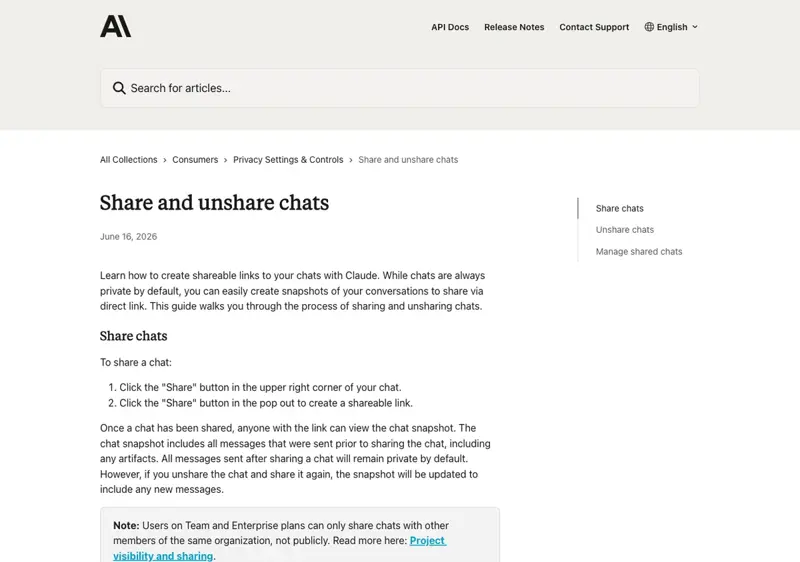
On Claude. Click your name in the bottom-left corner, open Settings, then Privacy. Next to “Shared chats,” click Manage. A window pops up listing every chat you’ve ever shared — the title, the date, and the link. Click Unshare next to anything you don’t want public anymore. That’s it. (One catch worth knowing: you can only do this from a browser, not the phone app. On mobile you can see your shared chats but not turn them off.)
Anthropic lays out these exact steps in its own help center, so you’re not guessing:
On ChatGPT. Open Settings, go to Data controls, and find Shared links. You’ll get a list of every link you’ve created. Delete any you don’t want floating around. Same idea, different menu.
Then confirm. Once you’ve unshared, the public page should stop working — clicking the old link gives a “not found” instead of your conversation. If you want to be thorough, search Google for your own name plus a phrase you remember typing. If nothing of yours comes up, you’re clear. (And if an old page still shows in Google for a day or two after you unshare, that’s just Google catching up — the page itself is already dead.)
What this means for you
If you’ve never used the Share button: you’re fine. Regular chats you just type and read are private to your account — they don’t get their own public web page. This whole thing only touches conversations someone deliberately turned into a shared link. Still, it’s worth a 30-second peek at your shared-links list, just to be sure past-you didn’t share something and forget.
If you’re job hunting: this one’s for you. A lot of the exposed pages were resumes and cover letters people had Claude help polish — full name, phone, address, work history, all sitting on a public page. If you ever shared a chat to save or send a draft, go unshare it now. Then keep the habit: copy the text out of the chat and paste it into an email or a doc. Don’t share the live link.
If you run a small business: your shared chats can carry more than you think — client names, pricing, a half-finished contract, that vendor you’re quietly negotiating with. Before you share a chat with a partner or contractor, ask whether you’d be okay with a stranger reading it. If not, copy the useful part out and send that instead.
If you’re a parent: kids share things without reading the fine print — that’s just being a kid. If your child uses an AI chatbot for homework, sit with them for two minutes and show them the share list. Not to scare them. Just so they learn the one habit that matters: a “share” link is a public link, so don’t put your name, your school, or your address in a chat you’re about to share.
What this fix can’t do
Let me be straight about the limits, because “unshare and you’re safe” is a little too tidy.
- It can’t reach copies other people already made. If someone screenshotted your page or saved it while it was public, unsharing your link doesn’t recall their copy. You can close the door, but you can’t un-ring a bell that already rang.
- It can’t scrub archives instantly. Some services quietly save snapshots of public web pages. Anthropic itself noted that shared content, once public, “may be archived by third-party services.” Unsharing stops new copies; it may not erase every old one.
- It doesn’t make your normal chats confidential. This story is only about shared links. Your everyday private chats are a separate question — what the company stores, what it might use to train future models, who could see it. That’s a bigger topic, and we cover it in our plain-English guide to whether ChatGPT is actually private.
- It won’t fix the next button. Some new “share,” “publish,” or “make public” feature will show up, and a fresh batch of people will be surprised again. The fix isn’t memorizing one menu. It’s the habit: before you make anything public, assume the whole internet can read it.
If your worry is less “did I share something” and more “can I even trust what this thing tells me,” that’s a different and honestly more useful question — we wrote a whole guide on whether you can trust AI and when to double-check it.
The bottom line
Nobody hacked Claude. A bunch of people just learned, all at once, that the Share button does exactly what it says — it shares, with everyone. Google cleaned up the search results in a day. The part that’s on you takes two minutes: open your settings, look at what you’ve shared, and turn off anything you wouldn’t post publicly.
The deeper skill here isn’t a menu path — it’s understanding what these tools actually do before you click. That’s the whole idea behind our AI Fundamentals course: no hype, no jargon, just enough understanding to use AI with confidence instead of getting surprised by the next headline. Learn how these tools really work once, and “Share” stops being a trap.
Go check your shared-links list right now, while you’re thinking about it. Two minutes. Then you never have to wonder.
Sources
- TechCrunch — PSA: Your Claude shared chats and Artifacts may have ended up on Google
- Fortune — A trove of users’ seemingly private conversations with Anthropic’s Claude showed up in Google search results
- Tom’s Guide — I just learned your Claude AI chats could show up in Google — here’s how to check yours
- Malwarebytes — Shared Claude chats were searchable on Google
- Anthropic Help Center — Share and unshare chats