On October 8, Anthropic took Claude Docs, Slides and Design out of beta and put them on every Claude plan, including the free one. If you run a small nonprofit, that sentence matters more than it sounds. The board meeting is still in three weeks, the development office is still you, and nobody on staff has ever opened a design tool on purpose.
There’s a date floating around that muddies this. October 15 shows up in a lot of coverage as the day these tools “turn on by default.” That date is real, but it belongs to Enterprise organizations. If you’re on a free or personal account, you don’t have to wait for anything. This article walks through what changed, a workflow for turning your numbers into a board report and a donor deck, and the one rule that decides whether this is safe to do: never paste a donor record into a general chatbot.
What just changed (and what didn’t)
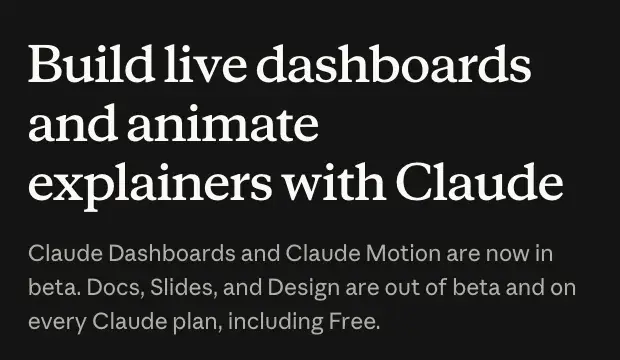
Here’s the announcement, as Anthropic’s own page puts it: “Claude Dashboards and Claude Motion are now in beta. Docs, Slides, and Design are out of beta and on every Claude plan, including Free.”
Three things people keep mixing up, so let’s separate them:
- October 8 is general availability. Docs, Slides and Design left beta and became available on all plans. When they first launched on September 16, they were beta-only on paid plans, with Team and Free to follow, according to Unite.AI’s reporting. Our earlier walkthrough was written when the free tier was still “coming soon.” That part is now out of date, and it’s fixed there.
- October 15 is an Enterprise default. Anthropic’s Docs help page says it directly: on Enterprise plans, Docs “turn on by default October 15, 2026,” and owners can enable them earlier under Organization settings, then Artifacts. If your nonprofit is on an Enterprise contract, your admin controls this. If you’re on Free, Pro, Max, or Team, it’s on by default already.
- Dashboards and Motion are not part of the free change. Those two launched in beta this week. Dashboards is a paid-plan beta and Motion is a Team and Enterprise beta, per TestingCatalog’s plan breakdown. Everything below is about Docs and Slides.
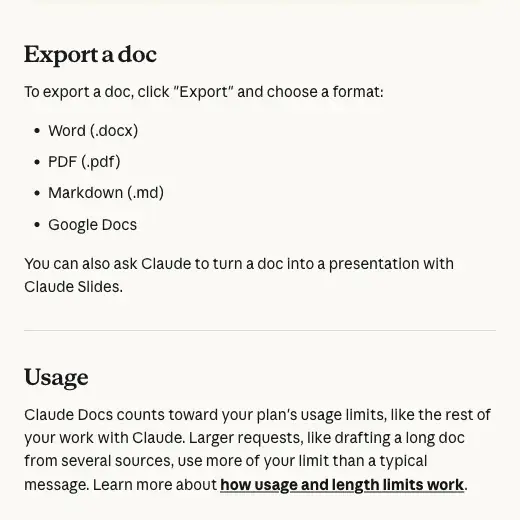
Free doesn’t mean unlimited, and that’s the catch you’ll hit first. Anthropic’s help page says Claude Docs “counts toward your plan’s usage limits, like the rest of your work with Claude,” and that larger requests, like drafting a long doc from several sources, use more of your limit than a typical message. There’s also a temporary usage promotion running through October 15. Coverage disagrees on whether Free accounts are included, so I wouldn’t plan around it. We’ll come back to limits in the troubleshooting section.
Why nonprofits, and why now
Most of the how-to content about AI slides is written for consultants and marketers. Nonprofit staff do the same work with less: a development coordinator who is also the grants writer, the newsletter editor and the person who fixes the printer. Three kinds of document eat that person’s month.
- The board report. One to three pages, numbers plus a story, due before every meeting.
- The donor update. A short deck or letter that says “here’s what your money did,” usually built the night before.
- The appeal or thank-you letter. Repetitive, emotionally loaded, and easy to get slightly wrong.
These are exactly the “clean, single-idea” documents AI drafting handles well. The honest limit is polish: you’ll still do a design pass.
The adoption numbers suggest most of the sector is already experimenting. According to the Virtuous and Fundraising.AI 2026 Nonprofit AI Adoption Report, which surveyed 346 nonprofits in December 2025, 92% use AI in some capacity, 81% use it ad hoc, and 47% have no AI governance policy. Candid’s July 21, 2026 summary of Blackbaud Institute and Edge Research surveys found 85% of social-impact professionals use AI at work, but only 33% say their organization uses it very effectively. And per Candid’s write-up, only about half of nonprofits have paid or enterprise AI tools, while nearly a quarter rely on free versions.
Those are different surveys measuring different populations, so don’t average them. But they point the same direction: lots of staff are already pasting things into chatbots, and most organizations haven’t decided what’s okay to paste. That brings us to the rule.
The rule that comes before any prompt: aggregates only
Here’s the line from NTEN’s Generative AI Use Policy Template for the social sector: “Do not include employee, client, or vendor personal data in any inputs into the GAI tool unless authorized by Organization Legal.” The same template tells organizations to anonymize personal data before uploading files where feasible, and to approve the vendor and the intended use first.
Donors are the clearest case. Candid’s summary of the donor side of its research found that 68% of donors said protecting sensitive or personal data in AI use is very important, while 36% of nonprofits were taking that step. More than three-quarters of donors said disclosing AI use is important. About a quarter of nonprofit staff said they do it.
So the practical rule for this workflow is simple:
Describe your numbers in aggregate. Never paste donor names, emails, gift-by-gift records, notes from donor conversations, or anything about the people you serve.
One more thing, from Anthropic’s own privacy page for consumer plans (Free, Pro, Max). Chats can be used to improve Claude if you’ve opted in through the “Model Improvement” setting in Privacy Settings, or if a conversation is flagged for safety review. Incognito chats are not used to improve Claude, even if Model Improvement is on. Thumbs-up and thumbs-down feedback stores the related conversation for up to five years. That page covers consumer plans only. Commercial products like Team and Enterprise are covered by separate terms, so read those if that’s your plan.
I’m not saying “Claude will train on your donors.” I’m saying you don’t have to find out. If a donor’s name never goes in, there’s nothing to leak, retain, or explain to a board member who asks.
A worked example: from a donor export to something safe to paste
Let’s use a made-up organization, Harbor Light Community Pantry. Everything below is invented, including the people, but the arithmetic is real. Here’s a raw export of eight gifts from last quarter:
| Donor | Gift | Date | Channel | Status |
|---|---|---|---|---|
| Marguerite Ellison | $250 | Jul 14 | Online | New |
| Dwayne Okafor | $50 | Jul 22 | Online | Renewing |
| Priya Raman | $1,000 | Aug 3 | Check | Renewing |
| Tomas Vidal | $75 | Aug 9 | Online | New |
| Elaine Whitcomb | $500 | Aug 19 | Check | Renewing |
| Samir Haddad | $25 | Sep 2 | Online | New |
| Joyce Lindqvist | $150 | Sep 11 | Online | Renewing |
| Anthony Reyes | $2,500 | Sep 24 | Check | Renewing |
That table does not go into Claude. Not the names, not the emails that would sit next to them in a real export, not the dates that could identify a gift.
Here’s what does:
- 8 gifts totaling $4,550, average $569.
- 3 first-time donors gave $350 combined. 5 renewing donors gave $4,200.
- 5 online gifts totaling $550. 3 checks totaling $4,000.
- One lead gift made up 55% of the quarter’s total.
Notice the last line. When your sample is tiny, an aggregate can quietly point at one person. In a small town, “one $2,500 gift in September” might be enough for a board member to guess who it was. So the second half of the rule is: if a category has fewer than five donors, fold it into a bigger one or round it. I’d write “a lead gift representing just over half of the quarter” and leave the amount and date out.
The program numbers are safe as they are, because they describe an activity rather than a person: 612 households served, 38,400 pounds of food distributed, 1,150 volunteer hours.
The workflow: board report to donor deck
Here’s the sequence I’d follow, using Harbor Light’s numbers. One note on what you’re about to read: I haven’t pasted a transcript of Claude’s output into this article, because the output changes every time and I’d rather show you the inputs and the checks than a one-time result. What I’m giving you is the prompt, what to look for, and where it tends to go wrong.
Step 1: Check your privacy settings (one minute)
Open Claude’s Privacy Settings and look at Model Improvement. If you’re about to work with anything even mildly sensitive, decide on purpose whether that setting should be on. Per Anthropic’s page, incognito chats are never used to improve Claude. For aggregated, non-identifying numbers, the risk is low either way. Settings are the habit worth building, because the next person on your team will paste something they shouldn’t.
What you should see: a toggle you can read and change. If your organization has a Team or Enterprise plan, ask your admin which terms apply to your workspace.
Step 2: Write the facts block
Before you open Claude, write a short plain-text block of facts. This is your source of truth, and you’ll check Claude’s output against it later.
Organization: Harbor Light Community Pantry (fictional)
Period: Q3 (July–September)
Program: 612 households served; 38,400 lbs of food distributed; 1,150 volunteer hours
Giving: 8 gifts totaling $4,550; 3 first-time donors, 5 renewing; 5 online, 3 by check
Notable: a lead gift made up just over half of the quarter's giving
Wins: opened Saturday hours in August; started a produce-rescue partnership with two grocers
Challenge: demand up, volunteer shifts on weekday mornings hard to fill
Ask for the board: approve a pilot for evening volunteer shifts
No names, no emails, no individual gifts. If a number would let someone figure out who a person is, it stays out.
Step 3: Ask for the board report first, as a doc
Start with the document, not the deck. A doc forces the argument into order. Anthropic’s Docs help page says you can ask Claude for a doc in a conversation, begin your request with /docs, or pick Output and then Docs in the message box. It also says Claude “asks a few questions before it starts, then drafts the doc on screen.”
Paste this:
Create a one-page board report for a small community food pantry using only the facts below.
Audience: our board of directors, who are volunteers and not finance experts.
Structure: (1) three-sentence summary, (2) program results, (3) giving results,
(4) one challenge and the decision we need from the board.
Rules: use only the numbers I gave you. Do not invent any figures, quotes,
or percentages. If something is missing, put [NEED: ...] in brackets instead of guessing.
Plain language, no jargon. Keep it under 350 words.

[paste your facts block here]
The two rules that earn their keep are “use only the numbers I gave you” and the bracket instruction. Without them, AI drafting tools tend to fill gaps with plausible-sounding specifics.
What you should see: a document on screen with your four sections. Claude may ask a clarifying question or two first, like what tone the board prefers. Answer briefly. Then read every number against your facts block. Don’t skim. If a number isn’t in the block, it shouldn’t be in the doc.
Step 4: Fix it by instruction, not by retyping
You can edit directly, or tell Claude what to change. The help page notes that people with edit access can work on the same doc at the same time as you and Claude. Try instructions like:
- “Cut the summary to two sentences and lead with the households served.”
- “The challenge section reads like a complaint. Reframe it as a decision for the board.”
- “Add a one-line thank-you to our volunteers at the end. Don’t name anyone.”
Step 5: Turn the doc into a deck
The Docs help page says you can “ask Claude to turn a doc into a presentation with Claude Slides.” Use that, and be specific about audience and length:
Turn this report into a 6-slide deck for a board meeting.
One idea per slide. Slide 1: the headline result. Slides 2–3: program results.
Slide 4: giving. Slide 5: the challenge. Slide 6: the decision we're asking for.
Keep each slide to a headline and at most three short bullets.
Suggest a simple chart where one helps, using only the numbers in the report.
What you should see: an editable deck in the conversation. The earlier Claude Slides walkthrough found that structure and storyline come out strong while visual polish needs a pass. Expect to adjust spacing, fonts and any chart.
Step 6: The number check
This is the step that turns a draft into something you can put in front of a board. Open your facts block next to the deck and tick off every figure. Then use Claude as a second pair of eyes:
List every number and every factual claim in this deck.
For each one, tell me whether it appears in the facts I gave you earlier in this
conversation. Flag anything that does not.
That check isn’t perfect, since the model that wrote the deck is also checking it. Treat it as a quick filter before your own read, not a replacement for it.
Step 7: Export and share
For the deck, Anthropic’s announcement says PowerPoint and PDF downloads “look like what you made in the editor,” and reporting on the launch says decks can go to Google Slides as editable files. Treat the fidelity claim as Anthropic’s, not a tested fact. Always open the exported file before the meeting.
For a doc, the help page lists four formats under Export:
Sharing works differently by plan. On Free, Pro and Max, you can share with anyone who has the link, as a viewer or an editor. On Team and Enterprise, docs can’t be shared outside your organization, by link or by email invitation. For a board packet, that means a free-plan link is easy but public to anyone who gets it, and an organization-plan doc needs a PDF export to reach a board member outside your workspace.
Prompts you can paste today
These all assume you’ve already built your aggregate-only facts block.
The donor update deck
Create a 5-slide donor update for supporters of a small nonprofit.
Tone: warm, specific, grateful. No hype, no exclamation points.
Slide 1: "Here's what your gifts did this quarter." Slides 2–4: one result each,
with the number first and a one-sentence plain explanation. Slide 5: a simple
thank-you and one clear next step.
Use only the facts below. Do not invent stories, names, or quotes.
If a story would help, put [STORY NEEDED: ...] as a placeholder for me to fill in.
The placeholder is important. Real stories from the people you serve should come from you, with their consent, not from a model.
The appeal letter from reviewer notes
Turn these bullet points from our program officer's feedback into a one-page
appeal letter to individual donors. Keep it under 300 words. Plain language,
first person plural. End with one specific ask. Do not invent statistics.
[paste your bullets here]
The “make it sound like us” pass
Here is a paragraph from our last annual report so you can match our voice:
[paste 100–150 words of your own public writing]
Rewrite the draft above to match this voice. Keep every number unchanged.
Use public, approved text only. A published annual report is fine. An internal email chain is not.
The board-friendly translation
Rewrite this finance paragraph for board members who are not accountants.
Define any term a volunteer might not know in a short parenthetical.
Do not change any numbers.
How this compares to your other options
You have more choices than “pay for a designer” or “fight with a template.” Here’s how the realistic paths line up for a small nonprofit, using only facts I could verify.
| Claude, Free plan | Claude for Nonprofits (Team) | Claude Enterprise | |
|---|---|---|---|
| Cost | $0 | Nonprofit standard price listed at $8 per user per month, minimum 2 seats, up to 150 seats | Contact sales |
| Docs + Slides | Included, within usage limits | Included, on by default | Included, on by default from Oct 15, or earlier if an owner enables it |
| Sharing a doc | Anyone with the link | Within your organization only | Within your organization only |
| Who it fits | A solo coordinator drafting aggregate-only reports | A small team that wants shared, governed use | Large organizations with admin and compliance needs |
| Data terms | Consumer terms: chats may be used if Model Improvement is on | Commercial terms, which differ from consumer terms | Commercial terms |
| Extras | Nothing nonprofit-specific | Nonprofit connectors (Blackbaud, Benevity, Candid are named) and a free AI Fluency for nonprofits course | Higher usage limits, Compliance API, SCIM |
A few details on Claude for Nonprofits, from Anthropic’s nonprofit page. It’s open to registered 501(c)(3) organizations and their international equivalents, K-12 schools, and some mission-based healthcare providers. Teams under 20 people verify through a partner called Goodstack, which the page describes as a quick two-to-three-minute check. Larger organizations verify through the sales team. There’s also an “access” price of $3 per user per month for nonprofits based in low- and middle-income countries. Anthropic announced the program on December 2, 2025, with discounts of up to 75% on Team and Enterprise plans. Prices exclude tax and can change, so confirm on the page before you budget.
The point of the table: the free change doesn’t replace the nonprofit program. It removes the barrier to trying the tool. When your team grows past one person doing the drafting, or you want shared workspaces and nonprofit connectors, the paid nonprofit tier is the next step.
What this means for you
If you’re a solo development coordinator. You’re the primary audience. Your first action: build one facts block for last quarter, run Step 3, and compare the draft to your last real board report. If the structure is better than yours, keep it. Check every number.
If you’re an executive director of a small organization. Your risk is time, not tools. Your first action is to write a half-page “what we paste and what we don’t” rule and share it with your staff before anyone experiments. Use the NTEN template as a starting point.
If you’re a volunteer board treasurer. You can use the board-friendly translation prompt to turn financial statements into plain language, but only with aggregates and only for your own understanding. Your first action: take one paragraph from the last financial report and ask for a plain-language rewrite with no numbers changed.
If you’re a program manager. Program results are your safest material, because they describe activity, not individuals. Your first action: turn this quarter’s outputs into three one-sentence results a donor would understand, and drop them into the donor update prompt.
If you’re a church or ministry administrator. The same logic applies to bulletins and announcements, and the same caution applies to member information. Start with the AI for churches never-paste guide, then try the doc prompt on this week’s announcements. Your first action: draft the bulletin from a plain list of events, with no names of members in it.
If you’re a grant writer. Slides won’t write your proposal, but Docs can turn reviewer bullets into a readable draft. Our grant prompts guide covers disclosure rules for federal grants, which still apply when the tool changes. Your first action: use the appeal-letter prompt with a set of your own public bullets and compare it to what you’d have written.
If you’re on an Enterprise contract. Your admin decides. Ask who the Claude organization owner is, and whether Docs, Slides and Design are enabled under Organization settings, then Artifacts. If they’re not on yet, they will be on October 15 by default. Your first action: ask your admin what data terms apply to your workspace before you use it for anything sensitive.
Edge cases and troubleshooting
“I ran out of usage in the middle of a deck.” Docs and Slides count toward your plan’s usage limits, and longer drafts use more. On the free plan, a rolling window resets, so the practical fix is to plan the work in two sessions. Build the report first, take a break, then ask for the deck. Shorter, more specific prompts also use less than long back-and-forth rewrites.
“The PDF export looks messy.” One user on X wrote on October 9 that generating a PDF from Claude Design is “always a mess” and takes several tries to get every slide looking right. That’s one person’s experience of Design specifically, with low engagement, so don’t treat it as a verdict. But it matches the advice to open any export before you present. If PDF is rough, try PowerPoint, or export the doc to Word and format it there.
“My exported PowerPoint doesn’t match what I saw in Claude.” Anthropic says PowerPoint and PDF downloads look like the editor. Some early testers have reported rough edges on complex layouts. Keep your slides simple: one headline, three bullets, one chart. Simple slides survive any export.
“Claude put a number in my report that I never gave it.” It happens. That’s why the prompt tells it not to, and why Step 6 exists. If you find an invented figure, say so plainly in the chat: “That 14% isn’t in my facts. Remove it and anything like it.” Then re-read the whole thing.
“I can’t share the doc outside my organization.” On Team and Enterprise plans, that’s a documented limit. Export a PDF and send that.
“The chart didn’t update when my numbers changed.” The Docs help page lists this under known limitations: charts and diagrams don’t update automatically. You have to ask Claude to refresh them from the new data.
“I can’t change sharing settings from my phone.” Also documented. The mobile app for iOS and Android can’t change sharing settings yet. Do that from a browser.
“Our admin hasn’t turned it on.” On Enterprise, owners can enable Docs, Slides and Design early in Organization settings under Artifacts. Otherwise it arrives by default on October 15.
“There’s no comment-only access.” The help page lists this as a known limitation. People you share with can be viewers or editors. If you want feedback without edits, send a PDF.
What it can’t do
It can’t make your data safe for you. The aggregate-only rule is a habit, not a feature. No setting turns a donor record into something safe to paste.
It can’t replace a designer for flagship pieces. For your annual report or a campaign launch, you’ll still want a human with design training. Use Claude for the routine documents that otherwise eat your month.
It can’t guarantee a number is right. Language models write fluent text, and fluent text can be wrong. Every figure needs a human check against your records.
It can’t speak for the people you serve. Don’t ask it to invent a beneficiary story, and don’t paste a real person’s story in without consent. If you want a story in the deck, write it yourself or use a placeholder.
It can’t make Dashboards or Motion free. Those are separate beta tools on paid plans. If you want a live giving dashboard, that’s a different conversation.
It can’t be your AI policy. Blackbaud Institute found formal AI policies at 14% of organizations in its 2025 study and 30% in its March 2026 survey of 1,389 social-impact professionals, with another 37% planning one. That’s rising, but a tool can’t set your rules. Your board should.
FAQ
Is Claude Slides really free? Yes, in the sense that Docs, Slides and Design are available on every plan, including Free, as of October 8. Usage counts toward your plan’s limits, so heavy use will hit a ceiling. There’s no fixed number of free decks.
Does October 15 change anything for me? Only if you’re on an Enterprise plan. That’s when Docs, Slides and Design turn on by default for those organizations, and owners can enable them earlier.
Can I put donor names in? I wouldn’t. NTEN’s policy template says not to include personal data in inputs unless authorized by your organization’s legal lead, and the safer habit is aggregates only. Fold small groups together so one donor can’t be picked out.
Does Claude train on my chats? For consumer plans, Anthropic says chats may be used to improve Claude if you opt in under Model Improvement, or if a conversation is flagged for safety review. Incognito chats aren’t used. Team and Enterprise are under separate commercial terms.
Do I need Claude for Nonprofits? Not to try this. The free plan covers a solo coordinator drafting aggregate-only reports. The nonprofit Team plan makes sense when several people need shared workspaces, nonprofit connectors, or commercial data terms.
What can I export to? Docs export to Word, PDF, Markdown and Google Docs. Slides can export to PowerPoint, PDF and Google Slides, according to Anthropic’s announcement. Open every export before you use it.
Does it work with Google Slides? Decks can be exported to Google Slides as editable files, per the launch coverage. Claude for Google Workspace, which works inside Google Docs, Sheets and Slides, is a separate product that Anthropic announced on October 6 as a paid-plan public beta.
Is this safe for a church or ministry? It’s as safe as what you put in. Use bulletins, event lists and public announcements. Leave out member names, prayer requests, giving records and anything pastoral.
Should I tell donors I used AI? Candid’s summary found that more than three-quarters of donors say disclosure matters, while about a quarter of nonprofit staff do it. A short line in your report is cheap trust-building. Check your organization’s policy.
What if my board doesn’t know we’re using AI? Tell them. A one-paragraph policy and an honest “we draft with AI and verify every figure” is better than a surprise.
The bottom line
The free plan now has enough to draft a board report and a donor deck without a designer. That’s real help for a team of one. What it doesn’t have is judgment about your data, and that part is yours. Build the facts block, keep names out, check every number, and open the export before the meeting.
If you want to go deeper on the fundraising side, our Fundraising with AI course covers donor communication, appeals and campaigns, and Nonprofit Growth with AI covers the wider operations side. For the slides themselves, AI for PowerPoint & Slides walks through building decks across several tools. If you work with clients rather than donors, our consultants’ Claude Slides workflow covers the same tools from that angle, and the privacy and trust guide compares how the major assistants handle your data.
Sources
- Anthropic: Build live dashboards and animate explainers with Claude (Oct 8, 2026)
- Claude Help Center: Get started with Claude Docs
- Claude Help Center: Get started with Claude Design
- Anthropic: Claude for Nonprofits
- Anthropic: Introducing Claude for Nonprofits (Dec 2, 2025)
- Anthropic privacy center: Is my data used for model training?
- Unite.AI: Anthropic launches Claude Dashboards and Motion, takes Docs out of beta
- TestingCatalog: Claude launches Dashboards and Motion in beta
- NTEN: Generative AI Use Policy Template for the Social Sector
- Candid: Impact and trust, key takeaways on nonprofit AI practices (July 21, 2026)
- Blackbaud Institute: Bridging the AI effectiveness gap
- Virtuous: 2026 Nonprofit AI Adoption Report
- Claude: Claude now works with Google Docs, Sheets, and Slides
- Claude Academy: Getting started with Claude for nonprofits
