On October 20, 2026, OpenAI announced Locked Chats in its ChatGPT release notes: you can put a conversation behind a 4-digit PIN, and it disappears from your history and search. If you hold other people’s secrets for a living, the word “locked” sounds like good news. It isn’t the news you need. OpenAI’s own help page says what the feature does not do, and the list reads like a checklist of the things a therapist, lawyer or bookkeeper would hope a lock would cover.
This guide is for people who keep client or patient information: therapists and counselors, lawyers and paralegals, bookkeepers and tax preparers, HR staff and financial advisors. It explains what the PIN protects, the four things people assume it protects but doesn’t, and what to do instead, in plain English. It is information, not legal advice, and where a rule depends on your state or your profession’s regulator, I say so rather than guess.
What Locked Chats is
Locked Chats is an access control. OpenAI’s help page says it lets you keep selected conversations in your account while hiding them from your regular chat history, pinned chats and regular conversation search, which it says “can help keep sensitive conversations out of view when you share your screen or use a shared device.”
You find your locked chats under Projects, then Locked chats. Opening them takes a 4-digit account PIN, or on supported phones Face ID, Touch ID or your device unlock. OpenAI’s page says the feature is available on ChatGPT Free, Go, Plus, Pro, Business, Enterprise and Edu, and not on ChatGPT for Healthcare. The October 20 release note says it was rolling out gradually to Free, Go, Plus and Pro users, so as of October 26 your account may not have it yet.
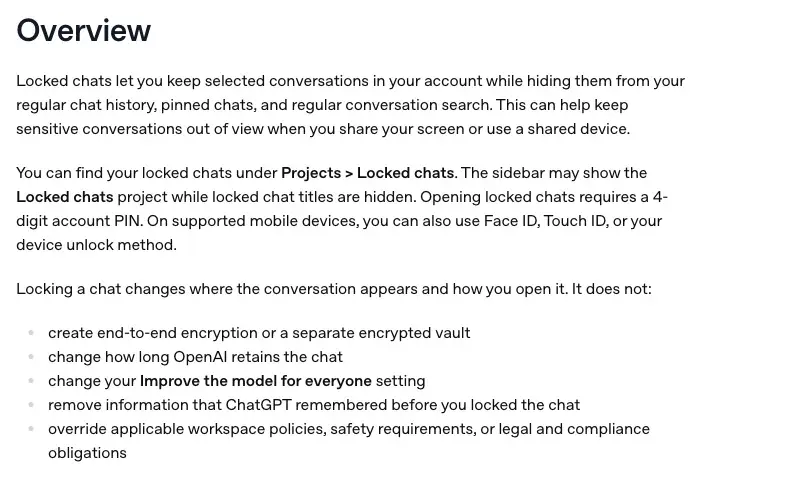
Read that list slowly. According to OpenAI, locking a chat does not:
- create end-to-end encryption or a separate encrypted vault
- change how long OpenAI retains the chat
- change your “Improve the model for everyone” setting
- remove information that ChatGPT remembered before you locked the chat
- override applicable workspace policies, safety requirements, or legal and compliance obligations
Everything in the rest of this post follows from those five lines.
How to turn it on
As of October 26, 2026, per OpenAI’s help page:
- Open a regular chat, open its more options menu (the three dots), and choose Lock chat. Confirm by choosing Lock chat again.
- ChatGPT asks you to create a 4-digit account PIN the first time. The same PIN works on your other signed-in devices. Face ID, Touch ID or device unlock is optional and set up per device.
- The chat moves out of regular history. To start a new locked chat later, open Projects, then Locked chats, enter the PIN, and type a message.
- When you finish, choose Lock now to end access. On the web, access also ends when you refresh or close the tab. On iOS and Android it ends after 1 minute away from the locked chat or 1 minute in the background.
If “Lock chat” isn’t in the menu, OpenAI says the feature may not have reached your account yet. On desktop you need the new ChatGPT app for macOS or Windows.
What a PIN protects, and what it doesn’t
Here is the honest summary. A PIN protects against a person looking at your screen or your unlocked device. It does nothing about who else can reach the data on OpenAI’s side, or what the law says about it.
The table below turns the question into the form professionals actually ask it.
| Your question | Does Locked Chats change it? | What actually answers it |
|---|---|---|
| Can someone next to me see this chat? | Yes, it helps. | The PIN, plus checking your other open devices. |
| Does it add end-to-end encryption? | No. | OpenAI says it adds no end-to-end encryption or separate vault. |
| How long does OpenAI keep it? | No. | OpenAI’s retention rules for chats. |
| Will it be used to train models? | No. | Your “Improve the model for everyone” setting, or your plan. |
| Can my employer’s admin see it? | Not by unlocking. | Admins can’t unlock or reset a PIN, but workspace policies and compliance logs still apply. |
| Does it create privilege or HIPAA cover? | OpenAI says it doesn’t override legal or compliance obligations. | The law, your contracts and, for HIPAA, a signed BAA. |
The sentence I would put on a sticky note
“Locked” means hidden from the next person who borrows your screen. It does not mean confidential in the sense your profession uses the word.
Four things a PIN does not fix
1. It isn’t end-to-end encryption
OpenAI’s page says so in its own list. The PIN sits on your side of the screen. The question for client data is what happens on the other side of the connection, and the PIN doesn’t touch that.
2. It doesn’t change retention or training
Locked chats “follow your existing model-improvement setting,” OpenAI’s page says, and the release note says retention and model-improvement settings “stay unchanged.” On individual plans, OpenAI’s data page says it “may use your content to train our models” unless you turn off Improve the model for everyone in Settings, under Data controls, or use “Do not train on my content” in its Privacy Portal.
Two details from that page catch people. First, if you give a thumbs up or thumbs down on a response, on an individual plan, OpenAI says the entire conversation attached to that feedback may be used to train its models even if you opted out. Second, on ChatGPT Business, Enterprise and Edu, and the API, OpenAI says it doesn’t use inputs or outputs to improve its models by default.
Retention is a separate question from training. OpenAI’s retention page says a deleted chat is removed from your view at once and scheduled for permanent deletion from its systems within 30 days, unless it was already de-identified and disassociated from your account or OpenAI must keep it longer for security or legal reasons.
3. It doesn’t create privilege
This is the one lawyers ask about, and the details are easy to get wrong, so it is worth being exact.
In United States v. Heppner, a federal judge in the Southern District of New York, Jed Rakoff, ruled in February 2026 that a defendant’s conversations with an AI chatbot were not protected by attorney-client privilege or by the work-product doctrine. The chatbot was Anthropic’s Claude, not ChatGPT. According to Orrick’s summary, the defendant, a senior executive indicted for securities fraud, used the tool “on his own initiative and without direction from his attorneys,” and the FBI seized about 31 documents memorializing the conversations. The International Bar Association’s write-up dates the oral ruling February 10 and the written decision February 17.
Orrick lists the reasoning:
- The tool is not an attorney. In the judge’s words as Orrick quotes them: “Because Claude is not an attorney, that alone disposes of Heppner’s claim of privilege.”
- There was no reasonable expectation of confidentiality, because the tool’s privacy policy allowed it to collect inputs and outputs, use them for training, and disclose them to third parties, including government authorities.
- Putting privileged information into a public AI tool is a disclosure to a third party that can waive the privilege.
- Sharing the documents with a lawyer afterwards doesn’t make them privileged.
- Work-product protection covers materials prepared by or at the direction of counsel, and these weren’t.
The same alert calls it a first-impression ruling and says the protections of enterprise AI tools “have not been tested in court.” A separate decision dated February 10 came out differently on different facts: in Warner v. Gilbarco, a federal court in Michigan held that a self-represented plaintiff’s ChatGPT materials were protected work product, reasoning that AI programs “are tools, not persons.” That case dealt with work product, not privilege, and the IBA’s summary says neither ruling sets a broad rule.
What to take from this without overreading it: one district court said a consumer chatbot is not a lawyer and its privacy policy undercut confidentiality, in a case where the person acted without his lawyers. A PIN on the chat doesn’t change either of those facts. Whether your situation is different is a question for your jurisdiction’s rules and a lawyer.
4. It doesn’t make anything HIPAA-compliant
I did not find any page from HHS’s Office for Civil Rights that names ChatGPT or Locked Chats, so I’m not going to say what OCR “says” about them. What OCR does say, in its cloud-computing guidance, is general and clear:
When a covered entity engages the services of a CSP to create, receive, maintain, or transmit ePHI (such as to process and/or store ePHI), on its behalf, the CSP is a business associate under HIPAA.
The guidance adds that this holds “even if the CSP processes or stores only encrypted ePHI and lacks an encryption key,” and that a covered entity may use a cloud service for ePHI “provided the covered entity or business associate enters into a HIPAA-compliant business associate contract or agreement (BAA).”
Apply that to a PIN. If a PIN lock isn’t even encryption, it can’t replace a business associate agreement. And OpenAI’s BAA page is specific about who it will sign with:
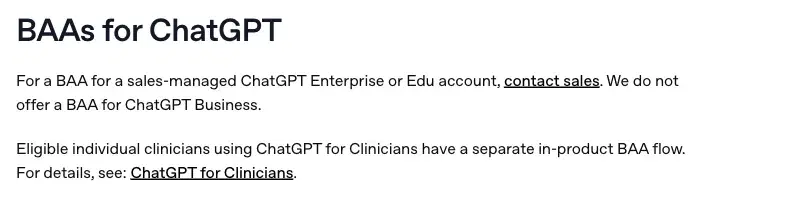
The same page says the API needs a signed BAA before you use it with protected health information, that self-serve signing requires an established history of API usage, and that “accepting a BAA and enabling HIPAA compliance support do not, by themselves, make your application HIPAA compliant.” It also says eligible individual clinicians using ChatGPT for Clinicians have a separate in-product BAA flow. I haven’t researched who qualifies for that, so check OpenAI’s page before assuming you do.
What the launch week looked like
I searched X and the web with Grok on October 26 for how professionals were reacting. The honest finding is that there wasn’t much. Direct commentary from lawyers, therapists, bookkeepers or HR people on Locked Chats specifically was thin in the first week, and most coverage was general tech press stressing the limits. I opened none of the posts Grok surfaced, so I’m not quoting any.
What did show up in its summary were the misreadings it listed: treating the lock as a vault, as privilege, as HIPAA cover, or as something that changes training. The practical snags it listed were ones OpenAI’s own page documents: the PIN reset deleting everything, temporary chats that can’t be locked, project chats that leave their project, and the menu item not showing up because of the gradual rollout.
A safer workflow in ten steps
The goal is not to give up on ChatGPT. It is to stop sending it identifiable client information at all, and to put a business contract under anything that has to be identifiable.
- Decide whether the model needs the details. Most requests (“draft a reply to a worried client”, “explain this notice in plain language”) need the shape of the situation, not the client’s identity.
- Swap identifiers for placeholders. Use labels like [CLIENT], [OWNER], [DATE] and [AMOUNT]. Keep the key (which placeholder is which person) in your own file, never in the chat.
- Round or generalize what you can’t remove. “A four-figure balance”, “early spring”, “a mid-sized county”.
- Check what the details can give away together. Several harmless facts can point to one person.
- Pick the plan on purpose. The table in the next section shows who trains by default and who will sign a BAA.
- Turn off training on a personal plan. Settings, Data controls, Improve the model for everyone. Skip the thumbs up and down on any conversation that touched real material.
- Use temporary chat for one-off questions. OpenAI says a temporary chat isn’t used to improve models while it remains temporary, but it may keep a copy for up to 30 days for safety.
- Use Locked Chats only for the problem it solves. Hiding a chat from the next person at your screen.
- Review the output. In its Alert 2026-19, dated June 24, 2026, the IRS’s Office of Professional Responsibility says, as Thomson Reuters Checkpoint reports it, that practitioners cannot solely rely on AI and must thoroughly review AI-generated documents for accuracy.
- Delete what you don’t need to keep, and know what deleting means. OpenAI’s retention page says a deleted chat is scheduled for permanent deletion within 30 days, and that deleting a chat doesn’t delete a file saved separately in Library; its locked-chats page says the same of a file in Space.
A worked example, start to finish
This example is invented for illustration by us. It is not a real client, and we did not run the prompt for this post; it’s a template you can adapt.
A bookkeeper has a message from a client about a payroll tax notice. The real file holds the owner’s name, the business name, the employer ID number, the notice date and a balance down to the cent. She wants help explaining the notice in plain language and writing a calm reply.
| In the real file | What goes into ChatGPT | Why |
|---|---|---|
| Owner’s name | [OWNER] | A name is the first identifier on HHS’s Safe Harbor list and identifies a client in any profession |
| Business name | [CLIENT BUSINESS] | A name plus a tax issue points to one firm |
| Employer ID number | Left out entirely | A unique number the model doesn’t need |
| Notice date | [NOTICE DATE] | Dates tie an event to a person |
| Balance to the cent | “A four-figure balance” | The size matters, the exact figure doesn’t |
| Town | Left out; “a small retail business” | A rare combination of town and trade can identify someone |
The prompt she would paste, written by us as a template:
You are helping a bookkeeper write a calm, plain-English reply to a client.
The client is [OWNER] of [CLIENT BUSINESS], a small retail business.
They received a payroll tax notice dated [NOTICE DATE] for a four-figure balance.
Draft a reply that explains in general terms what a notice like this usually means.
List the three questions I should ask the client before I respond to the agency.
Do not guess at law or penalties. Tell me what I need to confirm from the client's records.
When the draft comes back, she reads it against the real file, puts the real names back in her own document, and sends it herself. The key to the placeholders never entered the chat. Placeholders lower the risk; they don’t remove it, because a rare combination of facts can still point to one client. That is why step 4 comes before the paste, not after.
What counts as an identifier
If your work is health-related, HHS’s Safe Harbor method for de-identification gives you a concrete list. It requires removing 18 kinds of identifiers of the individual “or of relatives, employers, or household members,” and the covered entity must also have no actual knowledge that what’s left could identify the person.
The list, as HHS writes it, covers:
- names
- geographic subdivisions smaller than a state (including street address, city, county and ZIP code, with a narrow three-digit ZIP exception)
- all elements of dates except the year that relate to a person, such as birth, admission, discharge and death dates, and all ages over 89
- telephone and fax numbers, email addresses, URLs and IP addresses
- Social Security, medical record, health plan beneficiary, account and certificate or license numbers
- vehicle and device identifiers and serial numbers
- biometric identifiers, including finger and voice prints
- full-face photographs and comparable images
- any other unique identifying number, characteristic or code
Two things follow for a therapist. Dates directly related to a person are on the list, so “the session on March 3” is an identifier, while “a recent session” is not. And HHS’s guidance notes that identifying information alone, like a name, isn’t necessarily PHI, but “if such information was listed with health condition, health care provision or payment data, such as an indication that the individual was treated at a certain clinic, then this information would be PHI.” A name beside a diagnosis is PHI. The second route, Expert Determination, needs a qualified expert to document that the risk of identification is very small, which is not something to improvise in a chat window.
Which plan, which promise
The plan you use changes two things a PIN can’t: whether your content trains models by default, and whether OpenAI will sign a business associate agreement. Based on OpenAI’s help pages as of October 26, 2026:
| Plan | Trained on by default? | BAA on OpenAI’s BAA page | Locked Chats |
|---|---|---|---|
| Free, Plus, Pro | May be, until you opt out | Not listed | Yes |
| Business | No, by default | “We do not offer a BAA for ChatGPT Business” | Yes |
| Enterprise, Edu | No, by default | Sales-managed accounts, contact sales | Yes, still in compliance logs |
| API | No, by default | Self-serve standard BAA with an established API usage history | Not listed |
| ChatGPT for Healthcare | Not researched here | Not researched here | No |
A BAA is a contract. It is not a configuration that makes your workflow compliant, and OpenAI’s own page says so. Whether you are a covered entity at all, and whether a particular use is a permitted use, are questions for your compliance officer or attorney.
What this means for you
If you’re a solo lawyer or paralegal. The ABA’s Formal Opinion 512 of July 29, 2024, as a Katten summary reports it, says a client’s informed consent is required before inputting information relating to the representation into a self-learning generative AI tool, with the example of generating ideas without client-specific information as not needing consent. It also says lawyers should read and understand the terms of use and privacy policy. California’s State Bar 2026 Practical Guidance, which replaces its 2023 version, says a lawyer must not input confidential information into a system with material confidentiality or security risks without informed client consent, and that “reasonable efforts require more than reliance on generalized marketing assurances.” First action: read the data terms of the plan you use, and write down in one line what a client would be told.
If you’re a therapist or counselor. If you’re a HIPAA covered entity, HHS’s cloud guidance makes a BAA the entry ticket for ePHI in a cloud service, and OpenAI says it doesn’t offer one for ChatGPT Business. State licensing rules for counselors differ and I did not research them. First action: use placeholders only, take session dates out, and ask your board or professional association what applies in your state before putting any case detail into an AI tool.
If you’re a bookkeeper or tax preparer. The OPR’s Alert 2026-19, dated June 24, 2026, as Thomson Reuters Checkpoint reports it, cites penalties under IRC 6713 and 7216(a) for unauthorized disclosure of tax return information and says uploading sensitive client data to unsecured or public AI platforms presents a significant risk. First action: take employer ID numbers, Social Security numbers and account numbers out of anything you paste, including screenshots.
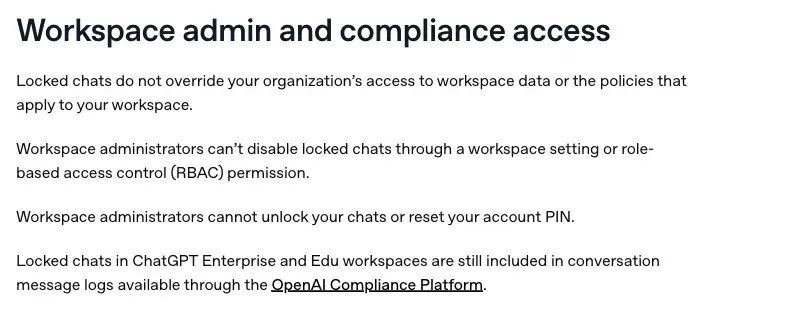
If you work in HR. Employee matters are the other place a PIN can mislead. If you use ChatGPT through your company’s Business, Enterprise or Edu workspace, OpenAI says admins can’t unlock your locked chats or reset your PIN, but that locked chats don’t override the organization’s access to workspace data, and that on Enterprise and Edu they stay in the Compliance Platform’s conversation logs. First action: ask IT what your workspace logs and keeps before you assume a locked chat is private from your own employer.
If you’re a financial advisor. I did not research securities regulators’ rules on AI and client data, so I can’t tell you what yours require. The limits above apply to your tool the same way. First action: ask your compliance team in writing whether consumer AI plans are approved for client information at all.
If you only share your screen a lot. This is what Locked Chats is for. Lock the chat you don’t want your clients or colleagues to scroll past, then check your other open devices, because OpenAI says other devices may keep showing a locked chat’s title until their lists refresh, and on iOS previously loaded content may stay visible until the app refreshes. First action: lock it before you start the call, not during.
Edge cases and troubleshooting
These come from OpenAI’s help page unless I say otherwise.
“I can’t find Lock chat in the menu.” OpenAI’s release note of October 20 says the rollout is gradual, and its help page says if the option is missing from an eligible chat’s menu, the feature may not be on your account yet. Desktop needs the new ChatGPT app for macOS or Windows.
“I can’t lock this chat.” Some chats can’t be locked: temporary chats, archived chats, group chats, chats created from a shared link, chats with scheduled tasks, meeting recordings or background tasks, and chats with responses saved as project sources. Codex conversations and local Work conversations can’t be locked either. OpenAI says temporary chats can’t be locked while they remain temporary, and that saving one converts it into a regular chat that follows your account’s settings.
“I locked a chat from a project and it lost its instructions.” OpenAI says a chat locked from a project leaves the project and stops using its instructions, files and memory, and after a permanent unlock it returns to regular history, not the project.
“I locked a chat I’d shared, and the link still works.” Locking doesn’t delete a shared link. Previously shared content stays available, and new messages sent while locked aren’t added. Delete the link separately.
“My uploaded file is still showing in Space.” Files uploaded or created in the chat are protected when you lock it. Files you added from elsewhere in Space stay available there, and files from connected sources keep their existing access rules.
“ChatGPT still remembers what I told it earlier.” Locking doesn’t remove information ChatGPT remembered before. Memory created only inside locked chats stays out of regular chats, but locked chats can use relevant information from regular memory.
“I forgot my PIN.” Forgetting it deletes nothing by itself, but resetting it permanently deletes all locked chats, memories stored only within them, and files protected only by the old PIN. OpenAI says Support can’t recover them. If you know the current PIN, changing it keeps your chats. After too many wrong attempts ChatGPT temporarily disables access.
“A screenshot of my locked chat is blank.” On Android, OpenAI says screenshots of locked chats may come out blank or black because the app hides protected content in screenshots.
“Someone with my unlocked chat copied it.” OpenAI says anyone who can open a locked chat can still copy its contents. The PIN guards the door, not what’s inside once someone is in.
What it can’t do
- It can’t make a chat confidential in the legal sense. Privilege and HIPAA obligations come from the law and from contracts, and OpenAI says locking doesn’t override legal and compliance obligations.
- It can’t replace a contract. A BAA, an enterprise agreement or a data-processing agreement is what binds the other side. OpenAI says it offers no BAA for ChatGPT Business.
- It can’t un-share or un-train anything. Shared links stay, and a locked chat follows your model-improvement setting.
- It can’t hide your chats from your organization’s compliance tools. OpenAI says Enterprise and Edu locked chats are still in conversation logs available through its Compliance Platform.
- It can’t undo a PIN reset. There is no recovery, and the reset is the sharpest edge in the whole feature.
FAQ
Does Locked Chats encrypt my conversations? No. OpenAI says locking a chat does not create end-to-end encryption or a separate encrypted vault. It changes where the chat appears and how you open it.
Does a locked chat stop OpenAI from training on it? No. Locked chats follow your existing “Improve the model for everyone” setting. On individual plans you can turn that setting off; OpenAI says Business, Enterprise, Edu and the API aren’t used to improve its models by default.
Is a locked ChatGPT chat protected by attorney-client privilege? Locking has no bearing on it. In Heppner, a federal court held that a defendant’s chats with a consumer AI tool, used without his lawyers’ direction, were neither privileged nor work product. It is one district court’s ruling, and a separate Michigan decision the same week reached a different result on different facts.
Can I put client information in ChatGPT if I lock the chat? The lock doesn’t answer that question. Your profession’s rules, your plan’s data terms and any contract with the other side do. The safest habit is to paste no identifiers at all.
What happens if I forget my PIN? Nothing happens to your chats until you reset it. A reset permanently deletes all locked chats, memories stored only in them, and files protected only by the old PIN, and OpenAI Support can’t recover them.
Can my employer see my locked chats? An admin can’t unlock them or reset your PIN, according to OpenAI. But the feature doesn’t override the organization’s access to workspace data or its policies, and on Enterprise and Edu, locked chats still appear in Compliance Platform logs.
Is a temporary chat safer than a locked chat for sensitive questions? They solve different problems. OpenAI says a temporary chat isn’t used to improve models while it stays temporary and stays out of your history, though OpenAI may keep a copy for up to 30 days for safety. A locked chat is saved and follows your training setting. A temporary chat can’t be locked.
If I delete a locked chat, is it gone? OpenAI says a deleted chat can’t be restored, in ChatGPT or through Support, and its retention page says deleted saved chats are scheduled for permanent deletion within 30 days, with exceptions for security or legal reasons. A file saved separately in Library or Space isn’t deleted with the chat, so delete it too.
Does removing the client’s name make it HIPAA-safe? Not by itself. HHS’s Safe Harbor method lists 18 kinds of identifiers, including dates other than the year, and requires that you have no actual knowledge that what remains could identify the person.
Where can I read more on ChatGPT privacy generally? Our plain-English guide, Is ChatGPT Actually Private?, covers the basics, and Temporary Chat in ChatGPT covers the personalize and save options. The glossary entry on private AI explains the wider idea.
The bottom line
Locked Chats is a small, honest feature with a clear job: hide a conversation from whoever else is looking at your screen or your phone. OpenAI says so itself, and then lists five things it does not do. For someone who holds client secrets, the right conclusion is to keep doing what protects clients, which is paying attention to what you type, where you type it and what the other side has promised, and to treat the PIN as a courtesy to the people around you.
Your first move this week: pick one task you already do in ChatGPT with real client material, rewrite it with placeholders using the steps above, and compare the two answers yourself.
If you want a structured version of this, our course ChatGPT Without the Liability (first 2 lessons free) is built around privilege-safe AI workflows for paralegals, HR managers and small business owners, and AI Therapy Notes: The HIPAA-Safe Workflow (first 2 lessons free) is aimed at licensed therapists.
Sources
- OpenAI Help Center: Using locked chats in ChatGPT
- OpenAI Help Center: ChatGPT release notes, October 20, 2026
- OpenAI Help Center: How your data is used to improve model performance
- OpenAI Help Center: Chat and file retention in ChatGPT
- OpenAI Help Center: Temporary chat in ChatGPT
- OpenAI Help Center: Getting a Business Associate Agreement for the OpenAI API
- HHS: Guidance on HIPAA and cloud computing
- HHS: Guidance regarding methods for de-identification of protected health information
- Orrick: Court rules AI conversations are not privileged, what United States v. Heppner means for you
- International Bar Association: US federal courts split on litigant AI use and privilege protections
- Katten: ABA weighs in on generative AI use in legal practice
- State Bar of California: Practical Guidance for the Use of Generative AI in the Practice of Law
- Thomson Reuters Checkpoint: IRS Office of Professional Responsibility issues guidelines on AI use in tax practice