If you run a daycare or a preschool, a surprising share of your week is spent writing: the monthly newsletter, the snow-day notice, the “there’s a stomach bug going around” alert, the gentle reminder about late pickup. A free chatbot can draft all of it in seconds, and that is exactly where directors get nervous, because the same message is also about other people’s children.
The nervousness is reasonable, and it has a clean answer. This guide shows the newsletter routine first, a prompt you can copy and a worked example, and then the rule that makes it safe to use: the chatbot gets facts about your week, never records about a child. It also says what the law actually says about that, as far as I could read it at the source, because “isn’t that illegal?” is the first question any director asks.
TL;DR. Paste five to eight bullets about your month into ChatGPT or Claude, ask for a short, warm newsletter, and read every line before it goes out. Leave out children’s names, photos, health details, birthdates and anything from an enrollment file. Turn off model training in your account first. Check your state’s licensing rules and your own photo-consent form: FERPA and COPPA may not cover you at all, while a state licensing rule may.
I am not a lawyer and this is not legal advice. Where a rule depends on your state, your funding or your program type, I say so instead of guessing.
Who this is for, and what it covers
This is written for directors and owners of small centers and home daycares, and for the lead teachers who write the classroom note. You don’t need to have used ChatGPT or Claude before. If you can type a few bullet points, you can do everything below.
Here is what the survey data says about how common this already is. Procare, a childcare software company, reported on March 4, 2026 that 39% of the people in its annual survey say they now use AI tools, a 77% increase from its previous report.
Treat those numbers with the care a vendor survey deserves: Procare sells childcare software, its respondents are not a random national sample, and the 77% is a relative rise, not 77 percentage points. It does tell you that you are not the only director wondering about this.
What AI is good at in a parent newsletter, and what it isn’t
A newsletter is mostly sorting and phrasing. You already know what happened this month; the hard part is turning a scribbled list into three friendly paragraphs that fit on a phone screen. That is a job chatbots do well.
Where AI helps:
- Turning bullets into a warm, plain-spoken first draft.
- Shortening and tightening a draft that is too long.
- Choosing a tone: friendlier, firmer, more formal, simpler for parents who read English as a second language.
- Making one set of facts into several messages: the email, the text, the sign on the door.
Where it should stay out of the way:
- Anything about one specific child: an incident, a behavior concern, a health matter, a developmental note.
- Anything that needs a licensed person’s judgment, such as whether a child should be excluded for an illness under your state’s rules.
- Facts it can’t know. A chatbot doesn’t know your closing date, your fee or your policy unless you tell it, so don’t leave a gap for it to fill.
That last point is the reason for the routine below. You supply the facts, the model supplies the phrasing, and you check the result against your own calendar before anything is sent.
The rule that comes first: facts in, never records
Before the prompt, one rule. Keep it on a sticky note by the computer.
Give the chatbot facts about your program, not records about a child.
A fact about your program is “the center closes at noon on Wednesday” or “Room 2 is learning about autumn leaves.” A record about a child is anything that comes from an enrollment file, a daily report, an incident form or a health form, or anything that could point to one child: a name, a photo, a birthdate, an allergy, a diagnosis, a custody arrangement, a note about behavior.
The test I would use: if a parent in another room read your pasted text, could they tell which child it was about? If yes, it is a record. Take it out, or don’t send that part to a chatbot.
Names are the obvious part. The less obvious part is combinations. “The toddler in the Sunflower Room with the peanut allergy who started in September” names nobody, and in a small center it names one child. When a detail matters, write around it (“a child in one of our rooms”) or leave it for a conversation with the parent.
Photos get their own line. Don’t upload a child’s photo to a chatbot for any reason, including a harmless craft idea. A photo-consent form that parents signed for your private app or your bulletin board may not say anything at all about AI tools, and you do not want to find out what a parent thinks it meant after the fact.
Is that the law, or just caution?
Both, depending on where you are and how your center is set up. Here is what I read, at the source, on October 27, 2026.
| Rule | Who it covers | What it says | For your newsletter |
|---|---|---|---|
| FERPA | Schools and institutions that receive US Department of Education funds | The rules apply to institutions that receive funds under programs the Secretary of Education administers, and to the recipient as a whole | Depends on your funding. Ask your district or licensing office |
| COPPA | Operators of websites and online services | It applies to personal information collected online from children, and the FTC says it does not cover information collected from adults that may pertain to children | An adult typing a closure notice is not the case COPPA describes. That is not the same as permission |
| State licensing | Licensed child care centers | Set by each state. California’s rule for centers says records obtained from or regarding children are confidential | Read yours |
| The tool’s terms | You, as the account holder | Training settings, retention, minimum age, who is responsible for what you submit | Set the account up before you paste anything |
Take them one at a time.
FERPA. The Department of Education’s FERPA regulations (34 CFR Part 99) apply to institutions that receive funds under programs the Secretary of Education administers, and to that recipient as a whole (34 CFR §99.1). The same regulations define an “early childhood education program” to include Head Start, Early Head Start and “a State licensed or regulated child care program” (§99.3). A definition is not a coverage rule, though: whether a given center is covered turns on the funding test. If you are not sure which side you are on, the question for your district or licensing office is short: “Are our children’s records covered by FERPA?”
COPPA. The FTC’s COPPA FAQ says the rule was amended on April 22, 2025, applies to operators of commercial websites and online services, covers personal information “collected online from children,” and “does not cover information collected from adults that may pertain to children.” A director typing a closure notice isn’t a service collecting information from a child. That helps you here, and it also tells you what COPPA is not: a general confidentiality rule for children’s records. (I read the first part of the FTC’s FAQ, not its section on schools, so I say nothing about that.)
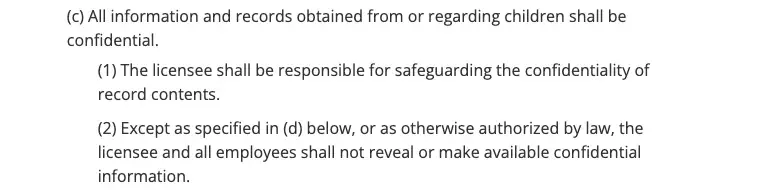
State licensing. This one depends on where you are. California is one example. Its regulation for child care centers, Title 22 section 101221, says that “All information and records obtained from or regarding children shall be confidential,” makes the licensee “responsible for safeguarding the confidentiality of record contents,” and bars the licensee and all employees from revealing confidential information except as the regulation or the law allows. The record contents it lists include identifying details, emergency contacts and health and medication information.
That is California’s rule, not every state’s, and I am not telling you your state has the same words. I am telling you that a state can put a confidentiality duty on licensed centers directly, whatever FERPA does or doesn’t cover, so look for your own state’s version in your licensing rules or ask your licensing consultant.
The tool’s own terms. This is the one you can control today, and the next section does exactly that.
Set up your account before you paste anything
A few settings change what happens to what you type. The details below are from OpenAI’s and Anthropic’s own pages, read on October 27, 2026. Settings move around, so if a menu looks different, search the help center for the setting’s name.
ChatGPT
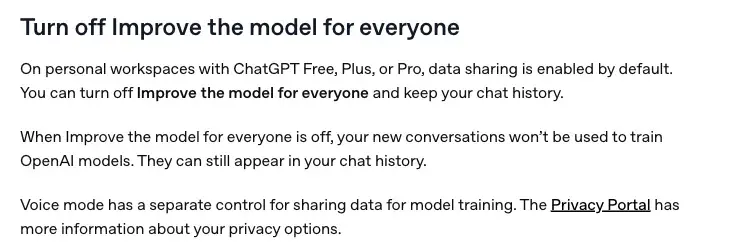
On personal ChatGPT plans (Free, Plus and Pro), OpenAI’s data controls page says data sharing for model training is on by default, and you can turn off “Improve the model for everyone” and keep your chat history. On the web the path is: open your account menu, Settings, Data controls, then turn that setting off. On the phone apps it is: sidebar, your profile icon, Settings, Data controls.
Three limits are worth knowing, all from the same page:
- Turning training off “does not delete or hide saved chats.” Your old chats stay in your history until you delete them.
- If you click thumbs up or thumbs down on a reply after opting out, “the entire conversation associated with that feedback may be used to train OpenAI models.” Skip the thumbs on anything that touched real material.
- Business, Enterprise, Edu and ChatGPT for Healthcare workspaces are not used for training by default. That is a plan-level choice, and it is the better fit if your center ever wants a shared account.
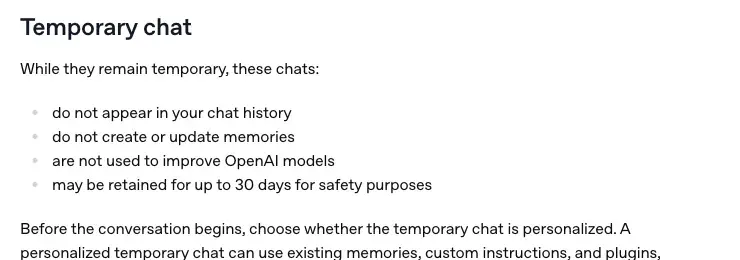
Temporary chat is a separate mode. OpenAI says a temporary chat doesn’t appear in your history, doesn’t create or update memories and isn’t used to improve its models, and that it “may be retained for up to 30 days for safety purposes.” If you save a temporary chat, it becomes a regular chat and follows your account’s settings.
Memory is the setting people forget. When it is on, ChatGPT can remember details from your past chats, saved memories, custom instructions, files in your Library and connected apps (Settings, Personalization, Memory). OpenAI’s Memory page adds that deleting a chat alone “does not necessarily delete a separate saved memory created from that chat.” For a newsletter routine you don’t want a tool quietly building a picture of your center’s families, so check what it has remembered, and keep real details out in the first place.
Claude
Anthropic’s consumer terms, effective October 8, 2025, require users to be at least 18 (or the minimum age of consent where you live, if higher) and say you are responsible for the inputs you submit. Anthropic’s announcement of those changes gives consumer users a choice in Privacy Settings about whether chats are used to improve Claude. It says that if you allow training, data retention extends to five years, and that otherwise the existing 30-day retention period continues. It also says the changes don’t apply to services under its commercial terms: Claude for Work (Team and Enterprise), the API and Claude for Education among them. So the same logic holds as with ChatGPT: look at the training choice in your settings first, and treat a work plan as a plan-level decision.
Neither company’s settings turn a chatbot into a place to store a child’s file. They reduce what the provider does with your chats. They don’t change what your state’s licensing rule says you may reveal. That part stays your job.
The newsletter routine, step by step
Step 1: Jot the facts. Keep a running note on your phone called “Newsletter” and drop things in as they happen. At the end of the month you have your bullets. Good bullets are short and concrete: dates, times, events, reminders, the name of the theme, a thank-you to a volunteer. If a bullet is about a child, rewrite it as a fact about the group (“the Ladybug Room built a leaf collage”) or drop it.
Step 2: Replace any specifics you can’t avoid. If you must mention a staff member, a first name is normal in a newsletter. If you must refer to a child, don’t: write “one of our toddlers” or leave it out.
Step 3: Paste the prompt. Open a new chat (a Temporary Chat in ChatGPT if you like), paste the prompt below, then paste your bullets where it says so. The prompt is one block so the Copy button gets all of it.
You are helping the director of a small daycare write a monthly newsletter for parents.
Write it in a warm, plain, friendly voice, the way a trusted director would talk to parents at pickup.
Use short paragraphs and no more than 350 words.
Use at most two emoji in the whole newsletter, and none in the subject line.
Start with a subject line, then a one-sentence welcome, then the sections: What we did, What's coming, Reminders, Thank you.
Use only the facts I give you below. Do not add events, dates, prices, policies, names or details that are not in my notes.
If something I need is missing, write [CHECK: what is missing] instead of guessing.
Do not mention any child by name, and do not describe any individual child.
Write about groups and rooms, such as "our toddlers" or "the Ladybug Room".
End with one sentence that invites parents to talk to me at pickup if they have questions.
My notes for this month:
[PASTE YOUR BULLETS HERE]
Two lines in that prompt do most of the work. “Use only the facts I give you” and “write [CHECK: …] instead of guessing” turn a chatbot’s habit of filling gaps into a visible flag you can search for before you send. Also note the length cap and the emoji cap: they come from the parent complaints later in this guide.
Step 4: Read every line. This is the step that is not optional. Compare each date, time, fee and rule against your calendar and your handbook. Search for “[CHECK” and fix each one. Delete any sentence you wouldn’t say out loud to a parent.
Step 5: Make it sound like you. Change two or three sentences to the way you really talk. Add one specific thing only you know: the joke a three-year-old made about the snow shovel, in a way that identifies nobody. Parents notice voice.
Step 6: Send it from your own tool. Put the finished text in your usual email, app or printed page. Keep the chatbot out of the sending step.
A worked example, start to finish
The inputs and the output below are a sample written by us to show the shape: the center, the rooms and the events are made up, and we did not run this through a model for the post. The point is the pattern. Here are the bullets a director might jot down:
- Closed Thursday, November 26 and Friday, November 27 for Thanksgiving. Back Monday, November 30.
- Fall picture day is Tuesday, November 10, in the morning. Photographer is from the company we used last year.
- Toddlers did leaf rubbings and a "leaf hunt" in the yard.
- Pre-K room started a unit on how seeds travel.
- New: please sign out with a full signature, not initials.
- Parent night on Wednesday, November 18, 6 pm, snacks provided.
- Thank you to Ms. Alvarez for repainting the cubbies on her own time.
A sample answer, written by us to show the shape:
Subject: November at Little Oak: leaves, seeds and a long weekend
Hello, Little Oak families! November is here, and the yard is full of leaves, which our toddlers have noticed.
What we did. Our toddlers made leaf rubbings and went on a leaf hunt in the yard. In the Pre-K room, we started a unit on how seeds travel.
What’s coming. Fall picture day is Tuesday, November 10, in the morning. Parent night is Wednesday, November 18, at 6 pm, and we’ll have snacks.
Reminders. We are closed Thursday, November 26 and Friday, November 27 for Thanksgiving, and we reopen Monday, November 30. Please sign your child out with your full signature, not initials.
Thank you. A big thank-you to Ms. Alvarez, who repainted the cubbies on her own time.
If you have questions, come find me at pickup.
Look at what is in it and what is not. Every date came from the bullets. No child is named. Nothing about the photographer’s company, the picture prices or the unit’s learning goals was added, because the notes didn’t contain them. If you had left out the closing dates, a good run would have written “[CHECK: closing dates]” in that spot instead of making them up. It is also a little generic, which is why step 5 exists.
The other messages: closures, illness, pickup and tuition
The same routine works for the notices you dread. Here the rule about facts matters even more, because these messages carry dates, money and health information.
Closures and delays. Give the model the decision, the date, the reason you want to give and what parents should do. Ask for two versions, an email and a 160-character text. Check the date and the reopening time against your own record before sending.
Write a short notice to parents from a daycare director.
Facts: we are closing at noon on [DAY, DATE] because of [REASON].
Pickup is between 11:30 and noon.
We will tell families about reopening by [TIME] on [DAY].
Give me an email version of no more than 100 words and a text-message version of no more than 160 characters.
Use a calm, clear tone. Do not add any facts that are not above.
Illness alerts. The model can word the message. It can’t decide your policy. Don’t ask it to tell you what illnesses require exclusion; paste in your own written policy or your state health department’s guidance, and tell it to use only that. Don’t name a child, a room with one sick child, or any detail that would let a parent work out whose child it was. A message that says “we have had a few cases of a stomach illness in the center” is a different message from one that names a room and a day.
Write a short, calm notice to parents of a daycare.
Facts: some children at the center have had a stomach illness this week.
Our written policy says: [PASTE YOUR EXACT POLICY ON WHEN A CHILD MAY RETURN].
Remind parents of that policy in plain words, thank them for keeping sick children home, and tell them how to reach me.
Do not name any child or room, do not guess the cause, and do not give medical advice.
Use only the facts above.
Late pickup and tuition. The hard part is tone: clear about the fee, kind about the person. Give the model the cutoff time, the fee and the effective date yourself, ask for under 120 words, and tell it not to sound accusatory. For money messages, have a second person read the draft. A made-up date or amount does the most damage there.
What parents say when they suspect a machine wrote it
Our research pass searched public parent and teacher forums for how families react. I should be straight about how much that is worth: Reddit asked for a login, so I read a search tool’s report of those threads and not the threads themselves, and I name none of them. Read what follows as anecdote about what to expect, not as data.
The reports fall into a few patterns:
- Some parents said they wouldn’t mind. Less time on newsletters means more time in the classroom.
- Others said a note that arrives long, emoji-heavy and more than once a day made one parent say she no longer trusted it to describe her child’s day, and she had started to skim.
- Some parents notice a change in style (suddenly perfect grammar, an overly formal tone) and say it reads as AI-generated.
- A few said they would rather read a short note with a typo than a polished one with no connection to what happened.
- One report was a parent whose center had put a toddler’s photo into a paid ChatGPT account for a Grandparents Day picture. The parents had signed photo-consent forms that they understood to mean no uploads outside the center’s private app, and they were upset when they found out.
Nothing here is a study, but the patterns are a decent guide, and the fixes are cheap.
| What parents notice | Why it backfires | What to do instead |
|---|---|---|
| A long note with several paragraphs and many emoji | It reads as filler, and parents skim it | Cap the length in the prompt and allow one or two emoji at most |
| A sudden change in voice | Parents wonder who wrote it | Change a few sentences to your own words and keep the tone you’ve always had |
| General statements that could describe any day | The note doesn’t show you were paying attention | Add one specific, true detail that only you know |
| Notes sent twice a day | One report described them as long, emoji-heavy and sometimes sent twice a day | Keep your usual rhythm; AI should save time, not multiply messages |
| A photo or detail about a child they didn’t expect to see used | It breaks a promise they thought they had | Read your photo-consent form; keep photos out of chatbots |
Should you tell parents you use AI to draft? That is for you and your center’s policy to decide. The practical standard: you wrote the facts, you read every line, and you are accountable for what goes out under your name. If a parent asks, say so plainly.
Your childcare software may already do some of this
Many directors already pay for childcare management software, and some vendors are adding AI. In a post last updated on October 22, 2026, Brightwheel describes how it is bringing AI to its product. By its account, about 2,000 schools had early access over the summer, and the questions they asked most were about room ratios, who is clocked in, rosters and which families aren’t enrolled in autopay. Brightwheel AI answers questions from the information already in your account (billing, enrollment, attendance, ratios, rosters, staff and family contacts). The post says that, for now, it can’t send a message, mark an invoice paid or update a record. It is not a newsletter writer, which is the point: it is an assistant for questions about your own data, and it only sees what you can see. The post also says that anywhere you see Brightwheel AI, you choose whether to use it.
That is one vendor, on one date, and your software may be different. If your software has an AI writing feature, ask the vendor these three questions before you turn it on:
- Where does the text I type go, and is it used to train a model?
- Who at the vendor can see it, and how long is it kept?
- Can I turn it off for my whole center, and for individual teachers?
If the answers are vague, write the newsletter with a chatbot and facts only, as above, and keep the software for what it was built for.
What this means for you
If you run a home daycare by yourself. A newsletter once a month is enough, and the routine above is the whole job. Make a free account, turn off training, keep a running note on your phone and write only about the group. Your first action: set up the account and write one newsletter from this month’s notes.
If you direct a single center with a small staff. You probably write the newsletter, the notices and the emails. Pick one person (you) to use the chatbot, so the settings are in one place. Your first action: put the “facts in, never records” rule in your staff handbook as one sentence, and ask each teacher to read it.
If you are a lead teacher who writes the room note. Your director may have a rule about AI, and you should ask before you start. Your first action: ask your director whether chatbots are allowed and, if so, whether the center has a rule about what goes in them.
If your preschool is part of a school district or a university. FERPA and your district’s technology rules may apply. Your first action: ask your district’s privacy or technology office before you paste anything, and use only the tools they have approved.
If you are a parent reading this. Ask your center how it uses AI and what it never puts into it. A good answer is short and specific. Your first action: ask whether the photo-consent form you signed covers AI tools.
Edge cases and troubleshooting
The model invents an event or a date. The prompt says “use only the facts I give you” for this reason. If it still adds a fact you didn’t give it, add the line “If you are about to add a fact I did not give you, stop and write [CHECK] instead,” and always compare dates against your calendar. A confident wrong date in a closure notice costs you more than the time you saved.
The draft is too long or sounds like an advertisement. Add a word limit and “write like a director talking to parents at pickup, not like marketing copy.” Then cut every sentence that isn’t a reminder, an event or a thank-you.
A real detail slipped in. If you notice you pasted a name, a photo description or a health detail, stop. In ChatGPT, delete that chat from your history, and check Settings, Personalization, Memory for anything it saved. OpenAI’s page says deleting the chat alone may not remove a separate saved memory. Then tell your director, and follow your center’s policy on a privacy slip; don’t hide it.
You need it in Spanish or another language. A chatbot can draft a translation, but you can’t check one you can’t read. Ask a fluent colleague or a parent volunteer to read it before it goes out, and keep the wording simple, because idioms translate badly.
A parent asks, “Did a computer write this?” Answer honestly and without defensiveness: you wrote the facts, you used a tool for the first draft, and you read it. The worst answer is a denial.
What this can’t do
- It can’t check your facts. The model has no access to your calendar, your fees or your policies. Every date, number and rule is yours to verify.
- It can’t make a tool compliant. A setting that turns training off is not a legal clearance. It doesn’t change what your licensing rule says you may reveal.
- It can’t replace judgment on a child. Anything about safeguarding, health, behavior or development belongs to you, your staff and the child’s family, not to a chatbot.
- It can’t build trust you haven’t earned. A good newsletter works because parents believe you pay attention to their children. Polish doesn’t create that.
- It hasn’t been shown to make parents read more. I looked for a study of whether newsletters are read, or whether AI-written ones are read more or less, and I did not find one for US daycare. What I found was Procare’s survey figure on AI use and its figure on how teachers value communication software, and neither measures reading.
FAQ
Is it legal for a daycare to use ChatGPT for a newsletter? A general newsletter written from facts about your program doesn’t involve a child’s record. The question to ask is what you put into the chat. Which rules apply to you depends on your state’s licensing rules and your funding, so check both.
Does FERPA apply to my daycare? It depends on whether your institution receives funds under programs the US Department of Education administers. The regulations list state-licensed child care programs in their definition of an early childhood education program, but the coverage test is the funding test. Ask your district or licensing office.
Does COPPA stop me from typing about children into a chatbot? The FTC says COPPA applies to personal information collected online from children and doesn’t cover information collected from adults that may pertain to children. That doesn’t make the practice permitted under your state’s rules, your contracts or your own consent forms.
Should I use a Temporary Chat? It helps. OpenAI says a temporary chat isn’t used to improve its models and doesn’t create or update memories, though it may be retained for up to 30 days for safety. It doesn’t change the rule about what you type.
Can I put a child’s first name in if there is no last name? I wouldn’t. In a small center a first name identifies a child, and your newsletter doesn’t need it.
Can I paste in a daily report to get a summary of the week? Not a child’s report. A daily report is a record about one child. If you want a weekly summary for the group, write the group-level facts yourself.
What about a photo-collage or a “what would you look like as a grandparent” craft? That means uploading a child’s photo to a chatbot. Don’t do it without explicit permission that names AI tools, and I would not do it at all.
The bottom line
A daycare newsletter is a good first job for AI, because it is made of facts you already hold and sentences you’ve written a hundred times. The prompt above gives you a first draft; the part that takes judgment is the part that stays with you: what goes in, what stays out, and whether every line is true before it is sent. Keep children’s names, photos and records out of the chat, set your account to stop training on your chats, read your state’s licensing rule and your own photo-consent form, and read every line.
If you want to go further than a newsletter, AI for Childcare & Daycare Ops (first 2 lessons free) covers parent communication, enrollment, scheduling and billing for centers, with a lesson on safety, security and data privacy. For the privacy habits that apply to any chatbot, AI Privacy 101 (first 2 lessons free) is the place to start.
The free School Email Composer skill is a ready-made prompt for school and parent emails you can adapt. If you are a classroom teacher rather than a director, the same no-names approach is in AI report-card comments without pasting a student’s name and Is that free AI tool safe for your students’ data?. What to try first: open your phone’s notes, start a list called “Newsletter,” and add this week’s three facts.
Sources
- OpenAI Help Center, Data controls in ChatGPT (read October 27, 2026)
- OpenAI Help Center, Memory in ChatGPT (read October 27, 2026)
- Anthropic, Consumer Terms of Service (effective October 8, 2025)
- Anthropic, Updates to Consumer Terms and Privacy Policy
- FTC, Complying with COPPA: Frequently Asked Questions
- US Department of Education, FERPA regulations (34 CFR Part 99)
- Cornell LII, California Code of Regulations Title 22, section 101221, Child’s Records
- Procare Solutions, 2026 Child Care Business Trends Report release, March 4, 2026 (The AI Journal)
- Brightwheel, How We’re Bringing AI to Brightwheel (last updated October 22, 2026)