On October 6, Google released Nano Banana 2.1, the newest version of the AI image maker that sits inside the Gemini app. Three days later, on October 9, the free version of Gemini is scheduled to shrink to a single model. Those two facts landed in the same week, and almost nobody has connected them. If you make images in Gemini without paying, the question you actually care about isn’t “how good is 2.1?” It’s “will I get it, or something smaller, on Friday?”
Here’s the short answer, and then the long one. Image generation is listed by Google as a feature you get without a paid plan, and nothing Google has published says that changes on October 9. But Google’s own help page also says which Nano Banana you get depends on which Gemini model is selected, and the reported Oct 9 change leaves free accounts with only the smallest model. If Google doesn’t change that routing, free images would come from a lighter version, Nano Banana 2 Lite, not 2.1. Whether Google will change the routing is something it hasn’t said. I’ll show you the pages, quote the words, and mark every place where I’m inferring.
I built this from Google’s DeepMind model card for 2.1, Google’s Gemini help pages (opened this morning), the Gemini release notes, The Decoder’s launch report, a Perplexity deep-research pass that read several hundred sources, and Google’s own launch posts and early tester reactions on X. I haven’t been able to test 2.1 from a free account myself, so where I describe what a free user sees, I’m describing what Google documents.
What Nano Banana 2.1 is, and what changed
Nano Banana is Google’s name for its image generation and editing models. You type “make a poster of a lighthouse at sunset with the words OPEN DAILY,” or upload a photo and say “remove the person on the left,” and it does the work. Version 2.1 is the third generation most people have seen, after Nano Banana (2025) and Nano Banana 2, which went free in the Gemini app earlier this year. We covered that in Nano Banana 2 Is Now Free in the Gemini App, and our What Is Nano Banana? page has the background.
Google’s DeepMind model card, published October 6, says 2.1 “is based on Gemini 3.6 Flash,” which is the mid-sized model in Google’s current lineup. The card lists where it’s distributed: the Gemini app, Google AI Studio, the Gemini API, Google Search’s AI Mode, Google Ads, Google Flow and Google Stitch.

That list matters, and so does what it doesn’t say. “Distributed in the Gemini app” means the model is available there. It doesn’t say every account, free or paid, has it today. Google’s own announcement on X used the phrase “starts rolling out today,” which describes a gradual release, and the Gemini release-notes page I opened this morning still ends at September 30 with no entry for 2.1. So if you don’t see it yet, that’s not proof you’re excluded.
What’s better, in Google’s words and numbers
Google describes 2.1 as improving “across the board,” with “notable leaps in visual design, mask-based editing, and subject consistency to help you create more natural-looking images.” In everyday terms:
- Cleaner text inside images. Posters, menus, signs and infographics with fewer misspellings.
- Better edits that leave the rest alone. “Mask-based editing” means changing one region (swap the shirt color) without redrawing everything else.
- Characters that stay the same person. Multi-image and multi-turn consistency, so a character looks like the same character across a series.
- Up to 14 reference images. According to the model card details reported by The Decoder, up to ten objects and four characters can be kept consistent.
- Search-grounded images. It can use Google Search to get facts and visuals right, which helps with diagrams and infographics.
- Three “thinking” levels (minimal, medium, high) in the developer tools.
Google’s own evaluation numbers (human-preference scores that Google ran itself, so treat them as a manufacturer’s claims) compare 2.1 with Nano Banana 2:
| What was measured (Google’s own tests) | Nano Banana 2.1 | Nano Banana 2 |
|---|---|---|
| Overall text-to-image preference | 1050 | 990 |
| Infographic design | 1048 | 961 |
| Infographic factuality | 0.521 | 0.179 |
| General editing | 1026 | 938 |
| Single-character consistency | 1028 | 981 |
| Multi-character consistency | 1106 | 978 |
| Mask/ink editing | 1049 | 965 |
| Stylization | 1062 | 991 |
The biggest jumps are in infographic accuracy (nearly tripling on Google’s factuality score) and multi-character consistency. Those match the features Google highlights.
An independent check arrived the same day. The public image-model leaderboard Arena reported preliminary results for 2.1 at roughly 5th in text-to-image (1328 points), 6th in single-image editing (1428) and 4th in multi-image editing (1431), with gains over Nano Banana 2 of about 80, 38 and 67 points. So it’s a solid upgrade that lands near the top of the pack, not a new runaway leader. One early tester on X summed it up as “more like an upgrade than a new benchmark leader,” which is about right.
One correction worth making
A lot of coverage implies 4K output is new. It isn’t. Nano Banana 2 already supported 4K in the developer API, and what 2.1 does is improve quality and consistency while dropping the smallest 512-pixel option. More importantly for you: the Gemini app doesn’t give free users 4K. Google’s help page says you can “download images at 2K resolution with a Google AI plan or at 1K without an AI plan.” The 4K number is a developer-tool figure. If you’ve seen “free 4K Nano Banana” in a headline, ignore it.
For developers, Google’s pricing is about half the old rate: $0.0336 per 1K image (down from about $0.067), $0.0504 for 2K and $0.0756 for 4K, according to The Decoder. Nano Banana Pro, the top-tier version, is listed at $0.134 per 1K image. That price drop is a developer story, though. It doesn’t tell you what a free app user gets.
What Google’s help pages say about free users
This is the part I’d have wanted someone to check for me, so here are the actual pages.
Page 1: the limits and upgrades page
Google’s “Gemini Apps limits & upgrades” page has a feature table. In it, the row “Image generation with Nano Banana 2” has a checkmark under all four columns: “Without a Google AI plan,” Google AI Plus, Google AI Pro and Google AI Ultra. Next to it, “Redo images with Nano Banana Pro” shows an X for free and checkmarks for the paid plans.
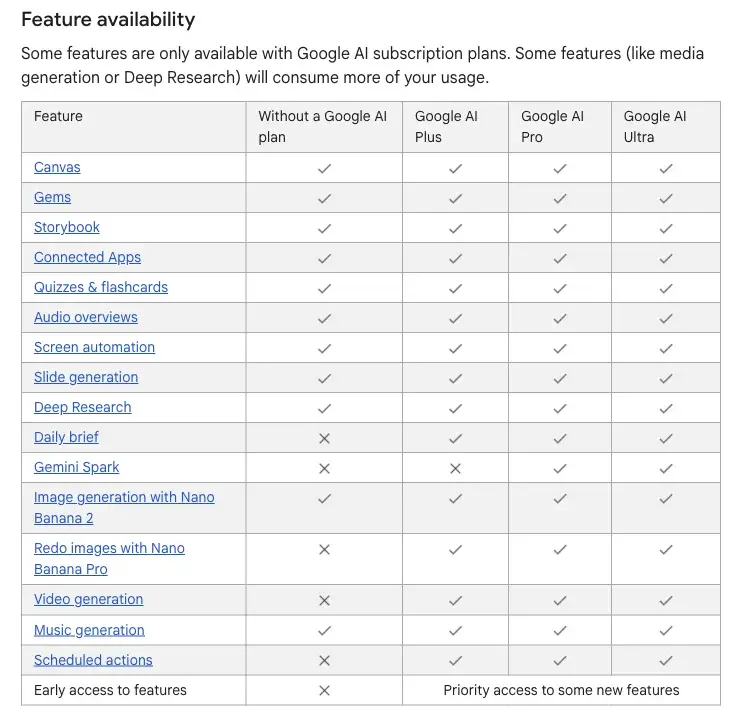
So as of today, in writing, image generation is a no-plan feature. That’s the good news. Two caveats apply. The page still says “Nano Banana 2,” not 2.1, so it hasn’t been updated for the new version. And the same page still shows all three model sizes (Flash-Lite, Flash and Pro) as available on every plan, which contradicts the Oct 9 change that 9to5Google reported on October 3 from Google’s support documentation. In other words, the page hasn’t caught up with the future yet, so what it says today doesn’t settle what it’ll say on Friday. We walk through the full change in Is Gemini Still Free? What Changes Oct 9.
The page also describes limits in a way that surprises people. Instead of a fixed number of images per day, it says usage is compute-based: it depends on how complex your request is, which model or feature you use and how long the conversation is, and it refreshes about every five hours until you reach a weekly limit. The multipliers are: free accounts get “standard limits,” AI Plus 2x, AI Pro 4x, and AI Ultra 5x or 20x the Pro limits. No number of images per day is published for any plan. Older articles quote 20, 50, 100 and 1,000 images a day. Those come from older snapshots and aren’t what Google’s current page says.
Page 2: the “Generate & edit images” help page
This is the page that matters most for Friday. Under “About Nano Banana models,” Google writes:
“To use a different Nano Banana model, switch your Gemini model before you create your image request.”
And then it lists three:
“Nano Banana 2 Lite: This option is used when the Gemini model is set to Flash-Lite. It is optimized for speed. It is ideal for quick images and basic ideas. It isn’t designed for multiple image references or for multiple edits.”
“Nano Banana 2: This option is selected when you make an image request with the Gemini model set to Flash or Pro. It balances speed with higher image quality, more world knowledge, and reliable text rendering. It can accept multiple reference images.”
“Nano Banana Pro: Available with a Google AI Plan, this option is available when you have the Gemini model set to Pro and want to redo an image when additional detail is needed.”
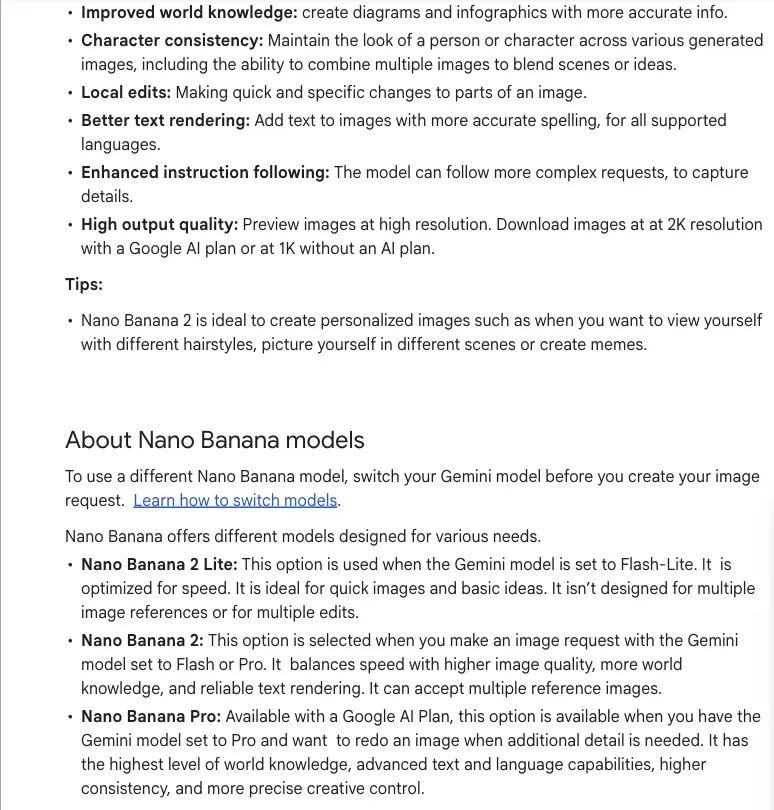
Read those three lines together and the connection to October 9 jumps out. Today, a free user can pick Flash and get Nano Banana 2. On October 9, according to the reported change, a free user can only use Flash-Lite, and by Google’s own routing, Flash-Lite means Nano Banana 2 Lite. That’s a model Google itself says “isn’t designed for multiple image references or for multiple edits.”
The same page also says free users download at 1K while paid users get 2K, and it still talks about a “daily quota” for Nano Banana 2 images, with no number, which sits oddly beside the five-hour, weekly description on the limits page. Google’s documentation isn’t fully consistent here, which is another reason to treat the future as unconfirmed.
So will free users get 2.1, or something lighter? What we know and don’t
I’d rather lay out three layers than give you a confident headline.
Confirmed by Google, in writing:
- Nano Banana 2.1 was released October 6 and is distributed in the Gemini app, per the DeepMind model card.
- Image generation (as “Nano Banana 2”) is listed as available without a Google AI plan.
- Free downloads are 1K, paid are 2K.
- Which Nano Banana makes your image depends on the selected Gemini model, with Flash-Lite mapped to Nano Banana 2 Lite and Flash or Pro mapped to Nano Banana 2.
- No per-day image count is published for any plan.
Reported, but not yet implemented:
- From October 9, free accounts are limited to Gemini 3.5 Flash-Lite. Google AI Plus keeps Flash-Lite and Flash (Pro goes away on a per-account date). AI Pro gains Deep Think. This comes from changes spotted in Google’s support documentation and reported by 9to5Google on October 3, then picked up by other outlets. Google’s live limits page hadn’t been updated to match when I checked.
Not known, and my inference:
- Whether the Gemini app will use 2.1 for the “Flash” tier, replacing Nano Banana 2. Probably, since 2.1 is built on Gemini 3.6 Flash, but Google hasn’t documented a “Nano Banana 2.1” label in the app.
- Whether the routing rule stays as written once free accounts only have Flash-Lite. If it does, free images would come from Nano Banana 2 Lite. That’s an inference from Google’s own routing text, not an announcement.
- Whether Google will quietly route free users to 2.1 or Lite-with-2.1-upgrades regardless of the text model. It could. Nothing suggests it will, and nothing rules it out.
My honest read: plan for free images to be lighter after Friday, and be pleasantly surprised if they aren’t. The ones most likely to feel the difference are people who edit the same image several times, combine multiple photos, or put a lot of text into an image, which are exactly the strengths Google lists for 2.1.
For Google AI Plus subscribers ($4.99), the picture is better. Plus keeps Flash, which routes to Nano Banana 2 (and presumably 2.1). What Plus loses, once Pro is removed from the picker, is the model setting that Google’s help page ties to the “Redo with Pro” button. The page says Nano Banana Pro is available “when you have the Gemini model set to Pro.” That’s another inference, but a fair one: if Pro isn’t selectable, the Pro redo may be unavailable too. Google says it will email Plus accounts with their own date.
A 15-minute test to see what you actually get
Instead of guessing, run the same three prompts today and again after Friday’s change reaches your account. You’ll have a before-and-after on your own account.
Setup: Open Gemini in a browser. Note which model is selected in the model picker (write it down, plus the date and time). Use the same account both times.
Test 1: text. Prompt: “Create a cafe sign that says exactly: FRESH BREAD / OPEN 7 TO 3 / CLOSED MONDAYS. Chalkboard style.” Look at the spelling and spacing. Count errors.
Test 2: a multi-step edit. Upload a photo of a room or your desk. Prompt 1: “Make the wall behind it light blue.” Prompt 2: “Now add a plant on the left.” Prompt 3: “Now change the lamp to brass.” Check whether the furniture and layout stay put across the three edits, or the room drifts.
Test 3: two references. Upload two photos (for example, a mug and a kitchen table). Prompt: “Place the mug from the first image on the table from the second image, natural light.” Google says Nano Banana 2 Lite isn’t designed for multiple image references, so this test will show you which model you’re on.
What to record: which model was selected, number of text errors in test 1, whether the room stayed consistent in test 2, and whether test 3 worked or gave you a message about references. Save the images. After Friday, repeat on the same account with the same prompts. If something has gotten worse, you’ve got evidence, and you’ve found a reason to consider the $4.99 AI Plus plan or another tool. If nothing changed, you’ve found out the cheap way.
One more thing to check is the download size. Google says free users download at 1K, so a 1024-pixel image is expected. Don’t be surprised, and don’t mistake it for a downgrade.
What early testers are finding
Only a day old, so take this lightly. Most of what’s circulating is promotional or Google-published. A few useful first-hand notes, translated out of tech-crowd shorthand:
- Editing is better. One tester who ran a “continuity stress test” (the same image edited again and again) found that 2.1 handled instructions like “remove this object” more cleanly than version 2, with less drift in the person’s posture and position from one edit to the next.
- Likeness can still slip. The same tester found that 2.1 sometimes regenerated a different-looking person across many repeated edits, where version 2 held the likeness longer. That’s one person’s test, with their own hypothesis about why, and I’d treat the hypothesis as unverified. But it matches Google’s own caution in the model card about “imperfect character identity preservation.”
- Text and local edits look good, “everything else untouched” isn’t guaranteed. Another tester who ran a sequence in Google AI Studio reported correct text, correct prices and a correct clock time, but a cup handle on the wrong side and slight shifts in other objects after a small text edit.
- Skeptics exist. Some users say the drift still shows within a few generations, and that it looks like an upgrade rather than a leap.
Google’s own model card lists remaining weaknesses that line up with all of this: blurry small text at 1K, unreliable long paragraphs, imperfect identity preservation, doodle or mask marks that sometimes stay after an edit, input poses that persist when you ask for a different pose, occasional left-right confusion, and occasional slowdowns.
None of these testers had a measured free-versus-paid comparison, and none reported an image count. As of this morning, I found no first-hand post from a free user describing exactly what they get from 2.1 in the app.
How it compares with ChatGPT’s image tool
If Gemini’s free tier gets lighter, it’s fair to ask where else you’d go. The honest comparison is narrower than the hype.
| Gemini (Nano Banana) | ChatGPT Images 2.5 | |
|---|---|---|
| Free access to image generation | Listed as a no-plan feature | Free users can create images, with a separate rate limit |
| Exact free image count published | No | No |
| How limits are described | Compute-based, refreshes about every five hours, weekly cap | A separate image-tool limit, with a reset time shown after you hit it |
| Free download size | 1K | Not specified in OpenAI’s free-tier FAQ |
| Image quality tied to which chat model you pick | Yes, per Google’s help page | Documented as a separately limited tool |
| Invisible watermark | SynthID on every Gemini-app image | See ChatGPT’s provenance page |
| Recent limit change | None documented for Oct 9 | OpenAI said Images 2.5 left existing limits unchanged |
No independent test I could find compares 2.1 and ChatGPT Images 2.5 under identical conditions, so I won’t tell you one is better. If you want to try the ChatGPT side, our explainer on ChatGPT Images 2.5’s sketch tool is a good starting point, and our free AI image generator roundup covers other options that don’t tie you to either company.
What this means for you
If you’re a free Gemini user who makes the occasional image: you’ll probably barely notice. Single images from a clear prompt are what the Lite tier is for. First action: run the 15-minute test today so you have a baseline.
If you edit the same image many times, or combine photos: this is the group most likely to feel a change, since Google says Nano Banana 2 Lite isn’t designed for multiple references or multiple edits. First action: run Test 2 and Test 3 today, and again after Friday. If they degrade, decide whether $4.99 a month is worth it.
If you’re on Google AI Plus ($4.99): you keep Flash, so everyday images should hold. Watch for Google’s email with your date for losing Pro, and note that the Pro redo may be affected. First action: use any Pro-redo habit now, and check the model picker when the email arrives.
If you’re on Google AI Pro ($19.99) or Ultra: nothing in the reported change reduces your image access, and you get downloads at 2K. First action: try 2.1’s strengths (text, infographics, multi-character scenes) and compare against your old prompts.
If you sell products (Etsy, Shopify, Amazon): better text and consistency help, but marketplaces increasingly want AI images disclosed and the photo must match the real item. Every Gemini image carries an invisible SynthID mark. Our What Is SynthID? page explains what it does and doesn’t prove. First action: check your marketplace’s current AI-image rule before relying on any generated product photo.
If you’re a developer or you use AI Studio: the pricing drop is real: about half the earlier price per 1K image. You’re also on a separate track from app limits. First action: look at the model ID gemini-nano-banana-2.1 in Google’s docs and note that the older gemini-3.1-flash-image is scheduled for deprecation on October 29, 2026.
If you teach or run a team: decide on a standard tool instead of letting everyone use whatever’s free this week. Free tiers move. Our Gemini course covers plans and limits, and our AI image generation course covers prompts that work across tools.
Edge cases and troubleshooting
I haven’t tested these from a free account, so I’ve marked what’s documented versus likely.
1. “I don’t see Nano Banana 2.1 in my Gemini app.” (Documented rollout.) Google says it “starts rolling out today.” There’s no global completion date. Refresh, update the app, and try again in a day or two. There’s no documented “2.1” selector in the app, so you may not see a label.
2. “My images look lower quality than before.” (Documented download sizes.) Free downloads are 1K, paid are 2K. If you recently moved from a paid plan to free, the size will drop.
3. “The image won’t accept more than one reference photo.” (Documented for Lite.) Google says Nano Banana 2 Lite isn’t designed for multiple image references. If you’re on Flash-Lite, that’s the likely cause. Switch to Flash if it’s still available on your plan.
4. “My edits keep changing parts of the picture I didn’t touch.” (Documented weakness.) Google’s own model card lists mask marks persisting and imperfect preservation. Make one change per message, and start a fresh image if the drift builds up.
5. “The text in my image is misspelled or blurry.” (Documented weakness.) The model card flags blurry small text at 1K and unreliable long paragraphs. Keep text short, put it in quotes, and ask for large lettering.
6. “I hit a limit way sooner than expected.” (Documented design.) Google describes usage as compute-based, with a five-hour refresh and a weekly cap, and says more complex requests use more. Simple prompts cost less than long multi-image edits. Wait for the refresh or switch to a lighter request.
7. “I can’t redo with Nano Banana Pro.” (Documented.) Redo with Pro is for paid plans and, per Google’s help page, depends on the Gemini model being set to Pro. It’s also unavailable if you’ve already reached your daily quota of Nano Banana 2 images.
8. “My images have a visible watermark.” (Documented, region-specific.) Every Gemini-app image carries an invisible SynthID watermark. In India, South Korea and Vietnam, Google’s watermark settings page says you only see the visible-watermark toggle with an AI Ultra subscription; otherwise visible watermarks are applied automatically to everything you create. Check the watermark settings page for your country.
9. “Under 18 and can’t edit.” (Documented.) Editing images isn’t available to users under 18, and school accounts can face different restrictions.
What Nano Banana 2.1 can’t do
It can’t promise you a free 2.1 after October 9. Google hasn’t said which model free accounts will get for images, and its own documentation points to a lighter one if routing stays as written.
It can’t give you 4K in the Gemini app for free. 4K is a developer-tool capability. App downloads are 1K free and 2K paid.
It can’t keep a face the same forever. Even Google’s model card lists imperfect identity preservation, and early testers saw likeness drift over repeated edits.
It can’t be trusted for exact text in long paragraphs or tiny type. Short, large text works much better than a page of copy.
It can’t tell you how many images you get. Google publishes limits as multiples and refresh windows, not counts, for every plan.
FAQ
What is Nano Banana 2.1? It’s Google’s latest image generation and editing model, released October 6, 2026. According to its model card it’s built on Gemini 3.6 Flash and improves text rendering, mask-based editing and subject consistency over Nano Banana 2.
Is Nano Banana 2.1 free in the Gemini app? Google’s help pages list image generation, as Nano Banana 2, as available without a paid plan, and Google says 2.1 is rolling out in the Gemini app. Google hasn’t published a statement on exactly which plans get 2.1 or when the rollout finishes.
Will Nano Banana stay free after October 9? Image generation is listed as a free feature and nothing published says it’s being removed. But free accounts are reportedly limited to the Flash-Lite model from October 9, and Google’s routing page maps Flash-Lite to the lighter Nano Banana 2 Lite. Google hasn’t said whether that will change.
What’s the difference between Nano Banana 2 Lite, 2, 2.1 and Pro? Per Google’s help page: 2 Lite is for quick, basic images on Flash-Lite, not designed for multiple references or multiple edits. 2 is selected on Flash or Pro, with better quality and text. 2.1 is the newer version of that tier. Pro is a paid-plan redo option for extra detail.
How many free images can I make a day? Google doesn’t publish a number. It describes compute-based usage that refreshes about every five hours up to a weekly limit, with free accounts on “standard limits.” Older figures like 20 a day come from outdated snapshots.
How do I know which Nano Banana I’m using? Google says it depends on the Gemini model you select. Flash-Lite uses Nano Banana 2 Lite, and Flash or Pro uses Nano Banana 2 (and presumably 2.1 as it rolls out). There’s no documented “2.1” label in the app yet.
Does Nano Banana 2.1 make 4K images in Gemini? Not for app users, as far as Google’s pages say. The 4K output is a developer capability. The app lets free users download at 1K and paid users at 2K.
Are the images watermarked? Yes, invisibly. Google says images made in Gemini carry a SynthID watermark. In India, South Korea and Vietnam, users without an AI Ultra plan also get a visible one automatically. See our SynthID explainer.
Is Nano Banana 2.1 better than ChatGPT Images 2.5? No independent test I could find compares them under identical conditions. Google’s own numbers and the Arena leaderboard show 2.1 improving on its predecessor and placing near the top, but there’s no verdict.
Should I pay for Google AI Plus because of this? Only if you find, after the 15-minute test, that Lite-level images fall short for what you do. For occasional single images, probably not. For heavy editing or multi-photo work, test first.
The bottom line
Nano Banana 2.1 is a real upgrade, built on a stronger base model, with better text, cleaner edits and steadier characters, and Google’s own pages say image generation is a free feature. What nobody can tell you today is which version free users will get after October 9, because Google’s help pages tie the image model to the chat model, and the reported change shrinks the free chat model to the smallest one. So don’t panic, and don’t assume. Run the 15-minute test now, run it again after Friday, and decide with your own results.
If you want to get more from whichever tier you’re on, our Google Gemini course covers plans, models and limits, our AI Image Generation course teaches prompts that hold up across tools, and AI Fundamentals explains why model choice, not just the app, decides what you get.
Sources
- Google DeepMind, “Nano Banana 2.1 Model Card” (Oct 6, 2026)
- Google Gemini Apps Help, “Generate & edit images with Gemini Apps”
- Google Gemini Apps Help, “Gemini Apps limits & upgrades for Google AI subscribers”
- Gemini Apps release notes
- Gemini API docs, Nano Banana 2.1
- The Decoder, “Google’s new image model Nano Banana 2.1 generates better images for less money”
- Neowin, “Google launches Nano Banana 2.1 with better editing and subject consistency”
- Android Authority, “Google launches Nano Banana 2.1”
- 9to5Google, Gemini model limits report (Oct 3, 2026)
- Notebookcheck, “Google Gemini drops Flash and Pro for free users on October 9”
- Arena, text-to-image leaderboard
- Arena, image-edit leaderboard
- OpenAI Help Center, “Provenance signals in OpenAI-generated content”
- Google, SynthID Detector and AI-content verification
