
You just walked out of a showing. The Hendersons loved the kitchen, hated the roof, and asked a question about the inspection timeline you can’t quite remember the answer to. You’re in the car, hands on the wheel, and the honest move — check the email thread before you call them back — usually waits until you’re parked somewhere with two free hands. Most agents just wing it from memory instead, and most of the time memory is close enough. Not always, though — and “close enough” is exactly the kind of thing that turns into an awkward phone call three weeks later when the timeline you guessed at doesn’t match what the lender actually said. On September 3, 2026, Google removed that wait. You can now just ask your inbox out loud.
What just changed
Google’s official announcement, published September 3, calls it “Use your voice to get more done in Gmail, Docs, and Keep” — and the headline undersells it a little. This isn’t dictation. It’s three separate conversational voice features, each built into a different app, each doing a genuinely different job.
Gmail Live lets you have a spoken conversation with your inbox. Ask “which lender sent the latest pre-approval update for the Nguyen file?” and it searches your mail, reads back an answer, and shows you a transcript with links to the actual source emails so you can verify before you act on anything. The conversational part matters here — you can ask a follow-up (“and when did they say the appraisal would be done?”) without repeating the client’s name or file details again, the same way you’d naturally continue a conversation with a person instead of re-typing a full search query every time.
Docs Live is a hands-free co-writer. Talk through an idea — a follow-up email, a listing description, a closing recap — and it organizes what you said into a structured first draft. With your permission, it can pull context from Gmail, Drive, and Chat while it writes.
Keep Live turns a spoken brain-dump into an organized note or checklist. Say everything you’re thinking after a showing, in whatever order it comes out, and it structures it into something you can actually act on later.
Here’s the part that matters before you get excited: these three features are not equally available to everyone.
| Feature | What it does | Plan required | Platform at launch | Language |
|---|---|---|---|---|
| Gmail Live | Ask spoken questions, get answers pulled from your inbox with linked sources | Google AI Plus, Pro, or Ultra | Android and iOS | English only |
| Docs Live | Talk through an idea, get a structured first draft (can use Gmail/Drive/Chat context with permission) | Google AI Pro or Ultra only | Android and iOS | English only |
| Keep Live | Turn a spoken brain-dump into an organized note or checklist | Google AI Plus, Pro, or Ultra | Android only at launch | English only |
That table is the whole ballgame for a lot of agents. If you’re on the $19.99/mo Google AI Plus plan and carry an iPhone, you get Gmail Live and nothing else — Docs Live needs the pricier Pro tier, and Keep Live isn’t on iOS yet at all. Google also says availability for Workspace business accounts — the kind a lot of brokerages actually issue — is “coming soon,” not live today. If your work email lives on a brokerage-managed Google Workspace account rather than a personal Google account, check with your office before assuming this works for you on day one.
That split isn’t an accident, either. Google has spent the last year pushing Gemini deeper into every paid tier as the reason to upgrade rather than a free add-on, and gating the most writing-heavy feature — Docs Live — behind the pricier Pro/Ultra plans fits that pattern: the feature most likely to save you real drafting time is also the one Google charges the most to unlock. Worth knowing going in, so you can decide whether the upgrade is worth it for your specific workflow rather than assuming the cheapest plan gets you everything the announcement described.
And no, this isn’t the same thing as the Gemini-for-Mac voice feature Google shipped back on July 29. That one is desktop dictation — long-press the Fn key and it types whatever you say into any open app, cleaning up your “umms” as it goes. This is different: it’s conversational retrieval and drafting built into three specific mobile apps, not a system-wide typing tool. Different capability, different device, different use case. If you already use the Mac dictation feature for typing emails at your desk, this is the version for when you’re not at a desk at all.
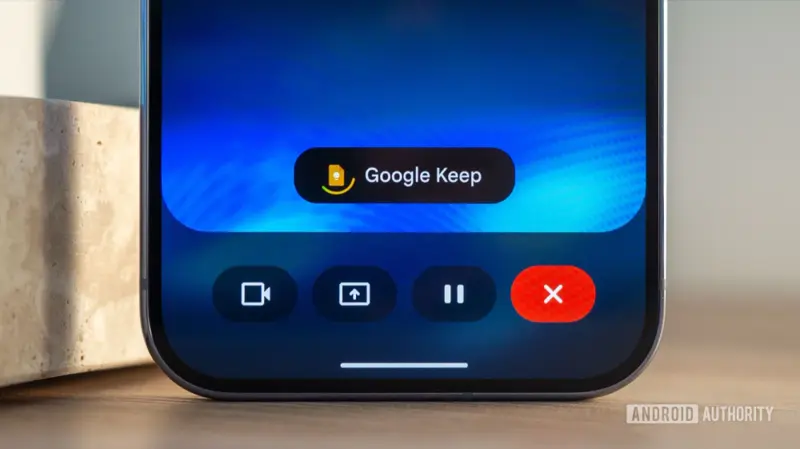
That “feels like a call, not a chatbot” design is deliberate, and it’s worth understanding before you use it with anything client-facing. There’s no text box waiting for you to type — you tap the Live icon, the interface goes full-screen, and you’re just talking the way you would to another person, with a visible transcript scrolling underneath so you can catch a misheard word in real time instead of finding out later.
Why this is landing now, and whether agents are actually ready for it
Google didn’t build this in a vacuum — real estate has been one of the faster-adopting professions for everyday AI tools, and the numbers back that up more than most industries. RPR’s February 2026 survey of 225 quality-screened agents found 82% already use AI tools in their business, and 92% either use one or plan to. The bigger, more established NAR 2025 Technology Survey — a wider benchmark, not a small self-selected sample — puts active monthly use at 68%, with ChatGPT the most-named tool (58%) and Gemini a distant but real third (20%).
| Metric | Figure | Source |
|---|---|---|
| Agents currently using AI in their business | 82% | RPR, Feb 2026 (n=225) |
| Agents using AI daily or several times a week | 68% | RPR, Feb 2026 |
| Top perceived benefit of AI | 71% cite time savings | RPR, Feb 2026 |
| Top concern about AI | 63% cite output accuracy | RPR, Feb 2026 |
| Agents with any AI use at least monthly | 68% | NAR 2025 Technology Survey |
| Agents using AI-generated content (listings, etc.) | 46% | NAR 2025 Technology Survey |
| Agents naming Gemini as a top AI tool used | 20% | NAR 2025 Technology Survey |
| Agents reporting “significant” business impact from AI | 17% | NAR 2025 Technology Survey |
That last row is the honest caveat sitting underneath all the adoption enthusiasm: plenty of agents have tried AI, far fewer say it’s genuinely changed how their business runs. And the “63% cite accuracy as the top concern” line is exactly why the verify-before-you-repeat-it habit in the walkthrough above isn’t optional caution — it’s the difference between this being a real time-saver and this being the next thing your broker has to write a policy about.
The walkthrough: setting it up and running it for real
Google’s launch post explains what the features do but doesn’t publish a step-by-step activation guide, so here’s the sequence that actually works, based on the access requirements Google documents and how the rollout behaves in practice.
Step 1: Confirm you’re eligible. You need a personal Google Account — not (yet) a brokerage-managed Workspace account — on a Google AI Plus, Pro, or Ultra plan. Gmail Live and Keep Live need Plus or higher; Docs Live needs Pro or higher. If you’re not sure which plan you’re on, check at one.google.com.
Step 2: Update your apps. Update Gmail, Google Docs, and Google Keep from the Play Store or App Store. If you’re on an iPhone, skip ahead — Keep Live isn’t there yet, so updating Keep alone won’t get you the feature.
Step 3: Open Gmail and find the Live entry point. Look for the Gemini/Live icon near the search bar. Tap it, and you’ll get a live, conversational interface — not a text box.
Step 4: Test with something that doesn’t matter. Before you trust this with a client’s information, ask it something generic: “What’s the subject of my most recent email?” Watch how it responds, notice the transcript it shows, and check that the source links actually point to the right emails. This is the single most useful five minutes you’ll spend on this feature, because it tells you how the tool behaves before you’re relying on it for something real.
Step 5: Grant microphone access deliberately. Your phone will ask. Don’t approve it reflexively on a shared or borrowed device.
Step 6: For Docs Live, authorize connected sources narrowly. It can pull from Gmail, Drive, and Chat — but only with your permission, and Google’s own documentation is explicit that you control what it’s allowed to touch. Grant it the least access that gets the job done, and revisit those permissions if your brokerage has an approved-tools list.
Step 7: Run the real workflow. Here’s what that actually looks like end to end, using the Henderson file from the top of this post as a worked example:
You’re in the car after the showing. You open Gmail Live and ask: “What did the lender say about the Henderson file’s appraisal timeline?” Gmail Live searches the thread, reads back a summary — “Sarah at Meridian Lending said the appraisal is scheduled for Thursday and results usually take 2 to 3 business days” — and shows you the source email so you can confirm that’s accurate before you repeat it to anyone. You open the linked email. It checks out.
Now you open Docs Live and say: “Draft a short follow-up to the Hendersons. Tell them the appraisal is scheduled Thursday, results usually take 2-3 business days, and I’ll call the second I hear anything. Keep the tone warm, not clinical.” Docs Live produces a three-sentence draft along those lines. You read it — every word, not a skim — fix the one line that sounds stiffer than you’d actually talk, and send it from your own device once you’re back at a keyboard, or on the spot if you’re comfortable sending from mobile.
Last stop before your next appointment: Keep Live. You say everything that’s rattling around in your head — “buyer loved the kitchen, flinched at the roof age, wants the HOA docs, asked if the roof’s been reroofed or just patched, need to check the seller disclosure again” — and Keep Live turns that stream of consciousness into a clean checklist you can actually work from later, instead of a voice memo you’ll never replay.
That’s the whole loop — ask, verify, draft, review, capture — and none of it required you to pull over, open a laptop, or type with your thumbs at a red light.
A second worked example, because the first one was a buyer file — here’s a listing-side version. You just finished a listing appointment with a seller who’s nervous about pricing. Walking back to your car, you open Keep Live and say: “Seller wants to list at 485, comps in the neighborhood are running 460 to 475, need to send them the three closest comps by tomorrow, they’re worried about the updated kitchen not showing well in photos, schedule the photographer for this week.” Keep Live turns that into a four-item checklist instead of a two-minute voice memo you’d otherwise have to relisten to and transcribe by hand later. Back at your desk that evening, you open the checklist, pull the three comps from your MLS, and you’re already halfway through the task instead of starting from “wait, what did they say again?”
Gemini Live vs. the Mac dictation feature vs. just typing it yourself
You’ve got three ways to get words into your inbox now, and they’re not interchangeable.
Typing it yourself is still the right call whenever you’re already at a keyboard and the message matters enough to word carefully — a listing description, a negotiation email, anything with fair-housing language in it. Voice is for the fifteen minutes between showings when the alternative is doing nothing until you’re back at your desk.
What this means for you
If you’re a solo agent juggling your own inbox and calendar: Gmail Live is the highest-value piece for you specifically because you don’t have an assistant to ask “what did the lender say” on your behalf. First action: turn it on this week and use it for one week’s worth of real follow-ups before you decide whether it earns a permanent spot in your routine.
If you’re on a team with a transaction coordinator: Let your coordinator keep the system of record. Use Gmail Live for the fast recall moments — “did the inspector confirm Thursday?” — and route anything that needs a permanent paper trail through your normal process, not a voice transcript. First action: agree with your coordinator on what voice-recalled information still needs written confirmation.
If you’re a broker or team lead: Before your agents start using this with client data, put a one-page policy in front of them — approved accounts only, what never gets spoken aloud in public, and what still needs human review. First action: adapt NAR’s brokerage AI-policy guidance (linked in Sources) into something your office signs off on this month, not eventually.
If you’re a new agent still building your systems: Don’t let this replace learning your CRM and transaction management software properly. Voice AI is a shortcut for people who already have a system; it’s not a substitute for building one. First action: get your file-organization habits solid first, then layer voice on top.
If you’re a luxury or high-end agent: Your clients’ financial details are exactly the kind of information NAR’s privacy guidance warns against speaking aloud in a public setting — and luxury transactions often involve more of it, not less. First action: reserve Gemini Live for logistics (timing, scheduling, general status) and keep financial specifics for private, written channels.
If you’re an agent who drives a lot between rural or spread-out listings: This is arguably the single best use case in the whole announcement — dead time in the car becomes productive time. First action: build the habit of one Gmail Live check and one Keep Live capture per drive, and see how much mental load it takes off by Friday.
If you’re skeptical AI voice tools are more trouble than they’re worth: That’s a fair starting position — Google itself only launched this Sep 3, and reviewers were still asking “should you?” within a day of launch. First action: try it for exactly one week on non-critical tasks, and only keep using it if it actually saved you time, not because it’s new.
If you’re a buyer’s agent who spends most of your day in the car: This is closer to built for you than any other profile on this list — the dead time between showings is exactly the gap Google designed the feature to fill. First action: pick one recurring drive (your longest commute between listings, say) and make it your standing Gmail Live + Keep Live window every day this week, then check at the end of the week how many follow-ups you actually got out faster.
Edge cases and troubleshooting
“I have Gemini access but Docs Live isn’t showing up.” You’re probably on Google AI Plus, which doesn’t include Docs Live — that one needs Pro or Ultra specifically. Gmail and Keep Live are the Plus-tier features; Docs Live is the pricier one.
“Keep Live isn’t on my phone at all.” If you’re on iPhone, that’s expected — Keep Live launched Android-only. Google hasn’t given a date for iOS.
“My brokerage email is a Google Workspace account and none of this works.” Google’s own launch post says Workspace business-customer availability is “coming soon” — it wasn’t live for business accounts at launch. This only works on personal Google Accounts for now.
“It feels slower than just typing.” You’re not wrong that voice loses to typing for some tasks — one early reaction on X put it plainly: talking to email and documents “seems slower than typing for most tasks.” Voice wins specifically for hands-busy moments (driving, walking a listing, carrying paperwork), not as a universal replacement for your keyboard.
“I’m not sure how much of what I say gets stored or used.” The FTC’s voice-assistant privacy guidance is a good general baseline here: understand when the device is actually listening, check the privacy policy, review and delete recordings you don’t need, and use multi-factor authentication on the account — especially since Gmail Live can surface sensitive correspondence.
“The transcript doesn’t quite match what I said.” Treat the visible transcript as your fact-check step, not an afterthought — that’s exactly why Google shows it. Gmail Live’s own design assumes speech recognition won’t be perfect, especially with property addresses, client names, and dollar figures, so read the transcript before you act on the answer.
“I tried it right when it launched and it wasn’t there yet.” Google’s own post describes the rollout as happening “this week,” not instantly to every eligible account the moment the announcement went live. If you checked on launch day and came up empty despite having an eligible plan and an updated app, give it a few more days and check again before assuming something’s wrong with your account.
“It only launched in English — I need it in another language for clients or for myself.” Confirmed: all three features are English-only at launch, with no announced timeline for additional languages. If your practice runs primarily in another language, this doesn’t help you yet.
“I said something out loud I probably shouldn’t have.” Review what the assistant heard immediately — check the transcript, draft, or note — and correct or delete it before sharing anything downstream. This is the fastest fix, and it’s exactly why you shouldn’t treat any of these three features as fire-and-forget.
“My brokerage hasn’t approved any AI tool, and I don’t know if I’m allowed to use this.” Ask before you assume. NAR’s brokerage guidance specifically recommends an approved-tool list precisely because agents were already using AI faster than offices were writing policy for it — if your office doesn’t have one yet, that’s a five-minute conversation worth having with your broker this week, not after you’ve already used it on a live deal.
“Docs Live pulled in a detail from an email I didn’t want referenced.” This is the tradeoff of granting broad permission for convenience. If a draft surfaces something from a connected source you didn’t intend to include, don’t just delete that line and send — go back and narrow what Docs Live is authorized to pull from, the same way you’d tighten sharing permissions on a Google Doc that got too much access.
What this can’t do
It doesn’t replace your transaction record. Keep Live organizes your spoken notes into something readable, but it’s not a substitute for a contemporaneous, verified file in your transaction management system. Anything that matters for compliance — deadlines, disclosures, the paper trail an inspection dispute would need later — still has to land in your actual system of record, not just a Keep note on your phone.
It doesn’t verify facts for you. Gmail Live retrieves and summarizes; it doesn’t guarantee accuracy. NAR’s March 2026 brokerage guidance is blunt about this: AI can “hallucinate” plausible-sounding but false property facts, square footage, or market details, and the agent and brokerage stay responsible for whatever reaches a client or a listing. The tool showing you a source link is a feature you have to actually use, not a guarantee built into the answer.
It doesn’t work on a brokerage Workspace account yet. If your work email is Workspace-managed rather than a personal Google Account, you’re waiting on Google’s “coming soon” for business availability — and there’s no published date for when that changes.
It doesn’t check fair-housing or disclosure language. A voice-drafted follow-up still needs the same human review any client communication needs — nothing here screens for compliance language automatically, and a fast, confident-sounding draft is easier to accidentally rubber-stamp than a slow, effortful one.
It doesn’t work in a language other than English. No exceptions at launch, on any of the three features, on any plan tier — if your practice serves clients primarily in Spanish, Mandarin, Vietnamese, or any other language, this specific feature set doesn’t help you yet, even though the rest of Gemini does support other languages elsewhere in the product.
How this sits alongside the tools you already use
If your brokerage already runs Compass AI, Side, eXp’s Mira, or a similar brokerage-branded AI layer, Gemini Live isn’t trying to replace that — it’s a personal-account voice feature on top of Gmail, Docs, and Keep specifically, not a brokerage platform integration. Your brokerage tool likely still owns your CRM data, your MLS syncing, and your lead routing; Gemini Live only ever sees what’s in your personal Gmail, Docs, and Keep. That’s a meaningful boundary to keep straight, because it means this doesn’t automatically pull in anything from your brokerage’s separate systems, and it means using it doesn’t create a new integration your IT or compliance team needs to audit — it’s scoped to accounts you already control directly.
FAQ
Is Gemini Live free? No. It requires a paid Google AI subscription — Plus (currently $19.99/mo) for Gmail Live and Keep Live, Pro or higher for Docs Live. There’s no free tier for any of the three features.
Does this work with my brokerage’s Workspace email? Not yet. Google’s launch post says Workspace business-customer availability is “coming soon” — as of launch, this is a personal-Google-Account feature only.
Is this the same as the Gemini app’s voice mode I might already use? No. This is specifically Gmail Live, Docs Live, and Keep Live — conversational features built into those three apps. The general Gemini app’s assistant mode and July’s Gemini-for-Mac dictation are both separate features with different mechanics.
Can I use this while driving? Google doesn’t publish specific driving guidance for these features. Use the same judgment you’d apply to any hands-free phone task — many states restrict phone interaction while driving even hands-free, so check your local laws and consider using it only when parked or as a passenger.
What happens to the audio I speak into it? Google’s launch materials don’t publish a feature-specific retention policy beyond the general Google AI privacy terms. The FTC’s general voice-assistant guidance (linked below) is a reasonable baseline: review your account’s privacy and activity controls periodically.
Can I use this for client financials or negotiation details? NAR’s brokerage guidance advises against entering client financial or negotiation details into unapproved AI tools, since many tools store prompts or use them to improve models. Treat this the same way — don’t speak identifying financial or negotiation specifics aloud where it could be overheard, and check whether your brokerage has approved this tool at all.
Why doesn’t Keep Live work on my iPhone? It launched Android-only. Google hasn’t announced an iOS timeline.
Is this actually faster than just calling my transaction coordinator? For a quick fact-check, often yes — you get an answer in seconds instead of waiting for someone to check their own inbox. For anything that needs a documented answer, your coordinator (or your own written record) is still the right channel.
Does this replace the voice-to-text feature already built into my CRM? No, and it’s not really competing with it. Your CRM’s voice notes are usually a dictation shortcut for logging activity inside that one system. Gmail Live specifically answers questions by searching your actual inbox and citing the source email — a different job than transcribing a note into a CRM field.
What happens if it mishears a client’s name, address, or a dollar figure? This is the exact failure mode the visible transcript exists to catch — Google’s own design assumes voice recognition won’t be flawless with proper nouns, addresses, and numbers, all three of which are common in real estate conversations. Read the transcript every time before you act on the answer, especially for anything with digits in it.
The bottom line
Gemini Live’s three new voice features solve a real, specific problem — the dead time between appointments where checking your inbox properly means pulling over, and doing it from memory means risking a wrong answer to a client. Used for what it’s actually good at — quick recall, rough drafts, structured notes — it’s a genuine time-saver. Used as a replacement for verification, compliance review, or your transaction record, it’s a liability waiting to happen.
The plan-and-platform gating is real, and it means this isn’t a universal day-one win for every agent reading this. Check the table above against your own plan and phone before you build a habit around a feature you might not actually have yet — and if you’re on an iPhone with a Plus subscription, know that you’re getting the Gmail Live piece today and waiting on the rest.
Start narrow. Try it on real but non-sensitive follow-ups for a week before deciding how much of your workflow it earns. And if you want the fuller AI playbook for your business — MLS automation, listing copy that survives fair-housing scrutiny, and the CMA workflow that saves the most time of anything in this list — our AI for Real Estate Agents course walks through all of it in about an hour, free to start.
Sources
- Google — Use your voice to get more done in Gmail, Docs, and Keep (Sep 3, 2026)
- Google — Turn your voice into action in Gemini Live
- Google Help — Get started with Google Workspace with Gemini
- Android Authority — You can now talk your way through Gmail, Docs, and Keep (Sep 3, 2026)
- TechCrunch — Google launches AI voice features in Gmail, Docs, and Keep
- Google — Gemini for macOS adds new natural language capabilities (Jul 29, 2026)
- NAR — Why Every Brokerage Needs an AI Use Policy
- NAR — REALTORS® Embrace AI, Digital Tools to Enhance Client Service (2025 Technology Survey)
- RPR — 2026 AI Adoption Survey
- FTC Consumer Advice — How To Secure Your Voice Assistant and Protect Your Privacy
- Google — official X/social launch posts, @sundarpichai and @GoogleWorkspace (Sep 3, 2026)