On Thursday, October 1, OpenAI added a button to ChatGPT’s shopping results that says Try on. Tap it, give ChatGPT a selfie, and it shows you wearing the jacket, skirt, or sunglasses you were looking at. You can even upload a screenshot from any other store and ask for the same thing.
It’s a fun feature, and it works the way you’d hope. The part that deserves more attention than the demo is what you hand over to get it: a photo of your face, and ideally your whole body, that ChatGPT saves for next time. On a personal account, that photo can also be eligible to help train OpenAI’s models unless you’ve switched a setting off.
This guide covers how Try on works step by step, what a generated image can and can’t tell you about fit, and the exact settings to check before you upload anything. I’ll be straight about one thing up front: I built this from OpenAI’s release notes, its help-center pages, launch coverage, and research papers, not from running the feature on my own photo. Where something is unconfirmed, I say so.
What just changed
OpenAI announced two shopping features together, both available on web and mobile. TechCrunch’s Sarah Perez called it a “global launch,” and no country exclusions have been published.
- Try on adds a button to clothing and accessory listings in ChatGPT’s shopping results. You take or upload a selfie, and ChatGPT Images generates a picture of you wearing the item.
- Favorites lets you save any product, or sort products into folders, in your ChatGPT Library. Saved items sit alongside your try-on images.
Both run on ChatGPT Images 2.5, the image model OpenAI launched in September. OpenAI says it produces more natural lighting and richer textures, follows editing instructions better, and generates images faster than the previous version.
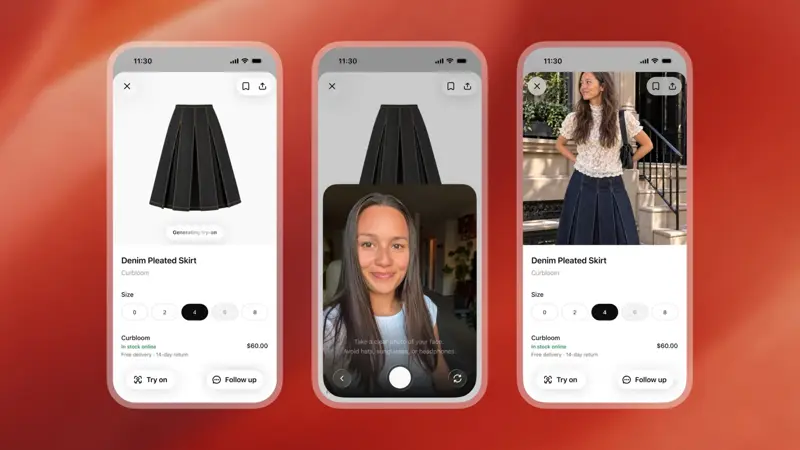
That middle screen is worth a second look. The camera prompt reads “Take a clear photo of your face. Avoid hats, sunglasses, or headphones.” So the feature is explicitly looking at your face, not just estimating a body shape.
OpenAI’s own release note is short. Here’s the entry on its help-center page:
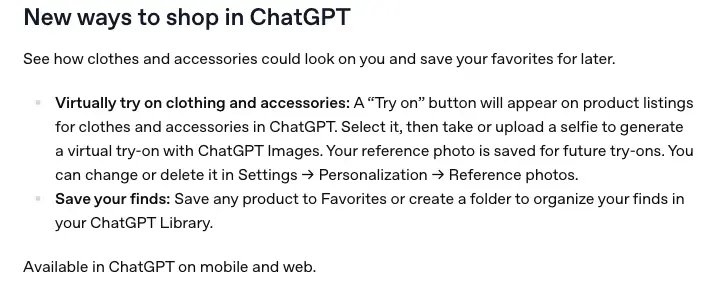
Notice what it says: your reference photo is saved for future try-ons, and you can change or delete it under Settings → Personalization → Reference photos. Everything else in this guide builds on those two facts.
What OpenAI confirmed, and what it didn’t
| Question | What’s confirmed | What’s not stated |
|---|---|---|
| Where is it available? | ChatGPT on web and mobile | No country list or restrictions published |
| Which plans get it? | Images 2.5 is available across ChatGPT’s tiers | No separate Free/Go/Plus/Pro matrix for Try on |
| What do I upload? | A selfie or full-body photo; or a screenshot of an item from any store | Exact photo requirements beyond the on-screen prompt |
| Is the photo saved? | Yes, as a reference photo for future try-ons | A Reference-photo-specific retention period |
| Can retailers opt in or out? | — | Not stated in OpenAI’s announcement or TechCrunch’s report |
| Does it guarantee fit? | No. It’s a visual impression | Any published accuracy or return-rate figures |
That last row matters most for the next few sections. There’s no OpenAI-published number showing that Try on makes you pick better sizes. Any claim like “reduces returns by 20%” attached to this feature is made up.
How to use it, step by step
Here’s the flow as OpenAI and the launch coverage describe it.
Step 1: Ask ChatGPT to shop
Describe what you want in plain words. Something like:
Find me a navy blazer for job interviews, under $150, that works for a rounded or athletic build. Show three options.
ChatGPT returns product listings. The Try on button appears on clothing and accessory listings. It doesn’t appear on everything (see the troubleshooting section).
You can also skip ChatGPT’s own results. Upload a screenshot of an item from any retailer’s site and ask it to try that on you. TechCrunch’s report and OpenAI’s launch material both describe this. In practice, it turns ChatGPT into a fitting room for the whole internet, not just the products it surfaces.
Two other things OpenAI says it can do while shopping: describe a style and ask it to find pieces that complete the look, or upload a photo of an outfit you like (a celebrity’s, say) and ask it to find items you can buy that match.
Step 2: Tap Try on
Select it on the listing you want. If you haven’t used Try on before, ChatGPT asks for your photo.
Step 3: Take or upload your photo
This is the step where your decision matters. You can take a selfie in the moment or upload one. Reporting from AbsoluteGeeks says the feature asks for a face photo and a full-body photo, while OpenAI’s release note says “a selfie.” In OpenAI’s demo, the camera screen asks for a clear photo of your face.
Which should you give it? A face-only selfie works for things near the face (sunglasses, earrings, hats, a collar). For a garment’s length, drape, or how a jacket sits on your shoulders, a full-body photo gives the image model far more to work with. The tradeoff is obvious: a full-body photo is a more personal image.
Whatever you provide becomes your reference photo. OpenAI saves it so you don’t have to retake it for each item.
Step 4: Read the result like a stylist, not a tailor
ChatGPT Images generates the picture. Use it to answer questions like: does this color suit me? Is this length what I had in mind? Does this style look like something I’d actually wear?
Don’t use it to answer “will a medium fit?” We’ll get to why in the next section.
You can keep chatting. Ask for the same jacket in a different color, or ask it to put the blazer with a different pair of trousers.
Step 5: Save to Favorites
Save the products you like to Favorites, or sort them into folders, in your ChatGPT Library. TechCrunch notes that these items are saved alongside your try-on images. We’ll come back to why that matters for privacy.
A worked example: one purchase, start to finish
Let’s carry a single purchase through. This is an illustrative scenario with made-up measurements, not a test I ran, but each step follows the process above.
The situation: Dana is buying a blazer for job interviews. The listing says “Free delivery, 14-day return” (the same kind of return line shown in OpenAI’s demo).
Step A, the style check (what Try on is good for). Dana asks ChatGPT for navy blazers under $150, taps Try on for the second result, and gets a picture of herself in it. Verdict from the image: the color is right, the cut looks sharp, the length looks about where she wants it. Good enough to shortlist.
Step B, the size check (what Try on can’t do). The image can’t tell Dana whether size 8 fits. So she goes to the retailer’s size chart and compares it with her own measurements:
| Size 8 (retailer chart) | Dana (measured) | Verdict | |
|---|---|---|---|
| Bust | 36 in | 36.5 in | Slightly over |
| Waist | 29 in | 30 in | Slightly over |
| Hips | 39 in | 40 in | Slightly over |
Her numbers sit between size 8 and size 10. She reads the reviews, finds two that say the blazer “runs small,” and orders the 10.
Step C, the safety net. She orders with a 14-day return window, and keeps the packaging until she’s tried it on in person.
The point isn’t the numbers. It’s the division of labor. Try on narrowed the choice by look. The size chart, the reviews, and the return policy decided the size. That’s the right use of this feature, and nothing in OpenAI’s materials suggests otherwise.
What a generated image can and can’t tell you about fit
OpenAI is careful here, and so are the reporters who covered it. A generated image shows how a color or style might look on you. It can’t confirm fit, fabric drape, or sizing. Those are the factors that cause most clothing returns.
The research backs up that caution. I went through the academic literature on virtual try-on, and here’s what it does and doesn’t say:
| Finding | Source | What it means |
|---|---|---|
| Virtual fitting rooms improved product evaluations and purchases for lower-BMI users, but could hurt responses among higher-BMI users, because avatars resembling the user can trigger self-image threat. Combined a large field experiment and five lab experiments. | Journal of Marketing Research (2023), “Virtual Fitting Room Effect: Moderating Role of Body Mass Index” | Try-on can help, and it can also make some people feel worse. It isn’t neutral. |
| Immersive tech (AR, VR, mixed reality, 3D) affects consumer behavior across industries; the studies vary widely by technology and context. A review of 129 high-quality studies. | “Immersive technologies and consumer behavior: a systematic review of two decades of research” (2025) | Results from makeup, eyewear, or 3D size tools don’t automatically transfer to photo-generated clothing try-on. |
| Perceived realism in AR shopping apps is driven by how diagnostic, controllable, and personalized the app feels, and realism predicts continued use. 296 users, two apps. | “The realism of augmented reality (AR)-based apps: antecedents and implications for continuance use” | “Looks realistic” builds trust. It doesn’t prove the garment fits. |
| A review of try-on technology flags limits: incomplete catalog coverage, product inconsistency, body-image effects, privacy concerns, and little field-experiment evidence. It cites a randomized field experiment where virtual fit information raised order value and cut fulfillment costs tied to returns. | Systematic literature review on try-on technology (EasyChair preprint) | The best evidence for fewer returns comes from systems that give real fit information, not only a nice picture. |
The honest summary is that virtual try-on can reduce uncertainty, and fit information (not just appearance) is what appears to cut returns. A generated selfie is the first kind of help and not the second. There’s also a risk the research names directly: appearance-fit confusion. A fabric that drapes beautifully in the image can feel like proof it’ll fit, when the image generator was only drawing a plausible garment.
OpenAI hasn’t published accuracy or return-rate data for this feature. Without that, assume the image shows style, not size.
Where your photo goes
This is the part most launch coverage skips, so let’s go slowly.
The photo trail
When you use Try on, your photo can end up in more than one place:
| Where it lives | What it is | How to remove it |
|---|---|---|
| Reference photo | The photo ChatGPT saves for future try-ons | Settings → Personalization → Reference photos → change or delete |
| The chat | Your uploaded photo and the generated images | Delete the chat. OpenAI says deleted chats are scheduled for permanent deletion within 30 days, with exceptions for security or legal needs |
| Library | Favorites and try-on images are saved together | Check your Library and delete items there too |
| Training eligibility | On personal accounts, content (including images) may be used to improve models unless you turn the setting off | Settings → Data controls → turn off “Improve the model for everyone” |
| Feedback | If you tap thumbs up or down on a response, the whole conversation may be used for training, even if you’ve opted out | Don’t rate a try-on conversation |
OpenAI hasn’t published a retention timeline specific to reference photos. What it has published is general: deleting a chat schedules deletion within 30 days, subject to exceptions. Treat the reference-photo deletion button as “remove it from my account,” and don’t assume it overrides the general rules.
The training default
This is the setting that matters most, so here’s OpenAI’s own wording. On its Data Controls page:
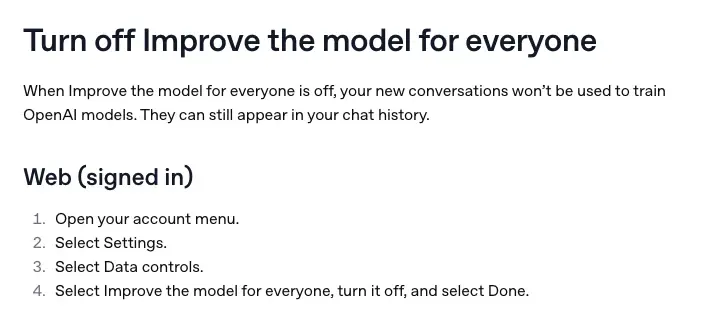
When “Improve the model for everyone” is off, your new conversations won’t be used to train OpenAI’s models. Two details people miss:
- It applies to new conversations. Turning it off doesn’t pull back content you already shared.
- It doesn’t delete anything. Your chats stay in your history. Deleting is a separate step.
Business, Enterprise, Edu, and Healthcare workspaces aren’t used for training by default. Personal accounts are the ones where the default can include your content. AbsoluteGeeks put it plainly in its coverage: on personal accounts, uploaded images can be used to train OpenAI’s models by default unless you opt out.
There’s also a second route: the OpenAI Privacy Portal has a “Do not train on my content” option that OpenAI says works the same way.
Temporary Chat
OpenAI says Temporary Chats don’t appear in your history, don’t create or update memories, and aren’t used to improve its models. They may be kept for up to 30 days for safety. If you save one, it becomes a regular chat and follows your normal settings. What I couldn’t confirm is whether the Try on button appears inside a Temporary Chat at all. If privacy is your priority, test that before you rely on it. We covered how the mode works in our Temporary Chat guide.
What about the retailer?
OpenAI’s announcement doesn’t say retailers receive your photo, the generated image, or any inferred sizing data. But OpenAI’s privacy policy says information shared with third-party shopping partners is governed by those partners’ policies. A safe working assumption: OpenAI handles the upload and the try-on stage. The moment you click through to a store, check out, or use that store’s own tools, the retailer’s rules apply.
The legal question, briefly
Two laws come up a lot when people discuss body photos. Neither is a reason to panic, and I’m not a lawyer, but here’s the plain version.
GDPR (EU). Biometric data means data from technical processing of a person’s physical traits that allows or confirms unique identification. The law’s own recital says photographs are not automatically biometric data. They count only when processed in a way that identifies a person. An ordinary uploaded photo is still personal data, with all the usual protections.
Illinois BIPA. The state’s biometric privacy law covers scans of face geometry and expressly excludes photographs themselves. Damages are $1,000 per negligent violation and $5,000 per intentional or reckless one. In Svoboda v. Amazon.com, the Seventh Circuit upheld class certification on December 17, 2025, in a suit alleging Amazon’s own virtual try-on tool captured facial geometry to place overlays. That’s a case about a different company and different technology. It doesn’t say ChatGPT’s feature violates any law. It shows why a try-on tool that reads a face is a legitimate privacy conversation, and not a theoretical one.
What people are saying
The conversation on X is less about image quality than you’d expect. The feature is only two days old, so much of the chatter is news roundups. Among the real reactions, the privacy worry is the loudest. One user pointed out that on a personal account, uploaded photos can train models unless you opt out, and called the photo the real cost of the feature. Another told people flatly not to upload it. A third flagged that your face and outfits end up stored in ChatGPT, calling it the part nobody’s talking about yet.
On the product side, one post said a generated outfit looking good and the clothes actually fitting are two very different things. A reply under TechCrunch’s post said ChatGPT had just “killed another wave of startups,” a nod to the many standalone try-on apps. And TechCrunch itself notes OpenAI is late to this: Google launched virtual try-on last year. OpenAI’s edge is where the feature sits, inside the same conversation where you’re already asking for outfit ideas.
One question from the replies is fair and unanswered: whether ChatGPT’s product ranking is paid or genuinely best for the shopper. OpenAI runs ads inside chats that merchants can use, and it previously shut down its Instant Checkout feature after it underperformed.
Which tool answers which question
| Your question | Best source | Why |
|---|---|---|
| Does this color and style look good on me? | ChatGPT Try on | This is what a generated image is for |
| Will size M fit my shoulders and waist? | The retailer’s size chart and measurements | The image isn’t calibrated to your body or the garment |
| How does the fabric behave (stretch, sheerness, wrinkling)? | Product description and reviews with photos | A generated image can mimic drape without simulating it |
| Will it hold up for my situation (formalwear, athletics)? | Reviews from people with your use | Appearance is only one part |
| Can I return it if I’m wrong? | The retailer’s return policy | OpenAI’s Favorites doesn’t change a store’s return rules |
| Who sees my photo? | OpenAI’s privacy and data-controls pages | And the retailer’s policy once you click through |
What this means for you
If you’re an occasional online shopper: use it for what it does well: narrowing choices by look. First action: before your first upload, open Settings → Data controls and decide on training, then try it on one low-stakes item.
If you’re privacy-conscious: you don’t have to skip it, but you should set it up on your terms. First action: turn off “Improve the model for everyone,” use a plain-background photo with no one else in frame, and plan to delete your reference photo when you’re done shopping. Our AI Privacy 101 course walks through these settings across ChatGPT and Claude.
If you’re buying formalwear, tailored pieces, or anything expensive: this is where the gap between “looks good” and “fits” costs the most. First action: use Try on to shortlist, then buy only from a store with a free-returns policy, and have the item altered if needed.
If you’re a small online seller: Try on is a shopper-side feature, not a seller tool. OpenAI hasn’t said whether retailers can opt their products in or out of the button. First action: don’t rely on it for your product images; our guide to product photos with ChatGPT Images 2 and the disclosure rules for Etsy and Shopify cover what you can use today.
If you’re sensitive about body image: the research is clear that virtual fitting rooms can make some people feel worse, with the strongest negative effects found among higher-BMI users in the 2023 study. First action: you don’t have to use a feature that makes you feel bad about your body. If you do try it, use it for accessories first.
If you’re thinking of uploading someone else’s photo: don’t, without their clear permission. First action: use your own photo, or ask. For children, don’t upload their photos at all. OpenAI’s terms require users to be at least 13, with a parent or guardian’s permission for anyone under 18.
If you’re buying on a gift budget: it’s tempting to try a gift on the recipient’s photo. First action: skip it. Use ChatGPT’s text shopping help (“gifts for someone who likes X, under $Y”) instead, and keep Try on for your own photos.
Edge cases and troubleshooting
1. “I don’t see a Try on button.” The button shows up on clothing and accessory listings, not on every product, and not in every response. Fix: ask ChatGPT specifically for clothing or accessories and look at the listings it returns. Make sure your ChatGPT app is up to date. If you still don’t see it, try the web version. OpenAI hasn’t published a country or plan list, so availability can vary.
2. “The result changed my face, hair, or build.” Generated images aren’t perfect edits. If the image moves your hair, skin tone, or proportions, ask for a correction (“keep my face and hair exactly as in my photo; only change the jacket”). If it keeps happening, that’s a sign to rely on the image less.
3. “The garment’s logo, print, or details look wrong.” Image models can alter prints, seams, collars, pockets, and proportions. Treat fine details as approximate and check them against the product photos on the retailer’s page.
4. “I want accessories, but it gave me a weird result.” Earrings and sunglasses depend on your face. Hats depend on your hair. A clear, front-facing photo (no hat, no sunglasses, as OpenAI’s own camera prompt says) helps.
5. “I deleted the chat but my photo is still there.” The reference photo lives under Settings → Personalization → Reference photos, separately from the chat. Delete it there. Then check your Library, since favorites and try-on images are saved together.
6. “I turned off training, but I’m still worried.” Training controls apply to new conversations from that point on. They don’t delete past ones. And if you rate a response with thumbs up or down, OpenAI says the entire conversation may be used for training despite your opt-out. So: opt out first, upload second, and skip the rating.
7. “The screenshot try-on picked the wrong item.” When you upload a screenshot, make sure the item is the main subject and the page isn’t cluttered with other products. Crop it tight. Then say which item you mean (“the green jacket in this screenshot”).
8. “The size looked right but it didn’t fit.” That’s the expected result, not a bug. The image shows appearance. Go back to the size chart and reviews.
What this can’t do
Be clear on the limits before you spend money on its advice.
It can’t tell you your size. A single photo has no calibrated depth, measurements, or fabric data. OpenAI says the output is a visualization only.
It can’t show you how fabric moves. The image may resemble real folds without simulating stretch, lining, or how the cloth behaves when you sit, bend, or walk.
It can’t prove the garment looks like that in person. Colors vary with screens and rendering, and image models can change details.
It can’t replace a retailer’s return policy. Favorites organizes products. It doesn’t change a store’s inventory, orders, or returns.
It can’t promise your photo’s whole lifecycle. OpenAI has published general data-retention and training rules, but nothing specific to reference photos. Where the answer isn’t published, the honest answer is “unknown.”
FAQ
What is ChatGPT’s virtual Try on feature? It’s a button on clothing and accessory listings in ChatGPT’s shopping results. You take or upload a selfie, and ChatGPT Images 2.5 generates a picture of you wearing the item. OpenAI announced it on October 1, 2026, for web and mobile.
Is ChatGPT Try on free? OpenAI hasn’t published a separate plan list for Try on. It runs on ChatGPT Images 2.5, which is available across ChatGPT’s tiers, but plan-specific image limits may still apply. If you don’t see the button on your plan, that’s the reason to check.
Does it work with items from any store? Yes, in a way. You can upload a screenshot of an item from any retailer and ask ChatGPT to try it on you. The product doesn’t need to be listed in ChatGPT.
Does ChatGPT keep my photo? It saves it as a reference photo for future try-ons. You can change or delete it in Settings → Personalization → Reference photos. Deleting a chat is a separate action.
Can OpenAI use my selfie to train its models? On personal accounts, content you share, including images, may be used to improve OpenAI’s models unless you turn off “Improve the model for everyone” in Settings → Data controls. Business, Enterprise, Edu, and Healthcare workspaces aren’t used for training by default.
Is a selfie “biometric data”? Not automatically. Under GDPR, photographs are biometric data only when processed in a way that uniquely identifies someone. Under Illinois’s BIPA, photographs are excluded, but face-geometry scans are covered. Whether any given try-on tool crosses that line depends on how it processes the image. OpenAI hasn’t published that detail.
Will it tell me what size to buy? No. OpenAI says the output is a visualization and doesn’t guarantee fit or size. Use the retailer’s size chart and reviews.
How is this different from Google’s try-on? Google launched a similar try-on in Search last year. The practical difference reported so far is where the feature lives: OpenAI’s version sits inside a chat where you can ask follow-up questions, compare options, and save favorites. Neither company has published independent accuracy figures that I could find.
Can my teenager use it? OpenAI’s terms require users to be at least 13, with a parent or guardian’s permission for anyone under 18. Image-upload reminders and parental controls may apply to teen accounts. I’d keep children’s photos out of any shopping tool.
How do I delete everything? Delete your reference photo (Settings → Personalization → Reference photos), delete the chats where you uploaded photos, delete saved items from your Library, and turn off model training for future chats. OpenAI says deleted chats are scheduled for permanent deletion within 30 days, subject to exceptions.
The bottom line
Try on is a good idea executed the way you’d expect from a company that already has the image model: it’s quick, it works inside a chat, and it can try an item from any store on you. Use it to decide whether you like how something looks. Don’t use it to decide whether it fits.
The more important decision is the one before the upload. Before you give ChatGPT a photo of your face or body, spend two minutes on Settings → Data controls and Settings → Personalization → Reference photos. Decide whether you want that photo used for training, and whether you want it saved at all. Those settings are yours to change, and OpenAI’s own help pages tell you exactly where they are.
If you want a deeper grounding in what these tools do with your data, the AI Privacy 101 course is built for exactly this. And for the style side, Fashion & Personal Styling with AI shows how to use these tools to build a wardrobe that fits your body, your budget, and your life. We’ve also covered the wider question of what each AI assistant knows about you and whether ChatGPT is actually private.
Sources
- TechCrunch — ChatGPT can now virtually try on clothes for you (Oct 1, 2026)
- OpenAI Help Center — ChatGPT Release Notes
- OpenAI Help Center — Data controls in ChatGPT
- OpenAI Help Center — How your data is used to improve model performance
- OpenAI Help Center — Chat and file retention in ChatGPT
- OpenAI Help Center — Images in ChatGPT
- OpenAI — Introducing ChatGPT Images 2.5
- OpenAI — Privacy policy and Terms of Use
- AbsoluteGeeks — ChatGPT’s virtual try-on feature wants your selfie and full-body photo
- Relevant Audience — ChatGPT Adds Virtual Try On and Favorites for Shopping
- GDPR (Regulation 2016/679), Article 4(14), Article 9, Recital 51 — EUR-Lex
- Illinois Biometric Information Privacy Act, 740 ILCS 14
- Duane Morris Class Action Defense — Seventh Circuit Affirms Certification of BIPA Class of Amazon “Virtual Try-On” Users (Svoboda v. Amazon.com, No. 25-1361, Dec. 17, 2025)
- Journal of Marketing Research (2023), “Virtual Fitting Room Effect: Moderating Role of Body Mass Index”
- “Immersive technologies and consumer behavior: A systematic review of two decades of research” (2025)
- “The realism of augmented reality (AR)-based apps: Antecedents and implications for continuance use”
- “A Systematic Literature Review and Analysis of Try-on Technology” (EasyChair preprint)
- X posts reviewed for community reaction (October 1–3, 2026): @TechCrunch, @TansuYegen, @KirbysLastSnack, @notreal_dreams, @therealmeshapp, @vladyslav0x
