
If you saw a headline like “Google turns off Gemini and Search by default for K-12 student accounts” on your phone this week, you may have pictured your kid’s Chromebook going quiet overnight. It didn’t. On November 3, 2026, Google announced a plan: Gemini, Gemini Notebook, Gemini in Classroom and Google Search will be off by default for K-12 student accounts until a school administrator turns them on. The same announcement made a different feature, Guided Learning, available in Google Classroom around the world that day.
So one half of the news is live, and the other half is a promise with no date in Google’s own text. Some headlines make it easy to blur the two. This guide pulls them apart: what changed on November 3, what hasn’t happened yet, what “off by default” does and doesn’t cover, what teachers can see of your child’s chats, and what’s worth asking your school this week.
What Google announced on November 3
Google published two posts that day. The first, by Chris Phillips, Google’s vice president and general manager of education, covers three things. The second reports research on Guided Learning and the Classroom rollout. Here’s the short version of what they say.
Guided Learning in Google Classroom. Google says it’s “globally available” starting that day. When a student starts a Guided Learning activity their teacher assigned, Google describes it as “a 1-1 study tool, anchored in class material to help them stay on task.” It also gives teachers real-time insights into where the class might need extra support. In Gemini, Google says, Guided Learning “coaches students through the process of problem solving through open-ended questions and step-by-step breakdowns.”
Guided Learning in Search. Google is building it into Search for student accounts. If a student pastes in a physics problem or asks for help with a book report, Google says they’ll “see prompts to help them think critically and work through the concepts, without going directly to the answer.” This starts as a pilot in select U.S. schools later in November, with wider rollout “in the coming months.”
New school controls. This is the part that made headlines. Google wrote that access to Gemini, Gemini Notebook, Gemini in Classroom and Google Search “will be entirely off for K-12 student accounts until school administrators explicitly turn them on.”
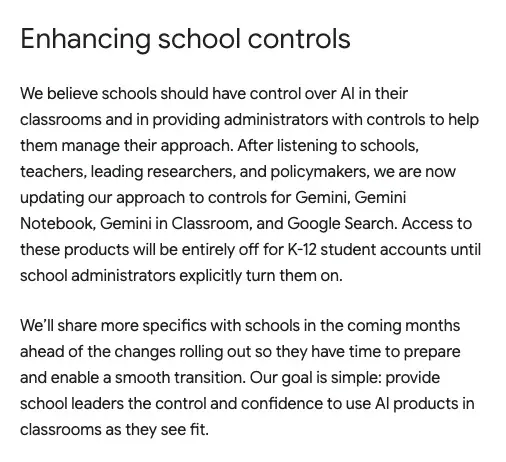
Read the second paragraph in that screenshot twice. Google says it will “share more specifics with schools in the coming months ahead of the changes rolling out.” That sentence is the reason I’d call the off-by-default switch an announcement, not an event. Nothing in Google’s post says it flipped on November 3.
What’s live, what’s coming, and what has no date
Parents can mistake “announced” for “done” here, so it helps to lay the pieces on a line. The timeline below mixes Google’s own dates with what news outlets reported, and I’ve marked which is which.
And the same thing as a plain comparison, because this is the table I’d show a friend at pickup:
| What | Where it stands on November 4 | What Google or the press said |
|---|---|---|
| Guided Learning in Classroom | Live | Google: “globally available” from November 3, assigned by a teacher |
| Guided Learning in Search | Pilot later in November | Google: select U.S. schools first |
| Gemini, Notebook and Search off by default for K-12 student accounts | Announced, not described in detail | Google: specifics “in the coming months”; NYT via 9to5Google: early 2027 |
| Teacher view of student chats | Described for Guided Learning and documented for assigned Notebooks | Chalkbeat: teachers can review student chats; Google’s help page covers Notebooks |
| Personal Google accounts | Not named in the announcement | Google’s sentence says “K-12 student accounts” |
One caution on that third row. The “early 2027” date comes from Google’s explanation to the New York Times, as reported by 9to5Google, and Chalkbeat wrote that the company will roll the changes out “more broadly early in the new year.” I couldn’t find that date in Google’s own posts. So treat early 2027 as the reported plan, and the “coming months” as the thing Google actually committed to in writing.
What “off by default” does and doesn’t cover
Start with who it covers. Google’s sentence names K-12 student accounts, the accounts a school manages for its students. It doesn’t mention teachers. It doesn’t mention your child’s personal Google account at home. And it says nothing about universities. I’d read it narrowly, because Google wrote it narrowly.
Then what “off” means. Google’s own X post, which CNN pointed to when it asked for details, said schools will be able to switch Gemini, Gemini Notebook and Search on individually, and called the whole thing “more choice, not less.” Under the old default, which CNN says Google set in August, Gemini was already on in Classroom. Now the school has to say yes first. That’s a real shift of power toward the school.
The catch is Search. CNN reports that Phillips told the New York Times that “search and A.I. are deeply integrated,” and that schools that ban AI “will not have access to search, and they’ll see a message from their school that indicates it’s not available.” So a school that wants no AI at all has to give up Google Search for its students.
Google told the Times that two options will be available in early 2027. In one, Search keeps AI Overviews and other AI features. In the other, Guided Learning takes their place. Chalkbeat reports the same shape: Guided Learning “will also replace AI overviews when students use Google Search on school accounts.” There’s no listed option for classic search with the AI removed.
Who’s unhappy, and why
Some of the reaction is worth knowing, because it tells you what your school is hearing. Chalkbeat quoted Eisha Buch, head of teaching and learning at Common Sense Media, calling it “a choice that isn’t really a choice,” and adding that “the likelihood of schools and students avoiding Google Search is really slim to none.” Lila Byock of Schools Beyond Screens called it a “hostile ultimatum.” New York City’s mayor, Zohran Mamdani, said that “no corporation should have the power to dictate how we teach our children.” Per CNN, New York City and Los Angeles had already blocked generative AI for many or all students this school year.
Google’s answer, from Phillips to Chalkbeat: “If a school is not comfortable with that and simply wants AI off, then they have the choice to not have search on at all.”
I think both sides have a point, and you don’t have to pick one to act on this. If you’re a parent, the practical takeaway is smaller than the argument: your school will soon be asked to make a choice it probably hasn’t thought about, and you can ask what it’s leaning toward.
Is Gemini safe for kids at school?
That’s the question parents actually type, so let’s answer it with what exists instead of what sounds reassuring.
Data. For school accounts, Google’s Workspace for Education terms apply. A June 2025 Google post says those terms “include enterprise-grade data protections, so your data is not reviewed by anyone or otherwise used to train AI models.” Common Sense Media’s January 2026 review of Gemini K-12 agrees on the privacy side: “Google has implemented strong privacy protections.” Personal accounts are a separate matter, and this announcement doesn’t cover them.
Content. Here Common Sense is blunter. Its January 9, 2026 report rates Gemini K-12 “High” risk overall. It says the product “doesn’t adjust for different ages across K-12,” treating a sixth grader the same as a high school senior, and that it writes at an 11th grade level. Chalkbeat’s summary of the reviewers: Gemini “often fails to provide age-appropriate responses and can easily be made to complete assignments.”
Guided Learning specifically. The January report did look at an earlier version of Guided Learning, and its verdict was mixed: “shows promise but has significant limitations.” Two of its complaints stood out: that “students can easily switch back to regular mode at any time” and that it “will complete homework assignments and essays.” This is the part to hold on to. Google says the Classroom version is different: “more rigorous,” built with teacher input, and students “will not be able to switch back into regular Gemini within Google Classroom,” per Chalkbeat’s report of what company officials said. Chalkbeat notes that Common Sense hasn’t published a standalone review of Guided Learning, so as of November 4 I found no public outside test of that claim.
So the honest answer to “is it safe” is: the data protections are better than the consumer product’s, the content record is mixed, and as of November 4 I found no independent check of the newest Classroom version. That’s not a reason to panic. It is a reason to ask your school how it plans to use it.
What does the research say about Guided Learning?
Google also released numbers on November 3, and they deserve a fair read.
In a randomized controlled trial with more than 300 students at the University of Tokyo, everyone got half a day to study a statistics lesson with standard online resources. Half also got Guided Learning in the Gemini app. Google reports that the group with standard tools improved by 5.3 percentage points, and the group with Guided Learning by 8.1, “1.5x higher learning gains in just a single study session.”
Three limits, and I’d say all three out loud to anyone quoting that figure. It’s Google’s study of its own product, and the post doesn’t name an outside evaluator. The students were at a university, not in grade school. And it measures one half-day session on one statistics lesson. Google’s own post says the number “might seem modest,” and adds that the gains came in “just half a day of study.”
The second study is a four-week pilot with the Ark school group across three UK secondary schools and four subjects. Teachers said Guided Learning “handled initial student questions effectively during independent work,” freeing them for one-on-one help. According to Google’s summary, the majority of surveyed students felt comfortable asking Gemini for help when stuck, and over half said it helped them solve problems on their own. That’s survey feedback, not a test score. Teachers also asked for clearer insight into how students engaged, and Google says it added that.
Where that leaves things, in my view: Guided Learning is a sensible design, and some early evidence points the right way. But “it coaches instead of answering” is a design goal, and Common Sense’s January testing shows how hard the line is to hold.
What teachers can see of your child’s chats
This is the question underneath most parent worry, and the answer has a clean part and a fuzzy part.
The clean part: for a teacher-assigned activity, yes, teachers can look. Chalkbeat reported that “teachers can assign work through Guided Learning and review student chats to see how students approach problems and what questions they ask.” Google’s own post says Guided Learning in Classroom “gives teachers real-time insights.”
The documented part is the older sibling, Gemini Notebook. Since October 19, teachers who assign a notebook in Classroom can see an overall summary of engagement, with common themes such as recurring questions and suggested areas for support, and they can open individual chat transcripts. Students see a notification that their conversations in assigned notebooks are visible to their teacher. Google’s help page says the transcripts are available “when Gemini activity is on,” and that insights are available on all Workspace for Education editions.
The fuzzy part: I couldn’t find a Google help page that spells out exactly what a teacher sees inside a Guided Learning activity, or whether a student gets the same visibility notice there. I also found nothing saying whether a parent can see a child’s school Gemini chats. If either matters to you, it’s a fair question for the school, and I’d put it in writing.
For a kid, the plain-language version is: assume the teacher can read what you type into anything your teacher assigned. That’s a good habit regardless of what any settings page says.
Reading the headlines like a parent
Here’s a worked example you can do on your own. When the next headline about this lands, run it through the same questions: Who exactly does it cover? Is it live or announced? Whose words is it? Here are five versions of the headline, checked against the sources.
| What you may have read | What the sources say | Verdict |
|---|---|---|
| “Google turns off Gemini for students” | Access “will be entirely off for K-12 student accounts until school administrators explicitly turn them on”; specifics come “in the coming months” | Announced, not yet in effect |
| “Gemini is disabled at my kid’s school” | Google’s announcement doesn’t say anything was switched off on November 3 | Check with your school, don’t assume |
| “Google will cut off Search unless schools accept AI” | CNN and Chalkbeat: schools that turn AI off lose Search, and Search will come with AI features or Guided Learning | Mostly right, Google calls it “more choice” |
| “Guided Learning stops kids from cheating” | Google: coaches rather than answers; Common Sense (January, earlier version): “will complete homework assignments and essays” | A design goal, not a guarantee |
| “Kids can’t use Gemini at home any more” | The announcement names K-12 student accounts; it doesn’t name personal accounts | Not what the announcement says |
That last row comes with a footnote. The announcement doesn’t cover a personal account, but it doesn’t promise anything about one either. And Eisha Buch’s warning to Chalkbeat applies: whatever Google does inside Classroom, students “will still encounter AI overviews on their personal devices and have easy access to other chatbots.”
The 10-minute parent check
You don’t need to understand the admin console. You need four answers from the school, and a short email gets them. Here’s the order I’d go in.
- Find out what your child’s school account can do today. Ask your child to show you what they see when they open Classroom, and whether their teacher has ever assigned a Gemini activity. Don’t guess from headlines.
- Ask who decides. It may be the school, the district or both. Find out whose name is on that decision.
- Ask what the school plans for the new controls. Gemini, Notebook and Search are separate switches, and Google says specifics are coming.
- Ask about Search. If the school wants no AI, the cost is Google Search for students. A good school will already know that.
Here’s an email you can adapt. This is a sample we wrote to show the shape, not something a school sent us:
Subject: Question about Gemini and Google Search on my child's school account

Hello,
I read that Google announced on November 3 that Gemini, Gemini Notebook and Google Search will be off by default for K-12 student accounts until school administrators turn them on.
Could you tell me what is switched on for my child's account today?
Who at the school or district decides whether Gemini, Notebook and Search are turned on?
Is the school planning to turn on Guided Learning in Classroom, and will teachers be reviewing student chats?
If AI features are turned off, how will students search for homework and research?
Could you also tell me where I can read the school's policy on student AI use?
Thank you,
[Your name]
Each question is one a school can answer in a sentence. If the answer to the first is “we don’t know yet,” that’s useful too.
What this means for you
Not every family is in the same spot. Here are the reader types I’d expect, and a first move for each.
- If your child is in elementary school: The default is moving toward off, which suits this age. Your first action is the email above, asking what’s on today, so you know the baseline.
- If your child’s district already restricts AI: Per CNN, New York City and Los Angeles are in this group. Your school’s question is the Search tradeoff. Ask whether the district has said how it plans to handle it.
- If your child is a middle schooler on a school Chromebook: I’d expect Common Sense’s point about Gemini not adjusting for different ages to bite hardest here. Ask whether teachers will assign Guided Learning or leave it off.
- If your teenager uses Gemini on a personal account: This announcement isn’t about that account. Your first action is a conversation, not a setting. Ask what they use it for, and whether it’s coaching or finishing homework for them.
- If you’re a teacher who is also a parent: Notebook insights are documented today. If your admin has switched Gemini Notebook on, try one on a test assignment before judging the feature.
- If you sit on a PTA or school board: Your first action is to ask for the plan before early 2027, not after. Google says it will share details with schools in the coming months, which is exactly when parents can still be heard.
- If you homeschool: A school-managed K-12 account is what Google named. A family setup isn’t described in the announcement, so don’t assume it applies either way.
Edge cases and troubleshooting
These are the situations I’d expect to come up, with what the sources support.
“My child’s school says Gemini is on right now.” That fits. Google said specifics for the new controls would come “in the coming months,” and CNN notes Google turned Gemini on by default in Classroom in August. “On now” and “off by default later” can both be true.
“The school wants no AI, and now my kid can’t search.” That’s the tradeoff Google described. Per the NYT quote in CNN, students at such a school would see a message from their school that Search isn’t available. Google’s blog doesn’t describe what that screen looks like, so I can’t tell you more.
“Guided Learning gave my kid the answer anyway.” Common Sense saw that in January, on the older version, in tests that included essays and problem sets. If you see it in the Classroom version, tell the teacher. It’s useful feedback, and Google has said it wants educator input on the Search pilot.
“My kid thinks the teacher can’t see what they type.” For assigned Notebooks, Google says students see a notice that conversations are visible to the teacher. For Guided Learning, the teacher view is described by Chalkbeat and Google. Tell your child to assume the teacher can read it.
“What date should I put in my calendar?” Google’s posts give none. The NYT, via 9to5Google, says early 2027, and Chalkbeat says “early in the new year.” Use “early 2027, as reported,” and wait for Google’s detail to schools.
“I’m outside the U.S.” Guided Learning in Classroom is global, per Google. The Search pilot is in select U.S. schools first. The off-by-default change is described for K-12 student accounts without a country limit, but Google hasn’t published regional specifics.
“My kid uses the AI Overviews in Search at home.” Home searching isn’t in the announcement. Common Sense’s Youth AI Safety Institute says Google Search’s AI Overviews and AI Mode are an “unacceptable risk” to students, per Chalkbeat. That’s a family-rules question, and a decent one to raise at dinner.
What this can’t fix
Be realistic about what a school setting does.
It can’t govern your child’s other devices. Chalkbeat reports Buch noting that district AI bans can only serve as a stop gap, and that students have easy access to other chatbots. If your teenager has a phone, a default on a school account doesn’t touch it.
It can’t turn Guided Learning into a guarantee. The design is promising and the early evidence is encouraging, but Common Sense’s January look at an earlier version found it would still complete work.
It doesn’t settle the content questions. Common Sense rated Gemini K-12 high risk for reasons that aren’t about homework, such as how it handles mental health topics, and said administrators can’t turn off some of those features. Google’s November announcement doesn’t mention that finding.
It doesn’t answer the evidence question yet. The headline study is Google’s, on university students, over one study session.
And it doesn’t tell you the date. Until Google tells schools how the controls work, nobody can give you an exact picture of what your child’s account will do.
FAQ
Did Google turn off Gemini for students on November 3? No. Google announced that access to Gemini, Gemini Notebook, Gemini in Classroom and Google Search will be entirely off for K-12 student accounts until school administrators turn them on, and said it will share specifics with schools in the coming months. What did go live that day was Guided Learning in Google Classroom.
When does the off-by-default change start? Google’s posts don’t give a date. The New York Times, as reported by 9to5Google, said two options will be available to schools in early 2027. Chalkbeat wrote that the company will roll the changes out more broadly early in the new year.
What is Guided Learning? It’s a Gemini mode that coaches students with questions and step-by-step breakdowns instead of giving the final answer. In Google Classroom, a teacher assigns it as an activity tied to class material. Google says students can’t switch back to regular Gemini inside Classroom.
Can teachers read my child’s chats? For a Guided Learning activity, Chalkbeat reports that teachers can review student chats. For assigned Gemini Notebooks, Google’s help page says teachers can review individual chat transcripts when Gemini activity is on, and students see a notice. Whether a parent can see them isn’t stated in what I read, so ask the school.
Will Google Search stop working for my child’s school? Only if the school leaves AI features off. Phillips told the New York Times that Search and AI are deeply integrated, so a school that turns AI off won’t have Search for its students. Schools that turn it on get Search with AI features, or Guided Learning in their place per Google’s early 2027 plan as reported.
Does this affect my child’s personal Google account? The announcement names K-12 student accounts and doesn’t name personal accounts, so as written it doesn’t. It also doesn’t make any promise about personal accounts.
Is Gemini safe for kids? For school accounts, Google says its Workspace for Education terms mean data isn’t reviewed by anyone or used to train its models. On content, Common Sense Media rated Gemini K-12 high risk in January 2026. Chalkbeat notes that Common Sense hasn’t published a standalone review of Guided Learning.
Is this the same as ChatGPT’s teen mode? No. OpenAI announced ChatGPT for Teens in August, per CNN, and it is a separate product; Google’s change applies to school-managed K-12 accounts and works through school administrators. We covered OpenAI’s version in ChatGPT’s teen mode: what changed.
The bottom line
The loud version of this story says Google switched off Gemini for kids. The accurate version is quieter and more useful: Guided Learning is live in Classroom, the Search version is due to start a pilot this month, and the off-by-default switch is a promise with the details still to come.
You don’t need to settle the argument about AI in schools this week. You can learn what your child’s account does today, find out who decides, and ask the school what it plans to do with the new controls before they land. The sample email above takes five minutes.
And whatever the school decides, the conversation at home matters more than the toggle. If you want help with that part, Parenting in the AI Age (first 2 lessons free) walks through homework help, family rules and what to do when AI gets in the middle of both.
If you’re also thinking about what your kid does on personal accounts, our posts on ChatGPT’s Study Mode and on Gemini’s study notebooks cover the tools your child might use outside school.
Sources
- Google: Designing responsible AI for learning (Nov 3, 2026)
- Google: New research shows how Guided Learning supports students (Nov 3, 2026)
- Google: AI in the learning era, the full collection (Nov 3, 2026)
- Chalkbeat: Google promises changes to chatbot Gemini to get students to do more of their own work (Nov 3, 2026)
- 9to5Google: Google will disable Search for students unless schools accept AI features in ‘Guided Learning’ push (Nov 3, 2026)
- CNN: Google will let schools turn off AI, but they may also lose Search (Nov 3, 2026)
- Common Sense Media: AI Risk Assessment, Gemini K-12 (updated Jan 9, 2026)
- Google Workspace Updates: The Gemini app is now available to all education users (June 20, 2025)
- Google Classroom Help: Create and assign Gemini Notebook & Gems in Google Classroom
- EdTech Innovation Hub: Google Classroom now lets teachers see students’ Gemini Notebook conversations (Oct 27, 2026)