

On November 20, Google put grocery stores, a credit bureau and a tax-prep company inside the same box you use to search the web. In the United States, Google says it is rolling out links to Albertsons, Safeway, Shaw’s and Target, so you can ask Google Search or the Gemini app for a grocery order. Experian’s credit tools are moving into Search. H&R Block can estimate your taxes and refund from Search. Angi and Thumbtack, which help you find local pros, are promised for “the coming weeks,” in Google’s words of November 20.
Google calls these Connected Apps, and it pitched them as a way to “get your year-end tasks done.” That is good timing: the post mentions Thanksgiving groceries and holiday parties, and the tax year is about to close.
This guide is the plain version for someone who has not used them yet. It covers what each app does, how to link and unlink one, what Google’s own example shows (including a detail in it that deserves a second look), what stays unanswered, and a short list of checks to run before any of this touches your cart, your credit or your return. I have not tested it on a live account, and it launched on November 20. Where Google hasn’t published a detail, I say so instead of guessing.
The short answer
TL;DR. Connected Apps let Google’s AI talk to a service you already use, after you link your account to it. Google says the new grocery apps help you “build your order and check out.” Its launch post doesn’t say whether you approve the order first, who handles the payment, or what each service can see. Until those answers exist, treat the cart as a draft you read line by line.
- What it is: a way for Search (the AI Mode tab) and the Gemini app to hand part of a job to a partner app, such as a grocery store, once you link your account to it.
- Who gets it: the new apps are rolling out in the US. Google’s help pages say availability varies by age, country and language.
- What it costs: Google’s post names no price and no subscription.
- What to do first: open your linked-apps page, link only one store, and read the cart before you confirm anything.
What changed on November 20
Google’s announcement is four short paragraphs, and it contains no numbers. Here is everything it says, in order.
Groceries. “In the U.S., we’re rolling out new Connected Apps through Search and the Gemini app to help with your grocery runs, including Albertsons, Safeway, Shaw’s, and Target.” Google says the apps “can help you build your order and check out with ease” and that they are “powered by the Universal Commerce Protocol.”
Credit. “Experian is already live on the Gemini app, and now we’re rolling it out to Search with the ability to help U.S. users check their credit rating and shop for a personal loan.”
Taxes. “U.S. users can also turn to H&R Block to calculate their taxes and estimate their refunds right from Search.”
Home help. “In the coming weeks, you’ll also be able to link your accounts to Angi and Thumbtack in Search.”
Two details are easy to miss. The grocery word is “including,” so the four names may not be the whole list. And Albertsons, Safeway and Shaw’s are banners of the same company, Albertsons Companies, as PPC Land points out. Google’s post doesn’t say whether they behave as three apps or one.
Walmart is not on the list, even though PPC Land reports that Walmart launched the protocol with Google in January. PPC Land noted the gap on November 21, and the post gives no reason.
Where Connected Apps came from
This did not appear from nowhere, and the history explains the odd edges.
- July 16, 2026: connected apps came to Search’s AI Mode with Instacart, Canva and YouTube Music, according to PPC Land. PPC Land says that in that first version AI Mode assembled the task and then sent you to the partner to finish it.
- September 23: Google began rolling out 14 connected apps in the Gemini app, Experian among them. Google’s post for that day describes the Experian one as a way to “monitor your credit.”
- October 28: Google opened a developer preview of a Connected Apps Platform and said it had launched more than 50 connected apps across Search and Gemini, per PPC Land.
- November 20: the grocery, credit and tax apps above.
So the news is less “Google can do errands now” and more “the errands list got four big grocers, a credit bureau and a tax company.” That helps explain why the launch post reads like a catalog entry and not a user manual.
What each app does, and what Google hasn’t said
Here is the launch post set against the questions a normal person asks. The right-hand column is the useful one.
| App | What Google says it does | Where Google says it works | What Google’s post doesn’t say |
|---|---|---|---|
| Target | Build an order and check out | Search and the Gemini app, US | Who processes payment; whether delivery is offered beside pickup |
| Albertsons, Safeway, Shaw’s | Build an order and check out | Search and the Gemini app, US | Whether it’s one app or three; which stores take part |
| Experian | Check your credit rating; shop for a personal loan | Gemini app already; Search rolling out, US | What data passes between Experian and Google |
| H&R Block | Calculate your taxes; estimate your refund | Search, US | Whether you need an H&R Block account; whether it reads past returns |
| Angi, Thumbtack | Link your accounts to find local pros | Search, “in the coming weeks” | Anything beyond the sentence |
PPC Land, which read the same post closely, listed what else is missing: how products are chosen and ranked, who processes payment, whether prices match the stores’ own sites, whether delivery is offered beside pickup, and whether ads appear. I would add the plain consumer question: when a link is made, which of your details move from the store to Google, and which move back?
How to link an app, step by step
Google’s help pages describe two routes, Search and Gemini. The steps below come from those pages. They describe how Connected Apps work in general and were written before this launch, so a screen for Target or Experian may differ in small ways.
In Search
- Sign in to your Google Account.
- Open AI Mode in Search.
- Ask for what you want. Google’s help page suggests naming the service at the start of the request with an at-sign, for example “@Calm recommend a 10-minute guided meditation for work stress.” For groceries, its example is “Make me a grocery cart on Instacart with healthy snacks and drinks for 8 adults.”
- If the app isn’t connected yet, you get the option to connect it. Many apps need an account with their service, and you link that account to your Google Account first. If it isn’t linked, click Link and follow the steps in AI Mode.
- If it is already linked, you see an option to continue.
Two details from that page matter. First, Google “may default to the last app you used for a certain task,” and you can change it by naming a different app. Second, once AI Mode finishes, you “may be directed to the connected app to finalize your requested action.” In Google’s own example, you are sent to Instacart to complete checkout and to manage and track the order. That example is about Instacart, which was the grocery app on the page when I read it, not the new stores.
In the Gemini app
- Sign in to the Gemini app. You must be signed in to use Connected Apps.
- On the web, type an at-sign in the prompt box and pick the app. If it isn’t connected, Gemini either connects it or asks for your permission.
- Or open the Connected Apps page from the sidebar (Customize; if you don’t see it, click More first) to browse the apps available to you.
The Connected Apps page has one more useful feature. Clicking an app opens its details page, which lists “supported and unsupported actions” and example prompts. For any new app, read that page before you ask for anything. It’s the closest thing to a manual.
Two limits from Gemini’s help page: when History is off, Connected Apps won’t be available on gemini.google.com, on iOS devices or on smart watches, and Gemini can’t use Connected Apps in Google Messages for now. The same page is written for personal accounts and points work or school accounts to a separate page, which I did not open.
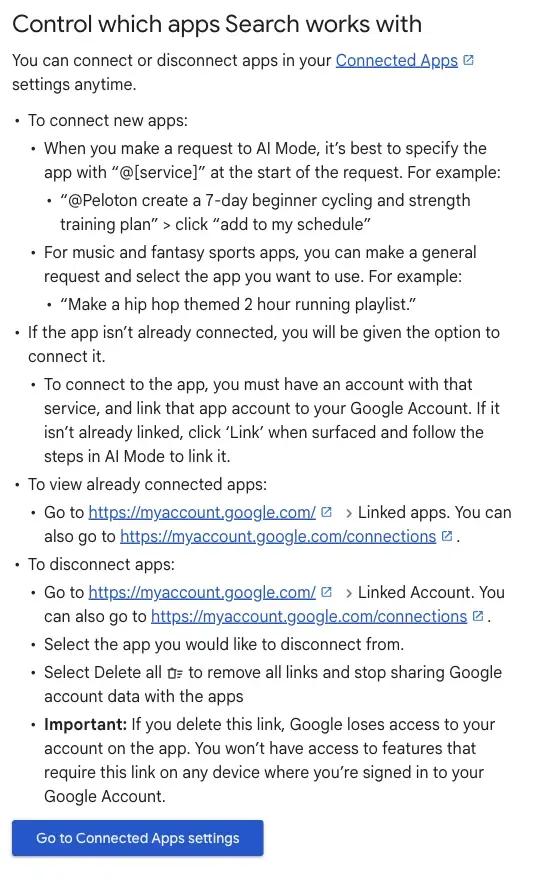
The disconnect steps in that screenshot are worth keeping: go to myaccount.google.com/connections, pick the app, and select Delete all to remove all links and stop sharing Google Account data with the apps. Google adds that if you delete the link, “Google loses access to your account on the app.”
A worked example: Google’s own Target order, read line by line
The best evidence about how this behaves is the example Google published with the announcement, and it repays a slow read. Here is what the image shows.
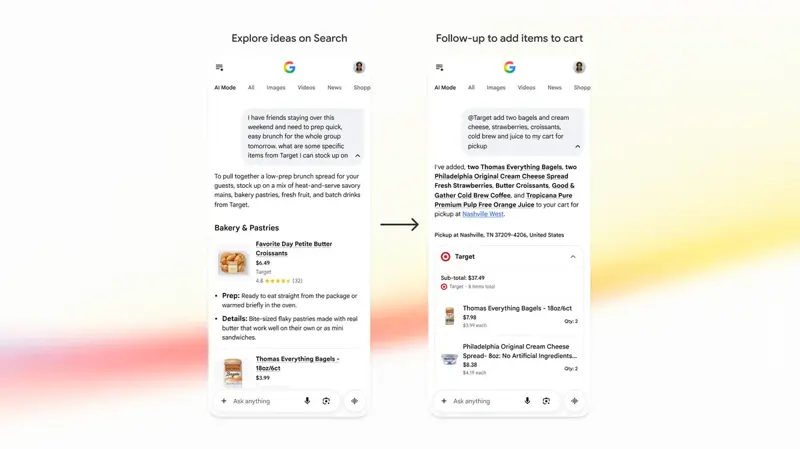
Step 1, the ask. The user types: “I have friends staying over this weekend and need to prep quick, easy brunch for the whole group tomorrow. what are some specific items from Target I can stock up on.” AI Mode answers with a plan and product cards. The first card is Favorite Day Petite Butter Croissants at $6.49, rated 4.8 stars from 32 reviews.
Step 2, the follow-up. The user writes: “@Target add two bagels and cream cheese, strawberries, croissants, cold brew and juice to my cart for pickup.” The at-sign is how the Target app is called up.
Step 3, the answer. AI Mode says it added two Thomas Everything Bagels, two Philadelphia Original Cream Cheese Spread, Fresh Strawberries, Butter Croissants, Good & Gather Cold Brew Coffee and Tropicana Pure Premium Pulp Free Orange Juice for pickup at a store in Nashville, Tennessee.
Step 4, the cart. A Target panel shows a sub-total of $37.49 and “8 items total.” The two lines visible in the image are:
| Line | Pack | Price each | Quantity | Line total |
|---|---|---|---|---|
| Thomas Everything Bagels | 18oz, 6 count | $3.99 | 2 | $7.98 |
| Philadelphia Original Cream Cheese Spread | 8oz | $4.19 | 2 | $8.38 |
Now check it against the request. The user asked for “two bagels.” The cart holds two packs of six, which is twelve bagels. Nothing in the image shows the user confirming that quantity before the items went in. PPC Land spotted the same thing and added a second one: two of the six products, the croissants and the cold brew, carry Target’s own labels (Favorite Day and Good & Gather), and the post doesn’t say how AI Mode chooses between store brands and national brands.
The arithmetic holds up. Two bags at $3.99 is $7.98 and two tubs at $4.19 is $8.38, which together make $16.36. Eight items (2 + 2 + 1 + 1 + 1 + 1) matches the count. The other four lines would then total $21.13 against the $37.49 sub-total, but the image cuts off before they appear, so I can’t check them.
This is not a gotcha. A human shopper who writes “two bagels” at a store and gets handed twelve would notice at once. An assistant that turns “bagels” into the nearest product has to pick a pack size, and the cart is where you catch it. The example also stops at the cart: it shows no sign-in, no payment screen, no substitution choice and no pickup time slot, which is why “check out with ease” is a claim you can’t yet verify from Google’s own material.
The habit to take from it: after the AI adds items, read three columns, pack size, quantity and price, before you read the sub-total.
Connected Apps, Universal Cart and Gemini Tasks: three different things
Google has three shopping features in the same few weeks, and the names blur. Here is how I would keep them apart.
| Feature | What it does | Where you decide to buy | Our guide |
|---|---|---|---|
| Connected Apps | Links a partner app (a store, a bureau, a tax company) so Search or Gemini can start a task in it | At the partner, or wherever the app’s flow ends; the grocery flow isn’t published | This post |
| Universal Cart | One cart across Search and Gemini that holds items from different stores and watches prices | You open the cart and choose how to pay | Universal Cart, how it works |
| Gemini Tasks | A mode of the Gemini app that takes a job and works through it, including calls and Google Pay checkout in the US | Per PYMNTS, you can set spending limits and sign off before the AI buys | Gemini Tasks is free now |
The short version: Universal Cart is the shared shopping list, Gemini Tasks is the assistant that can act on your behalf within spending limits you set, per PYMNTS, and Connected Apps is the plumbing that lets a specific store or service join in. A grocery order could touch more than one of them, and Google hasn’t said how they fit together. If you want the wider picture of AI tools that act for you, from recommending to spending, Should You Let AI Check Out for You? sorts them, and the agentic commerce explainer defines the term.
What linking shares, and how to undo it
Linking an account is a permission, so the questions are the ones you would ask any app: what can it see, what can it do, and how do I take it back.
What Google’s help pages say. On linked apps generally, Google says it “doesn’t set up links without your permission.” You can review the type of data you consented to share with a linked app, and you can remove a linked app’s access to your Google Account at any time. Google also says it doesn’t share your Google Account password with linked apps. For apps that AI tools use, the help page explains that if you ask Google AI to act on an app that isn’t linked yet, you “may get a prompt to link the app account with your Google Account,” and that prompt appears only if the developer has allowed it.
What the pages don’t give. I found no page that lists the permissions the Target, Albertsons, Experian or H&R Block links ask for. That’s the biggest practical gap. The consent screen you see when you link is the one place those permissions will show up, so read it before you approve, and decline if it asks for more than the job needs.
Undoing it. Disconnecting stops access going forward. It isn’t a delete button for what already happened. Google’s linked-apps page says the app “may keep the data you’ve already shared with them,” and that to delete that data you go to the app’s own website. Plan on two steps: unlink in Google, then use the store’s or service’s own privacy controls.
Does Google use it for ads? The launch post doesn’t say. Google’s Search help page says Google uses people’s interactions with Search and its AI experiences to develop and improve generative AI in Search, and that trained reviewers work with privacy precautions. PPC Land, citing earlier reporting, said Google’s Connected Apps policy, last updated September 28, bars partners from serving third-party advertising through their integrations. That is a rule about partners. It isn’t a statement about what Google does with the data, and Google’s post is silent on both. If that matters to you, say so in the questions list below.
What this means for you
If you’re hosting a big dinner this week. The grocery link is a timesaver only if you read the cart. Build the list the way you normally would, in plain words, then check pack sizes and quantities against what you need. First action: do one small test order for a few items, and look at the cart before you ask for the whole menu.
If you’re on a tight budget. An AI that picks “the nearest product” can drift toward store brands or bigger packs. Both can be fine or both can cost more. Compare the sub-total with a quick list you wrote yourself. First action: before you confirm, check the unit prices of your three most expensive lines.
If you’re thinking about your credit. Google’s post says Search can help you “check their credit rating and shop for a personal loan,” and that Experian was already live in the Gemini app. Checking a rating and applying for a loan are different acts with different consequences, and Google’s post doesn’t separate them. First action: read Experian’s own terms and the consent screen before linking, and apply for nothing until you’ve read the lender’s terms. I tried to open Experian’s own pages while writing this and its site blocked my browser, so I can’t tell you what it says about inquiries.
If you do your own taxes or run a one-person business. Google says H&R Block can “calculate their taxes and estimate their refunds” from Search. It doesn’t say whether you need an H&R Block account, whether it reads a prior-year return, or how it asks for your figures. An estimate is a starting point. First action: if you use it, run your own numbers through a second source before relying on the refund figure. Our five-test guide to asking a chatbot about your taxes has a method that applies here too.
If you share one Google account in a household. Link from your own account, not a shared family one, so the link and any history are yours alone. First action: check which account the AI Mode tab is signed in to before you link.
If you use a work or school Google account. The Gemini help page I read says it is for personal accounts and points work and school accounts to a separate page. I can’t say what an admin’s settings change. First action: don’t try this on a work account for a personal errand; use your personal one.
If you’re outside the US. Google’s announcement is explicit that these rollouts are in the US and gives no date for anywhere else. First action: don’t expect to see the new apps. Wait for Google to name your country.
Edge cases and troubleshooting
These are the problems I’d expect, drawn from what Google’s pages say, not from a long track record. When I searched X for reactions from November 20 to 24, I found few first-hand reports of ordering this way.
- You can’t find Connected Apps. The Search help page says availability varies by age, country and language and that apps are available in AI Mode. PPC Land, citing earlier reporting, said Connected Apps in Search are limited to AI Mode, the US, English and signed-in users. Check each: signed in, US, English, AI Mode tab open. On Gemini, the Connected Apps page lists only the apps available to you.
- It says the app isn’t connected. That’s the link prompt. Click Link, sign in to the store or service, and approve. You need an account with that service first.
- Gemini says it can’t use the app. Check History. When History is off, Connected Apps won’t be available on gemini.google.com, on iOS or on smart watches. Turn History on, or switch to a device where the app is available.
- It used the wrong app. Google may default to the last app you used for a task. Name the one you want with an at-sign at the start of the request, for example “@Target,” as Google’s own example does.
- The cart has the wrong pack size or quantity. Say so in a follow-up (“make it two bagels, single-pack”), or edit the cart at the store. Don’t assume the AI knows which of three sizes you meant.
- A product you didn’t ask for appeared. Remove it before checkout. Google hasn’t said how items are chosen or ranked, so a store-brand swap isn’t something to rely on the AI to flag.
- You’re sent to the store’s app to finish. On Google’s Search help page, the grocery example sends you to the partner’s app to complete checkout. That’s normal for that flow. For the new stores, how checkout ends isn’t published.
- You unlinked but still get emails or see data. Unlinking in Google stops Google’s access, but the store may keep what it already received. Use the store’s own account settings to ask for deletion.
What it can’t do
Honest limits, as of the launch and the documents I read:
- It isn’t a guarantee of the right order. Google’s help page warns that “AI responses may include mistakes.” The Target example shows how a small gap, “two bagels” versus two six-packs, can slip through a draft cart.
- It doesn’t make Google the seller or the guarantor. The stores remain the stores. Google’s post doesn’t describe who handles a missing item or a refund, so use each store’s own policy and keep the order confirmation.
- It doesn’t publish its permissions. As of November 24, the launch post lists no data-sharing details, no spending limits, and no approval step for the grocery apps.
- It isn’t a financial or tax adviser. AndroidGuys’s coverage of the launch called these useful starting points and said users should still review financial details, loan terms and tax assumptions carefully. An estimate isn’t a return, and a rating isn’t a loan offer.
- It doesn’t cover everyone. The apps are US-first, English-first and, in Search, tied to AI Mode.
FAQ
What are Google Connected Apps? They are partner apps, such as stores and services, that Google’s AI can use for you in Search’s AI Mode and in the Gemini app once you link your account to them. Google’s help pages say AI responses may include mistakes, so you check the result.
Which grocery stores work with it? Google’s launch post names Albertsons, Safeway, Shaw’s and Target, with the word “including,” so the list may grow. Albertsons, Safeway and Shaw’s belong to one company. Walmart wasn’t named.
Does it cost anything? Google’s post names no price. Whatever the stores charge for items, delivery or pickup is their own pricing; check it in the cart.
Does the AI buy things without asking me? Google’s launch post says the apps help you “build your order and check out with ease” and doesn’t describe an approval step. Google’s help page for the Instacart flow sends you to the partner’s app to complete checkout. Until Google publishes the flow for the new stores, treat checkout as yours to confirm.
Is it safe to link my credit data? That’s your call, and the post can’t make it for you. Google says you can remove a linked app’s access at any time, but the app may keep data it already received. Read the consent screen and Experian’s terms first. Google’s post doesn’t say what passes between Experian and Google.
Can H&R Block file my taxes through Google? Google’s post says only that H&R Block can help you calculate your taxes and estimate your refund from Search. It doesn’t mention filing.
How do I disconnect an app? For Search, go to myaccount.google.com/connections, select the app and choose Delete all. For Gemini, open Customize, find the app, then More options and Disconnect. Then use the store’s own settings to delete data it already holds.
Does it work outside the US? The announcement says the new apps are rolling out in the US and doesn’t give a date for other places.
Will Angi and Thumbtack work now? Not yet. Google says “in the coming weeks” you’ll be able to link your accounts to them in Search.
Is this the same as Universal Cart or Gemini Tasks? No. Universal Cart is one cart across stores, and Tasks is a Gemini mode for jobs you hand off. Connected Apps is how a specific partner plugs in. The table above sets the three side by side.
The bottom line
Connected Apps are a real step: Google is putting stores and services inside the search box, and a grocery order is the kind of errand where that could save you tabs and time. It’s also a launch with a short announcement, a US-only rollout, and answers still missing on approval, permissions and ads.
So start small. Link one store from your own account, ask for a few items, and read the cart as if you were handed a receipt: pack size, quantity, price, then the sub-total. Leave credit and tax tools until you have read what they ask for. If something looks off, fix it in the cart or at the store, not in your head.
If you’d like a steadier footing for choices like these, Master Your Money with AI (first 2 lessons free) is where I’d start, and AI Privacy 101 (first 2 lessons free) covers what these assistants keep and how to keep control.
Sources
- Google, “Get your year-end tasks done with new Connected Apps” (Nov 20, 2026)
- Google Search Help, “Use & manage Connected Apps in Search”
- Google Gemini Apps Help, “Use & manage Connected Apps in Gemini”
- Google Account Help, “Learn about linked apps”
- Google Account Help, “Manage links between your Google Account & apps from other developers”
- Google, “New Connected Apps in Gemini” (Sep 23, 2026)
- PPC Land, “Google puts Target and Albertsons grocery carts inside Search and Gemini”
- PPC Land, “Google opens preview for third-party apps inside Search and Gemini”
- PYMNTS, “Google Adds Grocery Giants to Connected Apps Feature”
- AndroidGuys, “Google Search and Gemini Add Grocery, Credit, and Tax Tools Through Connected Apps”