

In the first week of November 2026, Grok Bot learned to pick up a phone. You tell it who to call and why. It dials the business, talks to whoever answers, shows you a live transcript, and writes you a recap when it hangs up. xAI’s own demo has it cancel an internet plan, and users report booking a pediatric appointment and talking a cable bill down.
It is also a tool that, in its own terms, makes you “the caller of record” and “solely responsible” for every call it places. That sentence is the reason this guide exists. It covers who can use the feature, how a call runs from your first message to the recap, what people have reported so far, what the terms say, and what to do if you have no Grok Bot or live outside the US.
One honest note first. We didn’t place a call for this post: we don’t have a Premium subscription to test with. Everything below comes from xAI’s own pages, the Grok Bot Terms, news coverage of the launch and what users have posted. Where those sources disagree or say nothing, the text says so.
TL;DR. Grok Bot can phone a US business for you. Per xAI’s FAQ, Grok Bot comes with the Premium ($30 a month), Super and Ultra plans, and not with Plus or Free. Reports say it works for US users calling US numbers. In xAI’s demo nothing dials until you tap Call on a confirmation card, and the demo shows Take over and End call buttons. The terms make you responsible for what it says and agrees to, and for following recording and robocall laws. Don’t hand it anything you wouldn’t read out to a stranger.
What Grok Bot’s phone calls are
Grok Bot is xAI’s agent product. It launched in beta on August 11, 2026, and xAI describes Bots as “AI teammates” that have their own computer, sign in to the tools you already use and work across apps, inboxes and more. It is a separate app from the Grok chat app, a point xAI’s FAQ makes in so many words. You use it from a desktop app or the companion apps on iOS and Android.
The phone feature is new on top of that. Elon Musk previewed it on October 25, according to AI Tool Ranked and Basenor. TeslaNorth reports it went live on November 4, when the official Grok Bot account on X posted a 42-second demo. One other report puts the activation a day earlier, on November 3, so treat the exact day as “the first days of November.”
What it does, as the demo and the coverage describe it:
- It places a call to a business on your behalf. The terms say xAI may assign you a temporary phone number for calls.
- It talks to whoever answers and, per AI Tool Ranked, can navigate hold queues and transfers.
- It shows a live transcript of both sides while the call runs.
- When it faces a question it can’t answer, TeslaBytes reports, a prompt appears for you to answer.
- When the call ends, it posts a recap in the chat.
What it is not: a phone service you can dial 911 from. The terms are blunt on that: “Calls are not a telephone service and cannot be used to reach emergency services.”
What you need before you try
Three things decide whether you can place a call at all: the plan, the country and the app.
The plan. xAI’s pricing page shows The X Subscription in five tiers: Free at $0, Plus at $8 a month, Premium at $30, Super at $100 and Ultra at $200. The Grok Bot FAQ says the feature comes with Premium, Super and Ultra, and that “Plus and Free don’t include it.” The pricing page agrees: the Plus card lists Grok Chat, Voice, Imagine, the API and Cursor, and the Premium card lists Grok Bot first.
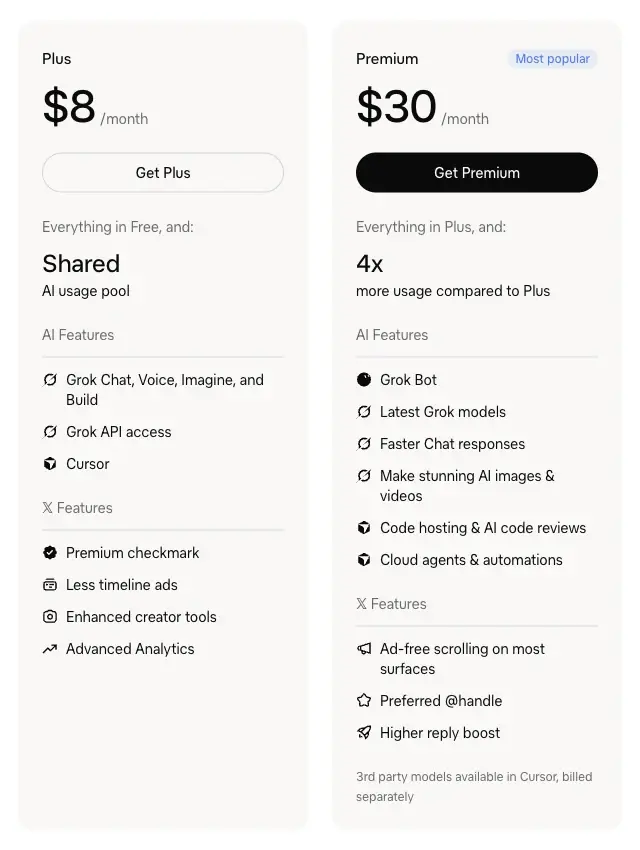
| Plan | Price per month | Grok Bot included | Usage compared with Plus |
|---|---|---|---|
| Free | $0 | No | Limited |
| Plus | $8 | No | Base |
| Premium | $30 | Yes | 4x |
| Super | $100 | Yes | 15x |
| Ultra | $200 | Yes | 50x |
One caveat on that table. None of xAI’s pricing, FAQ or “Get started” pages mention phone calls by name. That calls need Grok Bot, and so Premium or above, is our reading of the FAQ plus the news reports, which also name Premium as the entry point. The same FAQ says Grok Bot draws from a weekly usage pool shared with Cursor and the Grok apps, and that Super and Ultra have larger pools. Nothing from xAI says how much a call uses. Techloy’s reviewer, who tested Grok Bot on a free trial, saw usage climb from 6% to 81% in four days, which tells you the pool can drain quickly, though that was general use and not calls.
The country. Reports consistently say US only. AI Tool Ranked quotes a user: “For now calling only works for US users and only to US numbers.” Techloy’s reviewer, testing from Nigeria, says the bot told them it “only works for people in the United States (except Washington and Illinois) calling US numbers.” That is the bot’s own statement to one person. It isn’t in the terms, and xAI hasn’t said why those two states would be left out. They are both on the lists of all-party-consent states in the recording-law section below, which may or may not be related. The reviewer says they “never made a single call.”
The app. Per xAI’s FAQ, you talk to a Bot in the Grok Bot desktop app on macOS, Windows or Linux, or in the companion app on iOS or Android. The terms require users to be at least 18 (or the age of majority where they live, if higher) and say xAI may use age checks.
How a call works
TeslaNorth’s account of the official demo gives the order of events. The demo is xAI’s own and runs 42 seconds, so the flow below is what xAI chose to show. We haven’t run it ourselves.
Step 1. Ask in the chat. In the demo the bot noticed that an internet contract renewed in three days and asked whether to call and cancel. The user said yes and added: “And don’t let them talk me into a discount.” You can also start it yourself by naming the business, the goal and what you won’t accept.
Step 2. Read the Phone call card. Before dialing, the bot shows a card that names who it will call, with Cancel and Call buttons. TeslaNorth says the call starts only after the user taps Call. Check the name on the card: this is the last point where the call is only an idea.
Step 3. Tap Call. The call connects. Per xAI’s terms, the call identifies itself as made by a virtual assistant on your behalf and may be recorded, and you can’t alter or disable that.
Step 4. Watch the transcript. The demo showed a live transcript of both sides, plus Take over and End call buttons. Those buttons are your way to step in or stop the call if it goes wrong.
Step 5. Answer when it asks. TeslaBytes says a prompt appears when the bot faces an unknown question. A post by Sawyer Merritt on X calls it “a little answer box” where you type or select your reply. Anything you type there is something you chose to tell a stranger on the phone, so type it with that in mind.
Step 6. Read the recap. In the demo the support agent, “Dan”, offered 10% off for a year. The bot declined, saying the customer “got a much better deal with Starlink,” and Dan then confirmed the cancellation, per TeslaNorth. The recap in chat read: “Done. Your plan is canceled. As you said, they tried. But I said no thanks.”
A brief that works for any call
The demo’s “don’t let them talk me into a discount” is the pattern to copy: say the goal, and say what you refuse. Here is a template we wrote. We haven’t run it through Grok Bot, so adjust it to what the card shows.
Call [business name] at [number] and [cancel my plan / book an appointment / lower my bill].
My name on the account is [name]. Do not give an account PIN, a full card number or a Social Security number. Ask me in the chat if they want one.
Goal: [the one outcome I want].
Do not accept: [a discount, an upgrade, a longer contract].
If they offer something else, stop and ask me before agreeing.
At the end, tell me any confirmation number, the date and time, and the name of the person you spoke to.
Each line does a job. The first names the target. The second keeps secrets out of the call. The third and fourth set the goal and the walk-away. The fifth is the one that matters most legally, as the terms section below explains: you want the bot asking you before it commits you to anything. The last makes the recap something you can check later.
Three calls worth trying first
A booking or a check. The lowest-stakes call is one where being wrong costs little. Cryptobriefing reports that on November 4, X user @ArthurMacwaters posted that Grok was on a live call with a dental office checking whether the practice took his insurance. The same article adds the caution to carry over: coverage confirmed verbally is not the same as coverage confirmed in writing, and the answer is only as reliable as what the receptionist says. Ask the bot to get the confirmation in an email or text, or call your insurer yourself to check.
A cancellation. This is xAI’s own demo, so it is the best documented. It is also where reps push back. TeslaBytes reports a representative who refused to cancel a subscription after realizing an AI was on the line. Have your account number ready in case the bot needs it, and decide in advance whether you’ll take over.
A bill. One example from the coverage is Peter Yang’s Comcast call. As TeslaBytes tells it, the bot navigated the phone menu, declined small talk, rejected three upsells and cited a competitor’s offer from Sonic, cutting his bill from $84 to $45 a month. The call took 25 minutes, the account projects a saving of nearly $500 a year, and the bot paused to get his approval before accepting the final terms. It is one person’s report, and AI Tool Ranked notes that it is not independently verified. If you try this, bring a real competitor’s quote. The bot can only use leverage you give it.
What people have reported so far
The launch was on November 3 or 4, 2026, so there is no test of how often calls work. What exists is a handful of reports, which this table sorts by how much weight each can carry.
| Call | Reported by | What happened | How solid |
|---|---|---|---|
| Cancel an internet plan | xAI’s demo, via TeslaNorth | Bot asked first, showed the card, declined a 10% offer, confirmed the cancellation | The vendor’s own 42-second demo |
| Lower a cable bill | Peter Yang, via TeslaBytes | $84 to $45 a month after 25 minutes and three refused upsells | One user, not audited |
| Check dental insurance | @ArthurMacwaters, via Cryptobriefing | Live call to a dental office | One post; the outcome isn’t reported |
| Same-day pediatric appointment | A user, via TeslaBytes | Booked a same-day appointment | One user’s report |
| Recover a $100 gift card | A user, via TeslaBytes | Verizon Fios call recovered a $100 gift card | One user’s report |
| Cancel a subscription | A user, via TeslaBytes | The representative refused once they realized an AI was calling | One user’s report |
| Any call at all | Techloy’s reviewer | “Never made a single call”; the bot said calling works only in the US | One reviewer, outside the US |
Two things stand out. The successes are told by the people who got them. And the failures that appear are not about the bot’s skill but about the other end: a human who won’t deal with an AI, or a country where the feature doesn’t run.
Grok’s own research summary of X, which we treated as a lead and not a source, lists more complaints from users: the opening line that announces a virtual assistant on a recorded line, together with temporary numbers, makes calls sound like spam, and long holds use the weekly pool quickly. We couldn’t open the posts behind those, so read them as themes, not findings.
Grok’s summary also gave specific call limits, around ten calls a day and 85 minutes per call. Those numbers come from the bot’s own answers and user posts, not from any xAI page, so we’re not stating them as facts. The reliable statement is that xAI hasn’t published call limits.
What the terms say
You accept the Grok Bot Terms to use the feature. The section on phone calls, 2.7, is short enough to read in full.
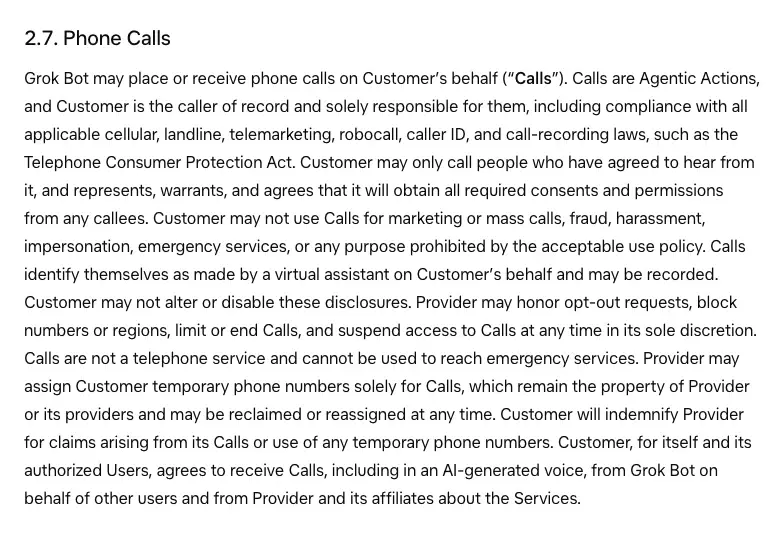
Here is what each part means in plain words.
| Clause | What it says | What it means for you |
|---|---|---|
| Caller of record | You are “the caller of record and solely responsible” for the calls | If the call breaks a rule, the terms point at you |
| Laws | You must comply with “cellular, landline, telemarketing, robocall, caller ID, and call-recording laws, such as the Telephone Consumer Protection Act” | You carry the legal duty, not the bot |
| Consent | “Customer may only call people who have agreed to hear from it” | The terms set a broad bar. How it fits a call to a business’s public line is a question for a lawyer |
| Banned uses | No “marketing or mass calls, fraud, harassment, impersonation, emergency services” | No sales calls, no calling lists, and nothing that isn’t your own call |
| Disclosure | Calls “identify themselves as made by a virtual assistant on Customer’s behalf and may be recorded” and you “may not alter or disable these disclosures” | The business will be told it is an AI. You can’t switch that off |
| Phone numbers | xAI may give you “temporary phone numbers solely for Calls” that it can reclaim at any time | The business sees a number that isn’t yours |
| Cost of mistakes | You’ll “indemnify Provider for claims arising from its Calls” | If someone makes a claim over a call, the terms put the cost on you |
Two earlier sections matter as much. Section 2.3 says agentic actions “may be inaccurate, incomplete, delayed, unsuccessful, or unintended,” and that you will use “appropriate human review before permitting Agentic Actions, including those involving external communications, financial transactions … legal commitments.” Section 2.4 says you are “solely responsible for charges, commitments, communications, and other consequences” of what the bot does, “whether or not such actions were intended, anticipated, or authorized.”
Put together, the terms treat the bot as your agent and you as the person who answers for it. BereaOnline’s author puts it this way: “You cannot automatically escape responsibility by explaining that the computer did the talking.” That is the author’s reading, and the author adds that the terms don’t settle every liability question. But for you the practical rule is clear: don’t let the bot agree to anything you haven’t read on the screen.
Is it legal
This isn’t legal advice, and the honest answer is that the law hasn’t caught up. What we can say is what the rules are and where they don’t clearly reach.
Recording. The terms say calls may be recorded. In the US, some states require every party to a call to consent to its recording. The Digital Media Law Project’s guide lists California, Connecticut, Florida, Illinois, Maryland, Massachusetts, Montana, New Hampshire, Pennsylvania and Washington, with notes that Illinois’ statute was held unconstitutional in 2014 and that Massachusetts bans “secret” recordings. The guide says eleven states but names ten, and lists change, so check your state’s current law. For calls across state lines, the same guide says it is hard to know in advance which state’s law applies, and advises you to “play it safe and get the consent of all parties.” The disclosure line on every Grok Bot call, that it is a virtual assistant and the call may be recorded, tells the other party it is a virtual assistant and that the call may be recorded. Whether that is enough in a given state isn’t something a blog can promise.
Robocalls. In February 2024 the FCC ruled that the Telephone Consumer Protection Act’s ban on “artificial or prerecorded voice” calls covers AI technologies that generate human voices. Such calls require the prior express consent of the called party, absent an emergency purpose or exemption. That ruling, FCC 24-17, was about unwanted robocalls. It doesn’t mention a consumer’s own assistant phoning a business, and we found no ruling that applies it that way. Grok Bot’s terms nonetheless name the TCPA as a law you must follow, so the two meet in your lap.
What this means in practice. One-off personal errands, such as a booking or a billing question, are far from the mass-calling and marketing the robocall rules were written for. The terms ban marketing and mass calls anyway. If you run a business, don’t use it to call customers or prospects. And if you live in one of the all-party-consent states, think about whether you are comfortable with a recorded call on your behalf.
Is it safe
Safety here means three separate things, and they aren’t equally covered by what xAI has said.
What the bot says in your name. The terms say the bot can be wrong. The Take over and End call buttons in xAI’s demo, and the pause for approval in Peter Yang’s call, are your defenses. Before you hang a cancellation or a payment on a call, read the transcript as it runs.
What you tell it. Anything you put in the chat or the answer box can end up said aloud to a stranger. The bot also hears only what the other person says: Cryptobriefing notes there’s no evidence Grok is connected to insurance carriers or practice software, so it is asking the front desk. Keep a Social Security number, a full card number, a password and medical details out of the brief. If the business asks for one, handle that part yourself.
What xAI keeps. Section 4 of the terms says Grok Bot “may retain Customer Data, files, browser sessions, credentials, memory, and routines in a persistent cloud environment,” and that Bots “must not be treated as separate security boundaries.” That is the general design of Grok Bot, not a clause about calls, but it is the setting the calls run in. If you use the Bot for other things, remember that what you shared there may be kept. Our course on AI Privacy 101: Use ChatGPT & Claude Without Oversharing (first 2 lessons free) covers the habits that apply to any assistant.
One claim we couldn’t confirm. A headline in search results reads “I Tested GrokBot’s AI Phone Calls. Then It Told Me It Was Human.” We didn’t open that article, so we can’t say what happened. What we can say is that the terms require the virtual-assistant disclosure and bar you from disabling it.
What this means for you
If you have Premium and a US number to call. Start with a low-stakes call, such as a booking or a store-hours check. Watch the first one’s transcript from start to end. Keep your thumb near Take over.
If you’re about to cancel something. Check your contract first for how it says to cancel. A phone cancellation the bot reports as done is worth confirming in writing, so ask for a confirmation number and an email.
If you want a cheaper bill. Get a competing quote yourself before you ask. The Comcast example worked, as reported, because there was a real Sonic offer to cite. Without it you’re asking a bot to haggle on nothing.
If you live in a state with all-party consent. Think about the recording notice before you place calls to people there. The disclosure is automatic, but the law’s fit isn’t something you can assume.
If you own a small business. Expect AI callers. They may be calling on a customer’s behalf, and the disclosure line is what lets you tell. Our explainer on agentic calling covers the idea, our guide to getting picked when Google’s AI calls local trades covers the receiving side, and this look at call-screening apps covers the opposite job: filtering calls that come to you.
If you’re outside the US. As of November 7, 2026, every report we read says the feature is US-only. Skip to the route below, which needs no Grok Bot.
If you’re on the free or Plus plan. xAI’s FAQ says neither includes Grok Bot. If you’re deciding what the Grok tiers get you, our earlier explainer on what Grok costs and which parts are free was written before The X Subscription existed, so check xAI’s pricing page for the current plans.
Edge cases and troubleshooting
The call card never appears. Give the bot the business, the number and the goal in one message. Techloy’s reviewer reports that the bot said calling was enabled on their account but never placed a call, so an enabled message isn’t a guarantee.
The business hangs up or won’t deal with an AI. TeslaBytes reports a representative refusing to cancel once they knew an AI was on the line. Use Take over or End call, then phone the business yourself. The disclosure can’t be disabled, so don’t plan on hiding it.
The phone menu loops. Reports differ on keypad menus. A source quoted by Basenor lists pressing keys as a capability, AI Tool Ranked says xAI hasn’t published keypad support, and Peter Yang’s demo reportedly got through a phone menu. If it stalls, end the call and phone the business’s direct line yourself.
A long hold uses your allowance. Per xAI’s FAQ, Grok Bot draws on a weekly pool, and the company hasn’t said how calls count against it. Check your usage on the dashboard xAI points to, at grok.com/dashboard. Don’t send the bot to wait on hold if you’re close to your limit.
The business calls back and nobody answers. The temporary number belongs to xAI and can be reclaimed. AI Tool Ranked quotes a user saying Grok Bot “can’t accept inbound phone calls yet,” though the terms say it “may place or receive” them. Give the business your own number for call-backs and put it in the brief.
It says “enabled” but you’re outside the US. One reviewer was told by the bot that it only works for the US. If you see this, believe it, and use the route below.
The recap doesn’t match what you heard. The terms say an action may be “inaccurate, incomplete, delayed, unsuccessful, or unintended.” Read the transcript, not only the recap, before relying on a cancellation or a promised price.
You’re not sure the call was allowed. Don’t place it. The terms ban marketing, mass calls, harassment, impersonation and emergency services.
What it can’t do
Take a call for you. The terms say Grok Bot “may place or receive” calls, but a user quoted by AI Tool Ranked says inbound doesn’t work yet. Don’t send a business your Grok number to call back on.
Reach emergency services. Never. The terms say so in as many words.
Decide what’s good for you. The terms say it’s your responsibility to review what it does before it commits you. A bot that gets a lower price on a longer contract may have done what you told it and still not what you wanted.
Hide that it’s an AI. The disclosure is fixed. If a business wants to deal only with people, the bot can’t change that.
Verify what it’s told. A receptionist’s answer on insurance, as Cryptobriefing points out, is a verbal answer. The bot repeats it. It doesn’t check it against a carrier.
Work outside the US, as far as anyone has reported. No timeline has been published for other countries.
No Grok Bot, or outside the US
You don’t need a bot to make a call go well. Most of what makes the demos work is preparation, and any chatbot can do that part. Here are three routes, in rising order of how much of the call the AI does.
| Option | Who talks to the business | What you need | What’s stated about limits |
|---|---|---|---|
| You call, with an AI-written script | You | Any chatbot, your phone | None: you are the caller |
| Google AI Mode, “Check for me” | Google’s AI, if the information isn’t online | A signed-in Google account, over 18, English | Results “can take up to 30 minutes” |
| Grok Bot | Grok’s AI | A Premium plan or above, US numbers | Not published by xAI |
Route 1: have a chatbot prepare the call, and make it yourself. This works with the assistant you already use. Give it the situation and ask for a script. Here’s a prompt to copy, each line one instruction.
I'm about to phone [business] to [cancel / book / lower my bill].
Write a short call script: an opening line, the one thing I'm asking for, and what I'll say if they offer [a discount / a longer contract / a transfer].
List the details I should have in front of me: account number, plan name, dates, the competitor's price if I have one.
Write three polite ways to say no to an upsell.
Add a closing checklist: ask for a confirmation number, the person's name, the date, and an email confirmation.
Check what it gives you against your own bill or contract. It can’t know your account.
Route 2: Google’s “Check for me”. Google’s help page for AI Mode says you can select “Check for me,” review the request, and select “Looks good.” Where a business’s information isn’t online, it says “Google can make calls on your behalf to gather the details you need,” and that “only the details you shared and confirmed will be provided to businesses.” The page says the feature is available in English to signed-in users over 18, and doesn’t name countries. It doesn’t say how the calls identify themselves. To skip calls for one request, type “don’t call.” Its help page is about checking local availability and pricing.
Route 3: Grok Bot, if you’re in the US and on Premium or above. Use the brief template above.
FAQ
Can Grok make phone calls? Grok Bot can, as of early November 2026. It places calls to businesses, per the demo and the coverage, and the terms say it may place or receive them. The terms and FAQ we read treat it as part of Grok Bot, which xAI’s FAQ says is a different app from the Grok chat app.
Is Grok Bot’s calling free? Not on the Free or Plus plan: xAI’s FAQ says neither includes Grok Bot. Premium, the cheapest plan that does, costs $30 a month on xAI’s pricing page. Nothing from xAI says whether calls cost extra beyond the plan’s weekly usage.
Does it work outside the US? Reports say it works for US users calling US numbers. One reviewer, testing from Nigeria, never completed a call.
Will the business know it’s an AI? Yes. The terms say calls “identify themselves as made by a virtual assistant on Customer’s behalf and may be recorded,” and you can’t alter or disable that.
Is it legal to let an AI call for me? Nothing we found says a one-off personal call is illegal, and nothing says it’s cleared. The FCC’s 2024 ruling covers AI-voiced robocalls and says they need the called party’s prior express consent unless an exemption applies. The terms make you responsible for compliance. For specific questions, ask a lawyer.
Is it legal to record the call? It depends on the state. Some require every party’s consent. The terms say calls may be recorded, and each call starts with a disclosure that says so.
Can it press keypad numbers? Sources differ. One lists it as a capability, another says xAI hasn’t published keypad support, and the Comcast demo reportedly got through a phone menu.
Can it call 911 or another emergency line? No. The terms ban calls to emergency services and say Calls “cannot be used to reach emergency services.”
What if I’m not sure it’s safe to share my details? Don’t share them. Keep numbers, passwords and medical details out of the brief, and handle that part yourself: end the call or use Take over, then phone the business directly.
Does Grok read my chats? The terms say Grok Bot may retain data, files, browser sessions, credentials and memory in a persistent cloud environment. They don’t say how it uses what you type in a call brief beyond placing the call. Read xAI’s privacy policy for the details.
The bottom line
Grok Bot’s phone calls launched in the first days of November 2026 and have been shown working in a handful of reports. The strongest evidence is xAI’s own demo, and the rest is individual users’ accounts. The safe way to use it is the way the demo shows: say the goal and what you refuse, read the card, watch the transcript and keep Take over in reach. The terms put the responsibility on you, so treat every call as one you made yourself.
If you can’t use it, the call still goes better with preparation, and a chatbot is good at that part. For the habits that keep what you tell any assistant from coming back to bite you, try AI Privacy 101: Use ChatGPT & Claude Without Oversharing (first 2 lessons free).
Sources
- Grok Bot Terms, xAI, sections 2.3, 2.4, 2.7 and 4, page headed “Last updated: October 31, 2026 (previous version)”
- Grok Bot frequently asked questions, xAI docs
- Introducing The X Subscription, xAI, October 12, 2026
- xAI pricing
- Introducing Grok Bot, xAI, August 11, 2026
- Grok Bot phone calls go live, TeslaNorth
- Grok Bot begins making phone calls for US businesses, TeslaBytes
- Grok Bot can dial US businesses for you, AI Tool Ranked
- Grok calls a dentist’s office to verify insurance, Cryptobriefing
- Grok Bot Can Now Make Phone Calls for You. But Who’s Responsible for What It Says?, BereaOnline, November 6, 2026
- Grok Bot review: I tested the free trial for 4 days, Techloy, October 31, 2026
- FCC Declaratory Ruling FCC 24-17, CG Docket No. 23-362, released February 8, 2024
- Recording phone calls and conversations, Digital Media Law Project
- Use AI Mode to check local availability and pricing, Google Search Help