TL;DR. Don’t start by asking whether a video looks fake. Start by asking where it came from. Find the first upload, look and listen for clues, run one or two checks, then read the result as odds rather than a verdict. No single tool can say “real”. The best commercial video detector in one 2024 benchmark was right 78% of the time.
Someone you trust sends you a video. A politician says something shocking, or a stranger makes an accusation, or a “news clip” you’ve never seen carries a logo you half recognize. It’s the kind of thing you’d forward in a second. This post is for the second before that.
It is written for ordinary people on phones, not for journalists with forensic software. The method has four steps, and nothing you don’t already carry: a phone, a search engine and, for the Google checks, a Google sign-in. It also doesn’t promise what no method can: a stamp that says “real”. What it gives you is a way to decide whether to believe, hold or forward, using the same ideas fact-checkers use.
What changed in the last few weeks
Three things happened in October that make this worth writing now.
- On October 7, Google opened its SynthID Detector to everyone. SynthID is an invisible watermark Google builds into the images, video and audio its AI makes. The detector at synthid.com can now check whether a file was made with AI from Google or partners that Google names: OpenAI, NVIDIA and Kakao, with Apple listed as coming. Google’s announcement says it’s available globally, in English.
- On October 20, two fake videos aimed at a U.S. Senate candidate were posted; the New York Times, as relayed by SA Current, reported more than 850,000 views in the first 24 hours. The Foundation for Defense of Democracies (FDD) wrote it up on October 26 as a Russian operation. We walk through it below.
- On October 21, Full Fact reported that Google’s own detector had flagged five apparently real images as AI. Google rolled out an update on October 15, and in Full Fact’s report the five come back as “Unsure”. More on that in Step 3.
There’s a fourth fact that matters if you’ve heard “just look for the Sora watermark”. OpenAI said on March 24, 2026 that it was discontinuing Sora in the consumer app and the API.
The U.S. midterm elections are on November 3. Everything below works for any clip, though: a “leaked” call from a boss, a “caught on camera” scam, a celebrity endorsement, a disaster video.
Why “does it look fake?” stopped working
Spotting fakes by eye is a skill most people overrate. A University of Florida team made hundreds of real and fake images and videos of faces and people talking, and participants rated them. On still images, people did no better than chance. On videos they did better: they got real and fake right about two-thirds of the time. The same team ran algorithms on the same material, and on video the algorithms’ performance fell to chance levels. The researchers note that the study tested specific types of faces and videos under controlled conditions, which may not reflect the full complexity of real-world online content, and that the balance between people and machines could shift as the technology evolves.
Machines don’t rescue you either. The Deepfake-Eval-2024 benchmark tested detectors on deepfakes that were circulating online in 2024 rather than lab-made samples. Its video set holds 1,072 real and 964 fake clips. The best commercial video detector in the paper scored 0.78 accuracy. The paper says none of the commercial models it evaluated reached 90% accuracy. Three off-the-shelf open-source video detectors scored 0.63, 0.50 and 0.51 on a measure called AUC, where 0.50 means the detector ranks fakes no better than chance.
Two cautions about those numbers. They come from different tests on different material, so don’t line them up as if they were one scoreboard. And the benchmark uses 2024 content and 2024 detectors, so it can’t tell you how a tool does on the newest generators.
What the numbers do say is that every layer is imperfect: your eyes, a free detector, even a paid one. That’s why the method below stacks several weak signals and puts the strongest one first, which is the source.
The 4-step check
Here’s the whole thing on one screen. The rest of the post explains each step.
Step 1: Find where it came from
This is the step that does the most work, and it needs no technology. Full Fact’s guide to spotting deepfakes starts here too: find the highest-quality version you can, search for keywords to locate the original footage, and reverse image-search screenshots to find where a clip came from.
Do these in order:
- Ask who posted it first. Not who sent it to you, who posted it first. The account that uploaded a clip is evidence in itself. Is it a news organization, a known person, an official account? Or is it an account with no history?
- Look at the account. When it was created, what else it has posted, whether the name matches a real person you can find somewhere else.
- Search for the claim in words. Don’t search for the video, search for what it says: the name, the event, the quote. If a clip showed something major, trustworthy news sources will usually have reported it. Full Fact’s general checks include whether trustworthy news sources have reported the same thing.
- Look for a longer or earlier version. A clip that is 20 seconds of a 40-minute event deserves a hunt for the full event.
- Ask the person who sent it where they got it. There’s a message you can paste for that, below.
What you want at the end of Step 1 is one of three outcomes. Either the clip traces to an original source you can judge, or it traces to a reliable report that confirms or debunks it, or it traces to nothing: no earlier version, no named source, a brand-new account. The third outcome is not proof of fakery, but it is a reason not to forward.
This copy-and-paste message works in a family chat without starting an argument:
Thanks for sending this. Before I pass it on, do you know where it first came from?
Do you have the link to the original post, or the full-length version?
I'm checking a few clips this week because there are a lot of fakes around.
Step 2: Look and listen, and don’t trust yourself too much
Looking is still worth a minute, as long as you treat what you find as clues. Full Fact’s guide lists these for video:
- Lip-sync. For the sounds “m”, “b” and “p”, the lips should fully close. A mouth that doesn’t close is a warning sign.
- Mannerisms. Check whether the person’s usual head movements or facial expressions are missing.
- Eyes on a still frame. Pause and see whether both eyes point the same direction. Full Fact notes that a squint can explain this, so it isn’t proof either way.
- Edges and turns. Look for glitches when the person turns sideways or covers part of their face. Slowing the playback helps, and YouTube’s settings go as low as 0.25 speed.
- Face shape and ears. Compare the outline with other photos of the person. Full Fact says to hold reference pictures beside the video, since ears are hard to fake convincingly.
For audio, Full Fact suggests asking whether the person would phrase things that way, listening for robotic sounds, unnatural pauses or an odd pitch or speed, and checking whether the background noise stays consistent during speech.
Google’s help page for its verification tool lists general artifacts to look for in AI images and videos: inconsistent or garbled text, errors in small details such as hands, teeth or background elements, inconsistent shadows and lighting, and repetitive patterns that seem unnatural.
Then comes the caveat Full Fact attaches. It says there are “few guaranteed ways to tell that video or audio was made using AI”, that the signs are clues and not proof, that a deepfake may lack them and a genuine recording may show them, and that the tips may become less reliable as the technology improves. When fact-checkers examined the Texas video we describe below, NewsGuard’s description, as PolitiFact reports it, was “unnatural eye movements and stagnant facial expressions”. Those were useful clues in that case. They would be worth less on a better fake.
So here’s how we’d use Step 2: if you see a clue, it should push you toward holding the clip. If you see nothing, it shouldn’t push you toward trusting it.
Step 3: Run one or two checks
You’re now looking for something a person can’t judge by eye. There are two checks worth running for most clips, and a third that’s useful when it applies.
Check A: reverse-search a frame. Pause the video on a clear frame, take a screenshot, and put it into a reverse image search such as Google Images. Full Fact recommends reverse image-searching screenshots, and Google’s help page names reverse image search, such as Google Images, as another way to find original sources. You’re looking for earlier copies, the original context, or fact-checks about the same footage. Use it to find out whether the clip is older than the caption says.
Check B: ask Google’s SynthID tools. Google’s help page says you can upload a video at gemini.google.com on a computer, using “Add files”, and ask something like “Is this a real video?” You need to be signed in with a personal or qualified Workspace account. The limits on that page: a file of 100 MB or less, a video shorter than 90 seconds, one file at a time, and about 10 video checks per rolling 24 hours (up to 5 minutes of video in total).
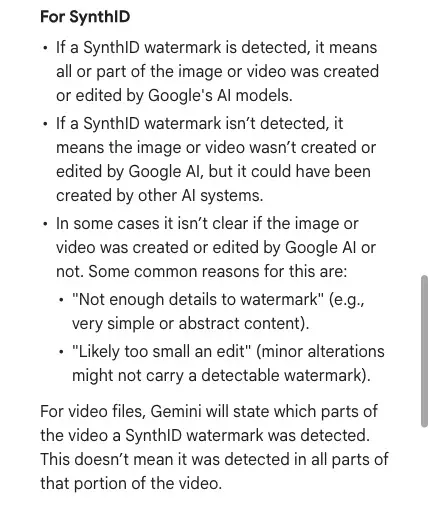
Read the result carefully, because Google’s page is specific:
- If a watermark is detected, it means all or part of the video was created or edited by Google’s AI models. For video, Gemini says which parts had a watermark, and the page adds that this doesn’t mean it was detected in all parts of that portion.
- If none is detected, the page says it means the video wasn’t created or edited by Google AI, “but it could have been created by other AI systems.”
- Sometimes the answer is unclear. Google lists “Not enough details to watermark” and “Likely too small an edit” as common reasons.
- The page also says “there’s still a chance that after many alterations the watermark won’t be detected.”
One thing to know: Google’s pages don’t line up on scope. On October 28, the Gemini help page said Gemini can currently only recognize content created by Google AI tools. Google’s October 7 announcement says the separate SynthID Detector at synthid.com covers Google and partners, OpenAI, NVIDIA and Kakao among them. So the standalone detector may cover more than the Gemini check. Either way, a “nothing found” answer from either one leaves open every AI system that doesn’t use SynthID.
Check C: Content Credentials, when the file has them. Content Credentials are a record of where a file came from and how it was edited. Google’s page says Gemini can show a summary of media composition, edit history, and whether AI was used, if the file carries them. It also says they don’t tell you whether a file is definitely AI-generated, and that Gemini doesn’t support credentials stored outside the file. If the file has none, that tells you nothing either way.
Now the part nobody likes: these tools are wrong sometimes, and you need to know how.
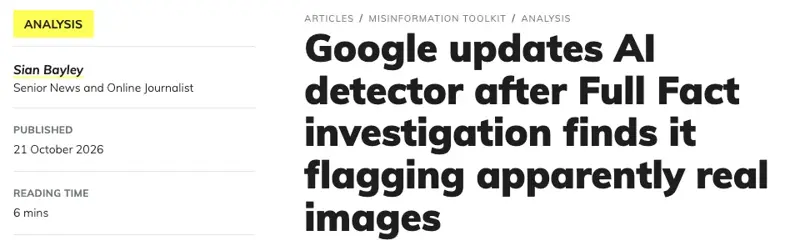
Full Fact tested Google’s public SynthID Detector on images that politicians had posted and found five that it flagged as “made or edited with Google AI”, even though the people who posted them said they were genuine and unaltered. Full Fact calls them “likely false positives”, because it can’t rule out a minor AI edit such as brightening, but it saw no obvious signs of manipulation. It did not measure how often this happens, and it said the tool has helped it correctly identify many AI-generated images. Google rolled out an update on October 15; in Full Fact’s October 21 report, the five return “Unsure”. Full Fact then found a further case, a September care-home image, that was still flagged after the update. Google told Full Fact that using the detector at scale without prior suspicion increases the chance of false positives, and recommends checking it against other signals, such as traditional fact-checking.
These were images, not videos, and the public detector had launched on October 7. The lesson is the one Full Fact draws: useful, not foolproof, never alone.
A word on online “AI video detector” sites. Full Fact’s advice is not to rely on AI detectors, since they don’t work consistently. The Deepfake-Eval benchmark gives that a number: no commercial detector it tested reached 90% accuracy. If you use one, treat a score as a nudge. A 98% reading is a reason to look harder at the source, not a finding.
Step 4: Read it as odds, then decide
By now you have three kinds of evidence: where it came from, what you saw and heard, and what the tools said. They don’t vote equally. In rough order of weight:
- A traceable original or a reliable fact-check. This settles most questions, in either direction.
- A positive tool result with a matching source problem. A SynthID hit plus an account created last month is a strong case.
- Visual and audio clues. They raise or lower your suspicion a little.
- A “nothing found” from a tool. It leaves you where you were.
Then make one of three calls:
| Call | When | What to do |
|---|---|---|
| Believe | You traced it to an original source you can judge, or to a reliable report | Fine to share, ideally with the source link |
| Hold | Source is unclear, a clue bothers you, or tools disagree | Don’t forward, and look again later: fact-checks often arrive after the first wave |
| Don’t forward | Source is traceably fake, or the claim is serious and you can’t verify it | Say why to the person who sent it |
The “hold” call is the one that earns its keep. A clip you don’t forward can’t spread through you, and waiting costs little next to being the person who passed a fake along.
One warning about a shortcut. When you’re unsure, it’s tempting to ask a chatbot “is this real?” and take its answer. That’s not the same as uploading a file to a watermark check. A chatbot answering from text can pass on a false claim, and FDD reports that this happened in the Texas case, below.
A worked example: the Texas video, step by step
We didn’t run this clip through any tool ourselves, and we’re not going to claim what a tool would have said. What follows is a walk through the published record, to show where each step points.
Step 1, the source. The video came from a new X account. According to FDD and PolitiFact, it had been created in September. PolitiFact reports, citing NewsGuard, that X gave Romania as the account’s signup country. Graphika said the account very likely impersonated a real Facebook user of the same name, a Texas man who had been a student of the candidate. AFP’s fact-checking team found that the account copied his Facebook page for its profile picture and early posts. When Lead Stories reached the real man, he said the man in the videos was not him and that the candidate had never abused him. Each of those facts was a source question a reader could ask: a brand-new account, a claim about a named person, a profile borrowed from a real person, and a real person who could be asked.
Step 2, looking and listening. NewsGuard described unnatural eye movements and stagnant facial expressions. Those are clues of the kind Full Fact lists, and not proof.
Step 3, tools. PolitiFact reports that an AI-detection tool, which it doesn’t name, gave the video a 98% likelihood of being a deepfake. Hold that number next to the benchmark: even a very high reading is one input, and here it agreed with the source evidence.
Step 4, the decision. Steps 1 and 2 were enough to hold the clip: a new account, a profile borrowed from a real person, a real person denying it. The 98% reading agreed with that. PolitiFact rated the claim Pants on Fire.
Here’s the detail from FDD’s brief that matters most for this post. It wrote: “In a new development, AI search tools quickly picked up and repeated the claim.” FDD says Google’s Gemini and Microsoft Copilot presented the claim as a real accusation, and only corrected the record once fact-checking reports were available. It adds that, according to NewsGuard, Google’s AI Overview stated that the man had made the accusation, citing ABC News and KTAL articles that never mentioned the allegation.
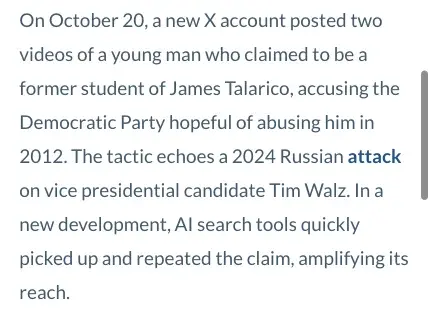
So “I asked a chatbot” is not a source check. In this case, tools that answer from text presented the claim as real until fact-checks existed. This is why Step 1 comes first.
Who made the video is a separate question from whether it’s fake. FDD describes it as a Russian operation. Graphika, as relayed by the Let’s Data Science report we read, said with “high confidence” that Storm-1516, which FDD calls a Russian influence network, produced the videos and that they are “very likely” deepfakes. We didn’t read Graphika’s own report. The point for you doesn’t depend on who made it: a new account, a named person, a shocking claim and no reporting.
The mirror case: a real video called a deepfake
Not every “that’s a deepfake” is right. In October, the Oregon Journalism Project published a story about a video of an upside-down American flag behind Washington County Commissioner Nafisa Fai at an October 10 event in Minneapolis, and called the video a “deepfake”. Its editor’s note of October 20 explains what happened next. The outlet had interviewed Fai on October 16, and a campaign supporter then gave it a different video of the event showing the flag right side up. After the story ran, readers questioned the conflicting images. The outlet then obtained new images showing the flag at the event had in fact been upside down, unpublished the story and said it regretted the error.
You don’t need to take a side in anything to see the lesson. The conflicting images were sorted out after publication, and the outlet’s first answer rested on a video supplied by a campaign supporter. Asking where each video first appeared, and who recorded it, is Step 1. Treat “this is a deepfake” like “this is real”: it’s a claim until you’ve traced it. The same four steps apply when a video makes someone look bad and you suspect it’s fake.
What each check can and can’t tell you
| Check | If it finds something | If it finds nothing | Stated limit |
|---|---|---|---|
| Source search (Step 1) | An original or a fact-check | No trail is a warning, not proof | Takes judgment about who to trust |
| Reverse search of a frame | Earlier copies, original context | Nothing doesn’t prove fake | Needs a clear frame |
| Gemini SynthID check | Google AI made or edited all or part | Could be other AI systems | 100 MB, under 90 seconds |
| SynthID Detector (synthid.com) | Made with AI from Google or named partners | Unclear results are possible | Full Fact found likely false positives on images |
| Content Credentials | Origin and edit history | Tells you nothing | Not stored outside the file |
| Online AI detector | A probability score | A low score isn’t proof | Best commercial video detector: 78% accuracy in one benchmark |
| Your own eyes and ears | Clues | Nothing you saw is not proof | About two in three right on videos in one study |
What this means for you
If you run a family group chat. You’re the person whose “wait, where did this come from?” does the most good, because people copy what the group does. First action: pin the message from Step 1 and say you’ll use it on anything that makes you angry.
If you have a relative who forwards everything. Don’t argue about the clip. Ask the source question, kindly, and offer to look at it with them. First action: next time they send something, reply with the three lines from Step 1 instead of your opinion.
If you run a business or a brand page. A fake video of you, your product or an executive is a real risk, and a real video of you can be called fake. First action: keep the original files of anything you publish, with dates, so you can show the first upload.
If you moderate a community page or a neighborhood group. Set a “hold” rule: clips about anything urgent go up only with a source link. First action: write the rule in the group description.
If you teach. The four steps make a good 20-minute exercise with a few clips you’ve chosen. First action: use the real clip that got called fake (above) next to a fake one and ask students to trace both.
If you’re a voter. For anything about when, where or how to vote, a video isn’t the source. Your state or local election office is. First action: look up your election office’s page now, and save it so you don’t need a clip when you’re rushed.
If your real video gets called fake. First action: post the original file with its source and date, and name the place and time. Don’t argue about pixels.
Edge cases and troubleshooting
The clip is longer than 90 seconds, or bigger than 100 MB. Google’s limits for the Gemini check are under 90 seconds and 100 MB. Trim a segment, preferably the part that matters. Any check on a segment covers only that segment.
Gemini says no watermark was found. Read it as “not made by Google’s AI”, nothing more. The page says it could have been created by other AI systems.
You only have a screenshot or a screen recording. Google’s page says for screenshots to crop tight around the image to get maximum accuracy. A re-recording is a copy of a copy. We found no controlled test of how WhatsApp or TikTok sharing affects detection, so don’t assume either way, but a clean result on a forwarded copy is weaker than the same result on the original. Ask for the original file.
A detector says 98% AI, but the poster is someone you trust. Go back to Step 1. A score is not a source. Ask the poster how they got the clip.
The account that posted it was deleted or suspended. That is what happened to the account in the Texas case. Search for the claim in words, and look for fact-checks that name the account, since they preserve what the post said.
Only part of the video may be fake. Gemini says which parts had a watermark when it finds one. A real clip with a short synthetic insert would pass a casual look. Check the moments that carry the claim.
You find the clip but no one writing about it. Search for the claim in words, not the clip’s file name. A fact-check will describe what the video alleges, so a search for the allegation finds it more easily than a search for the video.
It’s audio only. The clues differ. See our guide to the AI voice-cloning scam.
What this can’t fix
- It can’t prove a clip is real. Every tool here detects signs of AI, or the absence of them. None can certify authenticity, and Full Fact says there are few guaranteed ways to tell.
- It can’t read the caption. A tool that reads a file can’t tell you whether the event in a real clip happened where and when the caption says. The reverse search in Step 3 is the check for old clips with new captions.
- It can’t keep pace on its own. The benchmark is built on 2024 fakes and the Florida study on controlled material. The newest generators may be harder, so the source questions matter more over time, not less.
- It can’t make you faster than the fake. In the Texas case, the New York Times reported more than 850,000 views in the first 24 hours, as relayed by SA Current, and PolitiFact’s rating came two days after the videos were posted. The “hold” call exists because of that gap.
- It can’t fix the ground you’re standing on. If a platform doesn’t label AI content, or a chatbot repeats a false claim, you’re working around it. FDD’s recommendation is that AI companies make sure a cited article contains what the AI response claims it does, and it asks platforms to suspend repeat amplifiers. Those are fixes that sit with them.
FAQ
Can Gemini tell me whether a video is real? Not exactly. Google’s page says it can detect SynthID watermarks, which mark content made by Google’s AI tools, and show Content Credentials if a file has them. A result of “none detected” doesn’t mean the video is real.
Is there a way to check a video without paying? Google’s SynthID check in Gemini requires you to be signed in with a personal or qualified Workspace account, and its help page lists daily limits. Pricing for the standalone SynthID Detector isn’t stated in Google’s announcement.
Do AI video detectors work? Sometimes. The best commercial video detector in the Deepfake-Eval-2024 paper got 78% accuracy, and none of the commercial models reached 90%. Full Fact advises not to rely on them. For a longer look at the whole category, see do AI detectors actually work.
Can I trust a watermark that says the video is AI-generated? Treat it as strong evidence, not proof. Full Fact found five apparently genuine images flagged by Google’s detector, which Google then updated. Combine a watermark result with the source check.
What about Sora videos? OpenAI said on March 24, 2026 that it was discontinuing Sora in its consumer app and API. A logo, or no logo, doesn’t tell you whether the claim in a clip is true, so run the same four steps.
What if the video is from someone I know? Ask them where they got it. People forward things in good faith. The question is the same as for anyone else, and a friendly tone makes it easy to ask.
Why do chatbots sometimes say a fake is real? FDD reports that Gemini and Microsoft Copilot presented the Texas claim as a real accusation until fact-checks appeared, and says AI search tools “quickly picked up and repeated the claim”. That is a reason to use a chatbot as a place to start looking, never as a verdict.
How do I check a photo instead of a video? Use the same steps. We wrote a separate guide to telling if an image is AI-generated, and a piece on spotting AI slop in your feed.
The bottom line
You can’t promise yourself you’ll never be fooled, and a good method doesn’t claim it. What the four steps do is move the decision from “does this look fake?” to “do I know where this came from?”, which is a question you can actually answer. Put the source first, treat looks as clues, run a check or two, read the result as odds, and hold when in doubt.
If you’d like to build that habit for AI answers too, not just videos, Trust, but Verify: Fact-Checking AI (first 2 lessons free) teaches a short verify routine and a rule for when checking matters most.
Before the election, one thing worth trying: pick the last clip someone sent you that made you react, and run Step 1 on it. You may be surprised how quickly the source question answers itself.
Sources
- Google: Verify AI-generated images, videos, and audio (Gemini Apps Help)
- Google: SynthID Detector for everyone, October 7, 2026
- Google DeepMind: SynthID
- Full Fact: Google updates AI detector after investigation finds it flagging apparently real images, October 21, 2026
- Full Fact: How to spot deepfake videos and AI audio
- Deepfake-Eval-2024: A Multi-Modal In-the-Wild Benchmark of Deepfakes Circulated in 2024 (arXiv)
- University of Florida: Machines spot deepfake pictures better than humans, but people outperform AI in detecting deepfake videos
- FDD: Russian Operatives Plant Deepfake Targeting U.S. Midterm Elections, October 26, 2026
- PolitiFact: Russian disinformation group targets James Talarico with baseless claim in AI-generated video, October 22, 2026
- SA Current: Covert Russian election interference group targets James Talarico with disinformation campaign, October 22, 2026
- Let’s Data Science: Researchers tie fake Talarico assault video to Russian group Storm-1516, October 22, 2026
- Oregon Journalism Project: Editor’s note, October 20, 2026
- CBS News: OpenAI pulls the plug on its Sora AI video app, March 24, 2026