

TL;DR. A Claude connector is a permissioned link between Claude and another app, such as Gmail, Google Calendar or Zillow, so Claude can look things up there and, with your approval, act. Anthropic’s directory listed 993 connectors on October 21, 2026. The safe habit: read-only first, and keep anything that sends or books on “ask me first.”
Claude knows a great deal about the world and nothing about your Thursday. It can’t see your calendar, your inbox or the file you saved last week unless you paste it in. Connectors are how that changes. This week Zillow added one, which is why the question is suddenly everywhere: what is a connector, and what am I agreeing to when I switch one on?
Claude connectors are links between Claude and other apps and services that let Claude retrieve information from them and, depending on the connector, take actions in them. In plain terms: a connector is a plug with a permission slip attached. You sign in once, approve what Claude may do, and from then on, in any chat where you’ve turned it on, Claude can ask that app instead of guessing.
Last reviewed: October 21, 2026. Reviewed quarterly, because the directory, the plans and the permission settings are all changing quickly.
What Claude connectors actually are
A Claude connector is Anthropic’s name for a link between Claude and an outside app or service. Anthropic’s help page says connectors “let Claude access your apps and services, retrieve your data, and take actions in them” (Anthropic Help Center, accessed October 2026). Some come from Anthropic’s directory and some are custom servers a person adds by URL. Claude inherits the access you already have in each service.
The vocabulary is where people get lost, so here is how the neighboring terms differ. A connector gives Claude access to a service. MCP (the Model Context Protocol) is the open standard connectors are built on; our plain-language guide to MCP covers it, and you don’t need it to use one. A plugin can bundle connectors with instructions into a workflow, and Anthropic’s directory counts plugins separately. A skill is a reusable set of instructions for how to do a recurring job, as in our guide to agent skills. Put simply, the connector gives Claude access and the skill tells it what to do with it. OpenAI calls its version apps in ChatGPT.
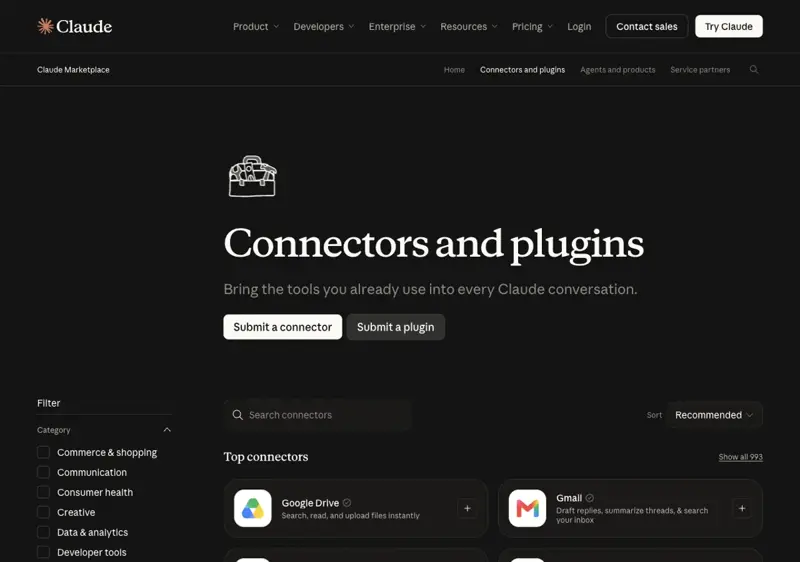
How big is the catalog? Anthropic’s marketplace page showed 993 connectors and 341 plugins when I checked on October 21, 2026, though another Anthropic page advertises “over 2,000 connectors and plugins” combined, so treat any single total loosely (Claude Marketplace). In April 2026 Anthropic said the directory had passed 200. Most listings are work tools: Google Drive, Gmail, Google Calendar, Canva, Microsoft 365, Notion, Figma, Slack, HubSpot, Asana and Linear sit at the top.
What you can connect, and what each kind does
Claude connectors fall into three practical groups: work tools, everyday-life apps, and specialist services. Work tools such as Gmail, Google Calendar and Google Drive hold your private data. Everyday apps such as Spotify, Resy and Booking.com mostly search and hand you back to the provider. Specialist connectors, such as Zillow’s for home search, are often read-only. The group tells you how careful to be.
On April 23, 2026, Anthropic announced 15 consumer connectors “for everyday life”: AllTrails, Audible, Booking.com, Instacart, Intuit Credit Karma, Intuit TurboTax, Resy, Spotify, StubHub, Taskrabbit, Thumbtack, Tripadvisor, Uber, Uber Eats and Viator (Anthropic, accessed October 2026). Expedia, Zillow, eDreams and Shop have been added since. The announcement says they are available on all plans, with mobile in beta, and that data from a connected app “isn’t used to train our models.”
| Group | Examples | What Claude can typically do | Risk level |
|---|---|---|---|
| Your private data | Gmail, Google Calendar, Google Drive | Search and read; draft; with approval, send, create or share | Highest. Check each action |
| Everyday apps | Resy, Spotify, Instacart, Booking.com, Uber | Search and compare; a few can act (Resy books, Spotify builds playlists); most hand off to the app | Low to medium |
| Specialist lookups | Zillow, AllTrails, Tripadvisor | Search, estimate, explain | Low. Zillow describes its connector as read-only |
| Money and checkout | Credit Karma, TurboTax, Shop | Read linked finances, estimate, or run checkout tools | Higher. Treat as a separate decision |
| Work platforms | Slack, Notion, HubSpot, Canva, Asana | Read and, often, create or update | Medium to high |
The point of the table is not the exact tool list, which changes, but the habit it teaches: look at what a connector’s tools can change before you switch it on.
How a Claude connector works, step by step
A connector works in three separate decisions. First, you authorize the service by signing in and granting permissions. Second, tool permissions decide whether Claude may use a given operation automatically, must ask, or is blocked. Third, you choose which connectors are switched on in a particular chat. Keeping those three apart explains most of the confusion people have.
The permission model has a few specific rules worth knowing. Claude normally inherits your permissions in the connected service: if you can’t open a file there, Claude can’t either. A custom connector that uses a shared credential is different, because its reach follows that credential. On Team and Enterprise plans, owners can set tools to “Always allow,” “Needs approval” or “Blocked,” and individuals can’t override those settings (Anthropic Help Center, accessed October 2026).
There’s also a loading setting that people mistake for a permission. Under + → Connectors → Tool access, you can pick Auto, Always available or On demand, which controls how connectors load into a conversation, not whether Claude may act (Anthropic Help Center, accessed October 2026). “Always available” is not “Always allow.”
Read tools and action tools: the difference that matters
Every connector is made of tools, and tools come in two kinds. Read tools retrieve information: search email, check an event, find a hotel. Action tools change something: send a message, create or delete an event, share or trash a file, book a table, check out a cart. Almost all the safety advice about connectors comes down to treating the second kind differently.
Anthropic’s own documentation shows how this plays out. For Google services, its Workspace help page says Claude can search and read Gmail, draft emails, and send, reply to and forward them, and that “by default, Claude asks for your approval before each of these actions.” Sharing, moving and trashing Drive files also need approval by default. For everyday apps, Anthropic describes booking and purchasing as “designed to check with you first,” which is a statement of intent, not a guarantee (Anthropic Help Center, accessed October 2026).
Here is a wrinkle that shows why you should check your own account. A separate Anthropic page for the Gmail connector says it “reads and searches email only; it can’t create, send, or modify messages” and lists Pro, Max, Team and Enterprise plans (Anthropic Docs, accessed October 2026). The Workspace help page, fetched the same day, says the connectors are “available for all users on Claude and Claude Desktop.” The two cannot both be current. The practical answer is to open the Gmail connector in your account and read the tools it actually lists.
Are Claude connectors free? What each plan gets
Claude connectors are available on every plan, but the details differ by connector and by plan. Anthropic’s April announcement says the everyday-life connectors are available “on all plans, with mobile in beta.” The services behind them have their own rules: Spotify’s personalized features are for Premium listeners, and Resy and Instacart need a sign-in to those services. Zillow’s connector needs no Zillow account and costs nothing.
Here is the plan picture from Anthropic’s help pages:
- Free: Directory connectors are available. Custom connectors, which are servers you add by URL, are limited to one.
- Pro and Max: The same connectors, with no custom-connector cap noted on the help page.
- Team and Enterprise: An Owner or Primary Owner must enable a connector for the organization first, then each person signs in with their own account. Owners can set per-tool approval levels.
- Mobile: Web connectors work on the iOS and Android apps. Installing connectors on mobile is still labeled beta.
One more consideration is data. Anthropic says retrieved Gmail, Calendar and Drive data is stored with the chat it was retrieved in, so deleting the chat deletes that data, and that it doesn’t train on your connector data. The same page notes that if you’ve opted into model improvement, content you copy from those services, or Claude responses containing connector information, may be used to improve models. Connected services also process data under their own terms, possibly outside the U.S.
What this means for small business owners
For an owner-operator, connectors turn Claude from a writing tool into something that has read your week. Running a small business means living in email, calendar and documents, and being the only person who can find anything in them. With Gmail, Google Calendar and Google Drive connected, you can ask what you quoted a customer last month, where Thursday has a gap, or what’s in last quarter’s spreadsheet.
Anthropic’s own small-business package leans on exactly this. Its May 13, 2026 announcement describes Claude for Small Business as eight connectors (QuickBooks, PayPal, HubSpot, Canva, Docusign, Google Workspace, Microsoft 365 and Slack) with ready-made workflows (Anthropic, accessed October 2026). The safe order is the one our course teaches: calendar and email first, money tools later.
The honest limit: a connector amplifies what’s in your accounts, including the mess, and customer email is content from strangers, which is where prompt injection lives. Keep sending on approval. The next step is Claude for Small Business (first 2 lessons free), which walks through connecting tools the safe way.
What this means for accountants and bookkeepers
For an accountant, the question is less “what can it do” than “what can it touch.” A bookkeeper’s accounts hold client data and permissions that took years to set up. A QuickBooks or Google Drive connector lets Claude pull a report or a folder into the chat instead of you exporting and pasting, which is also exactly where client confidentiality matters.
The workflow that fits best is read-first: connect Drive or the accounting tool with the narrowest role your software allows, ask for a variance summary or a list of unreconciled items, and have Claude draft the commentary for you to edit. Anthropic’s default is that changes need your approval, and Claude can only reach what your own role can reach, so a limited role is itself a safeguard.
The honest limit is that a connector doesn’t make a source of record. Numbers Claude summarizes still have to be tied back to the ledger, and nothing client-identifying should go into a service your engagement letter doesn’t cover. The next step is AI Privacy 101 (first 2 lessons free), which covers what happens to what you type and which settings matter.
What this means for marketers
For a marketer, connectors collapse the shuttle between tools. Canva, HubSpot, Slack, Asana and Google Drive are all among the listed connectors, so Claude can pull a campaign brief from Drive, check a task in Asana and work on a design or a list without you copying between tabs.
A practical routine is brief-to-draft: connect Drive and Slack, ask Claude to gather the latest campaign notes, and have it draft three variants for your review. Connectors that create or send, such as publishing a design or emailing a list, are the ones to keep on approval, because a wrong send reaches customers.
The honest limit is brand and accuracy. A connector gives Claude your materials, not your judgment about what is on-brand, and it can still state something false. For the fundamentals of writing prompts that make connector-fed work usable first time, start with AI Fundamentals (first 2 lessons free).
What this means for real estate agents
For an agent, the connector story this week is Zillow. Zillow’s connector is free, needs no Zillow account and, per Zillow’s help page, is read-only: it searches homes, compares neighborhoods, checks a Zestimate with the comparable homes behind it, and estimates affordability. It can’t contact an agent or request a tour, and it isn’t a source of agent-grade comps (Zillow, accessed October 2026).
The better-governed route for an agent’s own market data is a connector their MLS provides, such as the Flexmls MCP server, where the MLS has turned it on. Pasting MLS records into a chatbot is a different matter: California Regional MLS now restricts it by rule, and other MLSs are writing their own. We cover the rules and a full listing-appointment workflow in Zillow in Claude: What Real Estate Agents Can Actually Do.
The honest limit is that no connector clears you with your MLS. Check its AI rule first. The next step is AI for Real Estate Agents (first 2 lessons free), which covers an MLS AI audit and a CMA workflow with a spot-check protocol.
What this means for developers
For a developer, a connector is an MCP server with a friendly name. Anthropic’s help page says you can add custom connectors as remote MCP servers by URL, on every plan, with Free limited to one. Because Claude reaches them from Anthropic’s cloud, the server must be publicly reachable unless you configure network access.
The sensible habits are the same as for any credentialed integration: connect only servers you trust, review the access requested, block tools you don’t need, disable unused connectors, and monitor for changed tool behavior. Anthropic says plainly that custom connectors aren’t verified by Anthropic. Our MCP guide explains the protocol underneath.
The honest limit: a connector’s tools define its blast radius, so design them narrow. Build read tools first, add action tools one at a time, and give each a clear approval path. For going deeper, see MCP Tools Mastery (first 2 lessons free).
Common misconceptions about Claude connectors
“A connector means Claude can do anything in that app.”
Not quite. Claude inherits the access you have, so it can’t open what you can’t, and many connectors only search. Even the ones with action tools are designed to ask before booking, sending or buying. Which tools a connector exposes is what matters, and it’s listed on each connector’s directory page.
“Connecting an app means it’s on in every chat.”
No. Connecting and switching on are separate steps. A connector can be connected in settings and still be off in the conversation you’re in, which is the most common reason Claude “ignores” one. Naming the app in your request and checking the chat’s connector toggle fixes most cases.
“Connectors are safe because Anthropic verified them.”
Verified helps, but it isn’t a guarantee. Anthropic’s own directory notes that it does not control which tools developers make available and cannot verify that they will work as intended or won’t change. And the deeper risk, prompt injection, isn’t a verification problem: hidden instructions in an email or page can try to steer any AI that reads them. Anthropic says prompt injection is “far from a solved problem.”
“Connectors are a Claude-only thing.”
Only in branding. The same idea now runs across assistants: ChatGPT calls its version apps, and the standard underneath is MCP. Several services, including Booking.com, Spotify, Zillow, Expedia and Instacart, appear in both ecosystems according to first-party sources, though the privacy and permission settings differ, so check each product.
Related terms
Claude connectors sit in a cluster of closely related 2026 concepts: the protocol they run on, the rival versions from other assistants, the main security risk they introduce, and the multi-step pattern that turns a simple lookup into an action taken on your behalf. These are the terms worth knowing next if you want the full picture.
- MCP (Model Context Protocol): the open standard Claude connectors are built on
- ChatGPT Connectors: OpenAI’s version, now called apps
- Prompt Injection: hidden instructions that try to hijack an AI that reads untrusted content
- Agent Skills: instructions for how to do a job, the partner of a connector’s access
- Claude Cowork: Anthropic’s desktop agent that uses connectors to do multi-step work
- Agentic AI: the multi-step pattern that turns a read connector into an act-for-me one
- AI Browser: browsers that read pages and act, a cousin of connectors
See also
Courses, skills, blog posts and related terms connected to Claude connectors, grouped by type so you can pick the format that suits you. Take a course for depth, a skill for something to use today, and a blog post for current context.
Courses on Claude connectors and adjacent topics (first 2 lessons free)
- Claude for Small Business: connect your tools the safe way and run weekly workflows
- AI Privacy 101: Use ChatGPT & Claude Without Oversharing: the settings and habits that keep your data safe
- AI Fundamentals: how AI works, in plain language
- AI for Gmail: every AI feature in Gmail, plus the privacy controls
- AI for Real Estate Agents: an MLS AI audit and a defensible CMA workflow
- Claude Cowork Essentials: delegate file work with connectors on desktop, web and mobile
- Claude Mobile Productivity: use Claude’s work tools from your phone
- ChatGPT vs Claude: compare the two assistants head to head
- MCP Tools Mastery: the protocol connectors run on
- AI for Music Producers: Claude + Ableton: an honest look at a creative connector
- Claude for Excel: finance work with Claude inside Excel
- Claude for Legal: plugins and ABA-aware workflows for small practices
- AI for Loan Officers: borrower emails and compliance, with Zillow-style payment questions in mind
- Claude Computer Use: how Claude operates apps directly
Professional certificates
- Professional Certificate in Prompt Engineering: prompts that work across Claude, ChatGPT and Gemini
Skills that pair with connectors
- Neighborhood Research Analyst: neighborhood research for buyers and renters
- Property Listing Copywriter: listing copy you can paste in today
- MCP Google Drive Connector: the developer-side view of a Drive connector
- MCP Slack Connector: wiring an assistant to Slack
- MCP Notion Bridge: connecting an assistant to Notion
- MCP GitHub Integration: repos, issues and pull requests through MCP
- MCP Server Quickstart: build your first server
- Meeting to Slack Digest: turn notes into channel updates
Blog posts
- Claude Connectors Explained: 8 Everyday Apps to Plug In First: the everyday-user walkthrough
- Zillow in Claude: What Real Estate Agents Can Actually Do: the agent view of a read-only connector
- Claude Can Now Send Gmail: Safe 10-Min Setup: the send feature and the one setting to keep on
- Claude + QuickBooks: 20-Min Month-End Close: a connector workflow for bookkeepers
- 15 Claude Small Business Workflows, Ranked by Time Saved: what the small-business package ships
- Is Claude for Excel Safe? What Finance Teams Should Know: prompt injection and real data
- Should You Let Claude Answer in Your Team’s Slack?: a shared AI teammate in a channel
- Claude Plugged Into Okta, Wiz, CrowdStrike: IT Admin’s 30-Min Setup: security integrations for admins
- Claude Computer Use Setup: Pro + Max Guide: when Claude drives the computer instead
Related terms
- MCP, ChatGPT Connectors, Prompt Injection, Agent Skills, Claude Cowork, Agentic AI, AI Browser, AI Usage Limits, Computer-Using Agent, AI Hallucination, AI Memory, Personal Intelligence
The bottom line
Claude connectors are the point where Claude stops being a stranger to your work and starts reading your calendar, your inbox and your files, and, for a few services, acting there. The people who get the most from them aren’t the ones who connect everything. They’re the ones who start with read-only connectors, keep anything that sends, shares, books or buys on approval, and check what a connector’s tools actually do before they trust it. FindSkill.ai’s plain-language take: connect one app this week, ask it something that only needs reading, and add the next one when the first has earned it.
Frequently asked questions
What are Claude connectors? Claude connectors are permissioned links between Claude and other apps and services, such as Gmail, Google Calendar, Google Drive, Spotify, Resy and Zillow. Once a connector is switched on in a chat, Claude can retrieve information from that service and, depending on the connector, take actions there. Anthropic describes connectors as letting Claude access your apps and services, retrieve your data, and take actions in them. Anthropic’s public directory listed 993 connectors on October 21, 2026.
Are Claude connectors free? Anthropic says its everyday-life connectors are available on all plans, with mobile in beta. Free accounts are limited to one custom connector, which is a server you add yourself by URL, not a limit on directory connectors. On Team and Enterprise plans an Owner must enable a connector for the organization first. The services behind connectors have their own accounts and fees, such as Spotify Premium for some features. Anthropic’s pages disagree on whether the Gmail connector is available on the Free plan, so check your own account.
Are Claude connectors safe? Read-only connectors that search or estimate carry little risk. The risk rises when a connector can read private data, process content from strangers and act externally, for example by sending email. Anthropic says prompt injection is far from a solved problem. Keep actions that send, share, book or buy on approval, connect only trusted services, and disconnect what you don’t use. Claude inherits your permissions in each service, so it can’t open anything you couldn’t.
How do I add a connector to Claude? Open Customize, then Connectors, and click the plus next to Connectors. Choose a connector, read its description, click Connect or Install, and sign in to the service. Then, in a chat, click the plus or type a slash, hover over Connectors and switch on the services you want for that conversation. On Team and Enterprise plans an Owner has to enable the connector first, and each person then signs in with their own account.
What is the difference between a connector, MCP, a plugin and a skill? A connector is Claude’s name for a link to an app or service. MCP, the Model Context Protocol, is the open standard connectors are built on. A plugin is a package that can bundle connectors with instructions into a workflow. A skill is a set of instructions for how to do a recurring job. In short, a connector gives Claude access, and a skill tells Claude what to do with it.
Can Claude send email through the Gmail connector? It depends on which Anthropic page you read. The Google Workspace help page says Claude can send, reply to and forward Gmail messages and asks for approval by default. A separate Gmail documentation page says the connector is read-only and cannot create, send or modify messages. Both were live on October 21, 2026. Check the tools your own account lists before relying on either page, and keep approval on for anything that sends.
Sources
- Anthropic Help Center, “Use connectors to extend Claude’s capabilities,” accessed 2026-10-21. https://support.claude.com/en/articles/11176164-use-connectors-to-extend-claude-s-capabilities
- Anthropic, “New connectors in Claude for everyday life,” April 23, 2026, accessed 2026-10-21. https://claude.com/blog/connectors-for-everyday-life
- Anthropic Help Center, “Use Google Workspace connectors,” accessed 2026-10-21. https://support.claude.com/en/articles/10166901-use-google-workspace-connectors
- Anthropic Docs, “Gmail connector,” accessed 2026-10-21. https://claude.com/docs/connectors/google/gmail
- Anthropic Help Center, “Manage Claude’s tool access,” accessed 2026-10-21. https://support.claude.com/en/articles/13730515-manage-claude-s-tool-access
- Claude Marketplace, “Connectors and plugins,” accessed 2026-10-21. https://claude.com/marketplace/connectors-plugins
- Claude Marketplace, “Zillow connector,” accessed 2026-10-21. https://claude.com/marketplace/connectors/zillow
- Zillow, “Zillow Connector in Claude and ChatGPT,” accessed 2026-10-21. https://www.zillow.com/connect-claude-to-zillow/
- Anthropic, “Mitigating the risk of prompt injections in browser use,” November 24, 2025, accessed 2026-10-21. https://www.anthropic.com/research/prompt-injection-defenses
- Simon Willison, “The lethal trifecta for AI agents,” June 16, 2025, accessed 2026-10-21. https://simonwillison.net/2025/Jun/16/the-lethal-trifecta/
- Anthropic, “Introducing Claude for Small Business,” May 13, 2026, accessed 2026-10-21. https://www.anthropic.com/news/claude-for-small-business
- Wikipedia, “Model Context Protocol,” accessed 2026-10-21. https://en.wikipedia.org/wiki/Model_Context_Protocol