
On November 6, 2026, Amazon started letting a subset of US customers text its shopping assistant. A contact called “Alexa Shopping” appears on your phone, you send it a photo of a recipe or a list of things you’ve run out of, and it fills a cart, reorders, watches prices and, Amazon says, buys with your approval. On November 8, most people can’t use it. This guide covers who can, what you need to have ready, what the texts can do, and the questions about approval, privacy and fake messages that Amazon’s own pages leave open.
One thing up front. We don’t have an invite, so we haven’t texted it. Everything below comes from Amazon’s pages, read on November 8, 2026, plus Google’s and the FTC’s help pages. Where Amazon doesn’t say something, this guide says so instead of guessing.
What Alexa Shopping by text is
Amazon already had an AI shopping assistant called Alexa for Shopping, which lives in the Amazon Shopping app and on Amazon.com. Amazon’s help page says it combines Rufus and Alexa into one assistant with shared memory and personalized preferences. The new part is a way in: a text-message thread on your phone instead of the app. The box below sums up what Amazon’s pages say, what the pages we read leave out, and what Grok found on X.
Amazon’s launch article, dated November 6, puts it this way. Starting that day, a subset of customers can text Amazon’s personal AI shopping agent, and the option will roll out to “millions more customers in the coming weeks.” Rajiv Mehta, Amazon’s vice president of Conversational Shopping, is quoted: “Now with Alexa for Shopping, your personal shopping agent is just a text away.”
Amazon’s FAQ describes the idea as “handing off your shopping.” You can text a whole list at once, such as “we’re out of dog food and paper towels, and I need a gift for my sister,” and the assistant works through each item.
What you need before you try
Amazon’s FAQ answers “What do I need?” in four sentences. Here they are, then the same requirements as a checklist.
Texting is invite-only right now, and only available in the US. You need a personal Amazon account with a verified mobile number, and a phone with RCS chats turned on. Most Android phones with Google Messages and iPhones on iOS 18 or later support RCS chats, as long as your carrier does too. Google Fi on iPhone isn’t supported yet.
| Requirement | What Amazon says | What to check on your phone |
|---|---|---|
| Country | US only | Your Amazon account and phone number are US ones |
| Invitation | Invite-only for now | You’ve had an invitation from Amazon |
| Account | A personal Amazon account | You’re signed in to your own account, not a work or shared one |
| Phone number | A verified mobile number | The number on the account is the phone you’ll text from |
| Messaging | RCS chats turned on | Android: Google Messages. iPhone: iOS 18 or later |
| Carrier | Must support RCS | Your carrier supports RCS chats |
| Exclusion | Google Fi on iPhone: the FAQ says “isn’t supported yet” | If you use Google Fi on an iPhone, Amazon’s FAQ rules you out |
RCS chats are not the same thing as plain SMS or MMS texts: Google’s help pages treat them separately. Amazon’s two example screenshots we looked at show a composer that reads “Text Message • RCS,” so the thread is meant to run on it. The launch article and the FAQ name RCS and don’t mention plain SMS.
How to join, or get in line
There are two paths, and only one gets you in today.
If you were invited. Amazon’s launch article says invited customers accept the terms, link a phone number and start texting. The FAQ’s version: tap “Text Alexa,” review and accept the terms, and once you get a welcome text, you’re ready to go. The contact shows up on your phone as “Alexa Shopping.”
If you weren’t. Amazon’s article points everyone else to its landing page, amazon.com/text-alexa-shopping. Signing up there gets you news and offers from Amazon by text, and means you’re among the first to know when more invites go out. Read that carefully: it’s a notification list, not a promise of access on a date. Amazon gives no date beyond “the coming weeks.”
On the page itself, the heading is “Shop by text” and the line under it says “A new way to shop with Alexa. Sign in to your Amazon account to get started.”
Two habits are worth building before the invite arrives:
- Learn what the real contact looks like. Once you’re in, open the thread and look at the sender details. The “Is it safe?” section below explains why a name alone proves nothing.
- Decide what you’ll never text it. Amazon’s help page for Alexa for Shopping says that if you want certain information, such as sensitive personal data, kept from being used, don’t share it with Alexa. Decide your own list now: health details, bank numbers and other people’s private information stay out.
What you can text it
Amazon’s launch article lists a long set of jobs. Here they are grouped by what you’d actually be doing.
| Job | What Amazon says it does | Example from Amazon’s pages |
|---|---|---|
| Hand off a list | Works on each need and messages back suggestions, per the launch article | Dog food, a birthday gift and paper towels in one text |
| Groceries | Builds a weekly order, adds a recipe’s ingredients, schedules a last-minute delivery | “Add broccoli to that order” |
| Reorder | Finds a past purchase and buys it “with your approval” | The detergent you bought last month |
| Photos | Finds similar products from a photo of an item; adds a recipe photo’s ingredients | A makeup sponge you’re almost out of |
| Preferences | Remembers how you shop | “We only drink oat milk”; “my son wears a youth size 12 now” |
| Prices | Alerts you when a product goes on sale or hits a target price | Price history up to a full year |
| Lists | Adds to a grocery list or creates a gift list | A new gift list |
| Orders | Gives package updates and can cancel an order | Package status without opening the app |
| Research | Compares a category and pulls together key details, reviews and pricing | Top-rated robot vacuums |
| Beyond Amazon | Surfaces options from other stores through Shop Direct | Products from outside Amazon |
| Brand alerts | Tells you when a brand releases new products | Monitors Amazon and the wider web |
Amazon also says that over time the contact will carry order updates, delivery notifications and deals in the same thread, and that a request you start by text can carry over to the Amazon Shopping app, Amazon.com and Alexa-enabled devices, and back. The article says Amazon “is rolling out” that ability, so don’t assume it works on day one.
A few phrasings that match what Amazon shows, written by us as templates. We haven’t sent them, so treat them as starting points:
We're out of dog food and paper towels, and I need a gift for my sister. Start with the dog food.
Build my weekly grocery order from what I usually buy. Show me the total before you place anything.
Tell me when this drops to $15 or less. Alert me only, don't buy.
The second and third add instructions Amazon doesn’t promise it will follow. They’re there so you learn early whether it does. If it ignores “show me the total first,” you’ve learned something important before money is involved.
What the approval step looks like, and what it doesn’t
This is the question that matters most, so slow down here.
Amazon’s article says that when you ask it to reorder a past purchase, it buys the item “with your approval.” The same article says Alexa “can add items to your cart and seamlessly complete the purchase on your behalf.” Neither page says what the approval looks like in the thread. We found no page that describes a mandatory reply, a button, or a summary you must confirm.
Amazon’s own example is the nearest thing to evidence. Its first example image shows a customer sending a photo of a makeup sponge with “I’m almost out of these, can you reorder them?” The reply reads “All set: your Scartink 12-piece makeup sponge set is coming,” followed by a card.
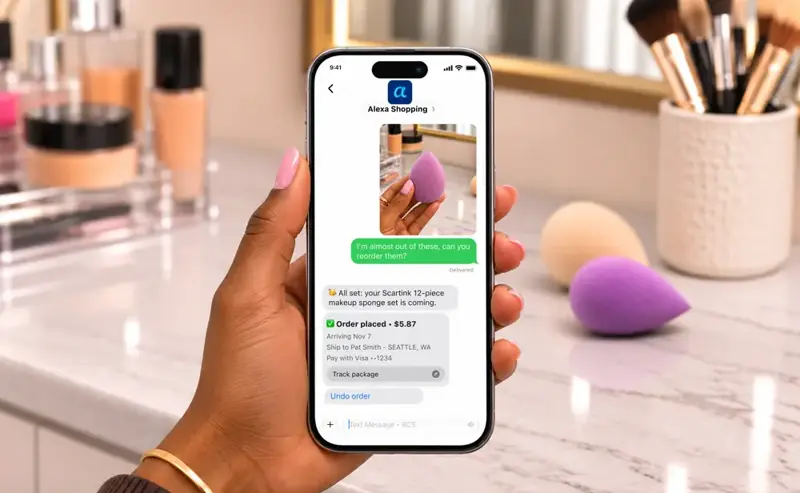
Read the card in that picture closely. It says “Order placed • $5.87,” then the arrival date, the ship-to name and city, the payment method as a Visa ending in 1234, a “Track package” button and an “Undo order” link. There is no separate “Shall I buy this?” message before it. That doesn’t prove the real thing skips a confirmation: it’s one marketing example. But it’s the only picture Amazon gives of a purchase by text, and in it the order is already placed when you see the details.
Two readings are possible, and Amazon’s pages don’t tell us which is right:
- Your request, “can you reorder them?”, is the approval, and the “Undo order” link is your safety net.
- A confirmation step exists in the real product and the example image skips it.
Until Amazon says, plan for reading 1. That means you should:
- Say clearly what you want. “Reorder the sponge set” is different from “I’m almost out of these.”
- Read every detail on the order card before you do anything else: item, count, price, arrival date, address and the card.
- Use “Undo order” fast if anything is wrong. Amazon’s FAQ also says “Alexa can also cancel an order for you,” though it gives no cancellation window or steps.
- Check the order in the Amazon app or on Amazon.com afterwards. Don’t treat a text saying something was undone as proof until you’ve seen the order’s status there.
A worked example: a Saturday grocery run
Here is Amazon’s grocery example, the one with a full item list and a total, walked through step by step. It’s Amazon’s lasagna example, not our test.
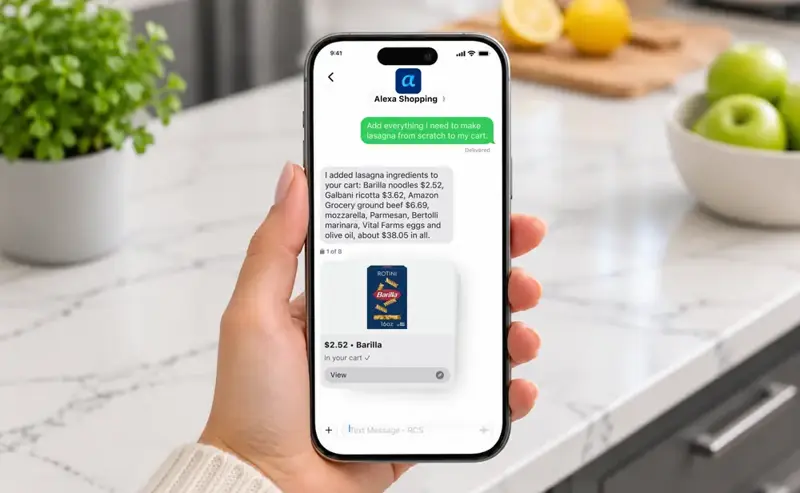
Step 1. You send one sentence. “Add everything I need to make lasagna from scratch to my cart.”
Step 2. The reply names items and prices. Amazon’s example lists eight items: Barilla noodles at $2.52, Galbani ricotta at $3.62, Amazon Grocery ground beef at $6.69, then mozzarella, Parmesan, Bertolli marinara, Vital Farms eggs and olive oil, “about $38.05 in all.” A product card underneath is marked “1 of 8” and shows “$2.52 • Barilla” and “In your cart.”
Step 3. Do the sums. The three prices the text names add up to $12.83. That leaves about $25.22 across the other five items, which the text doesn’t price one by one. The “1 of 8” cards under it may, but the summary asks you to take a total on items you haven’t seen priced.
Step 4. Look at what’s in the cart. The example’s product card shows a Barilla box with “ROTINI” printed on it at $2.52, which matches the “Barilla noodles” line. A lasagna needs flat sheets. It’s a marketing mock-up, so it may simply be a slip, but it shows how a wrong item can hide behind a friendly summary. You’d catch it in the cart and could miss it in a text.
Step 5. Check the cart, not just the thread. In the example, the items are added to a cart, not bought. The step that spends money is a separate one. Open the cart in the app, read the sizes and counts, and only then check out.
The lesson from the example: carts are low risk, orders are not. If the assistant adds, you review. If it buys, the order card in the thread is what Amazon’s sponge example shows you, with an “Undo order” link under it.
Price alerts and auto-buy: the part to slow down on
Two different things get mixed up here, and Amazon’s pages keep them in separate places.
An alert. Amazon’s launch article says you can ask to be told when a product goes on sale or reaches a target price, and that it can show up to a full year of price history. Amazon’s how-to page adds that price history covers 30, 90 and 365 days.
An automatic purchase. The how-to page gives an example of the wording: “Purchase this t-shirt when it’s $15 or less.” Alexa regularly checks prices. When your target is reached, it either alerts you or completes the purchase with your default payment method. The page doesn’t say whether it asks you again at that moment, and it says nothing about spending limits.
That page is about Alexa for Shopping generally. Amazon’s launch article describes auto-buy at the right price as part of the broader product, not specifically the text channel. So we don’t know from Amazon’s pages whether the text thread offers it the same way. If it does, here’s a safe pattern:
- Always say “alert me only” unless you truly want a purchase.
- Set a target you’d pay without a second thought, not your hoped-for price.
- Check the default payment method in your Amazon account first, since that’s the card it uses.
- Review your active price targets from time to time. The how-to page describes no settings menu and doesn’t say where to see them.
Scheduled Actions, a related feature on the how-to page, work differently. Amazon says Alexa either notifies you or adds items to your cart, so you review and check out yourself. That’s the safer mode for anything recurring.
Is it safe?
“Safe” covers four different worries. Take them one at a time.
A fake “Alexa Shopping” text
Treat the contact name alone as proof of nothing. Google’s help page on RCS chats with businesses says a verified business shows a check mark next to its name and “verified” in its profile details, and that verification means Google, a carrier or a third-party provider confirmed the business’s identity. Look for that mark in the thread, not just the name.
The FTC’s advice on spam texts is plain: don’t click links in an unexpected text, remember that “Legitimate companies won’t ask for information about your account by text,” and contact the company on a number or website you know is real, not the details in the message. To report one, forward it to 7726 (SPAM), use your messaging app’s report option, or go to ReportFraud.ftc.gov.
Amazon has its own check. Its page on verifying messages says you can ask Alexa for Shopping about a message, giving where it came from, when it arrived and what it said. It compares those details with Amazon’s record of communications and answers in seconds with one of three outcomes: confirmed, not matching any official Amazon communication, or unable to confirm. Anyone can also forward a suspicious message to verify@amazon.com without an app or an account. The page says “Amazon will never ask for your password, one-time passcode, or sensitive personal information over the phone,” and will never ask for payment over the phone or by email. That wording is about the phone and about email, and this new service does take shopping requests by text, so don’t stretch it to “Amazon never asks anything by message.” Its warning signs: false urgency, gift-card payment, links or replies, and claims that your account is locked.
One caution of ours, not the FTC’s. The FTC’s page tells you not to click links or share account information and to report the text. It doesn’t tell you to reply. So we’d skip replying “STOP” to a number you don’t recognize, and use a STOP command only in a thread you know is the real service. The launch article and the FAQ don’t mention a STOP command at all, which brings us to the next point.
Leaving, stopping and limiting
We looked for three things in the launch article, the FAQ, the how-to page and the help page, and found none of them:
- A spending limit for the text service.
- A switch that turns off purchasing but keeps the chat.
- Steps to stop the texts or leave the service.
That isn’t proof they don’t exist. It means Amazon’s launch article, text-shopping FAQ, how-to page and help page don’t describe them. We wouldn’t assume settings from other Alexa products carry over. Until Amazon documents it, the safest limit is one you control yourself: keep the card on the account one you’re comfortable with, and watch your order history.
Your messages and what Amazon keeps
Two separate things matter here: the thread, and Amazon’s memory of you.
The thread. RCS isn’t the same as end-to-end encrypted. Google’s help page says RCS chats between Google Messages users are automatically upgraded to end-to-end encryption, and that SMS and MMS are not encrypted that way. But the page on chats with businesses says “Verified RCS chats between businesses and users aren’t end-to-end encrypted.” Those chats are managed by businesses, messaging solution providers and carriers, and the page says businesses, providers and sometimes carriers can access content for delivery and other purposes. Google says it can see only what businesses send to users, to fight spam and abuse. Whether Alexa Shopping is a verified business chat isn’t something we confirmed. But the practical rule holds either way: don’t put in the thread anything you wouldn’t say to a store’s customer-service desk.
Amazon’s memory. Amazon says the assistant remembers what you tell it (“we only drink oat milk”) and uses your shopping history. Its help page says the assistant keeps context for the profile you’re logged into, and that you can review and manage Alexa interactions, shopping conversations included, on the Review Alexa History page. We found no retention schedule for the text channel specifically. If several people share one Amazon profile, you share what the assistant remembers, since Amazon says context is kept for the profile you’re logged into.
Ads in the replies
Amazon Ads’ page, dated June 11, 2026, says sponsored ads appear in Alexa for Shopping conversations and that “existing sponsored ads campaigns are automatically eligible to serve in Alexa for Shopping.” That page doesn’t mention text messages, and it doesn’t describe how ads are labelled. Amazon’s text-shopping launch article and FAQ don’t say whether ads appear in the text thread.
So the honest answer is: Alexa for Shopping is an advertising surface, and we couldn’t confirm whether the text thread is. Treat a suggested product the way you’d treat the first result on a store’s search page. It may be the best match or the best-paid one. For anything you’d normally compare, ask for a comparison, which Amazon says it does, and ask it for another option.
Text, the app or the website: which for what
Amazon says it is rolling out the ability for one conversation to move between text, the Shopping app, Amazon.com and Alexa-enabled devices. The channels differ in what Amazon documents for each.
| Job | Text thread | Shopping app or website |
|---|---|---|
| Quick reorder from a photo | Documented: send a photo of the item | App: the “+” icon next to the text box searches by image or transcribes a handwritten list |
| Recipe to cart | Documented: text a recipe photo or list | Not described on the pages we read |
| Price history | Up to a full year, per the launch article | 30, 90 and 365 days, per the how-to page |
| Comparing products | Ask for a comparison of a category | “Compare with Similar” on a product page |
| Checking what you’re buying | The order card in the thread | The full cart and order pages |
| Your history | Not described for text | Review Alexa History covers shopping conversations |
Our judgment, not Amazon’s: text suits quick, low-stakes repeat jobs where you already know the exact item. The app and the website suit anything where sizes, substitutions or the total matter, because you see the whole cart. If you’re buying something for a person, a deadline or an allergy, open the cart.
Amazon isn’t the only company building this. We covered what TikTok, Amazon, Perplexity and Google’s checkout agents do in Should You Let AI Check Out for You? and Google’s version in Google’s Universal Cart Is Live: How It Works, Is It Safe. The questions in those posts, who handles refunds and which settings keep you in control, apply here too.
What this means for you
If you got an invite today. Start with something cheap and reversible: a reorder of a $5 item you know. Watch exactly what the reply shows before and after it spends money, and write down whether you saw a confirmation step. That’s the fact the pages we read leave out.
If you’re on the waitlist. Sign up on Amazon’s landing page, make sure your phone meets the RCS requirement, and check your Amazon account has a verified mobile number. Nothing else is worth doing until you have the invite.
If you do the family grocery run. Use it to build the cart and stop there. Read every size and count in the cart in the app before you check out. In Amazon’s own lasagna example, the product card shows rotini for a lasagna.
If you use an iPhone. Check that you’re on iOS 18 or later, that RCS chats are turned on, and that your carrier supports them. If your service is Google Fi, Amazon’s FAQ says it isn’t supported on iPhone yet.
If you share a phone or an Amazon profile. Remember that memory is attached to the profile. Don’t have a child text it from your phone if you’d rather not have its preferences and sizes mixed into yours.
If you have an older relative who’ll receive a text like this. The pressing risk is not Amazon’s feature. It’s a copycat. Point them to verify@amazon.com, and tell them Amazon’s own page says it will never ask for a password or a one-time passcode over the phone, or for payment over the phone or by email.
If you sell on Amazon. This is another place shoppers might find you. Our guide to the free ChatGPT listing audit for Alexa for Shopping covers the seller side.
Edge cases and troubleshooting
We found no published list of real problems. Grok’s search of X on November 8 found almost no first-hand accounts from invited users: mostly news shares and a few comments. So this section is built from Amazon’s documented limits, not from complaints. Treat each as something to check, not as a reported failure.
- You have no invite. Amazon’s article gives no way to request one. The landing-page signup is the only route it names.
- Your iPhone is older than iOS 18. Amazon’s FAQ names iOS 18 or later. Update if your phone allows it, then check RCS and your carrier.
- RCS is on, but you’re on Google Fi with an iPhone. Amazon’s FAQ says it isn’t supported yet. Nothing in the pages we read offers a workaround.
- The wrong item or size shows up. Use “Undo order” or ask it to cancel, then check the order’s status in the app. Amazon’s FAQ says it can cancel an order but gives no time window.
- A conversation doesn’t appear in the app. Amazon’s article says it “is rolling out” continuity across text, the app, Amazon.com and Alexa devices. It may not be on for you.
- A text from “Alexa Shopping” that you didn’t start. Don’t reply or click. Check the verification mark, ask Alexa for Shopping through the app, or forward it to verify@amazon.com.
- An order you didn’t expect. Amazon’s how-to page describes one way a purchase happens on its own: a standing instruction such as “Purchase this t-shirt when it’s $15 or less.” Look through your orders and your recent chats for an instruction you gave. Amazon doesn’t say where to see standing targets.
- You want to start over. Amazon’s help page lets you review and manage Alexa interactions on the Review Alexa History page.
What it can’t do, and what we don’t know
- It isn’t open to most people. Invite-only, US-only, with a phone and carrier that support RCS.
- We haven’t used it. No part of this guide comes from an invited account.
- The pages we read don’t say how approval works in the thread. Its example shows an order placed with an Undo link.
- Spending limits, a purchase switch and exit steps aren’t documented on the pages we read.
- We can’t tell you whether ads appear in the text thread. The ad documentation covers Alexa for Shopping generally.
- It can be wrong. Amazon’s help page says the assistant “may not always get things right.”
- Its numbers are Amazon’s. The 400 million customers who used Alexa for Shopping in the last 12 months, and agentic features growing more than eight times since the start of the year, come from Amazon’s launch article, with no base given.
FAQ
Who can use texting with Alexa Shopping? A subset of US customers, by invitation, from November 6, 2026. Amazon says millions more will get access in the coming weeks and gives no date.
How do I get an invite? You can’t request one directly. Amazon’s page at amazon.com/text-alexa-shopping lets you sign up for texts about when more invites go out.
Does it cost anything? The launch article and the FAQ we read mention no fee for texting. Your carrier’s own messaging charges are a separate matter we didn’t look into.
What phone do I need? One with RCS chats turned on and a carrier that supports them. Amazon says most Android phones with Google Messages and iPhones on iOS 18 or later do, and that Google Fi on iPhone isn’t supported yet.
Does it buy things without asking me? For a reorder, Amazon says it buys “with your approval,” but doesn’t show what that looks like. For a standing price target, Amazon’s how-to page says it either alerts you or completes the purchase with your default payment method, and doesn’t say whether it asks again.
Can I cancel an order by text? Amazon’s FAQ says “Alexa can also cancel an order for you.” Its own example shows an “Undo order” link. Neither gives a deadline, so check the order afterwards.
Is the thread private? We couldn’t confirm. Google says verified business RCS chats aren’t end-to-end encrypted, and we didn’t confirm whether Alexa Shopping is one. Don’t put anything in it you wouldn’t tell a store’s service desk.
How do I know a text really is from Amazon? Look for the check mark Google says verified businesses show, ask Alexa for Shopping about the message, or forward it to verify@amazon.com. Amazon’s page says it will never ask for a password or a one-time passcode over the phone, or for payment over the phone or by email.
Will it work outside the US? Amazon’s FAQ says texting is only available in the US right now.
The bottom line
Texting Alexa to shop is a convenience for jobs you already know: reorders, a recipe turned into a cart, a price alert. On November 8 most people can’t try it, and the Amazon pages we read leave the three most important questions unanswered: how approval works in the thread, how to cap spending, and how to leave.
If you get an invite, begin with a $5 reorder and look at exactly what the reply shows. If you don’t, wait. The only urgent job today is to know what the real thing looks like, so a fake can’t borrow its name.
If you want a calm grounding in what AI tools do with what you type, AI Privacy 101: Use ChatGPT & Claude Without Oversharing (first 2 lessons free) is the best next step. For the basics of working with AI assistants day to day, try AI Fundamentals (first 2 lessons free).
Sources
- Amazon: Text, shop, done: Alexa for Shopping is now just a text away, November 6, 2026
- Amazon: Shop by text with Alexa Shopping (landing page and FAQ)
- Amazon: How to use Amazon’s shopping AI assistant
- Amazon: About Alexa for Shopping (help page)
- Amazon: Is that message really from Amazon? Just ask Alexa for Shopping
- Amazon Ads: agentic shopping advertising, June 11, 2026
- Google Messages Help: RCS chats with businesses
- Google Messages Help: check if a conversation is end-to-end encrypted
- FTC: How to recognize and report spam text messages, July 2022
- Grok search of X, November 8, 2026 (for what first-hand reports exist)